
Duke përdorur Excel, ju mund të ndërtoni lehtësisht mjetin tuaj të kërkimit WHOIS. Ky mjet do t'i ndihmojë zhvilluesit e faqeve të internetit ose kompanitë e hostimit të konvertojnë domenet në klientë potencialë. Ky mjet shfaq emrin e njerëzve ose organizatave që zotërojnë domene të ndryshme.
Shkarkojeni Tani
Nëse doni të filloni ta përdorni programin sa më shpejt të jetë e mundur, atëherë mund të:
Përndryshe, nëse dëshironi të bëni DIY, mund të lexoni përmbajtjen më poshtë.
Le të përgatisim GUI-në
GUI-ja e këtij mjeti është shumë e thjeshtë. Siç tregohet në figurë, mjafton vetëm një fletë me titujt dhe kolonat e nevojshme. Në këtë shembull, për një domen të caktuar, mjeti do të fshijë Emrin e Regjistruarit dhe Organizatën e Regjistruarit. Për t'i lejuar përdoruesit të ekzekutojnë makro, krijoni një buton në të njëjtën fletë.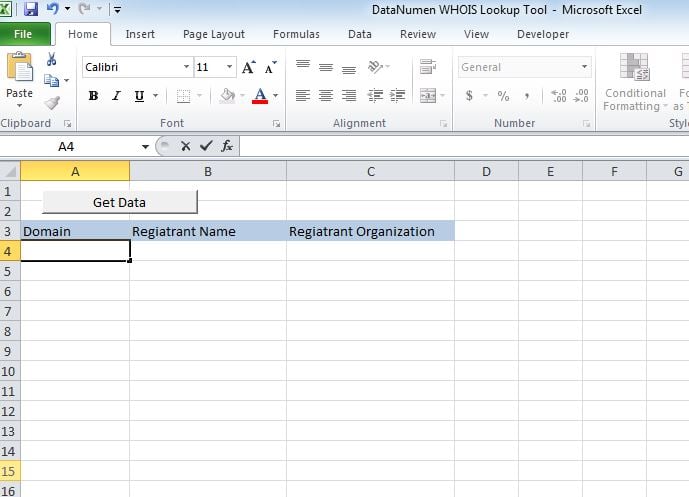
Le ta bëjmë atë funksional
Ngjitni skriptin në një modul të ri dhe bashkëngjitni nën "whoismacor" në butonin që krijuam në Sheet1.
Le ta testojmë
Shtoni domene në kolonën A dhe ekzekutoni makro. Vlerat do të shfaqen në kolonat përkatëse.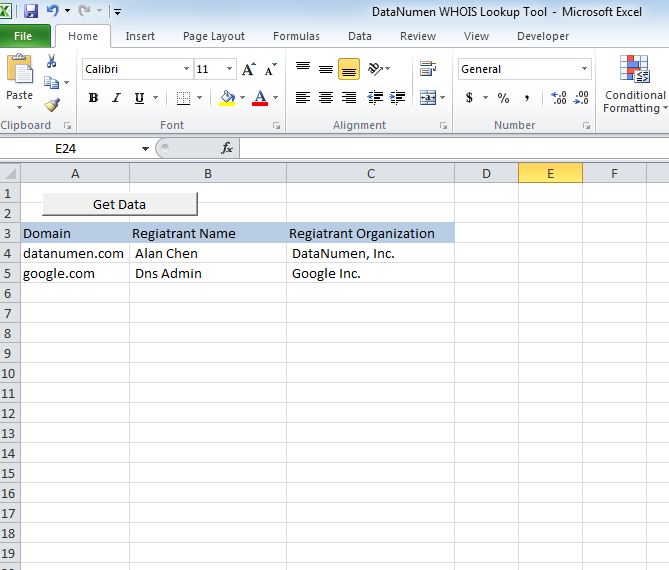
Modifikojeni atë
Deri tani, mjeti tregon 2 tituj p.sh., Emri i Regjistruarit dhe Organizata e Regjistruarit. Mund ta personalizoni mjetin për të marrë ndonjë nga titullin e mëposhtëm.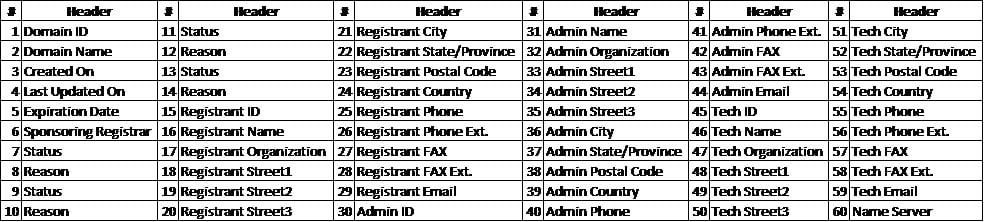
Rikuperoni skedarin xlsm
Nëse keni probleme në hapjen ose ruajtjen e këtij mjeti, ka ndryshime të mëdha që keni a skedar i korruptuar Excel dhe duhet ta rregulloni përpara se ta përdorni.
Dorëshkrim
Sub whoismacro()
    Dim v_lrow As Long
    Application.DisplayStatusBar = True
    v_lrow = Sheets("whois").Range("A" & Rows.Count).End(xlUp).Row
    Dim r As Long
    Dim v_string As String
    For r = 4 To v_lrow
        Application.StatusBar = "Macro is running... Now fetching Registrant Name and Organization info for domain at Row : " & r & " /// Total Rows : " & v_lrow
        Sheets("whois").Range("B" & r).Value = WhoIsName(Sheets("whois").Range("A" & r).Value)
        Sheets("whois").Range("C" & r).Value = WhoIsorganization(Sheets("whois").Range("A" & r).Value)
    Next r
    Application.StatusBar = "Ready"
End Sub

Function WhoIsName(v_string As String) As String
    Application.DisplayStatusBar = True
    v_string = Replace(v_string, "http://www.", "")
    v_string = Replace(v_string, "https://www.", "")
    v_string = Replace(v_string, "http://", "")
    v_string = Replace(v_string, "https://", "")
    Dim I As Long
    Dim browobj As Object
    Dim obj1 As Object
    Dim obj2 As Object
    Dim obj3 As Object
    Dim v_website As String
    Dim ws As Worksheet
    Dim rng As Range
    Dim tbl As Object
    Dim rw As Object
    Dim cl As Object
    Dim tabno As Long
    Dim nextrow As Long
    Dim URl As String
    Dim lastRow As Long
    Dim xmlobj As Object
    Dim htmobj As Object
    Dim divobj As Object
    Dim objH3 As Object
    Dim linkobj As Object
    Dim vv_startrow As Integer
    Dim vv_lastrow As Integer
    Application.DisplayAlerts = False
    Application.DisplayStatusBar = True
    URl = "https://www.whois.com/whois/" & v_string
    Set xmlobj = CreateObject("MSXML2.XMLHTTP")
    xmlobj.Open "GET", URl, False
    xmlobj.setRequestHeader "Content-Type", "text/xml"
    xmlobj.setRequestHeader "Cache-Control", "no-cache"
    xmlobj.send
    Set htmobj = CreateObject("htmlfile")
    htmobj.body.innerHTML = xmlobj.responseText
    x = InStr(htmobj.body.innertext, "Registrant Name:")
    y = InStr(x, htmobj.body.innertext, Chr(10))
    WhoIsName = Replace(Mid(htmobj.body.innertext, x, y - x), "Registrant Name:", "")
End Function

Function WhoIsorganization(v_string As String) As String
    Application.DisplayStatusBar = True
    v_string = Replace(v_string, "http://www.", "")
    v_string = Replace(v_string, "https://www.", "")
    v_string = Replace(v_string, "http://", "")
    v_string = Replace(v_string, "https://", "")
    Dim I As Long
    Dim browobj As Object
    Dim obj1 As Object
    Dim obj2 As Object
    Dim obj3 As Object
    Dim v_website As String
    Dim ws As Worksheet
    Dim rng As Range
    Dim tbl As Object
    Dim rw As Object
    Dim cl As Object
    Dim tabno As Long
    Dim nextrow As Long
    Dim URl As String
    Dim lastRow As Long
    Dim xmlobj As Object
    Dim htmobj As Object
    Dim divobj As Object
    Dim objH3 As Object
    Dim linkobj As Object
    Dim vv_startrow As Integer
    Dim vv_lastrow As Integer
    Application.DisplayAlerts = False
    Application.DisplayStatusBar = True
    URl = "https://www.whois.com/whois/" & v_string
    Set xmlobj = CreateObject("MSXML2.XMLHTTP")
    xmlobj.Open "GET", URl, False
    xmlobj.setRequestHeader "Content-Type", "text/xml"
    xmlobj.setRequestHeader "Cache-Control", "no-cache"
    xmlobj.send
    Set htmobj = CreateObject("htmlfile")
    htmobj.body.innerHTML = xmlobj.responseText
    x = InStr(htmobj.body.innertext, "Registrant Organization:")
    Debug.Print x
    y = InStr(x, htmobj.body.innertext, Chr(10))
    Debug.Print y
    WhoIsorganization = Replace(Mid(htmobj.body.innertext, x, y - x), "Registrant Organization:", "")
End Function
Hyrje e autorit:
Nick Vipond është një ekspert i rikuperimit të të dhënave në DataNumen, Inc., e cila është lider botëror në teknologjitë e rikuperimit të të dhënave, duke përfshirë riparimi i problemit docx dhe produkte softuerike për rikuperimin e opinionit. Për më shumë informacion vizitoni www.datanumen.com