
At times, you may want to quickly find and attach the last modified file in a specific Windows folder to an Outlook email. In this case, you can utilize the method introduced in this article.
Some users wish to let Outlook swiftly find out and append the last modified file in a Windows folder to an email, such as the most recently created, changed or saved file. However, Outlook doesn’t offer such a direct and native feature. Therefore, in the followings, we will expose a piece of VBA code, which can realize it with ease.
Attach the Last Modified File in a Windows Folder to Email
- At the very outset, you should launch your Outlook application.
- Then, after you get into the main Outlook window, you can press “Alt + F11” key buttons.
- Next you will access the Outlook VBA editor window in success.
- Subsequently, you ought to find and open a module which is not being used.
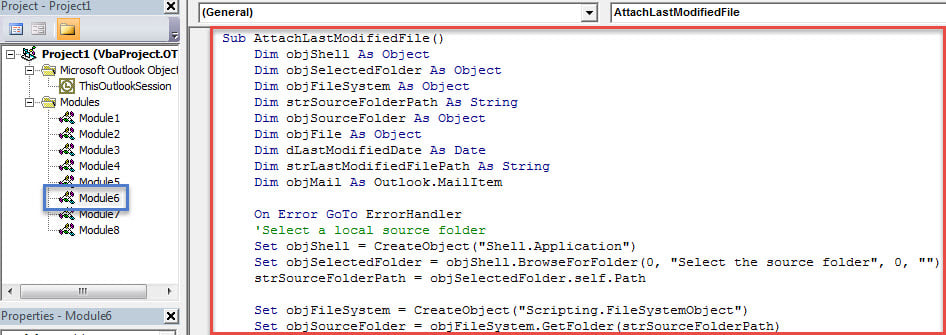
- And then copy and paste the following VBA code into this module window.
Sub AttachLastModifiedSpecificFile()
    Dim objShell As Object
    Dim objSelectedFolder As Object
    Dim objFileSystem As Object
    Dim strSourceFolderPath As String
    Dim objSourceFolder As Object
    Dim objFile As Object
    Dim dLastModifiedDate As Date
    Dim strLastModifiedFilePath As String
    Dim objMail As Outlook.MailItem

    On Error GoTo ErrorHandler
    'Select a local source folder
    Set objShell = CreateObject("Shell.Application")
    Set objSelectedFolder = objShell.BrowseForFolder(0, "Select the source folder", 0, "")
    strSourceFolderPath = objSelectedFolder.self.Path

    Set objFileSystem = CreateObject("Scripting.FileSystemObject")
    Set objSourceFolder = objFileSystem.GetFolder(strSourceFolderPath)

    If objSourceFolder.Files.Count > 0 Then
       For Each objFile In objSourceFolder.Files
           'Find the last modified file within "xlsx" file type in the selected Windows folder
           If (objFile.DateLastModified > dLastModifiedDate) And (objFileSystem.GetExtensionName(objFile) = "xlsx") Then
              'You can add or change criteria, such as
              'Left(objFile.Name, 4) = "Test" ---> file whose name begins with "Test"
              '(objFile / 1024) / 1024 > 2 --> File exceeds 2 MB
              'Note: Use "And" to connect more than one criteria
              strLastModifiedFilePath = objFile.Path
              dLastModifiedDate = objFile.DateLastModified
           End If
       Next

       If strLastModifiedFilePath <> "" Then
          'Confirm attaching it to the current outlook email
          strMsg = "The last modified file in the " & Chr(34) & strSourceFolderPath & Chr(34) & " is: " & vbCrLf & vbCrLf & "File: " & strLastModifiedFilePath & vbCrLf & "Date: " & dLastModifiedDate & vbCrLf & vbCrLf & "Do you want to attach it?"
          nPrompt = MsgBox(strMsg, vbQuestion + vbYesNo, "Confirm Attaching Last Modified File")

          If nPrompt = vbYes Then
             Set objMail = Outlook.Application.ActiveInspector.CurrentItem
             objMail.Attachments.Add strLastModifiedFilePath
         End If
      Else
         MsgBox "No file in the selected folder can meet your predefined criteria!", vbExclamation + vbOKOnly
      End If
    Else
      MsgBox "No file exists in the selected Windows folder!", vbExclamation + vbOKOnly
    End If

ErrorHandler:
    Exit Sub
End Sub
- After that, you can exit the current VBA editor window and proceed to add the new macro to Quick Access Toolbar or ribbon of Message window.
- Later you need to change your Outlook macro security level to low.
- Eventually you can have a try.
- Firstly, create and compose a new Outlook email as usual.
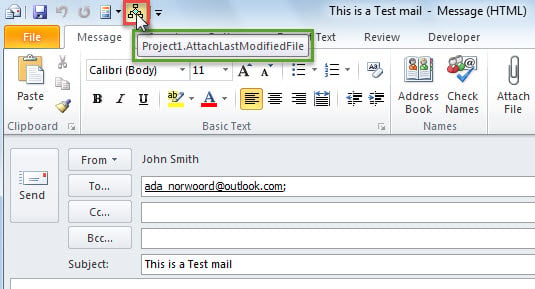
- Then hit the macro button in Quick Access Toolbar, like the image below:

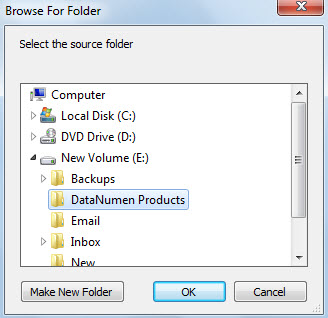
- Next you will be required to select a source Windows folder and hit “OK”.

- If there is such a file in the selected Windows folder, you’ll get a prompt like the following screenshot:

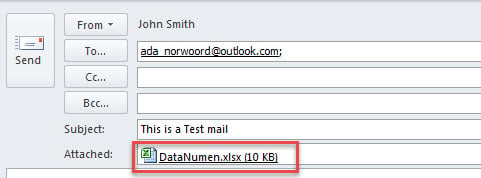
- When you hit “Yes”, this file will be attached at once.


Solve Outlook Problems as Soon as Possible
Whenever you encounter any Outlook issues, it is recommended to solve them as soon as possible. In this situation, you’d better prepare a robust Outlook fix tool in advance, such as DataNumen Outlook Repair. It is capable of fixing PST errors and rescuing your Outlook data effectively.
Author Introduction:
Shirley Zhang is a data recovery expert in DataNumen, Inc., which is the world leader in data recovery technologies, including corrupted mdf and outlook repair software products. For more information visit www.datanumen.com