
Learn about the size limits in Access databases, how to deal with them and look at the best ways out.
 This might come as a surprise to you if you are not a regular MS Access user, but as a matter of fact, there are certain size and other limits in the MS Access database platform. The MS Access 2016 edition provides you with a total space of 2 gigabytes for storing the content as well as the database objects. A single database can provide you with a maximum of 37, 768 objects, 1000 modules, 255 concurrent users, 14 characters for passwords, 64 characters for object name, and 20 characters for group per user name.
What to do when you reach the size limit
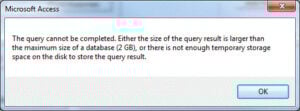 It is very common for your database files to grow larger when they are in use. This growth can often impede your performance, and at times might even become corrupted, causing more damage. In this kind of a situation, it is advisable to make use of the Compact and Repair command in the database. With the use of this command you can correct this problem, and also prevent it from occurring again in future.
With the changes that we make in our databases, its size keep on changing, and the database begins to grow. The reason for this growth can either be the data you are entering, or other sources like:
- The hidden, temporary objects that are created by the application to accomplish certain tasks. On occasions, these objects might end up remaining in your database much longer than their need in the application is still there.
- When an object from the database is deleted but the disk space it occupies is still not freed. Meaning the object is not there, but the space it occupied is still not free.
If you have temporary, unwanted files in your system and deleted objects that still occupy disk space, your application would perform slowly, making even the quickest of operations take longer.
Upsizing to SQL Server
The best way out of this situation is to scale your Access databases, and migrate to SQL Server. That is what a lot of business owners would do to safeguard all the data that is there in their databases. Migrating data from Access to SQL sure has its own set of challenges, but it is still an intelligent thing to do when struggling with space and size issues in Access databases.
MS SQL Server has been designed in a way that importing data from Access can be done smoothly. And since both applications are from Microsoft, compatibility is not a challenge, and the fear of data loss is also minimum.
If you are a user of MS Access, there are very high chances that you will come across this problem, and the only solution left with you would be to scale your application. Here we are only assuring you that if you opt for scaling you might as well be doing the right thing. And if you aren’t, you might probably putting your data at risk. In such a scenario, immediately invest in a tool to fix mdb database and deal with any contingencies.
Author Introduction:
Vivian Stevens is a data recovery expert in DataNumen, Inc., which is the world leader in data recovery technologies, including fix mdf and excel recovery software products. For more information visit www.datanumen.com