
Some users would like to quickly extract all the recipients from multiple Outlook messages files saved from Outlook emails. Now, this post will look at this to share a fast approach.
To extract the recipients from a single Outlook message file, you can just double click to open it and then copy the recipients in the opened Message window. But, if you need to deal with a batch of Outlook message files, the manual method isn’t efficient enough. Thus, you may look for a much more efficient way. Here we will introduce such one to you. Read on to get its details.
Extract All Recipients from Multiple Outlook Message (.msg) Files
- For a start, get access to Outlook VBA editor according to “How to Run VBA Code in Your Outlook“.
- Next, copy and paste the following VBA code into an empty module.
Dim strRecipients As String

Sub ExtractRecipientsFromOutlookMSGFiles()
    Dim objShell, objWindowsFolder As Object

    strRecipients = ""
    'Select a Windows folder
    Set objShell = CreateObject("Shell.Application")
    Set objWindowsFolder = objShell.BrowseForFolder(0, "Select a Windows Folder:", 0, "")

    If Not objWindowsFolder Is Nothing Then
       Call ProcessWindowsFolders(objWindowsFolder.self.Path & "\")
       'Display a Message
       MsgBox "Recipients: " & vbCrLf & strRecipients, vbInformation + vbOKOnly
    End If
End Sub

Sub ProcessWindowsFolders(strFolderPath As String)
    Dim objFileSystem As Object
    Dim objFolder As Object
    Dim objFile As Object
    Dim objItem As Object
    Dim objMail As Outlook.MailItem
    Dim objRecipient As Outlook.Recipient
    Dim objSubfolder As Object

    Set objFileSystem = CreateObject("Scripting.FileSystemObject")
    Set objFolder = objFileSystem.GetFolder(strFolderPath)

    For Each objFile In objFolder.Files
        If objFileSystem.GetExtensionName(objFile) = "msg" Then
           Set objItem = Session.OpenSharedItem(objFile.Path)

           If TypeName(objItem) = "MailItem" Then
              Set objMail = objItem
              'Extract recipients' email addresses
              For Each objRecipient In objMail.Recipients
                  strRecipients = strRecipients & objRecipient.Address & vbCr
              Next
           End If
        End If
    Next

    'Process all subfolders recursively
    If objFolder.SubFolders.Count > 0 Then
       For Each objSubfolder In objFolder.SubFolders
           If ((objSubfolder.Attributes And 2) = 0) And ((objSubfolder.Attributes And 4) = 0) Then
               Call ProcessWindowsFolders(objSubfolder.Path)
           End If
       Next
    End If
End Sub
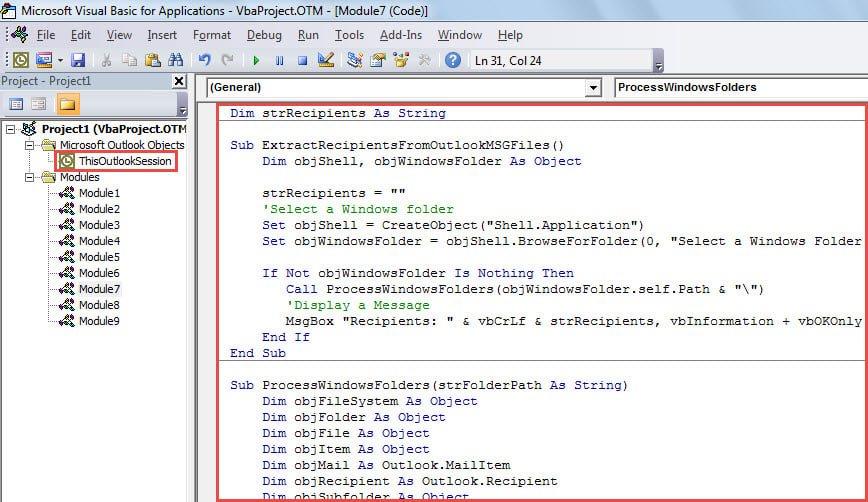
- Then, move cursor in the first subroutine.
- Subsequently, click “Run” button or press “F5” key.
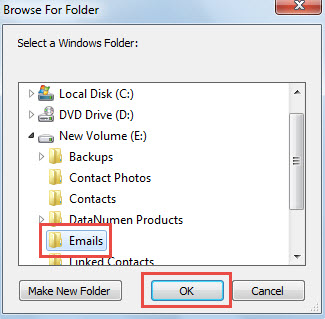
- Then, in the popup dialog box, select the Windows folder which contains the source Outlook message (.msg) files.

- After selecting, click “OK” to let macro continue running.
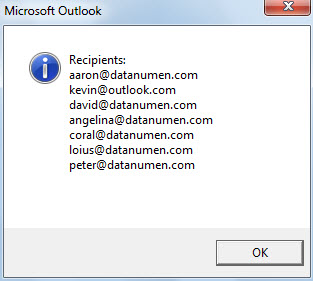
- When the macro finishes, a message listing out all extracted recipients’ email addresses will show up, as shown in the following screenshot.

Protect Your Outlook Data from Jeopardy
Outlook data is admittedly prone to corruption. Hence, it is a quite onerous task to safeguard Outlook data. It requires you to persevere in making regular backup for Outlook data. Also, if possible, it is prudent and recommended to prepare an experienced and professional Outlook PST repair tool, like DataNumen Outlook Repair, so that you can gain immediate and timely rescue in the event of Outlook corruption.
Author Introduction:
Shirley Zhang is a data recovery expert in DataNumen, Inc., which is the world leader in data recovery technologies, including recover Sql Server and outlook repair software products. For more information visit www.datanumen.com