
In this article we examine scenarios which generate errors relating to failure to append records in MS Access
 In MS Access, an append query is used when a user updates some records to an existing table, usually from other sources. Append query basically selects new records from other sources of data and copies them to the table in database. It is helpful in appending multiple records at once and it also allows the user to refine the selection with certain criteria. Users can review the selection before copying it to the existing table.
Issues with Appending Records
MS Access usually displays a dialog box when the append query is executed stating the probable reasons for its failure. The errors could arise because of the mismatch of field data types or due to key violations. Lock violation and Validation rule violations could also be the possible reasons for the error.
The article will discuss each issue separately and how we can solve these errors.
Type Conversion Failure
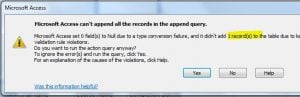 This is the most common error a user faces during Appending. It occurs due to the field type mismatch. Access usually faces problems if the data is not properly formatted or due to missing field types. For example if a user is trying to import data in a Numeric field such as date or age, and the data contains records like ‘Unknown’ then the Access might show it as ‘Type conversion’ error. The issue could also prevail if the date is not in US standardized format.
Key Violation
If the field/s is a part of Table’s primary key, then appending the date into that field/s could cause key violation errors. Primary keys should always a unique value and thus it might be taken care of while importing new records that they do not violate the primary key.
Users are recommended to check the destination table and primary key and ensure that they have set yes to their ‘No Duplicates’ property. Also, the appended data shouldn’t violate the destination table’s rules.
Lock Violation
It’s possible that the data being imported is already in use somewhere, thus causing the error in appending query. Users can check and ensure that the database is not opened elsewhere or by some other user/s. Users can also close the open tables, forms, queries, etc to prevent the error.
If the issue remains, users can check whether the Default record Locking is set to ‘No Locks’ by clicking Advanced option from tools.
Validation Rule Violation
Validation Rule of each field can be accessed from the lower pane of table design window, and users must check those before importing records. If the rule is violated, appending query will show error. Users should also check the destination table for given text fields and whether they had set No to ‘Allow Zero Length’. Error could be caused due to null value for fields whose ‘Required’ property is set to Yes.
In case while working with MS Access databases, you frequently seem to encounter all sorts of errors, it would be prudent for you to invest in a mdb fix tool to avoid incidents of data loss.
Author Introduction:
Vivian Stevens is a data recovery expert in DataNumen, Inc., which is the world leader in data recovery technologies, including repair SQL Server and excel recovery software products. For more information visit www.datanumen.com