
Using Excel you can easily build your own whois lookup tool. This tool will help website developers or hosting companies to convert domains into leads. This tool displays name of people or organizations owning different domains.
Download Now
If you want to start to use the software as soon as possible, then you can:
Otherwise, if you want to DIY, you can read the contents below.
Let’s prepare the GUI
The GUI of this tool is very simple. As shown in the image, just one sheet with necessary headers and columns is sufficient. In this example, for a given Domain, the tool will scrape Registrant Name and Registrant Organization. To allow users to run the macro, create a button on the same sheet.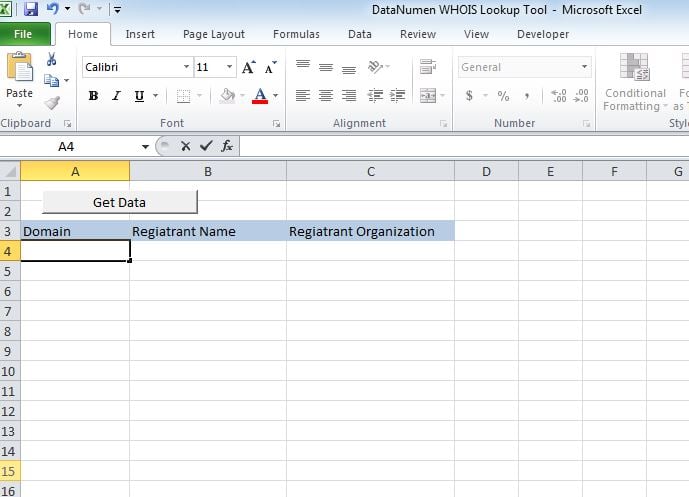
Let’s make it functional
Paste the script into a new module and attach the sub “whoismacor” to the button we created on Sheet1.
Let’s test it
Add domains in the Column A and run the macro. Values will be displayed on respective columns.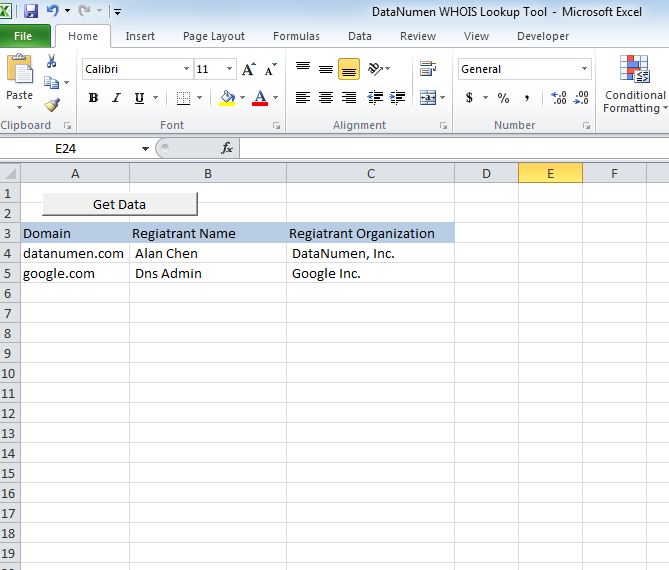
Modify it
As of now the tool shows 2 headers i.e., Registrant Name and Registrant Organization. You can customize the tool to fetch any of following header.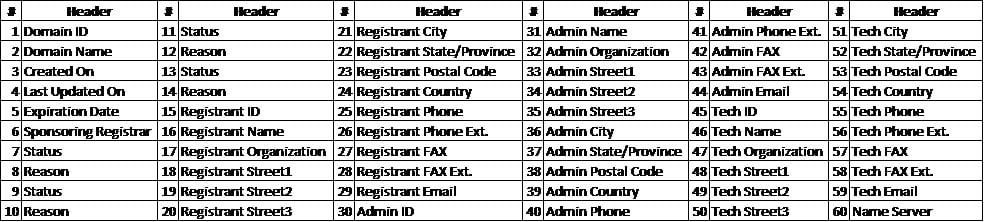
Recover xlsm file
If you are having trouble in opening or saving this tool, there are high changes that you have a corrupt Excel file and you have to fix it before using it.
Script
Sub whoismacro()
    Dim v_lrow As Long
    Application.DisplayStatusBar = True
    v_lrow = Sheets("whois").Range("A" & Rows.Count).End(xlUp).Row
    Dim r As Long
    Dim v_string As String
    For r = 4 To v_lrow
        Application.StatusBar = "Macro is running... Now fetching Registrant Name and Organization info for domain at Row : " & r & " /// Total Rows : " & v_lrow
        Sheets("whois").Range("B" & r).Value = WhoIsName(Sheets("whois").Range("A" & r).Value)
        Sheets("whois").Range("C" & r).Value = WhoIsorganization(Sheets("whois").Range("A" & r).Value)
    Next r
    Application.StatusBar = "Ready"
End Sub

Function WhoIsName(v_string As String) As String
    Application.DisplayStatusBar = True
    v_string = Replace(v_string, "http://www.", "")
    v_string = Replace(v_string, "https://www.", "")
    v_string = Replace(v_string, "http://", "")
    v_string = Replace(v_string, "https://", "")
    Dim I As Long
    Dim browobj As Object
    Dim obj1 As Object
    Dim obj2 As Object
    Dim obj3 As Object
    Dim v_website As String
    Dim ws As Worksheet
    Dim rng As Range
    Dim tbl As Object
    Dim rw As Object
    Dim cl As Object
    Dim tabno As Long
    Dim nextrow As Long
    Dim URl As String
    Dim lastRow As Long
    Dim xmlobj As Object
    Dim htmobj As Object
    Dim divobj As Object
    Dim objH3 As Object
    Dim linkobj As Object
    Dim vv_startrow As Integer
    Dim vv_lastrow As Integer
    Application.DisplayAlerts = False
    Application.DisplayStatusBar = True
    URl = "https://www.whois.com/whois/" & v_string
    Set xmlobj = CreateObject("MSXML2.XMLHTTP")
    xmlobj.Open "GET", URl, False
    xmlobj.setRequestHeader "Content-Type", "text/xml"
    xmlobj.setRequestHeader "Cache-Control", "no-cache"
    xmlobj.send
    Set htmobj = CreateObject("htmlfile")
    htmobj.body.innerHTML = xmlobj.responseText
    x = InStr(htmobj.body.innertext, "Registrant Name:")
    y = InStr(x, htmobj.body.innertext, Chr(10))
    WhoIsName = Replace(Mid(htmobj.body.innertext, x, y - x), "Registrant Name:", "")
End Function

Function WhoIsorganization(v_string As String) As String
    Application.DisplayStatusBar = True
    v_string = Replace(v_string, "http://www.", "")
    v_string = Replace(v_string, "https://www.", "")
    v_string = Replace(v_string, "http://", "")
    v_string = Replace(v_string, "https://", "")
    Dim I As Long
    Dim browobj As Object
    Dim obj1 As Object
    Dim obj2 As Object
    Dim obj3 As Object
    Dim v_website As String
    Dim ws As Worksheet
    Dim rng As Range
    Dim tbl As Object
    Dim rw As Object
    Dim cl As Object
    Dim tabno As Long
    Dim nextrow As Long
    Dim URl As String
    Dim lastRow As Long
    Dim xmlobj As Object
    Dim htmobj As Object
    Dim divobj As Object
    Dim objH3 As Object
    Dim linkobj As Object
    Dim vv_startrow As Integer
    Dim vv_lastrow As Integer
    Application.DisplayAlerts = False
    Application.DisplayStatusBar = True
    URl = "https://www.whois.com/whois/" & v_string
    Set xmlobj = CreateObject("MSXML2.XMLHTTP")
    xmlobj.Open "GET", URl, False
    xmlobj.setRequestHeader "Content-Type", "text/xml"
    xmlobj.setRequestHeader "Cache-Control", "no-cache"
    xmlobj.send
    Set htmobj = CreateObject("htmlfile")
    htmobj.body.innerHTML = xmlobj.responseText
    x = InStr(htmobj.body.innertext, "Registrant Organization:")
    Debug.Print x
    y = InStr(x, htmobj.body.innertext, Chr(10))
    Debug.Print y
    WhoIsorganization = Replace(Mid(htmobj.body.innertext, x, y - x), "Registrant Organization:", "")
End Function
Author Introduction:
Nick Vipond is a data recovery expert in DataNumen, Inc., which is the world leader in data recovery technologies, including repair docx problem and outlook recovery software products. For more information visit www.datanumen.com