
When you want to quickly insert texts into the end of a pretty long email message, it will take you some time to scroll down to the end. This article will expose a method that can enable you to quickly jump to the end or beginning of email body via VBA.
 Sometimes, when viewing a long email message, you may wish to be able to jump to or move the cursor to the end or start of the message body quickly at will. For example, you want to check the sender’s signature, thus, you have to jump to the end. In general, you have to keep scrolling down until reaching the end. It may be a bit troublesome. Therefore, here we will offer a piece of VBA code to you, which can help you jump to the end or start just by one click.
Quickly Jump to the Beginning or End of Message Body
- At the very outset, start your Outlook program.
- Then in the main Outlook window, press “Alt + F11” key buttons.
- Next you will enter the “Microsoft Visual Basic for Applications” window.
- At this point, you need to open a blank module or directly insert a new one.
- Subsequently, you ought to copy and paste the following VBA code into such a module window.
Dim objCurrentMail As Outlook.MailItem
Dim objWordDocument As Word.Document
Dim objWordRange As Word.Range
Dim VarPosition As Variant

Sub JumpToEnd()
    'Only work if the current email is using word editor
    Set objCurrentMail = Outlook.Application.ActiveInspector.CurrentItem
    Set objWordDocument = objCurrentMail.GetInspector.WordEditor

    If Not (objWordDocument Is Nothing) Then
       VarPosition = objWordDocument.Range.End - 1
       Set objWordRange = objWordDocument.Range(VarPosition, VarPosition)
       objWordRange.Select
    End If
End Sub

Sub JumpToStart()
    If Not (objWordDocument Is Nothing) Then
       VarPosition = objWordDocument.Range.Start
       Set objWordRange = objWordDocument.Range(VarPosition, VarPosition)
       objWordRange.Select
   End If
End Sub
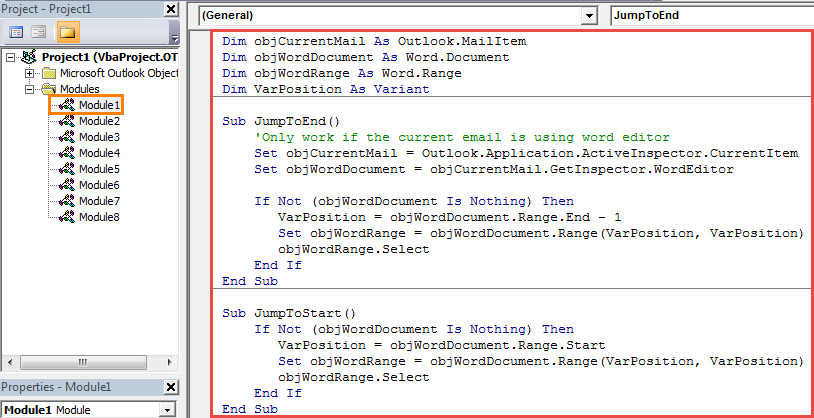
- After that, you had better add the two new subroutines to the Quick Access Toolbar of message window.
- Firstly, open an email in Message window.
- Then click the down arrow in Quick Access Toolbar.
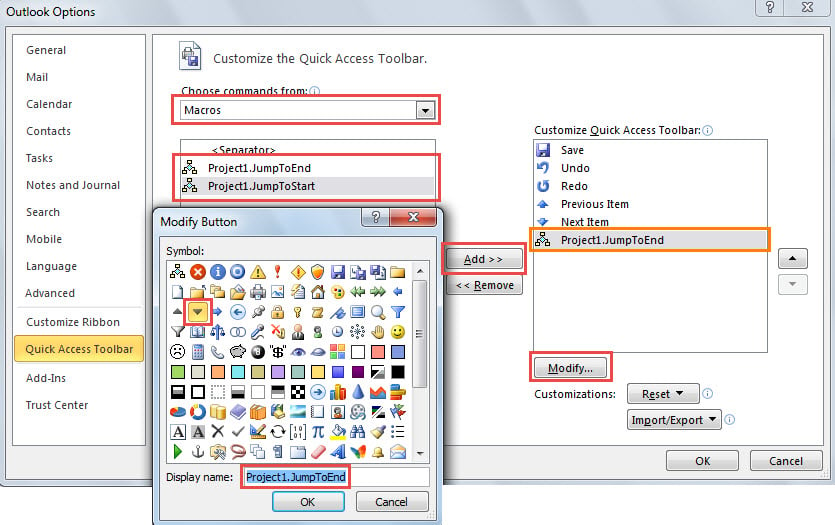
- From the drop down list, you should select “More Commands”.
- In the next window, you can add the macros to Quick Access Toolbar like the following screenshot:

- Lastly click a series of “OK” to save the changes.
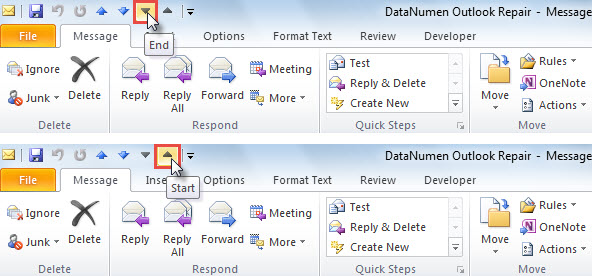
- Eventually, from now on, you can jump to the start or end of an email simply by clicking the button in Quick Access Toolbar, shown as the following image:

What If PST File Gets Compromised
Due to the fact that PST file is susceptible to errors and corruption, you ought to try your best to protect your PST data. For instance, you have to back up your PST file on a periodical basis. Moreover, so as to be able to get back damaged PST data in time, you had better keep a powerful tool in vicinity, like DataNumen Outlook Repair. It is specialized in fixing PST issues and retrieving PST data.
Author Introduction:
Shirley Zhang is a data recovery expert in DataNumen, Inc., which is the world leader in data recovery technologies, including SQL Server fix and outlook repair software products. For more information visit www.datanumen.com