
1. Introduction to SQL Server Replication
1.1 What is SQL Server Replication?
SQL Server replication is a set of technologies for copying and distributing data and database objects from one database to another, then synchronizing between databases to maintain consistency. This feature enables you to create and maintain multiple copies of your data across different servers and locations, ensuring data availability and reliability.
1.2 Purpose and Benefits of Replication
SQL Server replication serves multiple critical business needs and provides significant advantages for database management and data distribution:
- Data Distribution Across Locations: Replication enables you to share data across regional offices or global locations, improving operational efficiency by ensuring local access to required data. This reduces network latency and provides better performance for geographically distributed users.
- High Availability and Disaster Recovery: By maintaining replicas of critical data across multiple servers, replication provides redundancy that protects against hardware failures and disasters. In case of primary server failure, replicated copies can serve as fallback sources, minimizing downtime and data loss.
- Load Balancing and Scalability: Replication distributes read operations across multiple servers, preventing any single server from becoming a bottleneck. This approach enhances system performance and allows your infrastructure to scale horizontally as data and user demands grow.
- Real-Time Reporting and Analytics: Offloading reporting and analytics queries to replicated servers reduces the load on production databases. Users can run complex analytical queries against near real-time data without impacting operational systems, ensuring both performance and data freshness.
- Data Integration and Consolidation: Replication facilitates merging data from various sources into a single consolidated view. This is particularly valuable for organizations with multiple branch offices that need to aggregate data at headquarters, or for creating centralized data warehouses from distributed operational systems.
2. SQL Server Replication Architecture and Components
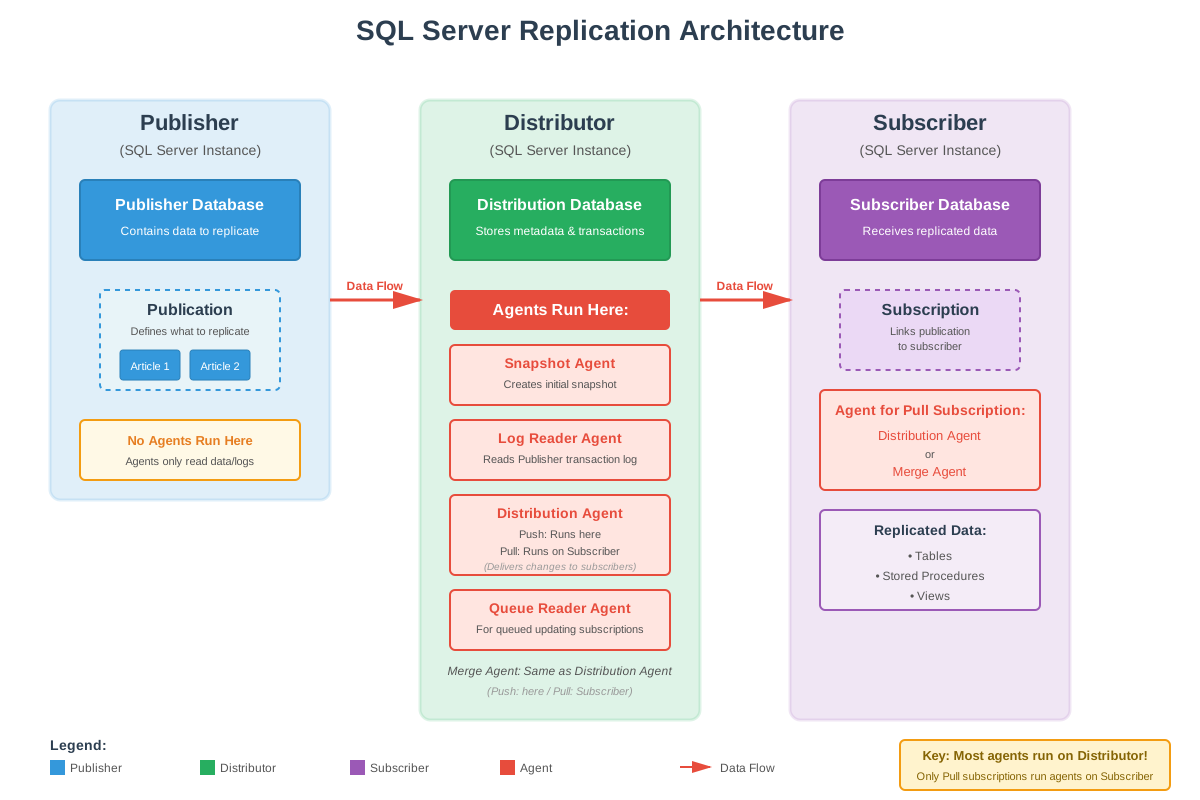
SQL Server replication architecture consists of several interconnected components that work together to distribute and synchronize data across your database infrastructure. This section explores the core components, including publishers, distributors, subscribers, publications, articles, subscriptions, and the agents that coordinate data flow between them:
- Publisher: A publisher is a SQL Server instance that hosts one or more databases containing data to be replicated. It serves as the authoritative source in the replication topology.
- Distributor: A distributor is a SQL Server instance that manages the flow of data between publishers and subscribers. The distributor instance hosts the distribution database, which stores replication metadata and transactions.
- Subscriber: A subscriber is a SQL Server instance that receives and stores replicated data from publishers. A single subscriber instance can host multiple subscriber databases, each receiving data from different publications.
- Publication: A publication defines what data will be replicated and how it will be distributed to subscribers. It groups related articles together and establishes the replication methodology that applies to all contained objects.
- Article: An article is the fundamental building block of replication, representing an individual database object that will be distributed to subscribers.
- Subscription: A subscription establishes the relationship between a publication and a subscriber, defining how and when data is delivered to the destination database.
- Agents: Agents are specialized processes that perform the actual work of moving and synchronizing data between replication components.
3. Types of SQL Server Replication
SQL Server provides several replication types, each designed for specific data distribution scenarios and business requirements. Understanding the characteristics, advantages, and limitations of each type is essential for selecting the right approach for your environment.
3.1 Snapshot Replication
Snapshot replication takes a snapshot of the data to be published at a specific time, then distributes the exact complete copy to the subscribers. It does not monitor for subsequent changes until the next snapshot is generated. Snapshot replication is the simplest form of replication, making it suitable for scenarios where data changes infrequently or where having slightly outdated data is acceptable.
Common use cases include distributing reference data like price lists or exchange rates that update periodically, providing initial datasets for data warehouses, and scenarios where a complete data refresh is preferable to tracking individual changes. For example, a company might use snapshot replication to distribute updated product catalogs to branch offices once daily.
The main advantages of snapshot replication are its simplicity, low maintenance requirements, and ability to replicate data without primary keys. However, it has significant disadvantages including high impact when snapshots are generated due to table locks, high latency between updates, and inefficiency for large datasets or frequently changing data. Any modifications made at subscribers are lost when the next snapshot is applied.
3.2 Transactional Replication
Transactional replication delivers changes from the publisher to subscribers in near real-time by replicating individual transactions as they occur. It begins with an initial snapshot to establish the baseline, then continuously monitors the transaction log for changes to published articles and delivers them to subscribers incrementally.
Transactional replication is ideal for server-to-server scenarios requiring high throughput and low latency. Common use cases include improving scalability and availability by offloading read operations to subscriber servers, supporting data warehousing and reporting with near real-time data, integrating data from multiple sites into a central location, and offloading batch processing to dedicated servers. For example, an e-commerce platform might use transactional replication to maintain synchronized inventory data across regional databases.
The advantages of transactional replication include low latency data delivery, high throughput for large transaction volumes, and the ability to make non-replicated modifications at subscribers. Disadvantages include greater complexity compared to snapshot replication, the requirement for primary keys on replicated tables, and potential for replication to break if conflicts occur such as primary key violations at subscribers.
3.3 Merge Replication
Merge replication is specifically designed for environments where subscribers need to work offline or with intermittent connectivity, then synchronize changes when connection is available. This replication type allows data to be changed at both publisher and subscribers independently, tracking changes using triggers and metadata tables, and automatically merging modifications during synchronization.
Merge replication is designed for mobile applications and distributed server environments where autonomous changes occur. Use cases include sales force automation where mobile users work offline and synchronize later, point-of-sale systems that operate independently and consolidate data periodically, and distributed applications where multiple sites need to update shared data. For example, a retail chain might use merge replication so each store can manage local inventory while synchronizing with the central warehouse system.
The advantages of merge replication include support for autonomous subscribers that can make changes, tolerance for intermittent network connectivity, and flexible conflict resolution. Disadvantages include greater complexity in setup and maintenance, performance overhead from tracking metadata and triggers, the addition of uniqueidentifier columns to tables, and potential for conflicts that require management and resolution.
3.4 Peer-to-Peer Replication
Peer-to-peer replication is built on transactional replication and enables multiple server instances (three or more nodes) to act as equal peers, with each node serving as both publisher and subscriber simultaneously. In this topology, all nodes maintain identical copies of data and can handle both read and write operations, providing a truly distributed multi-master environment.
Peer-to-peer replication is suitable for applications requiring scale-out of read operations and high availability. Use cases include web applications that distribute catalog queries across multiple nodes while maintaining consistent data, scenarios requiring maintenance or upgrades without downtime by taking nodes offline individually, and global applications with data centers in different regions. For example, a worldwide software support organization might use peer-to-peer replication across offices in different time zones so each location has local access to current data.
The advantages of peer-to-peer replication include improved read performance through scale-out, higher availability with multiple active nodes, and near real-time data consistency. Disadvantages include the requirement for Enterprise Edition, complexity in managing multi-node topologies, the need for identical schema and data across all nodes, and potential for conflicts when write operations aren’t properly partitioned.
3.5 Bidirectional Replication
Bidirectional replication is a specific transactional replication topology designed specifically for two-server environments where both servers need to exchange changes with each other. Each server publishes data and subscribes to the same data from the other server, creating a simple two-way synchronization flow. While peer-to-peer replication can also support two nodes, bidirectional replication provides improved performance for this specific scenario.
Bidirectional replication is appropriate for scenarios requiring two active servers with synchronized data, such as active-active configurations for high availability or geographically distributed applications where each site needs local write access. The topology requires careful application design to partition data updates and prevent conflicts.
The advantages include optimized performance for two-server scenarios, simpler configuration compared to peer-to-peer replication, near real-time synchronization, and lower overhead than merge replication. Disadvantages include the limitation to exactly two servers, lack of built-in conflict resolution requiring careful application design, and the need for proper partitioning strategies to prevent conflicts.
3.6 Updatable Subscriptions
Updatable subscriptions extend transactional replication to allow subscribers to make occasional changes to replicated data that then propagate back to the publisher and to other subscribers. Unlike merge replication or peer-to-peer topologies designed for frequent bidirectional updates, updatable subscriptions are intended for scenarios where the primary data flow is one-way (publisher to subscribers) but subscribers occasionally need to make corrections or updates.
Updatable subscriptions are appropriate for scenarios where most updates occur at the publisher but occasional updates at subscribers are necessary, such as field offices that primarily read data but need to make local corrections or updates. The topology requires careful planning to minimize conflicts and ensure data consistency.
The main advantages include allowing limited write operations at subscribers while maintaining transactional replication’s performance characteristics. Disadvantages include increased complexity, potential for conflicts requiring resolution, performance overhead from the two-phase commit protocol in immediate updating mode, and the requirement that all replicated tables have primary keys.
3.7 Comparison of Different Types of Replications
| Replication Type | Update Time | Publisher Count | Direction | Use Scenarios |
|---|---|---|---|---|
| Snapshot | Point in time | 1 | One direction (Publisher → Subscribers) | Infrequently changing reference data (price lists, exchange rates) |
| Transactional | Near real-time | 1 | One direction (Publisher → Subscribers) | High-throughput scenarios (e-commerce inventory, data warehousing, reporting) |
| Merge | Periodic (when connected) | 1 | Bidirectional (Publisher ↔ Subscribers) | Mobile applications, offline workers (sales force automation, field services) |
| Peer-to-Peer | Near real-time | Multiple (3 or more) | Bidirectional (all nodes) | Global multi-datacenter deployments (worldwide offices with local read-write access) |
| Bidirectional | Near real-time | 2 | Bidirectional (both servers) | Two-datacenter active-active configurations (dual-site high availability) |
| Updatable Subscriptions | Near real-time | 1 | Primarily one direction (occasional reverse updates) | Branch offices that primarily read but occasionally update (local corrections) |
4. Setting Up SQL Server Replication
4.1 Prerequisites and Requirements
4.1.1 Software Requirements
SQL Server replication requires compatible SQL Server versions across all participants in the topology. The distributor version must be equal to or higher than the publisher version, and the subscriber can be within two versions of the publisher. For example, a SQL Server 2016 publisher can replicate to SQL Server 2012, 2014, 2016, 2017, or 2019 subscribers.
4.1.2 Permission Requirements
Configuring replication requires specific permissions at each level. Members of the sysadmin fixed server role can perform all replication configuration tasks. For more granular permissions, users need to be members of the db_owner database role for publisher and subscriber databases.
4.2 Step 1: Configure Distribution
Configuring distribution is the first step in setting up SQL Server replication.
To configure distribution using SQL Server Management Studio:
- Connect to the SQL Server instance in SQL Server Management Studio.
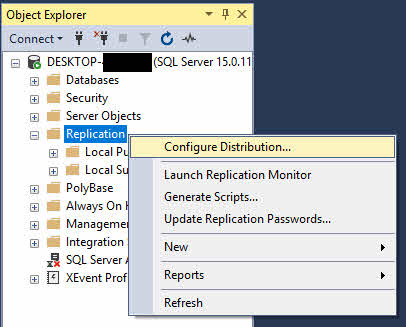
- In Object Explorer, right-click the Replication folder and select Configure Distribution.

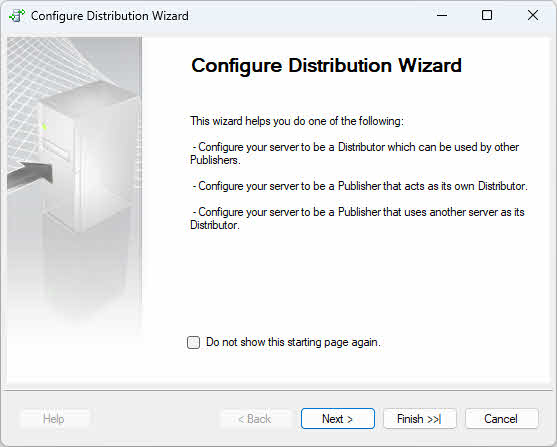
- In the Configure Distribution Wizard, click Next on the welcome page.

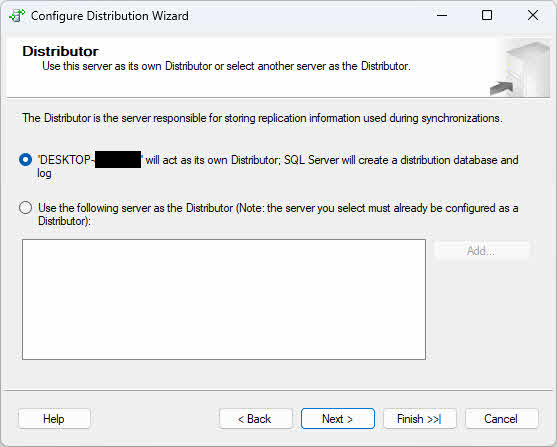
- On the Distributor page, choose one of the following options based on your topology requirements:
- Local Distributor: Select “ServerName will act as its own Distributor; SQL Server will create a distribution database and log” if you want the publisher and distributor to run on the same instance (The current instance). This configuration is simpler to set up and suitable for smaller environments or when network latency between publisher and distributor would cause issues.
- Remote Distributor: Select “Use the following server as the Distributor” and click Add to specify a remote distributor server if you want to offload distribution processing to a separate instance. This configuration improves performance when replication volumes are high by distributing the workload across multiple servers. You will need to provide the remote distributor name and specify a password that the publisher will use to connect to the distributor.
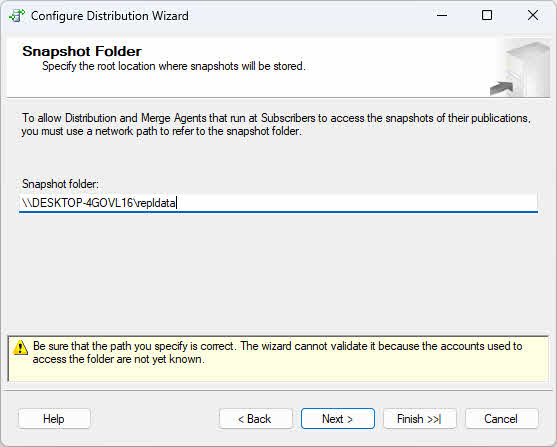
- Click Next to specify the snapshot folder location. Use a UNC path (such as \\servername\share\folder) rather than a local path to ensure accessibility across the network.
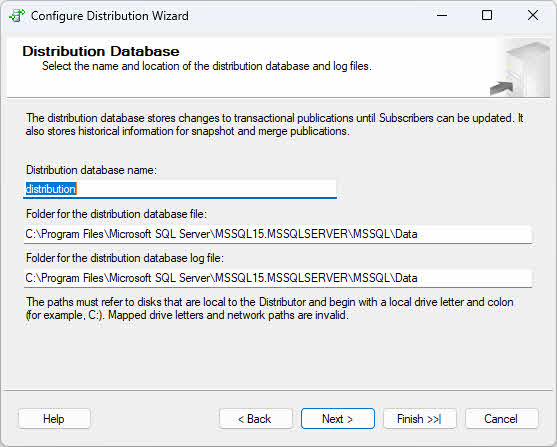
- On the Distribution Database page, accept the default distribution database name (typically “distribution”) or specify a custom name, then configure data and log file locations.
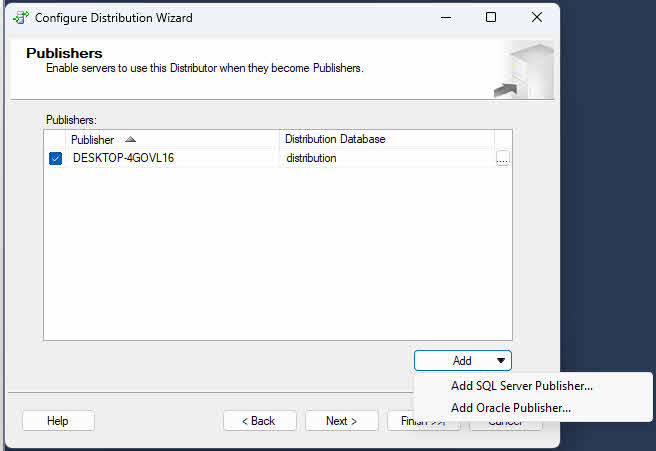
- On the Publishers page, verify that the current server is enabled as a publisher. If you configure the current server as a distributor, you may add additional publishers that will use this distributor.

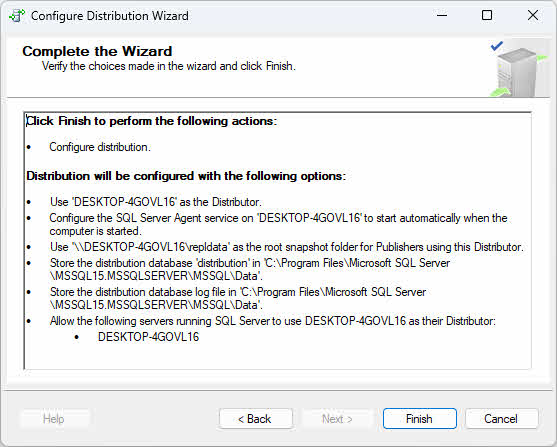
- Review the wizard actions and click Finish to configure distribution.
4.3 Step 2: Create Publication
After configuring distribution, the next step is to create a publication that defines which data objects will be replicated to subscribers.
To create a publication using SQL Server Management Studio:
- In Object Explorer, expand the Replication folder.
- Right-click Local Publications and select New Publication.
- The New Publication Wizard starts; click Next on the welcome page.
- Select the database you want to publish from the Publication Database page. This automatically enables publishing on the selected database.
- On the Publication Type page, select the replication type: Snapshot publication, Transactional publication, Peer-to-Peer publication, or Merge publication.
- On the Articles page, expand the Tables node and select tables to include as articles.
- Optionally expand Stored Procedures, Views, or other object types to include additional articles.
- Click Article Properties to configure filtering or other article-specific settings.
- On the Filter Table Rows page, add row filters if needed.
- On the Snapshot Agent page, choose when to create the snapshot: immediately, at a specific time, or on a schedule.
- On the Agent Security page, specify the security context for the Snapshot Agent.
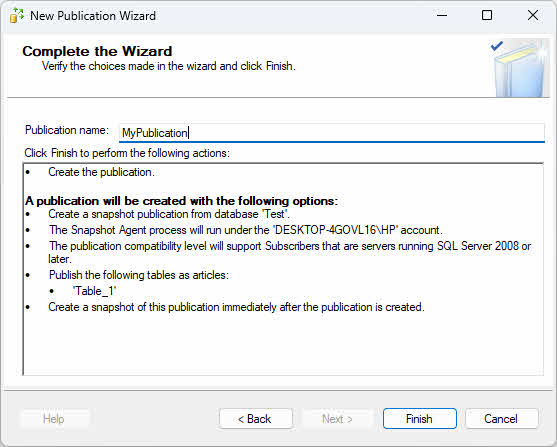
- On the Wizard Actions page, select Create the publication.
- Provide a publication name and click Finish.
4.4 Step 3: Create Subscription
After creating a publication, the next step is to create subscriptions that connect the publication to subscriber databases.
Subscriptions can be push subscriptions (managed by the distributor) or pull subscriptions (managed by the subscriber). The key differences are where you create the subscription and which agent location you select, which determines the action of the subscription(push or pull).
For Push Subscription (managed by the Distributor):
- On the publisher server, expand Replication -> Local Publications.
- Right-click the publication and select New Subscriptions.
For Pull Subscription (managed by the Subscriber):
- On the subscriber server, expand Replication, right-click Local Subscriptions, and select New Subscriptions.
- On the Publication page, click Find SQL Server Publisher and connect to the publisher server.
Common wizard steps for both subscription types:
- In the New Subscription Wizard, click Next on the welcome page.
- Select the publication and click Next.
- On the Distribution Agent Location page, choose the agent location:
- Push subscription: Select “Run all agents at the Distributor” – the Distributor will push changes to subscribers.
- Pull subscription: Select “Run each agent at its Subscriber” – each subscriber will pull changes from the Distributor.
- On the Subscribers page, select existing subscriber servers or click Add Subscriber to add new ones.
- For each subscriber, select the destination database or create a new database. Note: The subscription database must be different from the publisher database, even if using the same SQL Server instance.
- On the Distribution Agent Security page, click the properties button for each subscription to configure the security context.
- On the Synchronization Schedule page, choose continuous synchronization or scheduled synchronization.
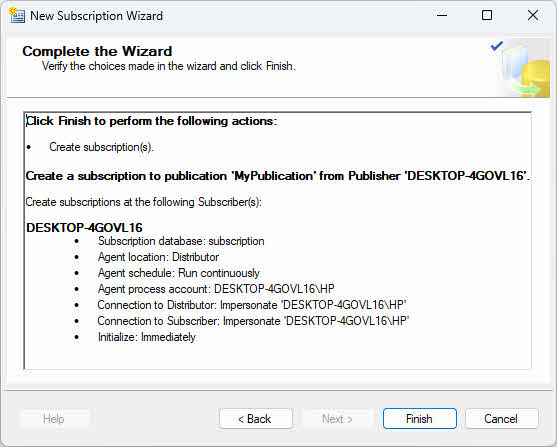
- On the Initialize Subscriptions page, select Immediately to initialize during wizard completion or At first synchronization.
- Review wizard actions and click Finish.
5. Monitoring and Managing SQL Server Replication
5.1 Monitoring Replication with Replication Monitor
To launch Replication Monitor:
- In SQL Server Management Studio, expand Replication in Object Explorer.
- Right-click Replication and select Launch Replication Monitor.
- If no publishers are registered, click Add Publisher in the left pane.
- Choose Add SQL Server Publisher and connect to the publisher server.
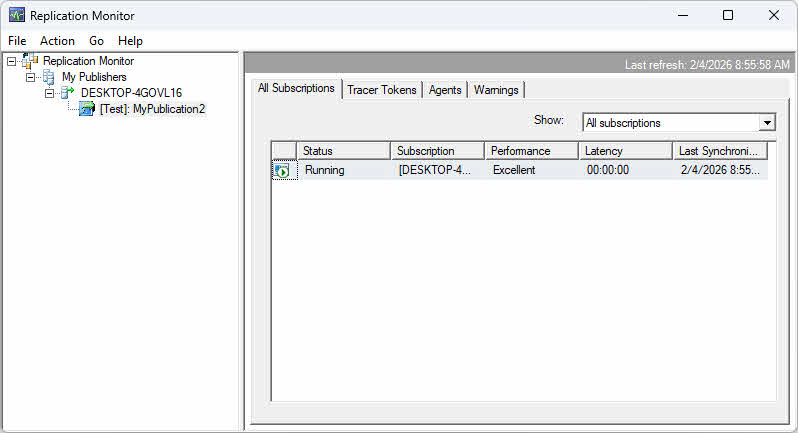
- The publisher appears in the left pane with expandable nodes for publications and subscriptions.
5.2 Performance Monitoring
5.2.1 Monitor Latency
Replication latency is the time delay between a change occurring at the publisher and that change being applied at the subscriber. Monitor latency to ensure data freshness meets business requirements.
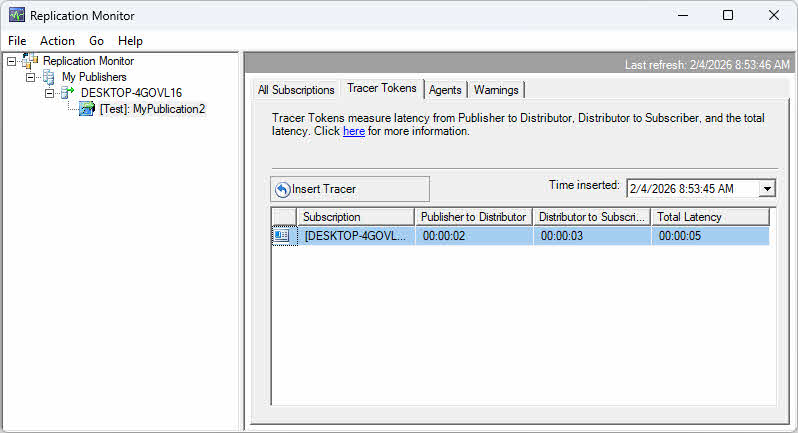
Use Replication Monitor to view latency metrics on the All Subscriptions tab. The Latency column shows average latency in seconds. For transactional replication, tracer tokens provide precise latency measurements by inserting marker transactions that are tracked through the replication pipeline.
To use tracer tokens:
- In Replication Monitor, select a transactional publication.
- Click the Tracer Tokens tab.
- Click Insert Tracer to inject a marker transaction.
- Monitor the token as it travels from publisher to distributor to subscriber.
- View the time taken for each segment to identify bottlenecks.
5.2.2 Monitor Throughput
Throughput measures the volume of data replicated over time, typically expressed as transactions per second or commands per second. Monitor throughput to ensure replication can keep pace with publisher activity.
While Replication Monitor provides basic synchronization status, delivery rate and detailed throughput metrics are not visible in the GUI. Use T-SQL queries against the distribution database to monitor throughput:
USE distribution
GO

-- Direct join to avoid subquery
SELECT TOP 20
    h.time AS [Time],
    a.name AS [Agent Name],
    h.runstatus AS [Status],
    h.delivered_transactions AS [Delivered Transactions],
    h.delivered_commands AS [Delivered Commands],
    h.delivery_rate AS [Delivery Rate (commands/sec)],
    h.delivery_latency AS [Delivery Latency (ms)],
    h.comments AS [Comments]
FROM MSdistribution_history h
JOIN MSdistribution_agents a ON h.agent_id = a.id
WHERE a.name LIKE '%MyPublication2%'
AND h.runstatus IN (2, 3, 4, 6)
ORDER BY h.time DESC
GO
Status codes: 1 = Start, 2 = In progress, 3 = Succeed, 4 = Idle, 5 = Retry, 6 = Fail. Compare delivery rate against publisher transaction rates to identify situations where replication is falling behind. Performance counters in Windows Performance Monitor provide additional throughput metrics for each replication agent.
5.2.3 Identify Bottlenecks
Replication bottlenecks can occur at multiple points in the topology. At the publisher, excessive snapshot generation time or Log Reader Agent delays may indicate resource constraints. Monitor CPU, memory, and disk I/O on the publisher during replication activities.
At the distributor, check for accumulating transactions in the distribution database. Large numbers of undistributed commands indicate the distributor can’t keep up with delivery. Monitor distributor server resources and consider using a dedicated remote distributor for high-volume scenarios.
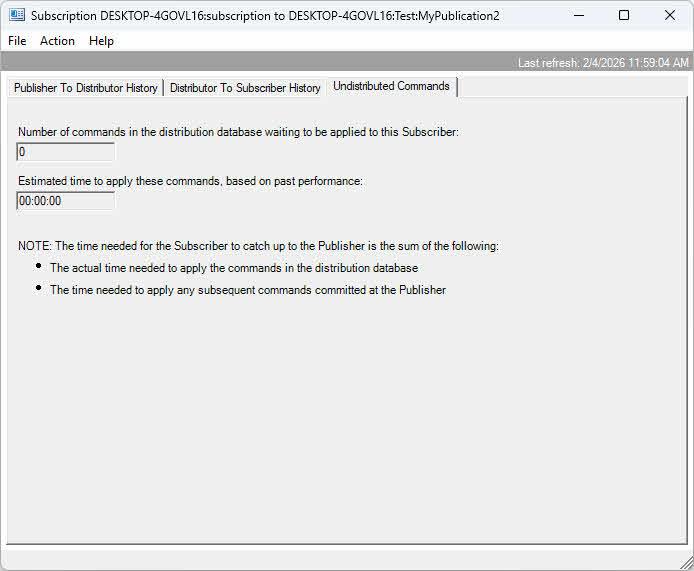
At the subscriber, slow application of changes may result from inadequate resources, missing indexes, or constraints that slow insert operations. Monitor subscriber resource utilization and query performance when Distribution Agent is running. Network bandwidth limitations between components also cause bottlenecks, particularly for large data volumes.
5.3 Managing Replication Agents
5.3.1 Start and Stop Agents
To start or stop a replication agent:
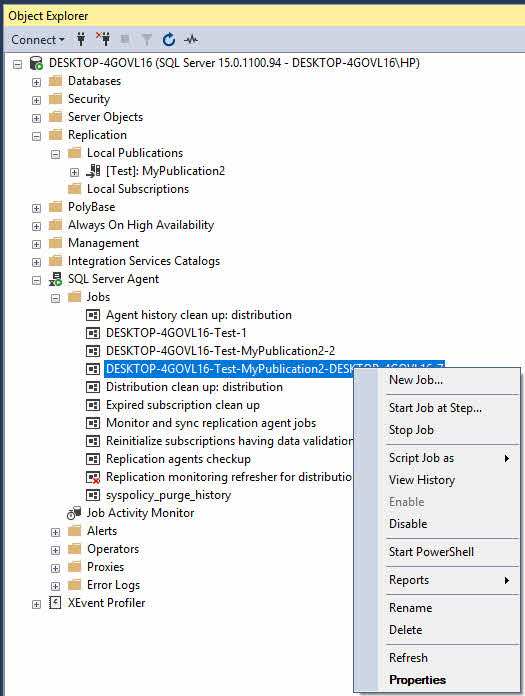
- In SQL Server Management Studio, expand SQL Server Agent -> Jobs.
- Locate the replication agent job (names typically include the publication and subscriber information).
- Right-click the job and select Start Job or Stop Job.
5.3.2 Configure Agent Profiles
Agent profiles contain parameter sets that control agent behavior. SQL Server provides default profiles optimized for common scenarios, and you can create custom profiles for specific needs.
To modify agent profiles:
- In Object Explorer, expand Replication.
- Right-click Replication and select Distributor Properties.
- Click the Profile Defaults button.
- Select an agent type (Snapshot, Log Reader, Distribution, or Merge) from the dropdown.
- Select a profile and click Properties to view parameter values.
- Click New Profile to create a custom profile based on an existing one.
- Modify parameters as needed and click OK.
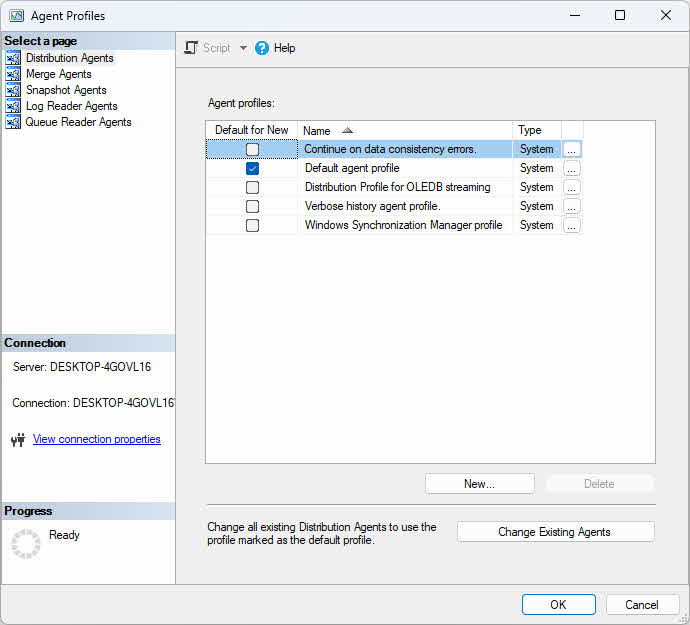
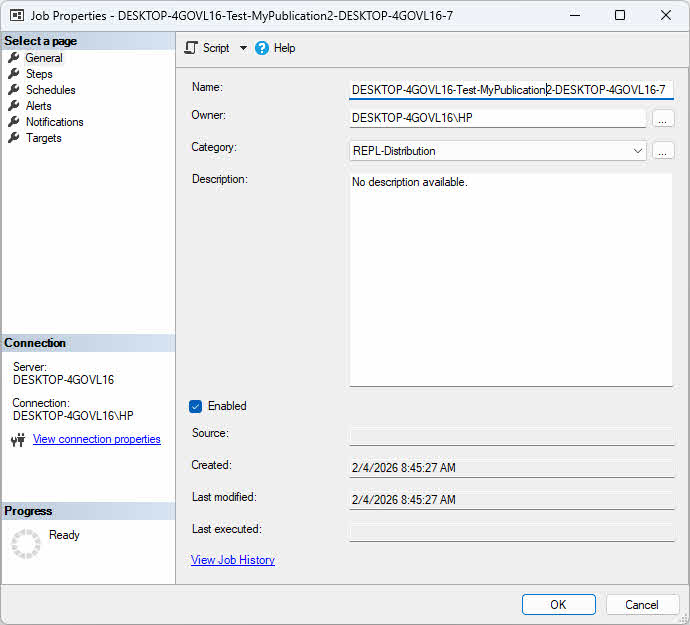
Apply a profile to an agent by editing the subscription properties and selecting the desired profile from the Agent profile dropdown.
5.3.3 Agent Parameters and Settings
Agent parameters fine-tune performance and behavior. Key parameters for Distribution Agent include CommitBatchSize (number of transactions applied per commit), CommitBatchThreshold (number of commands before commit), SubscriptionStreams (parallel connections for faster delivery), and QueryTimeout (timeout for commands).
For Log Reader Agent, important parameters include ReadBatchSize (transactions read per scan), ReadBatchThreshold (commands before delivery), and PollingInterval (delay between log scans). Adjust these parameters based on transaction volume and latency requirements.
5.4 Backup and Restore Considerations
Backing up databases involved in replication requires special considerations. For the publisher database, regular full and transaction log backups are essential. Mark the database backup for replication support by using the WITH REPLICATION option when backing up databases in transactional replication. Back up the distribution database regularly to protect the replication configuration.
When restoring a publisher database to the same server with the same name, use the WITH KEEP_REPLICATION option to preserve replication state. This option ensures that transactions not yet processed by the Log Reader Agent remain marked for replication, allowing replication to continue automatically without reinitializing subscriptions.
In disaster recovery scenarios where backups are unavailable, corrupted, or the database files are damaged, specialized recovery tools may be necessary. DataNumen SQL Recovery can extract data from corrupted or inaccessible MDF and NDF files, providing a last-resort option when standard restore procedures fail.
For more details on SQL Server backup, see our comprehensive guide.
6. Frequently Asked Questions (FAQ)
Q: What is the difference between snapshot and transactional replication?
A: Snapshot replication takes a complete copy of the data at a specific point in time and applies it to the subscriber, suitable for infrequently changing data. Transactional replication starts with an initial snapshot and then continuously replicates individual transactions as they occur, providing near real-time synchronization for frequently changing data.
Q: Can I replicate between different SQL Server versions?
A: Yes, SQL Server replication supports version compatibility within a limited range. The distributor version must be equal to or higher than the publisher version, and the subscriber can be within two versions of the publisher. For example, if the publisher is SQL Server 2016, the subscriber can be SQL Server 2012, 2014, 2016, 2017, or 2019.
Q: How do I handle conflicts in merge replication?
A: Merge replication provides built-in conflict detection and resolution mechanisms. You can configure conflict resolvers at the article level, choosing from built-in resolvers or implementing custom conflict resolvers. Conflicts are typically resolved using priority-based or timestamp-based methods, with the option to log conflicts for manual review.
Q: What are the performance impacts of replication?
A: Replication impacts performance in several ways: the publisher experiences overhead from tracking changes and generating snapshots, the distributor uses resources to store and forward transactions, and network bandwidth is consumed during data transfer. The impact varies by replication type, with snapshot replication causing periodic high-impact bursts and transactional replication maintaining a more consistent but continuous load.
Q: How do I secure my replication topology?
A: Secure your replication topology by implementing several best practices: use Windows Authentication or strong SQL Server authentication, encrypt connections using TLS, secure the snapshot folder with appropriate NTFS permissions, configure the Publication Access List (PAL) to control access, use separate service accounts with minimal required permissions for each replication agent, and regularly audit replication security settings.
Q: Can I replicate to Azure SQL Database?
A: Yes, you can replicate to Azure SQL Database using transactional replication with an on-premises SQL Server or Azure SQL Managed Instance as the publisher and distributor. Azure SQL Database can serve as a subscriber but not as a publisher or distributor. Merge replication and peer-to-peer replication are not supported with Azure SQL Database.
Q: How do I monitor replication lag?
A: Monitor replication lag using Replication Monitor in SQL Server Management Studio, which displays latency metrics for each subscription. You can also query distribution database tables like MSdistribution_history and MSrepl_commands, use performance counters specific to replication agents, or set up alerts based on latency thresholds to proactively detect and address synchronization delays.
Q: What happens when a subscriber is offline?
A: When a subscriber is offline, the behavior depends on the replication type. For transactional replication, transactions accumulate in the distribution database until the subscriber comes back online, then synchronization resumes. For merge replication, changes are tracked on both sides and merged when connectivity is restored. The retention period setting determines how long data is kept before it must be reinitialized.
Q: How do I add new articles to existing publication?
A: To add new articles to an existing publication, use SQL Server Management Studio to modify the publication properties and select additional objects, or use sp_addarticle stored procedure. After adding articles, generate a new snapshot and reinitialize all subscriptions to ensure subscribers receive the new articles. Some changes may require subscription reinitialization depending on publication settings.
Q: How do I remove replication from a database?
A: Remove replication from a database by first deleting all subscriptions using sp_dropsubscription, then dropping the publication with sp_droppublication, and finally disabling publishing on the database using sp_replicationdboption. If the server is a distributor, disable distribution using sp_dropdistributor. Always back up databases before removing replication configuration.
Q: What is the difference between SQL Server Replication and AlwaysOn Availability Groups?
A: Replication is a data distribution and integration solution that operates at the object level, while Always On Availability Groups is a high availability and disaster recovery solution that operates at the database level.
7. Conclusion
SQL Server replication provides a robust framework for distributing and synchronizing data across multiple databases and locations. The technology supports various scenarios through different replication types.
Selecting the right replication strategy depends on your specific requirements. Consider data change frequency, latency requirements, whether subscribers need to make updates, network characteristics, and subscriber autonomy needs. Snapshot replication works best for infrequently changing reference data where latency isn’t critical. Transactional replication suits high-volume scenarios requiring low latency and primarily one-way data flow.
Choose merge replication when subscribers need autonomous operation with offline capabilities and bidirectional synchronization. Implement peer-to-peer replication for load balancing read operations across multiple active nodes with near real-time consistency. Consider hybrid approaches combining multiple replication types for complex scenarios with diverse requirements.
References
- Microsoft Official Document: SQL Server Replication
- Microsoft Official Document: Types of Replication
- Microsoft Official Document: Peer-to-Peer – Transactional Replication
About the Author
Yuan Sheng is a senior database administrator (DBA) with over 10 years of experience in SQL Server environments and enterprise database management. He has successfully resolved hundreds of database recovery scenarios across financial services, healthcare, and manufacturing organizations.
Yuan specializes in SQL Server database recovery, high availability solutions, and performance optimization. His extensive hands-on experience includes managing multi-terabyte databases, implementing Always On Availability Groups, and developing automated backup and recovery strategies for mission-critical business systems.
Through his technical expertise and practical approach, Yuan focuses on creating comprehensive guides that help database administrators and IT professionals solve complex SQL Server challenges efficiently. He stays current with the latest SQL Server releases and Microsoft’s evolving database technologies, regularly testing recovery scenarios to ensure his recommendations reflect real-world best practices.
Have questions about SQL Server recovery or need additional database troubleshooting guidance? Yuan welcomes feedback and suggestions for improving these technical resources.