
1. Introduction to SQL Server High Availability
High availability in SQL Server refers to the system’s capability to remain operational with minimal downtime when faced with hardware failures, software issues, or planned maintenance. The importance of high availability cannot be overstated. When databases become unavailable, organizations face immediate consequences, including lost revenue, reduced productivity, and customer dissatisfaction.
While High Availability (HA) and Disaster Recovery (DR) are often used interchangeably, they address different failure scenarios. HA focuses on minimizing downtime caused by localized failures such as server or instance crashes, whereas DR is designed to recover from large-scale disasters that impact an entire data center or region.
Two critical metrics guide HA planning:
- Recovery Time Objective (RTO) defines the maximum acceptable downtime after a failure
- Recovery Point Objective (RPO) specifies the maximum tolerable data loss.
Availability is commonly measured in “nines”: 99.9% (three-nines) allows 8.76 hours of downtime annually, 99.99% (four-nines) permits 52.6 minutes, and 99.999% (five-nines) restricts downtime to just 5.26 minutes per year.
2. SQL Server High Availability Solutions Overview
2.1 Categories of HA Solutions
SQL Server high availability solutions can be categorized along several dimensions:
- Instance vs database level protections: Instance-level protections like Failover Cluster Instances protect entire instances including all databases and server objects, while database-level protections such as Always On Availability Groups protect specific databases.
- Synchronous vs asynchronous data movement: Synchronous data movement ensures zero data loss but may introduce latency, whereas asynchronous movement optimizes performance but accepts possible data loss.
- Automatic vs manual failover: Automatic failover minimizes downtime without manual intervention, while manual failover provides greater control but requires administrator action.
2.2 Common HA Solutions
SQL Server provides eight primary high availability solutions, each addressing specific scenarios:
- Always On Availability Groups
- Contained Availability Groups
- Distributed Availability Groups
- Failover Cluster Instances
- SQL Server Replication
- Log Shipping
- Database Mirroring
- Managed Instance Link
3. Always On Availability Groups
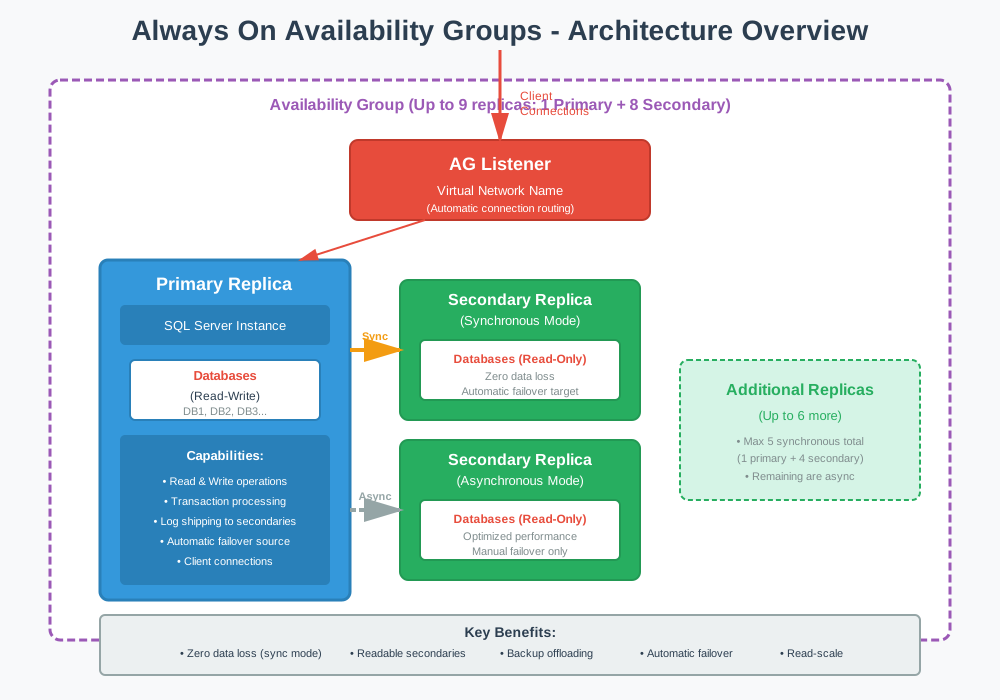
Always On Availability Groups represents SQL Server’s premier database-level high availability and disaster recovery solution, introduced in SQL Server 2012. It enables groups of databases to fail over together as a single unit while providing readable secondary replicas for query offloading.
Key Features
- Support for up to 9 replicas total (1 primary + 8 secondary)
- Up to 5 replicas in synchronous-commit mode (1 primary + 4 secondary)
- Automatic failover with zero data loss in synchronous mode
- Readable secondary replicas for query offloading
- Backup offloading to secondary replicas
- Availability Group listener for automatic connection routing
- Read-only routing for load balancing read queries
- Multiple databases fail over together as a group
Implementation Steps
- Configure Windows Server Failover Clustering (WSFC) or Linux Pacemaker cluster
- Enable Always On Availability Groups feature on all SQL Server instances
- Ensure databases use full recovery model and have full backups
- Create database mirroring endpoints on each replica
- Create the Availability Group and add databases
- Configure primary and secondary replicas with desired modes
- Create and configure the Availability Group listener
- Configure read-only routing if using readable secondaries
- Test failover procedures and verify application connectivity
Best For
- Mission-critical databases requiring maximum uptime
- Organizations needing both local HA and geographic DR
- Environments requiring read-scale capabilities
- Applications that benefit from offloading reporting queries
- Databases requiring zero data loss protection
- Multi-database applications needing coordinated failover
Pros
- Zero data loss with synchronous-commit mode
- Automatic failover minimizes downtime (typically seconds)
- Readable secondaries reduce load on primary
- No shared storage requirement
- Supports both Windows and Linux platforms
- Geographic distribution for disaster recovery
- Backup operations can be offloaded to secondaries
- Application connection strings remain unchanged after failover
Cons
- Requires Enterprise Edition for full functionality
- Standard Edition limited to Basic AG (1 database, 1 secondary, no readable secondary)
- Complex configuration and management
- Requires clustering infrastructure (WSFC or Pacemaker)
- Instance-level objects (logins, jobs) require manual synchronization
- Synchronous mode can introduce transaction latency
- Licensing costs for multiple servers
References
- SQL Server Always On Availability Groups: Complete Guide
- Microsoft Official Document: Overview of Always On availability groups (SQL Server)
4. Contained Availability Groups
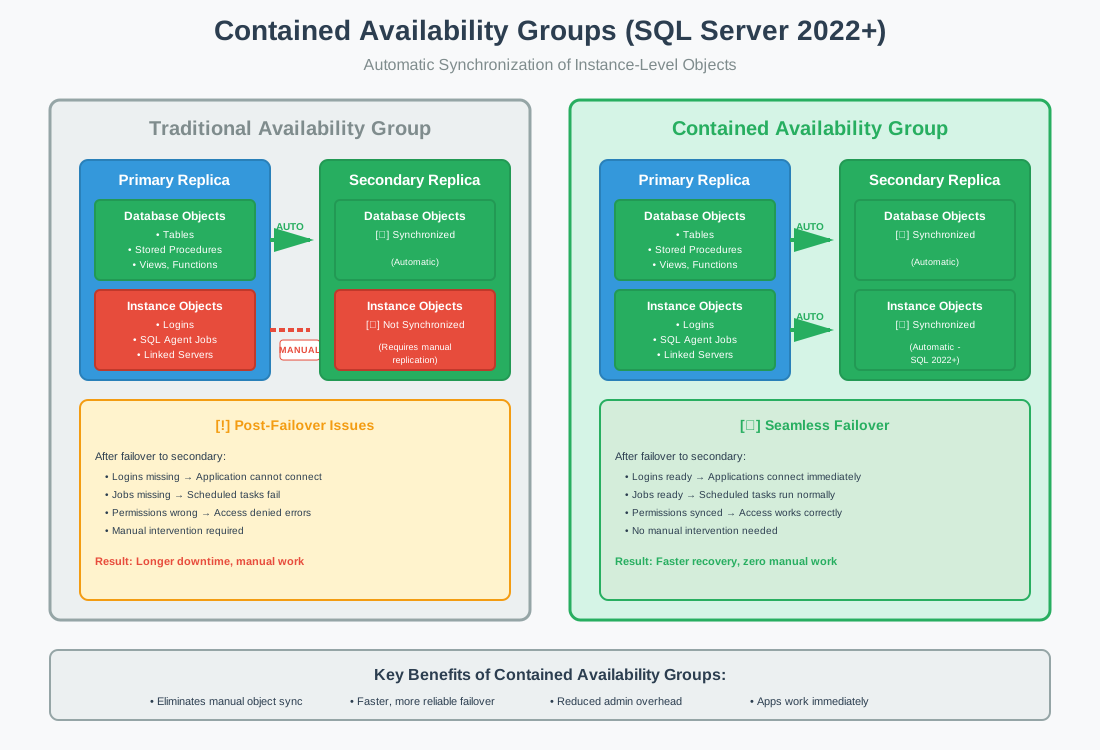
Contained Availability Groups, introduced in SQL Server 2022, extend traditional Always On Availability Groups by automatically synchronizing instance-level objects across replicas, eliminating the need for manual replication of logins, jobs, and other server-level objects.
Key Features
- Automatic synchronization of instance-level objects (logins, users, roles)
- SQL Server Agent jobs replicated across all replicas
- Database permissions synchronized automatically
- All Always On AG capabilities included
- Simplified failover with complete environment replication
- Support for both Windows and Linux platforms
Implementation Steps
- Ensure SQL Server 2022 or later on all instances
- Configure WSFC or Pacemaker cluster infrastructure
- Enable Always On feature on all instances
- Create Contained Availability Group with CONTAINED option
- Add databases to the contained AG
- Create logins and jobs within the AG context
- Configure listener and test failover
Best For
- Organizations wanting simplified AG administration
- Environments with frequent failover testing or operations
- Applications requiring many instance-level objects
- New SQL Server 2022+ deployments
- Teams seeking reduced post-failover configuration
Pros
- Eliminates manual synchronization of logins and jobs
- Faster, more reliable failover
- Reduced administrative overhead
- Applications work immediately after failover
- Simplified disaster recovery procedures
- All traditional AG benefits included
Cons
- Requires SQL Server 2022 or later
- Enterprise Edition required for full functionality
- Cannot convert existing traditional AGs to contained AGs
- All replicas must support contained AG feature
- Additional complexity compared to traditional AGs
References
5. Distributed Availability Groups
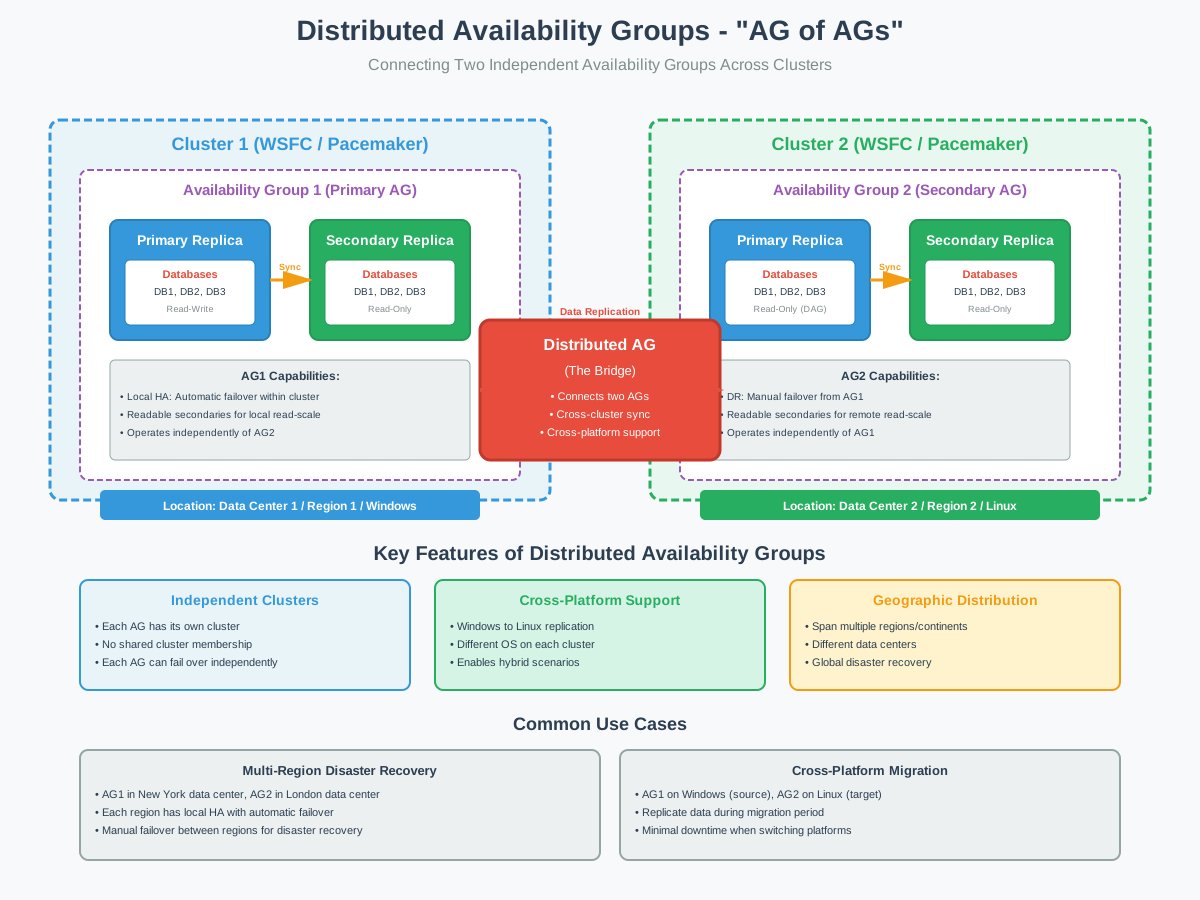
Distributed Availability Groups, introduced in SQL Server 2016, enable an “Availability Group of Availability Groups” architecture, connecting two independent AGs across separate clusters for advanced disaster recovery and migration scenarios.
Key Features
- Connects two independent availability groups
- Each AG maintains its own independent cluster
- Cross-platform support (Windows to Linux)
- Cross-cluster replication without shared cluster membership
- One AG serves as primary, other as secondary
- Supports both synchronous and asynchronous modes
- Geographic distribution across regions or continents
Implementation Steps
- Create and configure first Availability Group (primary DAG)
- Create and configure second Availability Group (secondary DAG)
- Create distributed AG linking the two AGs
- Configure data synchronization between AGs
- Set up listener on each AG for application connectivity
- Configure failover policies and test procedures
- Verify cross-cluster communication and replication
Best For
- Multi-region disaster recovery spanning independent data centers
- Cross-platform migration from Windows to Linux or vice versa
- Hybrid cloud scenarios connecting on-premises to Azure
- Major version upgrades requiring extended migration windows
- Organizations with multiple independent failover clusters
- Global enterprises needing continent-spanning replication
Pros
- Decouples cluster dependencies between sites
- Enables true geographic distribution
- Supports cross-platform scenarios
- Each AG can fail over independently
- Ideal for complex migration projects
- No shared cluster infrastructure required
- Can span different Windows domains or Linux distributions
Cons
- Requires Enterprise Edition
- High complexity in configuration and management
- Requires deep understanding of both clustering and AG technology
- More difficult to troubleshoot than standard AGs
- Additional latency for cross-region scenarios
- Requires careful planning of failover procedures
References
6. Failover Cluster Instances (FCI)
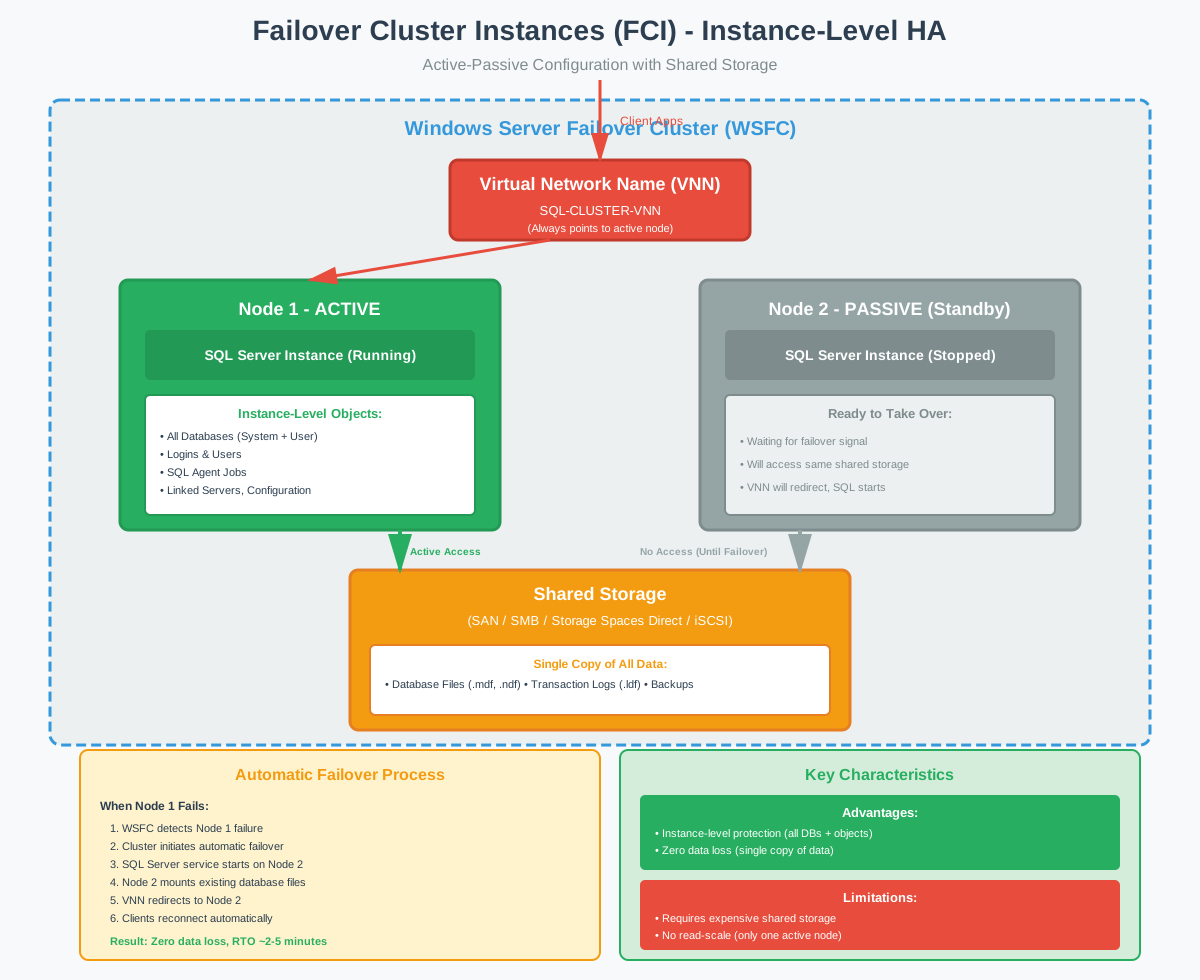
Failover Cluster Instances provide instance-level high availability using shared storage and Windows Server Failover Clustering, enabling automatic failover of an entire SQL Server instance including all databases and server-level objects.
Key Features
- Instance-level protection (all databases fail over together)
- Active-passive configuration with shared storage
- Virtual Network Name (VNN) for transparent failover
- Automatic failover when active node fails
- Zero data loss (single copy of data)
- Server-level objects included (logins, jobs, linked servers)
- Supports all SQL Server recovery models
Implementation Steps
- Configure Windows Server Failover Cluster (WSFC)
- Set up shared storage (SAN, SMB, Storage Spaces Direct)
- Configure cluster quorum settings
- Install SQL Server as Failover Cluster Instance on first node
- Add additional nodes to the FCI
- Configure Virtual Network Name and IP address
- Test failover between cluster nodes
- Configure client applications to use VNN
Best For
- Organizations with existing shared storage infrastructure
- Environments requiring instance-level protection
- Local high availability within a single data center
- Applications needing all databases to fail over together
- Scenarios where server-level objects must be protected
- Windows-only environments (Linux not supported for FCI)
Pros
- Complete instance-level protection
- Zero data loss guaranteed
- Automatic failover capability
- No need to synchronize logins or jobs
- Single copy of data reduces storage costs
- Supports all recovery models
- Application connection strings unchanged after failover
Cons
- Requires expensive shared storage infrastructure
- Shared storage is a single point of failure
- No read-scale capability (only one active node)
- Limited geographic distribution due to storage constraints
- Standard Edition limited to 2 nodes
- Windows only (no Linux support)
- Longer failover time compared to AGs (typically minutes)
- Complex storage configuration and management
References
- SQL Server Failover Cluster: Complete Guide for DBA
- Microsoft Official Document: Always On failover cluster instances (SQL Server)
7. SQL Server Replication
SQL Server Replication is a data distribution technology that copies and distributes data across multiple servers, supporting various topologies from simple one-way distribution to complex multi-master configurations, though primarily used for reporting rather than pure high availability solution.

Key Features
- Four replication types: Snapshot, Transactional, Merge, Peer-to-Peer
- Granular data selection (specific tables, columns, rows)
- Support for multiple subscribers from single publisher
- Bi-directional and multi-master topologies available
- Flexible scheduling and synchronization options
- Conflict resolution for merge replication
- Filtering capabilities with WHERE predicates
Implementation Steps
- Configure Distributor server (can be separate or same as Publisher)
- Create publication on Publisher database
- Select replication type based on requirements
- Choose articles (tables, views, stored procedures) to replicate
- Configure filtering and data transformation if needed
- Set up Subscriber databases
- Create subscriptions (push or pull)
- Initialize subscriptions with snapshot
- Monitor replication agents and latency
Best For
- Distributing data to multiple reporting servers
- Read-scale scenarios with reporting workloads
- Partial data distribution to remote sites
- Data consolidation from multiple sources
- Occasionally connected scenarios (merge replication)
- Supporting role in disaster recovery strategy
Pros
- Granular control over replicated data
- Multiple subscribers supported
- Flexible topology options
- Can replicate specific tables or columns
- Filtering reduces network traffic
- Supports heterogeneous replication (SQL Server to Oracle)
- Works with Standard Edition
Cons
- No automatic failover capability
- Complex configuration and management
- Potential for replication conflicts (merge and peer-to-peer)
- Latency in data synchronization
- Schema changes require careful coordination
- Not designed as primary HA solution
- Troubleshooting can be challenging
- Peer-to-Peer requires Enterprise Edition
References
8. Log Shipping
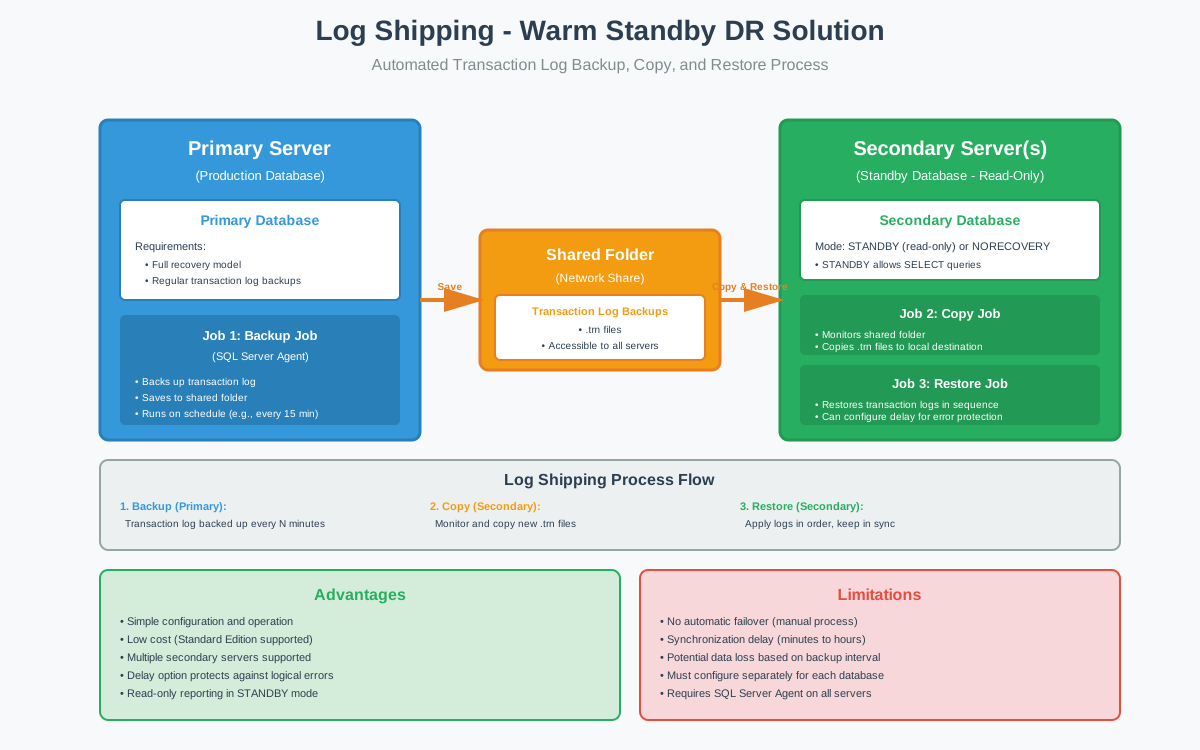
Log Shipping provides a warm standby disaster recovery and high availability solution through automated transaction log backup, copy, and restore processes, offering a simple and cost-effective approach to maintaining synchronized secondary databases.
Key Features
- Automated backup, copy, and restore jobs via SQL Agent
- Support for multiple secondary servers
- Configurable backup and restore intervals
- STANDBY mode allows read-only access to secondary
- Delayed log restore for error recovery protection
- Monitor server for centralized monitoring
- Transaction log compression support
Implementation Steps
- Ensure primary database uses full recovery model
- Create full backup of primary database
- Restore backup on secondary server with NORECOVERY
- Configure log shipping on primary database
- Specify shared backup folder accessible to all servers
- Configure backup job schedule on primary
- Configure copy and restore jobs on secondary
- Optionally configure monitor server
- Test failover procedures
Best For
- Cost-effective disaster recovery solutions
- Organizations with Standard Edition licensing
- Scenarios tolerating minutes of data loss
- Environments comfortable with manual failover
- Delayed recovery for error protection needs
- Reporting workloads using STANDBY mode
- Simple DR requirements without complex infrastructure
Pros
- Simple configuration and operation
- Low cost (Standard Edition support)
- Multiple secondary servers supported
- Configurable delay protects against logical errors
- Read-only reporting in STANDBY mode
- Tolerates high network latency
- Minimal impact on primary server
- Well-established, proven technology
Cons
- No automatic failover capability
- Must configure separately for each database
- Synchronization delay (minutes to hours)
- Potential data loss based on backup interval
- Manual failover increases RTO
- Requires SQL Server Agent running on all servers
- Secondary databases not accessible during log restore
- Applications require connection string changes after failover
References
- SQL Server Log Shipping: Complete Guide for DBA
- Microsoft Official Document: About log shipping (SQL Server)
9. Database Mirroring
Database Mirroring is a deprecated database-level high availability solution that has received no enhancements since SQL Server 2012, though it remains available in current versions. Microsoft strongly recommends migrating to Always On Availability Groups for all new deployments.

Key Features
- Principal and mirror server architecture
- Optional witness server for automatic failover
- Two operating modes: High Safety and High Performance
- Synchronous and asynchronous operation support
- Automatic page repair capability
- Database-level protection
- Encryption support for data transmission
Implementation Steps
- Ensure database uses full recovery model
- Create full backup and restore to mirror server with NORECOVERY
- Create mirroring endpoints on principal and mirror
- Configure certificates for authentication
- Establish mirroring session between servers
- Optionally configure witness server for automatic failover
- Set operating mode (High Safety or High Performance)
- Test failover procedures
Best For
- Legacy systems already using Database Mirroring
- Maintaining existing configurations until migration possible
- No other scenarios recommended (feature is deprecated)
Pros
- Fast automatic failover in High Safety mode with witness
- Zero data loss in High Safety mode
- Automatic page repair from partner
- Simpler than Availability Groups for single database
- Supports encryption for transmission
- Rolling upgrades with minimal downtime
Cons
- Deprecated since SQL Server 2012 (may be removed)
- Per-database configuration and failover
- No readable mirror (no read-scale capability)
- Each database fails over independently
- Connection string updates required after failover
- Limited to two servers (principal and mirror)
- No enhancements or new features
- Microsoft recommends migration to Always On AG
References
10. Managed Instance Link
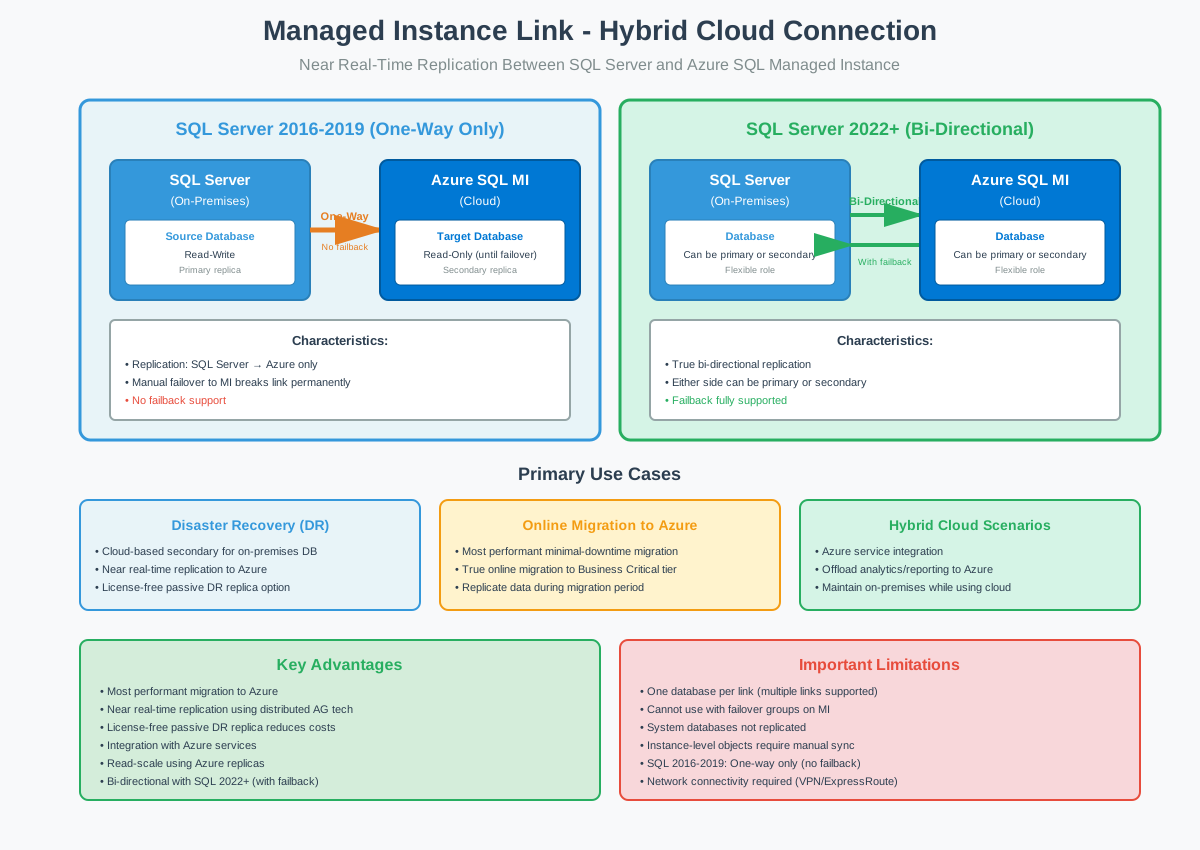
Managed Instance Link creates a hybrid connection between SQL Server and Azure SQL Managed Instance using distributed availability group technology, enabling near real-time data replication for disaster recovery, migration, and cloud integration scenarios.
Key Features
- Near real-time replication using distributed AG technology
- One-way replication (SQL Server 2016-2019 to Azure)
- Bi-directional replication with failback (SQL Server 2022+)
- One database per link (multiple links supported)
- Readable replicas on Azure SQL Managed Instance
- License-free passive DR replica option
- Online migration with minimal downtime
Implementation Steps
- Prepare SQL Server environment (VPN or ExpressRoute to Azure)
- Configure Azure SQL Managed Instance
- Enable Always On AG feature on SQL Server
- Create database mirroring endpoint
- Exchange certificates between SQL Server and MI
- Create Managed Instance Link using SSMS or scripts
- Validate replication and synchronization
- Configure read-only routing if using for read-scale
- Test failover procedures
Best For
- Hybrid disaster recovery with cloud-based secondary
- Online migration to Azure SQL Managed Instance
- Offloading analytics and reporting to Azure
- Organizations adopting hybrid cloud strategy
- Scenarios requiring Azure service integration
- Cost optimization with license-free passive DR
Pros
- Most performant, minimal downtime migration to Azure
- True online migration to Business Critical tier
- Bi-directional failover with SQL Server 2022+
- License-free passive DR replica reduces costs
- Integration with Azure services without full migration
- Read-scale capability using Azure replicas
- Automated backups on Azure side
- Geographic distribution to Azure regions
Cons
- One database per link limitation
- Cannot use with failover groups on MI
- System databases not replicated
- Instance-level objects require manual synchronization
- SQL Server 2016-2019 one-way only (no failback)
- Azure costs for Managed Instance
- Network connectivity requirements (VPN/ExpressRoute)
- Feature limitations (file tables, file streams not supported)
References
11. Comparison of High Availability Solutions
11.1 Feature Comparison Table
| Feature | Always On AG | Contained AG | Distributed AG | FCI | Replication | Log Shipping | Mirroring | MI Link |
|---|---|---|---|---|---|---|---|---|
| Edition | Ent/Std | Ent/Std | Ent | Ent/Std | Ent/Std | Ent/Std | Ent/Std | Ent/Std |
| Protection Level | Database | Database+Instance | Database | Instance | Database/Objects | Database | Database | Database |
| Data Sync | Sync/Async | Sync/Async | Sync/Async | Shared | Async | Async | Sync/Async | Async |
| Auto Failover | Yes | Yes | Yes | Yes | No | No | Yes | No |
| Read-Scale | Yes | Yes | Yes | No | Yes | Limited | No | Yes |
| RTO | Seconds | Seconds | Seconds | Minutes | Manual | Manual | Seconds | Manual |
| RPO | Zero/Min | Zero/Min | Zero/Min | Zero | Minimal | Minutes | Zero/Min | Minimal |
| Support Status | Active | Active | Active | Active | Active | Active | Deprecated | Active |
11.2 Choose HA Solution
When choosing the solution, consider the following factors:
- Budget considerations significantly impact solution selection: Enterprise Edition requirements affect licensing costs, while infrastructure needs vary from expensive shared storage for FCIs to commodity servers for Availability Groups.
- Complexity differs substantially: Log Shipping offers simplest implementation, while Distributed Availability Groups require extensive expertise.
- RTO requirements drive technology choices. Seconds of downtime demand Always On Availability Groups or FCIs with automatic failover. Minutes tolerance allows manual failover solutions like Log Shipping.
- RPO requirements equally matter: zero data loss mandates synchronous solutions, while minutes tolerance enables Log Shipping.
- Infrastructure constraints, read-scale needs, geographic distribution requirements, and cloud hybrid scenarios all influence optimal solution selection.
12. Best Practices for SQL Server High Availability
12.1 Planning and Design
Assess business requirements through careful RTO and RPO analysis for each database. Choose appropriate solutions matching requirements rather than defaulting to the most sophisticated options. Plan for both local high availability and geographic disaster recovery using layered approaches. Document architecture comprehensively including network diagrams, failover procedures, and recovery runbooks.
12.2 Implementation Guidelines
Test failover procedures regularly through scheduled tests and simulated failures to validate SQL Server high availability solutions and team readiness. Monitor health and performance continuously using SQL Server’s built-in tools like SQL Server Profiler and DMVs. Configure comprehensive alerting for synchronization lag, failover events, and health degradation. Maintain SQL Server backup strategies despite HA implementation, as backups remain the last line of defense against logical corruption and accidental deletions. Keep systems updated with cumulative updates, security patches, and firmware updates. Validate recovery procedures periodically through actual restores and application testing, and know how to handle scenarios like databases stuck in recovery mode.
12.3 Monitoring and Maintenance
Utilize tools like SQL Server Activity Monitor, SQL Server Performance Monitor, and Dynamic Management Views extensively for health monitoring, and run DBCC CHECKDB regularly to verify database integrity. Leverage the Always On Dashboard for visual assessment of Availability Group health. Monitor synchronization lag carefully, particularly for asynchronous replicas and Log Shipping. Track failover events meticulously using SQL Server Extended Events and analyze causes for patterns. Establish performance baselines for normal operation and monitor deviations indicating potential issues. Conduct regular capacity planning reviews ensuring infrastructure supports growing workloads.
13. FAQ
Q: What is the difference between high availability and disaster recovery in SQL Server?
A: High availability minimizes downtime for local failures within a data center, typically with automatic failover and RTOs in seconds or minutes. Disaster recovery protects against regional catastrophes, usually with manual failover and longer RTOs but covering events affecting entire facilities.
Q: What is the difference between High Availability (HA) and Read-Scale Solutions?
A: High Availability solutions ensure databases remain accessible during failures, focusing on uptime and automatic failover capabilities. Read-Scale solutions improve query performance by distributing read-only workloads across multiple database replicas, focusing on throughput and response times. While these serve different purposes, the same technology like Always On Availability Groups can provide both benefits simultaneously: readable secondary replicas offer read-scale capabilities while also serving as failover targets for high availability.
Q: Which SQL Server high availability solution is best for my needs?
A: The best solution depends on RTO and RPO targets, budget, edition availability, infrastructure, and expertise. Always On Availability Groups suits most enterprise scenarios, while Log Shipping works well for cost-sensitive environments. Evaluate requirements against the comparison table.
Q: Does Always On Availability Groups require Enterprise Edition?
A: Standard Edition supports Basic Availability Groups with significant limitations: one database per group, one secondary replica, and no readable secondary. Full functionality including multiple databases, eight secondaries, and readable replicas requires Enterprise Edition.
Q: Can I use Log Shipping with SQL Server Standard Edition?
A: Yes, Log Shipping is fully supported in Standard Edition, making it an attractive cost-effective disaster recovery solution for organizations without Enterprise Edition licensing.
Q: What is the difference between Always On Availability Groups and Database Mirroring?
A: Database Mirroring is deprecated and operates at individual database level with no readable secondary access. Always On Availability Groups supports groups of databases, up to eight secondaries, readable replicas, and enhanced monitoring. Microsoft recommends migrating to Always On.
Q: How do I choose between Failover Cluster Instances and Availability Groups?
A: Choose FCIs for instance-level protection with shared storage infrastructure. Choose Availability Groups for database-level protection, read-scale capabilities, and geographic distribution without shared storage. Organizations often combine both for comprehensive protection.
Q: Can I combine multiple SQL Server high availability solutions?
A: Yes, combining solutions is common. FCIs can serve as Availability Group replicas, providing instance-level local HA and database-level geographic DR. Log Shipping can supplement Availability Groups for additional remote protection. Test combined configurations thoroughly.
Q: What is the difference between synchronous and asynchronous replication?
A: Synchronous replication waits for secondary acknowledgment before committing, guaranteeing zero data loss but potentially introducing latency. Asynchronous replication proceeds without waiting, optimizing performance but creating possible data loss during failover.
Q: Do I still need backups if I have SQL Server high availability configured?
A: Absolutely yes. High availability protects against hardware failures but cannot protect against logical corruption, accidental deletions, or malicious actions that replicate to all copies. Backups remain essential for point-in-time recovery and compliance requirements.
Q: Do I still need backups if I have SQL Server high availability configured?
A: Absolutely yes. High availability protects against hardware failures but cannot protect against database corruption, accidental deletions, or malicious actions. Backups remain essential for point-in-time recovery and compliance requirements. In cases where database files become corrupted, and backups are unavailable or also corrupted, specialized SQL database repair software can help recover data from damaged MDF, NDF, and backup files.
Q: What is a Contained Availability Group and how is it different from a regular Availability Group?
A: Contained Availability Groups, introduced in SQL Server 2022, automatically synchronize instance-level objects like logins, jobs, and metadata. Regular Availability Groups only synchronize database objects, requiring manual replication of instance objects.
Q: Can I replicate data from SQL Server to Azure SQL Managed Instance?
A: Yes, Managed Instance Link provides hybrid replication between SQL Server and Azure. SQL Server 2016-2019 supports one-way replication, while SQL Server 2022+ enables bi-directional replication with failback for disaster recovery, migration, and hybrid scenarios.
Q: What happens to SQL Server Agent jobs during failover?
A: With traditional Availability Groups, jobs must be manually created on secondary replicas. Contained Availability Groups (SQL Server 2022+) automatically synchronize jobs. Failover Cluster Instances include jobs as part of instance-level protection.
14. Conclusion
SQL Server provides comprehensive high availability solutions addressing diverse requirements from departmental databases to mission-critical enterprise systems. Each solution offers distinct capabilities and trade-offs that database administrators must understand for informed decisions.
Always On Availability Groups represents the flagship technology for modern deployments, with Contained Availability Groups simplifying administration and Distributed Availability Groups enabling sophisticated cross-platform scenarios. Failover Cluster Instances continue serving instance-level protection needs, while Log Shipping remains relevant for cost-sensitive scenarios. Managed Instance Link opens cloud hybrid possibilities bridging on-premises SQL Server with Azure.
Matching solutions to specific business needs represents the critical success factor. There is no one-size-fits-all approach. Organizations must carefully evaluate RTO and RPO requirements, budget constraints, infrastructure capabilities, and administrative expertise. Often, the best architecture combines multiple solutions for comprehensive protection. Consider how your HA strategy aligns with broader cloud adoption plans, and consult dedicated articles for detailed implementation guidance to ensure your SQL Server infrastructure provides the reliability your business demands.
About the Author
Yuan Sheng is a senior database administrator (DBA) with over 10 years of experience in SQL Server environments and enterprise database management. He has successfully resolved hundreds of database recovery scenarios across financial services, healthcare, and manufacturing organizations.
Yuan specializes in SQL Server database recovery, high availability solutions, and performance optimization. His extensive hands-on experience includes managing multi-terabyte databases, implementing Always On Availability Groups, and developing automated backup and recovery strategies for mission-critical business systems.
Through his technical expertise and practical approach, Yuan focuses on creating comprehensive guides that help database administrators and IT professionals solve complex SQL Server challenges efficiently. He stays current with the latest SQL Server releases and Microsoft’s evolving database technologies, regularly testing recovery scenarios to ensure his recommendations reflect real-world best practices.
Have questions about SQL Server recovery or need additional database troubleshooting guidance? Yuan welcomes feedback and suggestions for improving these technical resources.