
Mit Excel können Sie ganz einfach Ihr eigenes Whois-Abfragetool erstellen. Dieses Tool hilft Webentwicklern und Hosting-Unternehmen, Domains in Leads umzuwandeln. Es zeigt die Namen der Personen oder Organisationen an, denen verschiedene Domains gehören.
Jetzt kostenlos herunterladen
Wenn Sie die Software so schnell wie möglich nutzen möchten, dann können Sie Folgendes tun:
Laden Sie die Software jetzt herunter
Andernfalls können Sie den folgenden Inhalt lesen, wenn Sie selbst basteln möchten.
Bereiten wir die GUI vor
Die GUI dieses Tools ist sehr einfach. Wie in der Abbildung gezeigt, ist nur ein Blatt mit den erforderlichen Überschriften und Spalten ausreichend. In diesem Beispiel werden für eine bestimmte Domain das Tool den Registrantennamen und die Registrantenorganisation durchsuchen. Erstellen Sie eine Schaltfläche auf demselben Blatt, damit Benutzer das Makro ausführen können.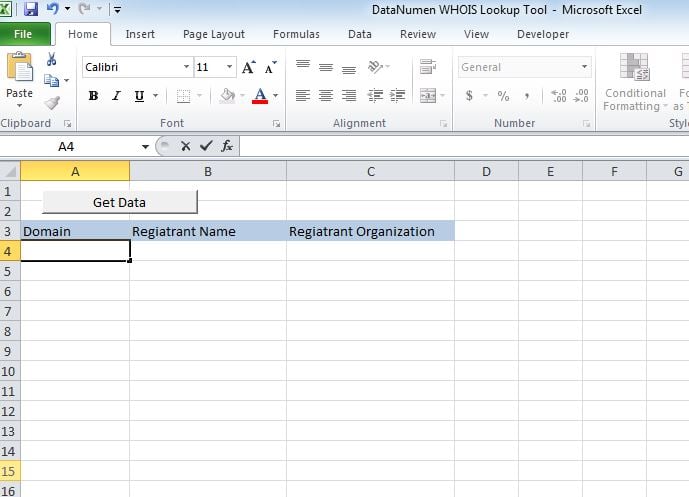
Machen wir es funktionsfähig
Fügen Sie das Skript in ein neues Modul ein und hängen Sie das Sub "whoismacor" an die Schaltfläche an, die wir auf Sheet1 erstellt haben.
Lass es uns testen
Fügen Sie Domänen in Spalte A hinzu und führen Sie das Makro aus. Die Werte werden in den jeweiligen Spalten angezeigt.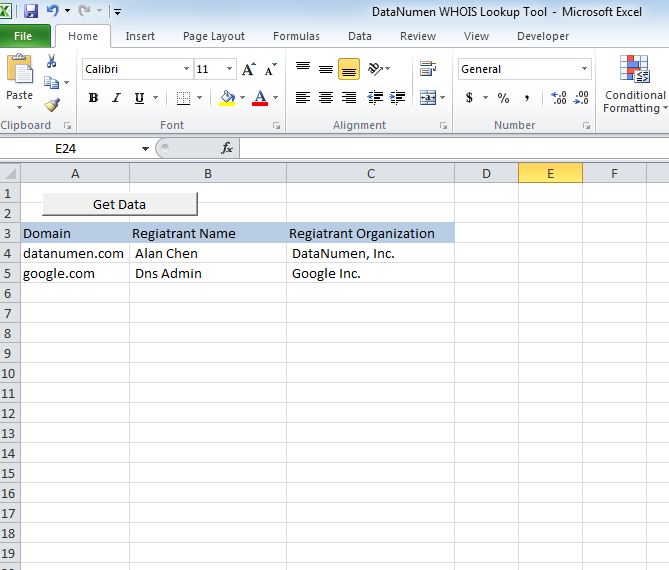
Ändern Sie es
Ab sofort zeigt das Tool 2 Überschriften an, nämlich Registrantenname und Registrantenorganisation. Sie können das Tool so anpassen, dass einer der folgenden Header abgerufen wird.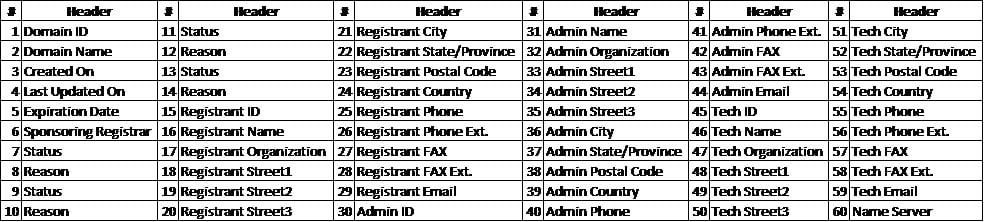
Wiederherstellen der XLSM-Datei
Wenn Sie Probleme beim Öffnen oder Speichern dieses Tools haben, gibt es viele Änderungen, die Sie haben beschädigte Excel-Datei und Sie müssen es reparieren, bevor Sie es verwenden.
Skript
Sub whoismacro()
    Dim v_lrow As Long
    Application.DisplayStatusBar = True
    v_lrow = Sheets("whois").Range("A" & Rows.Count).End(xlUp).Row
    Dim r As Long
    Dim v_string As String
    For r = 4 To v_lrow
        Application.StatusBar = "Macro is running... Now fetching Registrant Name and Organization info for domain at Row : " & r & " /// Total Rows : " & v_lrow
        Sheets("whois").Range("B" & r).Value = WhoIsName(Sheets("whois").Range("A" & r).Value)
        Sheets("whois").Range("C" & r).Value = WhoIsorganization(Sheets("whois").Range("A" & r).Value)
    Next r
    Application.StatusBar = "Ready"
End Sub

Function WhoIsName(v_string As String) As String
    Application.DisplayStatusBar = True
    v_string = Replace(v_string, "http://www.", "")
    v_string = Replace(v_string, "https://www.", "")
    v_string = Replace(v_string, "http://", "")
    v_string = Replace(v_string, "https://", "")
    Dim I As Long
    Dim browobj As Object
    Dim obj1 As Object
    Dim obj2 As Object
    Dim obj3 As Object
    Dim v_website As String
    Dim ws As Worksheet
    Dim rng As Range
    Dim tbl As Object
    Dim rw As Object
    Dim cl As Object
    Dim tabno As Long
    Dim nextrow As Long
    Dim URl As String
    Dim lastRow As Long
    Dim xmlobj As Object
    Dim htmobj As Object
    Dim divobj As Object
    Dim objH3 As Object
    Dim linkobj As Object
    Dim vv_startrow As Integer
    Dim vv_lastrow As Integer
    Application.DisplayAlerts = False
    Application.DisplayStatusBar = True
    URl = "https://www.whois.com/whois/" & v_string
    Set xmlobj = CreateObject("MSXML2.XMLHTTP")
    xmlobj.Open "GET", URl, False
    xmlobj.setRequestHeader "Content-Type", "text/xml"
    xmlobj.setRequestHeader "Cache-Control", "no-cache"
    xmlobj.send
    Set htmobj = CreateObject("htmlfile")
    htmobj.body.innerHTML = xmlobj.responseText
    x = InStr(htmobj.body.innertext, "Registrant Name:")
    y = InStr(x, htmobj.body.innertext, Chr(10))
    WhoIsName = Replace(Mid(htmobj.body.innertext, x, y - x), "Registrant Name:", "")
End Function

Function WhoIsorganization(v_string As String) As String
    Application.DisplayStatusBar = True
    v_string = Replace(v_string, "http://www.", "")
    v_string = Replace(v_string, "https://www.", "")
    v_string = Replace(v_string, "http://", "")
    v_string = Replace(v_string, "https://", "")
    Dim I As Long
    Dim browobj As Object
    Dim obj1 As Object
    Dim obj2 As Object
    Dim obj3 As Object
    Dim v_website As String
    Dim ws As Worksheet
    Dim rng As Range
    Dim tbl As Object
    Dim rw As Object
    Dim cl As Object
    Dim tabno As Long
    Dim nextrow As Long
    Dim URl As String
    Dim lastRow As Long
    Dim xmlobj As Object
    Dim htmobj As Object
    Dim divobj As Object
    Dim objH3 As Object
    Dim linkobj As Object
    Dim vv_startrow As Integer
    Dim vv_lastrow As Integer
    Application.DisplayAlerts = False
    Application.DisplayStatusBar = True
    URl = "https://www.whois.com/whois/" & v_string
    Set xmlobj = CreateObject("MSXML2.XMLHTTP")
    xmlobj.Open "GET", URl, False
    xmlobj.setRequestHeader "Content-Type", "text/xml"
    xmlobj.setRequestHeader "Cache-Control", "no-cache"
    xmlobj.send
    Set htmobj = CreateObject("htmlfile")
    htmobj.body.innerHTML = xmlobj.responseText
    x = InStr(htmobj.body.innertext, "Registrant Organization:")
    Debug.Print x
    y = InStr(x, htmobj.body.innertext, Chr(10))
    Debug.Print y
    WhoIsorganization = Replace(Mid(htmobj.body.innertext, x, y - x), "Registrant Organization:", "")
End Function
Einführung des Autors:
Nick Vipond ist ein Datenrettungsexperte in DataNumen, Inc., das weltweit führend bei Datenwiederherstellungstechnologien ist, einschließlich docx Problem reparieren und Outlook Recovery-Softwareprodukte. Für weitere Informationen besuchen Sie www.datanumen.com €XNUMX