
有時,當查看包含很多超鏈接的Outlook電子郵件時,您可能只希望快速打開具有特定域的超鏈接。 在這裡,我們將分享一種批量打開此類超鏈接的方法。
面對一封電子郵件中的多個超鏈接,您可能希望檢查其中一些而不是全部。 例如,您只想批量打開具有特定域的超鏈接。 通常,您必須一一單擊以將其打開。 這很麻煩。 因此,在下文中,我們將教您一種更便捷的方法。
批量打開電子郵件中具有特定域的所有超鏈接
- 首先,請按照下列步驟存取 Outlook VBA 編輯器:「如何在Outlook中運行VBA代碼“。
- 隨後,在「Microsoft Visual Basic for Applications」視窗中,啟用對「MS Word 物件庫」的引用,並引用「如何在 VBA 中新增物件庫引用“。
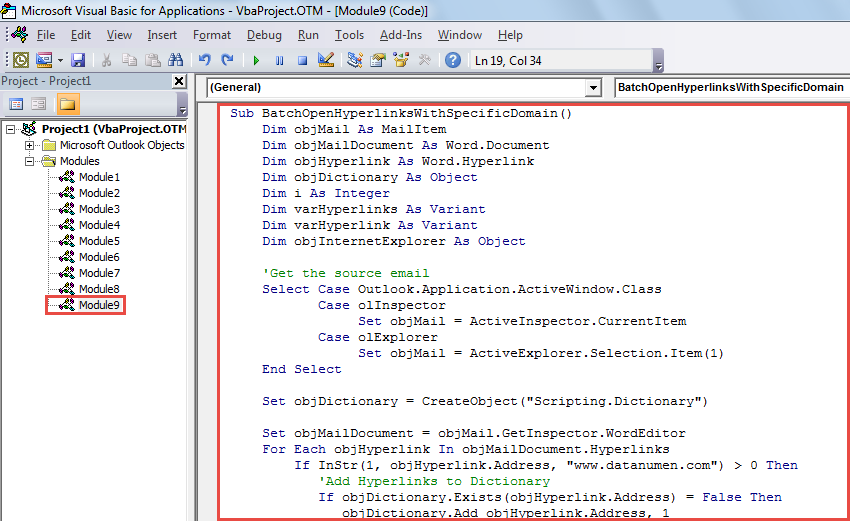
- 然後,將以下VBA代碼複製到未使用的模塊或項目中。
Sub BatchOpenHyperlinksWithSpecificDomain()
    Dim objMail As MailItem
    Dim objMailDocument As Word.Document
    Dim objHyperlink As Word.Hyperlink
    Dim objDictionary As Object
    Dim i As Integer
    Dim varHyperlinks As Variant
    Dim varHyperlink As Variant
    Dim objInternetExplorer As Object

    'Get the source email
    Select Case Outlook.Application.ActiveWindow.Class
           Case olInspector
                Set objMail = ActiveInspector.CurrentItem
           Case olExplorer
                Set objMail = ActiveExplorer.Selection.Item(1)
    End Select

    Set objDictionary = CreateObject("Scripting.Dictionary")

    Set objMailDocument = objMail.GetInspector.WordEditor
    For Each objHyperlink In objMailDocument.Hyperlinks
        If InStr(1, objHyperlink.Address, "www.datanumen.com") > 0 Then
           'Add Hyperlinks to Dictionary
           If objDictionary.Exists(objHyperlink.Address) = False Then
              objDictionary.Add objHyperlink.Address, 1
           End If
        End If
    Next

    'Batch Open Hyperlinks on different tabs in same Internet Explorer window
    Set objInternetExplorer = CreateObject("InternetExplorer.Application")
    varHyperlinks = objDictionary.Keys
    For i = LBound(varHyperlinks) To UBound(varHyperlinks)
        varHyperlink = varHyperlinks(i)

        If i = 0 Then
           objInternetExplorer.Visible = True
           objInternetExplorer.navigate varHyperlink
        Else
           objInternetExplorer.navigate varHyperlink, CLng(2048)
        End If
    Next
End Sub
- 接下來,將此宏添加到快速訪問工具欄或功能區。
- 最後,請嘗試以下步驟。
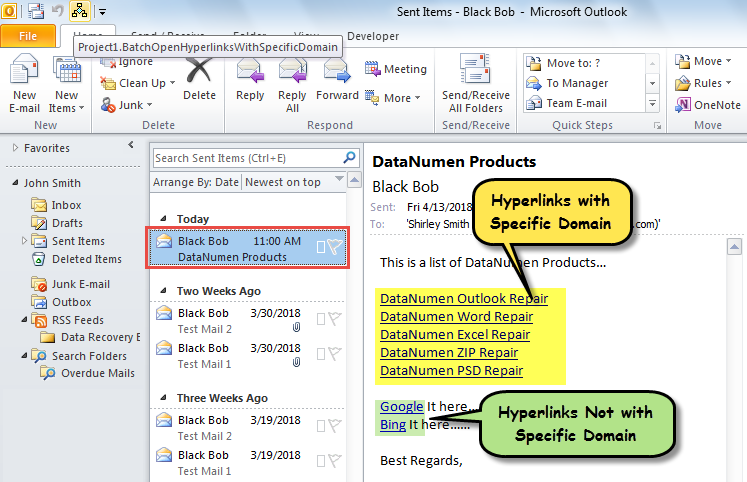
- 首先,選擇或打開Outlook電子郵件。
- 然後,單擊宏按鈕。

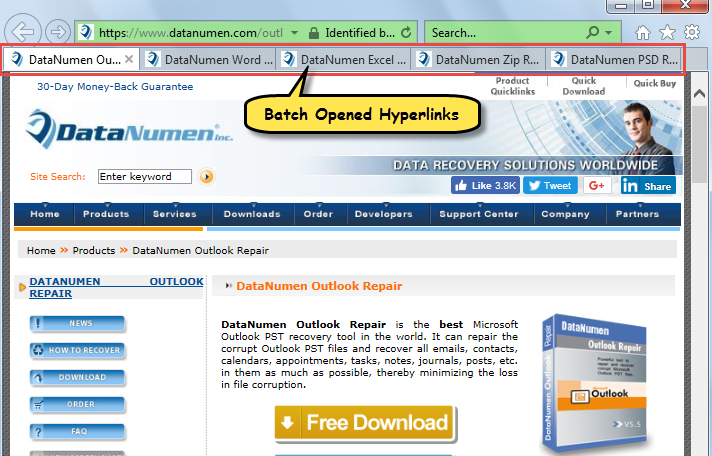
- 電子郵件中具有預定義域的超鏈接將立即在Internet Explorer中批量打開,如下圖所示:

擺脫惱人的Outlook腐敗
儘管Outlook易受錯誤和損壞的影響,但實際上,只要您注意所有風險,就可以輕鬆擺脫它們。 例如,您需要定期為Outlook進行數據備份。 此外,您應該當心可能包含病毒的可疑電子郵件。 最後但並非最不重要的一點是,您最好準備一個 Outlook修復 實用程序,例如 DataNumen Outlook Repair。 如果Outlook損壞,它可以為您提供幫助。
作者簡介:
Shirley Zhang是的數據恢復專家 DataNumen,Inc.是數據恢復技術的全球領導者,包括 腐敗 SQL Server 和Outlook修復軟件產品。 欲了解更多信息,請訪問 萬維網。datanumen.COM