
有些使用者希望快速從多個已儲存的 Outlook 郵件檔案中提取所有收件者。本文將介紹一種快速的方法。
要從單個Outlook郵件文件中提取收件人,只需雙擊以將其打開,然後在打開的“郵件”窗口中復制收件人。 但是,如果您需要處理一批Outlook郵件文件,則手動方法效率不高。 因此,您可能會尋找一種更有效的方法。 在這裡,我們將向您介紹這樣的一個。 繼續閱讀以獲取其詳細信息。
從多個Outlook郵件(.msg)文件中提取所有收件人
- 首先,根據「取得 Outlook VBA 編輯器的存取權限」的說明進行操作。如何在Outlook中運行VBA代碼“。
- 接下來,將以下VBA代碼複製並粘貼到一個空模塊中。
Dim strRecipients As String

Sub ExtractRecipientsFromOutlookMSGFiles()
    Dim objShell, objWindowsFolder As Object

    strRecipients = ""
    'Select a Windows folder
    Set objShell = CreateObject("Shell.Application")
    Set objWindowsFolder = objShell.BrowseForFolder(0, "Select a Windows Folder:", 0, "")

    If Not objWindowsFolder Is Nothing Then
       Call ProcessWindowsFolders(objWindowsFolder.self.Path & "\")
       'Display a Message
       MsgBox "Recipients: " & vbCrLf & strRecipients, vbInformation + vbOKOnly
    End If
End Sub

Sub ProcessWindowsFolders(strFolderPath As String)
    Dim objFileSystem As Object
    Dim objFolder As Object
    Dim objFile As Object
    Dim objItem As Object
    Dim objMail As Outlook.MailItem
    Dim objRecipient As Outlook.Recipient
    Dim objSubfolder As Object

    Set objFileSystem = CreateObject("Scripting.FileSystemObject")
    Set objFolder = objFileSystem.GetFolder(strFolderPath)

    For Each objFile In objFolder.Files
        If objFileSystem.GetExtensionName(objFile) = "msg" Then
           Set objItem = Session.OpenSharedItem(objFile.Path)

           If TypeName(objItem) = "MailItem" Then
              Set objMail = objItem
              'Extract recipients' email addresses
              For Each objRecipient In objMail.Recipients
                  strRecipients = strRecipients & objRecipient.Address & vbCr
              Next
           End If
        End If
    Next

    'Process all subfolders recursively
    If objFolder.SubFolders.Count > 0 Then
       For Each objSubfolder In objFolder.SubFolders
           If ((objSubfolder.Attributes And 2) = 0) And ((objSubfolder.Attributes And 4) = 0) Then
               Call ProcessWindowsFolders(objSubfolder.Path)
           End If
       Next
    End If
End Sub
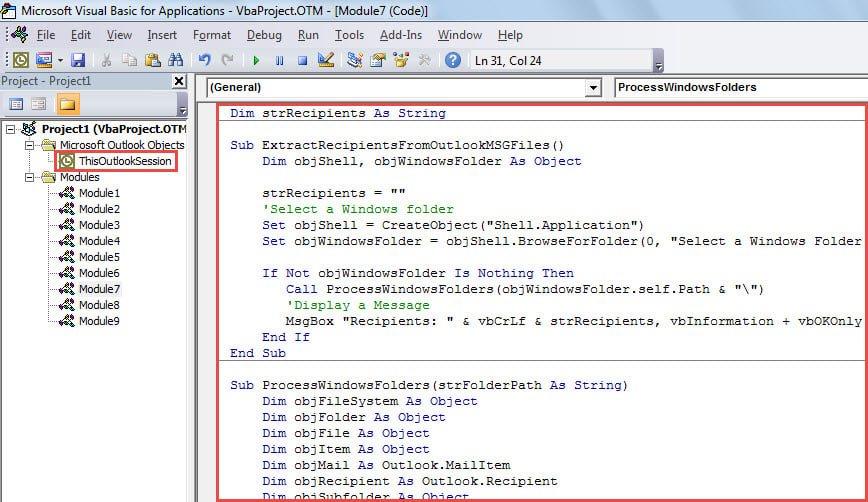
- 然後,在第一個子例程中移動光標。
- 隨後,單擊“運行”按鈕或按“ F5”鍵。
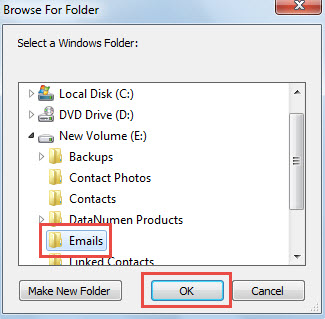
- 然後,在彈出對話框中,選擇包含源Outlook消息(.msg)文件的Windows文件夾。

- 選擇後,單擊“確定”以使宏繼續運行。
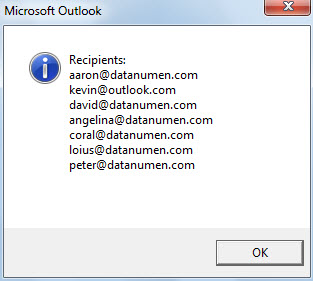
- 宏完成後,將顯示一條列出所有提取的收件人電子郵件地址的消息,如以下屏幕截圖所示。

保護Outlook數據免受危害
Outlook數據容易損壞。 因此,保護Outlook數據是一項非常繁重的任務。 它要求您堅持不懈地對Outlook數據進行定期備份。 另外,如果可能的話,建議您謹慎起見,並準備有經驗的專業Outlook。 PST維修 工具,例如 DataNumen Outlook Repair,這樣在Outlook損壞的情況下您可以立即獲得及時的營救。
作者簡介:
Shirley Zhang是的數據恢復專家 DataNumen,Inc.是數據恢復技術的全球領導者,包括 恢復 Sql Server 和Outlook修復軟件產品。 欲了解更多信息,請訪問 萬維網。datanumen.COM