
對於大多數用戶來說,週末安排的約會通常是私人的。因此,他們希望 Outlook 能自動將這類約會標記為私人約會並顯示為私人約會。本文將透過編寫一些腳本來實現這項功能。
為了更容易區分商務約會和私人約會,Outlook 允許用戶將約會標記為私人約會。 通過這種方式,您會發現無需私人約會即可輕鬆打印日曆。 在這種情況下,您可能希望 Outlook 自動識別特定約會並將其標記為私人約會。 例如,通常週末的約會是私人的,因此您希望讓 Outlook 自動將它們標記為私人。 下面,我們將引導您實現它。
自動將周末約會標記為私人
- 首先,根據“啟動Outlook VBA編輯器如何在Outlook中運行VBA代碼“。
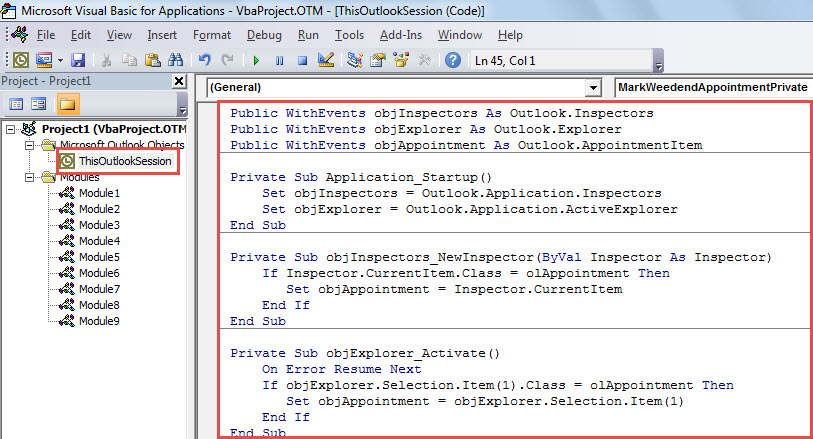
- 然後,在“Microsoft Visual Basic for Applications”窗口中,將以下代碼放入“ThisOutlookSession”項目中。
Public WithEvents objInspectors As Outlook.Inspectors
Public WithEvents objExplorer As Outlook.Explorer
Public WithEvents objAppointment As Outlook.AppointmentItem

Private Sub Application_Startup()
    Set objInspectors = Outlook.Application.Inspectors
    Set objExplorer = Outlook.Application.ActiveExplorer
End Sub

Private Sub objInspectors_NewInspector(ByVal Inspector As Inspector)
    If Inspector.CurrentItem.Class = olAppointment Then
       Set objAppointment = Inspector.CurrentItem
    End If
End Sub

Private Sub objExplorer_Activate()
    On Error Resume Next
    If objExplorer.Selection.Item(1).Class = olAppointment Then
       Set objAppointment = objExplorer.Selection.Item(1)
    End If
End Sub

Private Sub objAppointment_Open(Cancel As Boolean)
    Call MarkWeedendAppointmentPrivate(objAppointment)
End Sub

Private Sub objAppointment_PropertyChange(ByVal Name As String)
    If Name = "Start" Or Name = "End" Then
       Call MarkWeedendAppointmentPrivate(objAppointment)
    End If
End Sub

Private Sub MarkWeedendAppointmentPrivate(ByVal objAppointment As Outlook.AppointmentItem)
    Dim dStartDate As Date

    dStartDate = Format(objAppointment.Start, "Short Date")

    'If the appointment start falls on weekend
    Select Case Weekday(dStartDate)
           Case 7, 1
                'Mark it private
                objAppointment.Sensitivity = olPrivate
    End Select
End Sub
- 之後,重新啟動 Outlook 以啟動巨集。
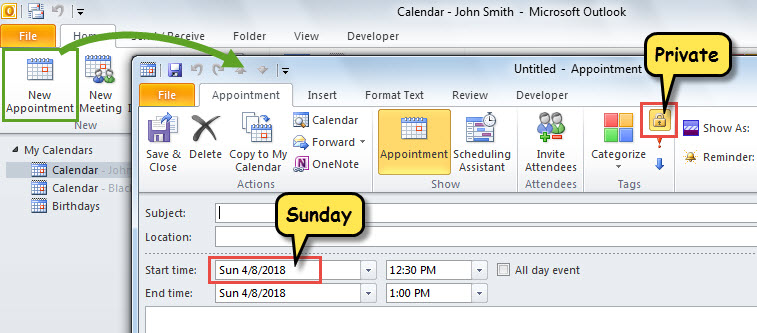
- 從現在開始,每次創建新約會或將現有約會更改為周末時,Outlook 都會自動將其標記為私人約會。

解決煩人的Outlook問題
您可能在處理 Outlook 時遇到了一些問題,例如應用程序意外凍結、彈出錯誤消息等。 當他們受苦時,你會擔心。 請冷靜下來! 恐慌無濟於事,只會讓情況變得更糟。 首先,您可以檢查是否可以像往常一樣訪問 PST 文件。 如果是這樣,您必須修復 PST 文件,這可以通過 收件箱維修工具 或更強大的外部工具,例如 DataNumen Outlook Repair.
作者簡介:
Shirley Zhang是的數據恢復專家 DataNumen,Inc.是數據恢復技術的全球領導者,包括 mdf維修 和Outlook修復軟件產品。 欲了解更多信息,請訪問 萬維網。datanumen.COM