
當您標記項目時,默認標記文本為“跟進”。 如果你想自定義它,你可以閱讀這篇文章。 這裡我們教大家用VBA來實現。
默認情況下,當您標記項目時,註釋為“跟進”。 如果你想改變它,你必須選擇“自定義”標誌選項,然後在彈出的對話框中輸入你想要的文本。 如果你經常需要指定特定的自定義標誌文本,你一定會不喜歡上面的方式,因為它太麻煩了。 因此,這裡我們將分享一個聰明的方法。 它將直接根據您的喜好定制標誌文本。 現在,請繼續閱讀以了解其詳細步驟。
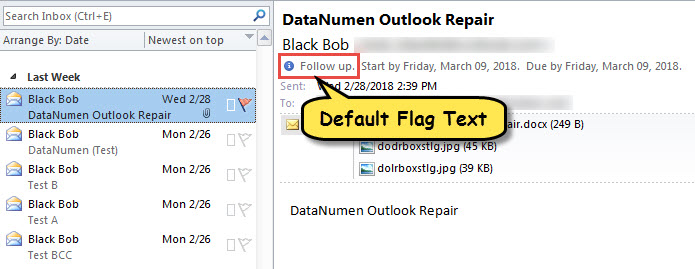
自定義標記項目中的標記文本
- 首先,根據“更改巨集設置如何在Outlook中運行VBA代碼“。
- 然後,按“ Alt + F11”以訪問VBA編輯器。
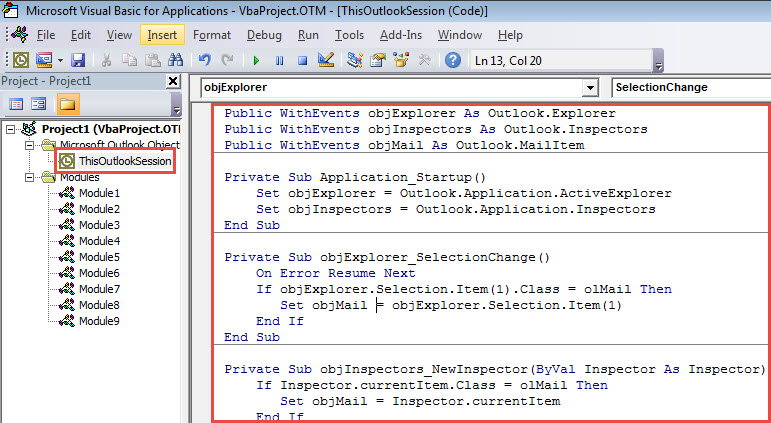
- 接下來,打開“ThisOutlookSession”項目並粘貼以下代碼。
Public WithEvents objExplorer As Outlook.Explorer
Public WithEvents objInspectors As Outlook.Inspectors
Public WithEvents objMail As Outlook.MailItem

Private Sub Application_Startup()
    Set objExplorer = Outlook.Application.ActiveExplorer
    Set objInspectors = Outlook.Application.Inspectors
End Sub

Private Sub objExplorer_SelectionChange()
    On Error Resume Next
    If objExplorer.Selection.Item(1).Class = olMail Then
       Set objMail = objExplorer.Selection.Item(1)
    End If
End Sub

Private Sub objInspectors_NewInspector(ByVal Inspector As Inspector)
    If Inspector.currentItem.Class = olMail Then
       Set objMail = Inspector.currentItem
    End If
End Sub

Private Sub objMail_PropertyChange(ByVal Name As String)
    Dim strFlagRequest As String

    If Name = "FlagStatus" Then
       If objMail.IsMarkedAsTask = True Then
          If objMail.FlagStatus <> olFlagComplete And objMail.FlagStatus <> olNoFlag Then
             'Enter your preferred note
             objMail.FlagRequest = "Custom Flag texts"
             objMail.Save
         End If
       End If
    End If
End Sub
- 之後,重新啟動 Outlook 以啟動此巨集。
- 最後,您可以嘗試一下。
- 首先,選擇或打開 Outlook 項目。
- 然後像往常一樣標記它。
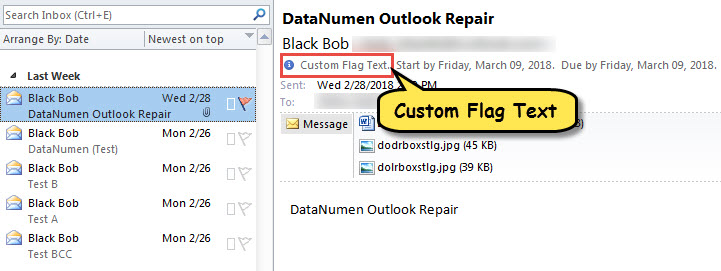
- 您將立即看到分配給該項目的自定義標誌文本,如下圖所示。

如果 PST 文件無法訪問怎麼辦
事實證明,Outlook 文件很容易因各種因素而損壞。 例如,如果您經常不正確地關閉 Outlook 應用程序或意外下載惡意附件,PST 文件可能會損壞。 這時候,你的第一個辦法就是使用內置的修復工具——Scanpst。 然而,如果失敗了,你別無選擇,只能求助於更專業的外部實用程序,例如 DataNumen Outlook Repair,由於其高品質而受到高度讚賞 PST恢復 率。
作者簡介:
Shirley Zhang是的數據恢復專家 DataNumen,Inc.是數據恢復技術的全球領導者,包括 腐敗 SQL Server 和Outlook修復軟件產品。 欲了解更多信息,請訪問 萬維網。datanumen.COM