
某些用戶希望新聯繫人能夠自動添加到 Outlook 中的兩個或多個文件夾中。 因此,本文將分享一種將新聯繫人自動同步到另一個聯繫人文件夾的方法。
也許您在 Outlook 中配置了多個電子郵件帳戶。 他們每個人都有自己的“聯繫人”文件夾。 在這種情況下,當您在一個文件夾中創建聯繫人時,您可能也希望將其同步到其他電子郵件帳戶的“聯繫人”文件夾。 為什麼不讓 Outlook 自動完成呢? 下面我們就教大家如何實現。
自動將新聯繫人同步到另一個聯繫人文件夾
- 首先,您需要啟動 Outlook 程序。
- 然後,在 Outlook 主窗口中,按快捷鍵 –“Alt + F11”。
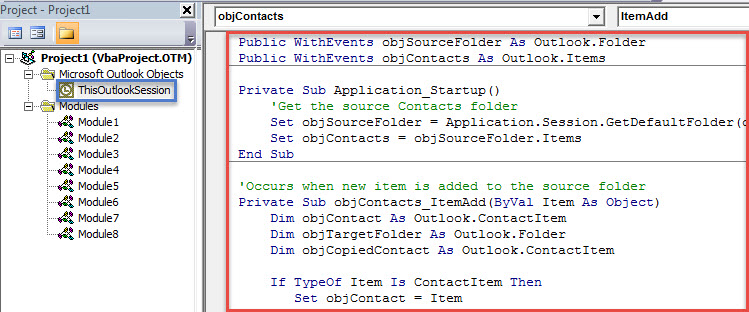
- 接下來,您將進入“Microsoft Visual Basic for Applications”窗口,在其中您應該找到並打開“ThisOutlookSession”項目。
- 隨後,複製以下 VBA 代碼並將其粘貼到項目中。
Public WithEvents objSourceFolder As Outlook.Folder
Public WithEvents objContacts As Outlook.Items

Private Sub Application_Startup()
    'Get the source Contacts folder
    Set objSourceFolder = Application.Session.GetDefaultFolder(olFolderContacts)
    Set objContacts = objSourceFolder.Items
End Sub

'Occurs when new item is added to the source folder
Private Sub objContacts_ItemAdd(ByVal Item As Object)
    Dim objContact As Outlook.ContactItem
    Dim objTargetFolder As Outlook.Folder
    Dim objCopiedContact As Outlook.ContactItem

    If TypeOf Item Is ContactItem Then
       Set objContact = Item

       'Specify the target Contacts folder
       '"Personal" refers to the displaying name of target Outlook file
       On Error Resume Next
       Set objTargetFolder = Application.Session.Folders("Personal").Folders("Contacts").Folders("From John Smith")
       If objTargetFolder Is Nothing Then
          Set objTargetFolder = Application.Session.Folders("Personal").Folders("Contacts").Folders.Add("From John Smith")
       End If

       'Copy the new contact
       Set objCopiedContact = objContact.Copy
       'Move copied contact to the target folder
       objCopiedContact.Move objTargetFolder
    End If
End Sub
- 之後,您需要簽署此代碼。 只需單擊工具欄中的“工具”按鈕,然後選擇“數字簽名”即可。 在彈出的對話框中,只需按照屏幕上的說明操作即可。
- 稍後您可以退出當前窗口並更改 Outlook 宏設置以允許數字簽名的宏。
- 最後,您可以重新啟動 Outlook 來啟動這個新巨集。
- 從現在開始,每次在來源資料夾中新增聯絡人時,都會自動同步到預先定義的目標資料夾。
應對常見的 Outlook 問題
如果您使用 Outlook 已有數十年,那麼您肯定遇到過各種各樣的問題,例如 Outlook 卡頓、頻繁出現錯誤訊息、PST 檔案損壞等等。通常,您可以嘗試透過以下方法解決這些問題:在安全模式下重新啟動 Outlook、建立新的 Outlook 設定檔、停用有問題的加載項等等。當然,您也可以藉助功能強大的修復工具,例如… DataNumen Outlook Repair。 它可以 修復PST 像軟木塞的錯誤。
作者簡介:
Shirley Zhang是的數據恢復專家 DataNumen,Inc.是數據恢復技術的全球領導者,包括 維修MDF 和Outlook修復軟件產品。 欲了解更多信息,請訪問 萬維網。datanumen.COM