
在今天的文章中,有3種快速方法來獲取與文檔中文本框,腳註和尾註相關的字數統計。
獲取文檔中單詞的總數並不難。 但是,如果要獲取不同類型文本的單詞數,則將需要執行更多操作。 以下是3種方法。 繼續閱讀以了解您可以使用的內容。 
方法1:計算包括文本框,腳註和尾註中的文本在內的單詞
默認情況下,Word會對出現在文檔中的所有單詞進行計數,包括文本框中的文本以及腳註和尾註中的單詞。
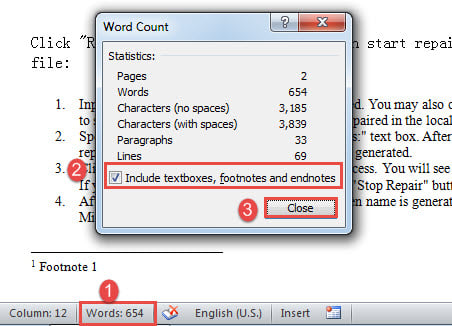
- 首先,前往狀態欄,然後按一下「字數」以開啟「字數統計」方塊。
- 在那裡,您將看到各種統計信息。 確保已選中“包括文本框,腳註和尾註”框。
- 然後單擊“關閉”。

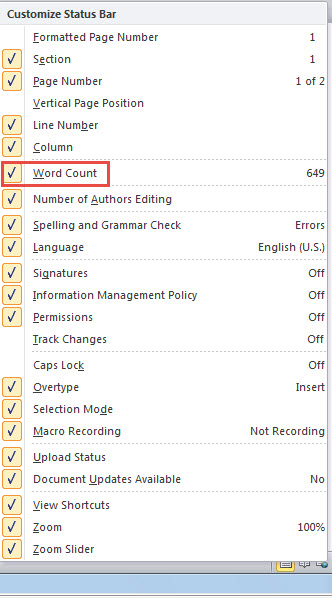
- 如果在狀態欄上找不到“單詞”命令,請在此處右鍵單擊。
- 接下來檢查“字數統計”。

方法2:從文本框中排除文本,腳註和尾註中的文本
這與方法1相反。因此,您只需取消選中“包括文本框,腳註和尾註”框。
方法3:運行Word宏從文本框,腳註和尾註中獲取單詞的單獨計數
- 首先,使用方法1中的方式觸發“字數統計”框,並確保選中了該選項框。
- 接下來按“ Alt + F11”打開VBA編輯器。
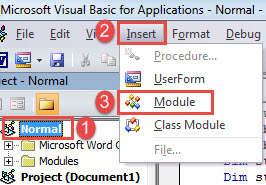
- 然後,通過單擊“普通”,在“普通”項目中插入一個新模塊。
- 然後單擊“插入”。
- 然後選擇“模塊”。

- 雙擊該模塊以打開編碼區域,然後在其中粘貼以下代碼:
Sub SeparateCountNumberOfTextboxFootnoteEndnote()
  Dim lTextboxWords As Long
  Dim lTextboxChars As Long
  Dim lDocumntWords As Long
  Dim lDocumntChars As Long
  Dim objTextboxShape As Shape
  Dim objTemp As Dialog
  Dim bDone As Boolean
  Dim objRange As Range
  Dim lFootnoteWords As Long
  Dim lFootnoteChars As Long
  Dim lEndnoteWords As Long
  Dim lEndnoteChars As Long

  Application.ScreenUpdating = False

 Do
   bDone = True
   For Each objTextboxShape In ActiveDocument.Shapes
     If objTextboxShape.Type = msoGroup Then
       objTextboxShape.Ungroup
       bDone = False
     End If
   Next objTextboxShape
 Loop Until bDone

 '  Count the words and characters in the whole document.
 Selection.HomeKey Unit:=wdStory
 Set objTemp = Dialogs(wdDialogToolsWordCount)
   objTemp.Update
   objTemp.Execute
   lDocumntWords = objTemp.Words
   lDocumntChars = objTemp.Characters

 With ActiveDocument
 '  Count the words and characters in all textboxes.
   lTextboxWords = 0
   lTextboxChars = 0
   If ActiveDocument.Shapes.Count > 0 Then
     For Each objTextboxShape In .Shapes
       objTextboxShape.Select
       objTemp.Execute
       lTextboxWords = lTextboxWords + objTemp.Words
       lTextboxChars = lTextboxChars + objTemp.Characters
     Next objTextboxShape
   Else
     MsgBox ("There is no text box in this document")
   End If

   '  Count the words and characters in all footnotes.
   lFootnoteWords = 0
   lFootnoteChars = 0
   If ActiveDocument.Footnotes.Count > 0 Then
     For Each objRange In .StoryRanges
       If objRange.StoryType = wdFootnotesStory Then
         objRange.Select
         objTemp.Execute
         lFootnoteWords = lFootnoteWords + objTemp.Words
         lFootnoteChars = lFootnoteChars + objTemp.Characters
       End If
     Next objRange
   Else
     MsgBox ("There is no footnote in this document")
   End If

   '  Count the words and characters in all endnotes.
   lEndnoteWords = 0
   lEndnoteChars = 0
   If ActiveDocument.Endnotes.Count > 0 Then
     For Each objRange In .StoryRanges
       If objRange.StoryType = wdEndnotesStory Then
         objRange.Select
         objTemp.Execute
         lEndnoteWords = lEndnoteWords + objTemp.Words
         lEndnoteChars = lEndnoteChars + objTemp.Characters
       End If
     Next objRange
   Else
     MsgBox ("There is no Endnote in this document")
   End If
 End With

 Application.ScreenUpdating = True

 MsgBox (" In this document there are totally" & vbCr _
   & Str(lDocumntWords) & " word(s) and" & Str(lDocumntChars) & " characters" & vbCr & vbCr _
   & "Including:" & vbCr _
   & Str(ActiveDocument.Shapes.Count) & " textboxes contain(s)" & vbCr _
   & Str(lTextboxWords) & " word(s)," & Str(lTextboxChars) & " characters" & vbCr & vbCr _
   & Str(ActiveDocument.Footnotes.Count) & " footnotes contain(s)" & vbCr _
   & Str(lFootnoteWords) & " word(s)," & Str(lFootnoteChars) & " characters" & vbCr & vbCr _
   & Str(ActiveDocument.Endnotes.Count) & " Endnotes contain(s)" & vbCr _
   & Str(lEndnoteWords) & " word(s)," & Str(lEndnoteChars) & " characters")
End Sub
- 最後,點擊“運行”按鈕。

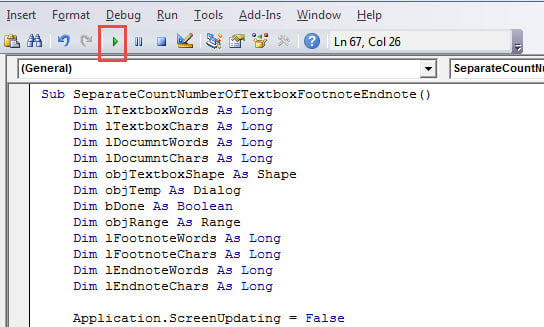
如果沒有文本框,腳註或尾註,您將收到以下消息框: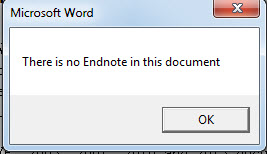
只需單擊“確定”繼續。 然後,您將看到另一個框,其中列出了字數統計的所有詳細信息。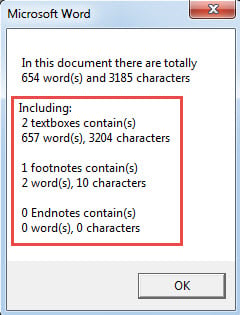
獲取恢復工具
由於Word可能會突然崩潰,因此建議您使用高級修復產品來進行修復。 這樣的工具可以節省很多 腐敗的話。 因此,請抓緊時間盡快獲得一份。
作者簡介:
陳薇薇(Vera Chen)是 DataNumen,Inc.是數據恢復技術的全球領導者,包括 修復XLS 以及 pdf 維修軟件產品。 欲了解更多信息,請訪問 萬維網。datanumen.COM