
"Ремонт Outlook" врятував мені життя
Вау!!!!!
Кілька моїх PST-файлів Outlook були пошкоджені, і Microsoft залишила мене без жодного рішення. Відновлення
Команда DataNumen Outlook Repair це найкраще рішення для відновлення даних Outlook і зменшення втрат файлів у разі пошкодження.
Наша передова технологія ремонту та відновлення Outlook гарантує:
– Відновлення ВСІХ елементів Outlook з УСІМИ властивостями
– Підтримка кількох ОС, пристроїв і типів файлів
– Найвищий рівень відновлення
Примітка:





DataNumen Outlook Repair порівняно з інструментом відновлення папки "Вхідні" (scanpst.exe), Stellar Repair для Outlook, Recovery Toolbox для Outlook тощо.
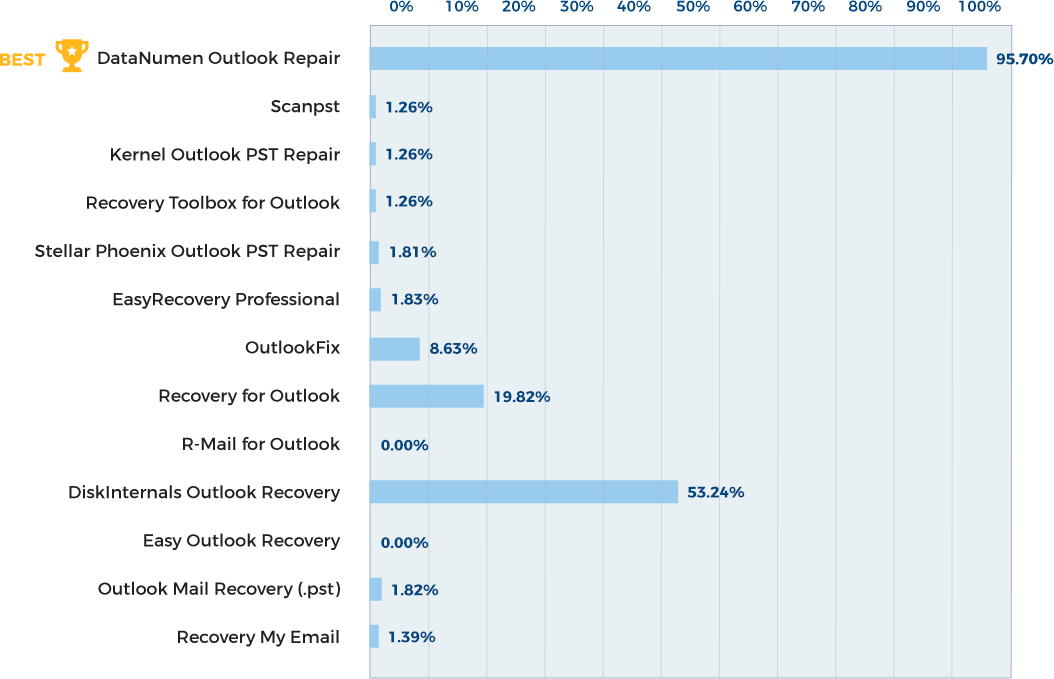
Дізнайтеся більше про те, як DataNumen Outlook Repair курить конкуренцію

"Ремонт Outlook" врятував мені життя
Вау!!!!!
Кілька моїх PST-файлів Outlook були пошкоджені, і Microsoft залишила мене без жодного рішення. Відновлення
"Ремонт Outlook" врятував мені життя
Вау!!!!!
Кілька моїх PST-файлів Outlook були пошкоджені, і Microsoft залишила мене без жодного рішення. Інструмент відновлення, вбудований в Outlook, не здатний ні на що (дійсно ні на що).
Ціна, яку я заплатив за DataNumen Цей інструмент – це інвестиція, про яку я не пошкодую. Я врятував близько 5000 електронних листів, причому втратив дуже мало повідомлень (і без необхідності бути ІТ-експертом).
Шкода, що вони не подумали розробити операційну систему...
Анна Д.
ІТ-фахівець на пенсії з 15-річним досвідом роботи
Брюссель, Бельгія
Вересень 19, 2026
Про себе:
Мене звуть Роберто, я професіонал з комп’ютерної криміналістики самостійно з 2008 р. І
Про себе:
Мене звуть Роберто, я професіонал з комп’ютерної криміналістики незалежно з 2008 року. Я живу в Чилі, недалеко від Коліни в регіоні митрополит.
Як судовий слідчий, який працює для багатьох різних клієнтів задля збереження їхньої конфіденційності я залишаюся невідомим і не маю веб-сайту і типовий обліковий запис електронної пошти Gmail.
Про моє використання DataNumen продукція:
Я вибираю Outlook Repair and Exchange Recovery from DataNumen як найкращий інструменти, які відповідають етапу процесу криміналістичного аналізу електронних листів.
На практиці при роботі з десятками PST або OST файлів, це не так рідко можна натрапити на файли, які мали певний ступінь внутрішніх
корупції, і, звичайно, вони також зберігають видалені електронні листи, які повинні бути відновлені, щоб аналіз був якомога повнішим. Тож зараз, будь-коли Я маю обробити такі файли електронної пошти, першим обов’язковим кроком є щоб пропустити їх DataNumen програмне забезпечення для отримання «фіксованого» набору. Дуже приємно DataNumen може виконувати пакетну обробку. Завантажте всі файли один раз і запустіть. У високому продуктивна машина з 32 ГБ оперативної пам’яті та 2x 2 ТБ пам’яті M.2, це може вимагають від одного до трьох днів без зупинки, залежно від випадку. Шкода DataNumen програмне забезпечення не використовує всі машинні ядра для прискорення, але тепер вони помістили цю ідею в свій список запитів. Після завершення я створюю a криміналістичне зображення з виправленими файлами, а потім перейдіть до аналізу цього зображення з X-Ways Forensics, моїм криміналістичним інструментом.
Роберто
rpetitpas (на) gmail.com
Коліна, Чилі
Березня 8, 2024
Хлопці, ви були чудові – щиро ціную вашу роботу та зусилля. Окупився, оскільки зараз файл працює ідеально. Дуже вражає
Хлопці, ви були чудові – щиро ціную вашу роботу та зусилля. Окупився, оскільки зараз файл працює ідеально. Дуже вражаюче обслуговування клієнтів і технічна підтримка.
Велике дякую,
Девід
AKL Research & Development Ltd
Об'єднане Королівство
Вересень 27, 2022
Раптом мій Microsoft Outlook не запускається. Ваша програма відновлює файл Outlook одним простим клацанням миші. Дійсно чудово!
Сіва Тамболі
Індія
Березня 15, 2022
Outlook зіпсувався, відразу після оновлення Windows моя програма електронної пошти Outlook перестала працювати. я використав datanumen продукт для перестановки електронної пошти
Outlook зіпсувався, відразу після оновлення Windows моя програма електронної пошти Outlook перестала працювати. я використав datanumen продукту, щоб правильно переставити папки електронної пошти, і він працював. Мені потрібно було лише запустити програму для виправлення даних, змінити ім’я файлу даних та запустити Outlook. Presto це спрацювало. Дуже дякую
Крейг
Самозайнятий
Листопад 20, 2020
Я вражений простотою використання та швидким відновленням файлу. Хоча все, мені це більше не потрібно, тому я видалив його після двох файлів
Я вражений простотою використання та швидким відновленням файлу. Хоча все, мені це більше не потрібно, тому я видалив його після двох відновлення файлів.
Спасибі велике.
Віктор Рамон Р.Г.
Home Work
Лейоа, Бізкая, Іспанія
Вересень 30, 2020
Дякуємо за товар для маленьких людей з гігантськими проблемами.
Я скористався вашим ремонтом Outlook.
Люсі Голд
Відставний вчений
Париж, Франція
Вересень 21, 2020
Ідеально, чудово.
Якби інші люди були такими ефективними.
Вітаю
Нільсон Геларді
Техас, США
Вересень 1st, 2020
Мені довелося надіслати повідомлення, щоб подякувати вашій компанії за це чудове Datanumen Outlook repair продукт!
Я використовував іншу програму для синхронізації свого світогляду
Мені довелося надіслати повідомлення, щоб подякувати вашій компанії за це чудове Datanumen Outlook repair продукт!
Я використовував іншу програму для синхронізації свого зовнішнього вигляду (Companion Link), і мій телефон і програма не працювали і стирали нові дані на моєму комп’ютері зі старими даними з телефону. У мене не було резервної копії файлу Outlook, і я був так розчарований втратою дуже важливих оновлень приміток. Я витратив майже всі пару днів на роздуми та придумування способу виправити це всіма можливими методами (попередні версії, інше програмне забезпечення для відновлення, інші підказки в Інтернеті), і це здавалося неможливим, але на щастя знайшов Datanumen продукт і зміг відновити/відновити втрачені нотатки! Будучи малим бізнесом і переживаючи деякі складні життєві періоди, я був надзвичайно пригнічений, сумний, злий, коли подумав, що мої дані Outlook були перезаписані цією помилкою, і розчарований тим, що не міг їх відновити, і був надзвичайно радий знайти це Datanumen програма, і вона працює для відновлення моїх даних, це дивовижно, а програмне забезпечення було інтуїтивно зрозумілим та простим у використанні. Це така чудова компанія, яка просто хотіла дати всім зрозуміти, що вони змінюють життя людей на краще !!!
Ще раз дякую
Алан Руді
Свобода реальна
Лос-Анджелес, Каліфорнія, США
Липень 17th, 2020
магічне програмне забезпечення
Виправлено черговий мій файл, який Microsoft зарахував до категорії "пошкоджених". Мільйон спасиб.
Каван Макдональд
Пенсіонер
Сент-Олбанс. Великобританія
Липень 9th, 2020
Чиста магія - виправлено файл, який scanpst.exe навіть не міг розпізнати як поштову скриньку Outlook. Вдячна подяка за приголомшливий продукт.
Каван Макдональд
Об'єднане Королівство
Червень 2nd, 2020
Я хотів би подякувати DataNumen вкл. за вашу допомогу та ваше програмне забезпечення, яке справді зробило свою справу і дозволило не дуже досвідченому людині
Я хотів би подякувати DataNumen вкл. за вашу допомогу та ваше програмне забезпечення, яке справді зробило свою справу і дозволило не дуже досвідченому користувачеві відновити свої файли PST Outlook 2007.
Чудовий продукт!
Піт М.
Пенсіонер
Калгарі, AB, Канада
Травень 8th, 2020
Ваш інструмент сприяв відновленню електронної пошти моєї дружини. Щиро дякую вам і всій вашій команді за те, що ви зробили це життєзабезпечувальне і легке
Ваш інструмент сприяв відновленню електронної пошти моєї дружини. Щиро дякую вам і всій вашій команді за те, що ви надали цей рятівний та простий у використанні інструмент !!
Кен Менті
Відставний GE Освітлення
Честерленд, Огайо, США
Серпень 8th, 2019
Дякуємо за щедру допомогу, і я вдячний за Ваші швидкі відповіді. Я точно рекомендую ваш продукт.
Тоні V
Травень 31, 2019
Привіт, хлопці
Це повідомлення служить ВЕЛИКИМ ДЯКУЮЧИМ за ваш чудовий інструмент відновлення Outlook. У мого замовника виникали численні перебої в електромережі
Привіт, хлопці
Це повідомлення служить ВЕЛИКИМ ДЯКУЮЧИМ за ваш чудовий інструмент відновлення Outlook. Мій клієнт зазнав численних перебоїв із електропостачанням, що спричинило псування Outlook pst. Scanpst придумав помилку із посиланням на проблеми з диском. Я погуглив цю помилку і, на щастя, натрапив на ваш продукт. Я встановив і запустив інструмент, на завершення якого пішло більше 2 годин. Кінцевим результатом став ідеально працюючий Outlook, який був набагато швидшим, ніж раніше! Мій клієнт перебуває поза Місяцем, оскільки це бізнес-рахунок, який значною мірою покладається на електронну пошту.
Дякую за чудовий продукт, я точно буду рекомендувати його всім своїм ІТ-колегам. Для вашої інформації середовище є таким:
Настільний ПК (старіша модель IBM) з двоядерним процесором, 4 Гб оперативної пам’яті, Windows 7 Professional та Outlook 2007. PST становить приблизно. 4.5 Гб.
Будь ласка, продовжуйте велику роботу.
З повагою
Стів
ІТ-фахівців
Дурбан, Південна Африка
18 Лютого, 2019
Зауваження.
Легкість і ефективність
Абделлатіф ФАЖР
Головний менеджер
Бізнес-додатки
Касабланка, Марокко
10 Грудня, 2019
Дуже велике спасибі.
Оновлення MS Office призвело до збою комп'ютера, і мені довелося видалити та перевстановити його. У процесі Outlook не приймав старий пакет. .ost
Дуже велике спасибі.
Оновлення MS Office призвело до збою комп'ютера, і мені довелося видалити та перевстановити його. У процесі Outlook не приймав старий пакет. .ost файл, і я втратив усі свої електронні листи, що зберігалися у підпапках (лише на локальному комп’ютері). Це помилка Outlook, а не повторне створення підпапок на сервері. Після 6 годин паніки я знайшов ваш сайт і завантажив програмне забезпечення, менш ніж за 30 хвилин все знову стало добре. Усі електронні листи безпечні та доступні.
ДЯКУЮ.
Ерік Енгельбрехт
Окленд, Нова Зеландія
18 Лютого, 2019
День народження DataNumen
Я завантажив ваше програмне забезпечення для відновлення Outlook через постійні повідомлення про помилки щодо мого файлу outlook.pst, який не закрився належним чином
День народження DataNumen
Я завантажив вашу програму для відновлення Outlook через постійні повідомлення про помилки про те, що мій файл Outlook.pst не закрився належним чином під час останнього використання. Ваша програма працювала ідеально. Мій файл PST збільшився з 1.9 ГБ до 2.45 ГБ, а «втрачені дані» були відновлені та дбайливо розміщені у двох «відновлених» папках (а не просто скинуті у папку «Вхідні») для мого перегляду. Повне відновлення та сканування відновлених поштових повідомлень зайняло менше 10 хвилин.
Ще раз кажу вам спасибі за те, що ви надаєте настільки хороше програмне забезпечення, яке робить те, що каже, без обмежень для приватного використання. Я настійно рекомендую цей інструмент усім користувачам комп'ютерів.
Пітер Джонс
Користувач домашнього комп’ютера
Аделаїда, Австралія
27 Червня, 2019.
Дійсно чудова програма, яка надзвичайно ретельно та глибоко занурюється у пошук видалених та втрачених електронних листів. Мені вдалося відновити значну кількість даних.
Дійсно чудова програма, яка надзвичайно ретельно та глибоко занурюється у пошук видалених та втрачених електронних листів. Мені вдалося відновити величезну кількість інформації, яку не змогло жодне інше програмне забезпечення, яке я використовував. Я дуже вдячний за можливість користуватися цією програмою конфіденційно та безкоштовно.
Дякую Datanumen!
Мураха Лі
Окленд, Нова Зеландія
Серпень 23, 2019
Це програмне забезпечення надзвичайно добре. Я дуже вдячний вам за надання такого важливого інструменту (DataNumen Outlook Repair v 1.2 повна версія) для
Це програмне забезпечення надзвичайно добре. Я дуже вдячний вам за надання такого важливого інструменту (DataNumen Outlook Repair v 1.2 повна версія) для загального користування. Повідомте мене, якщо б ви могли надати інструменти щось інше, окрім цього.
Мухаммед Міран
DATEL Systems & Software FZ LLC
Дубай. ОАЕ
Це закінчилося красиво.
Райан Фут
ІТ-консультанти Nexus
Парк-Сіті, штат Юта, США
Дякую за пораду. Тим часом я зрозумів, що робити. Відновив майже всю свою втрачену електронну пошту. Дякую за хороший продукт...
З повагою,
Джастін Мосс
Додатки інженер
Metton America, Inc.
Х'юстон, Техас, США
Здравствуйте,
Я отримав DVDRom із заархівованим PST-файлом. Мені вдалося його розпакувати, і все знову працює добре. Хочу подякувати вам за…
Здравствуйте,
Я отримав DVDRom із заархівованим PST-файлом. Мені вдалося його розпакувати, і все знову працює добре. Хочу подякувати вам за чудову підтримку та всю допомогу, яку ви мені надали. Якби не ви та AOR, я б, мабуть, не відновив дані у файлі. З повагою,
Робін де Рок
Вонст БВБА
Гераардсберген, Бельгія
Щиро дякую за вашу допомогу - я дуже ціную це.
Співробітник Procter & Gamble
USA
Привіт, дякую за відповідь. Мені вдалося розібратися в цьому з першого електронного листа, на жаль, що я вас турбував. До речі, люблю продукт.
Муррат
Австралія
Здравствуйте,
Чи можна вказати місце та ім'я кожного файлу на вкладці Пакетний ремонт? Це вже можливо на вкладці Відновлення, коли
Здравствуйте,
Чи можна вказати місце та ім'я кожного файлу на вкладці Пакетний ремонт? Це вже можливо на вкладці Відновлення, коли обробляється лише один файл, але було б дуже корисно, якби можна було редагувати деталі вихідного файлу в пакетному ремонті.
До речі, чудовий продукт! AOR відновив більшість елементів з дуже важливого PST-файлу розміром 6 ГБ. Мої попередні спроби зі SCANPST відновили лише 500 МБ!
З повагою,
Марк Хамфрі
Менеджер мережі
ТОВ "CB Richard Ellis Ltd"
Торонто, Канада
Час тому я купую Datanumen Outlook Repair і я цим задоволений, використовуючи його час від часу. Тепер мені потрібно відновити видалені електронні листи з групи NSF
Час тому я купую Datanumen Outlook Repair і я цим задоволений, використовуючи його час від часу. Тепер мені потрібно відновити видалені електронні листи з безлічі файлів NSF Lotus Notes. Я думав, у вас може бути хороший продукт, але, на жаль, у вас немає нічого для Lotus Notes. Ну, оскільки ти робиш все правильно, чому б і ні Datanumen Ремонт NSF? З найкращими побажаннями, Роберто
Роберто Петітпас
rpetitpas@gmail.com
Дякую, Алане, ремонт пройшов майже ідеально... Я не очікував такого результату. Щиро дякую. Гельмут
Гельмут Деммельхубер Деммельхубер Консалтинг
Тюбінген, Німеччина
13 вересня 2018 р
Велике спасибі за вашу підтримку --- це спрацювало, просто створивши новий профіль.
Ще раз спасибі,
Власник CARisma
Х'юстон, Техас, США
Травень 23rd, Хіти
Я просто хотів сказати спасибі за програмне забезпечення.
Мій файл даних Outlook здебільшого виправлено.
Мені потрібно було перевірити і видалити тонну записів
Я просто хотів сказати спасибі за програмне забезпечення.
Мій файл даних Outlook здебільшого виправлено.
Мені потрібно було перевірити та видалити купу записів, але, здається, я відновив більшість своїх даних.
Я ніколи не дізнаюся, що я втратив назавжди!
Ахмед Кадір
Naperville, IL, США
4 грудня 2018 р
Дорого, але він зробив все обіцяне, включаючи вкладення
Тож скільки це коштує? Дуже рекомендую!
Архітектор Брока Крума
Північний Ванкувер, BC, Канада
Листопад 1st, 2015
Advanced Outlook Repair повністю відремонтував 19 Гб Outlook 2007 .pst із декількома папками понад 15 років. Він зіпсувався після важкого
Advanced Outlook Repair повністю відремонтував 19 Гб Outlook 2007 .pst із декількома папками понад 15 років. Він пошкодився після сильного відключення і не відкривався навіть у безпечному режимі. Я чув про ваш інструмент від "chcw" на ExpertsExchange.com та з таблиці порівняння відсотків ремонту між інструментами на Datanumen.сайт. Я зробив копію файлу .pst і, не маючи успіху, спробував скопіювати Microsoft scanpst.exe. Сторонні інструменти допомогли багато років тому Outlook Express перетворення, тому я дивився в Інтернеті. Advanced Outlook Repair був єдиним, хто отримував позитивні відгуки про складні випадки, і вони показували приклади таких, тому я знайшов купон і купив його. Перший прохід зазначив, що оригінальний файл був відкритий іншим джерелом (хоча він був перезавантажений). Потім я спробував його з копією, і за кілька хвилин (близько 20%) мій Outlook відкрився - із повними сучасними папками та електронними листами. Мене це лякало, бо я думав, що чогось торкнувся і закрив. Через кілька хвилин це
Джоанн Ешленд
Х'юстон, Техас, США
Листопад 1st, 2015
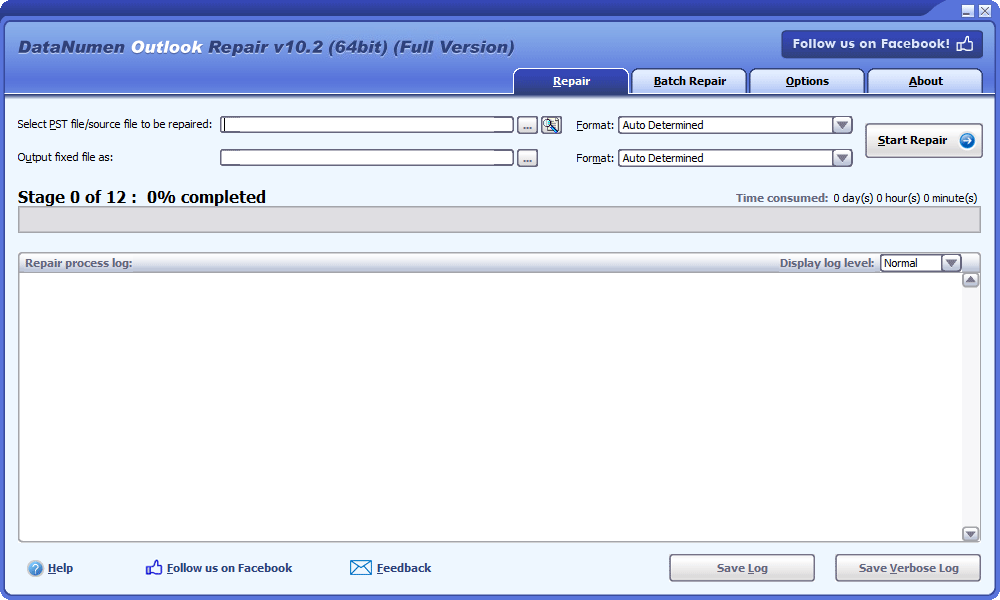
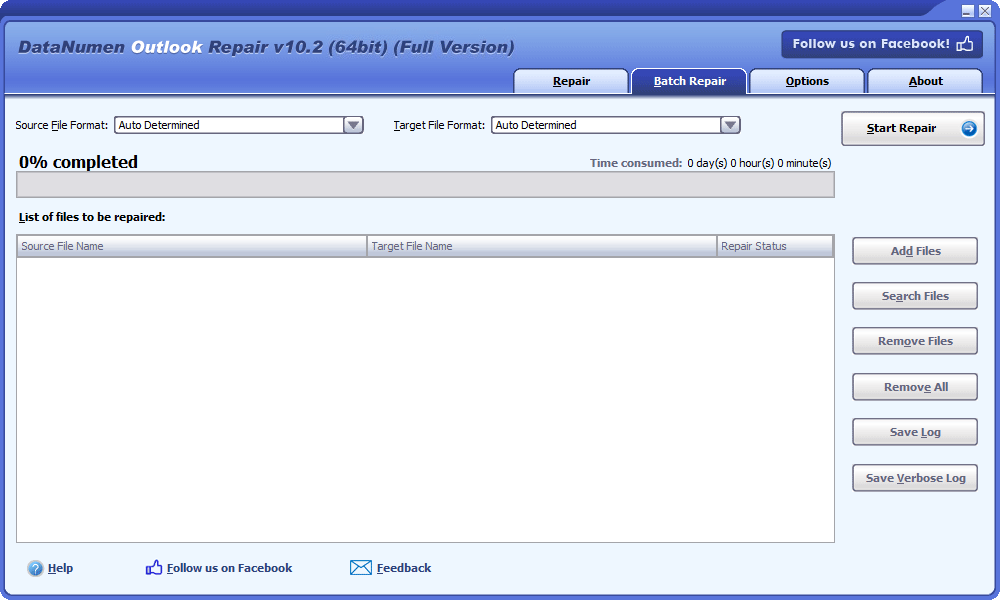
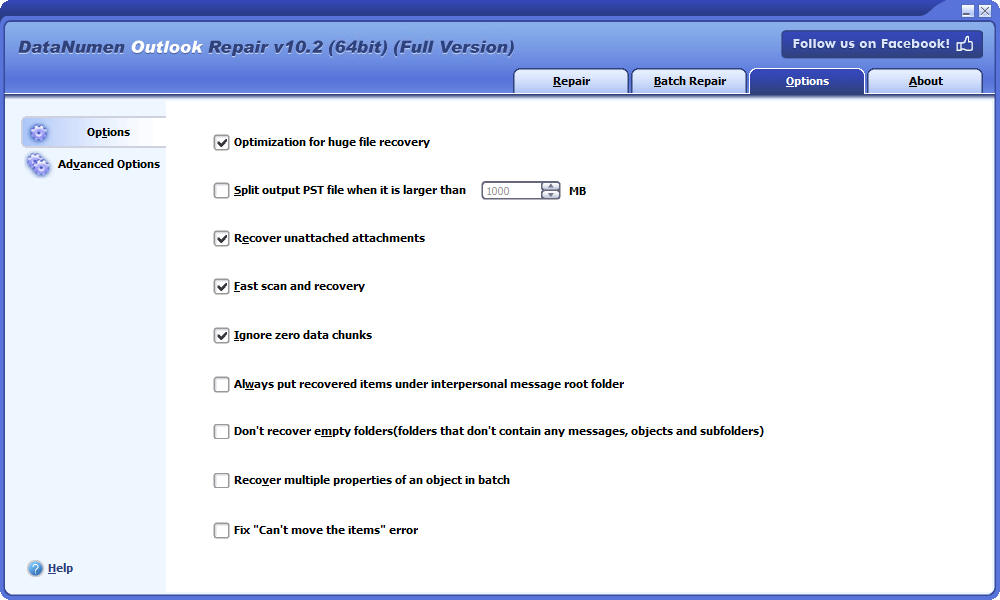

Старт DataNumen Outlook Repair.
Примітка. Перед початком роботи обов’язково закрийте Microsoft Outlook. Також закрийте інші програми, які можуть отримати доступ до PST-файлу.
Виберіть пошкоджений файл Outlook PST, який ви хочете відновити:

Щоб вибрати файл, введіть його назву безпосередньо або скористайтеся  кнопку, щоб знайти файл. Ви також можете використовувати
  кнопку для пошуку файлу.
Укажіть версію Outlook для файлу PST, про який йде мова, якщо вам це відомо. Ви можете використовувати поле зі списком  зробити це. Існує кілька доступних форматів, наприклад файл Outlook 2013-2019/Office 365 PST. Для формату також можна вибрати «Автоматично визначено». Якщо ви це зробите, DataNumen Outlook Repair проаналізує вихідний файл, щоб побачити формат файлу, що займає більше часу.
DataNumen Outlook Repair автоматично зберігає відновлені дані в абсолютно новому файлі PST xxxx_fixed.pst, де xxxx представляє назву вихідного файлу PST. Наприклад, Outlook_fixed.pst буде фіксованим іменем файлу, якщо Outlook є ім’ям вашого вихідного файлу. Однак ви можете перейменувати виправлений файл, якщо хочете:

Ви можете безпосередньо ввести назву файлу або скористатися кнопку, щоб вибрати файл під час перегляду.
Ви можете вибрати формат фіксованого файлу PST у полі зі списком який знаходиться поруч із полем редагування. Ви можете вибрати два можливих формати: Outlook 97-2002 і Outlook 2003-2019/Office 365. DataNumen Outlook Repair автоматично вибере формат файлу, сумісний із версією Outlook на локальному комп’ютері, якщо залишити формат «Автоматично визначено».
Натисніть
 кнопку. Після того, DataNumen Outlook Repair почне відновлювати ваш вихідний файл, використовуючи свої складні алгоритми, та покаже індикатор виконання:

Після завершення процесу відновлення ви побачите повідомлення, яке виглядає так, якщо воно було успішним:
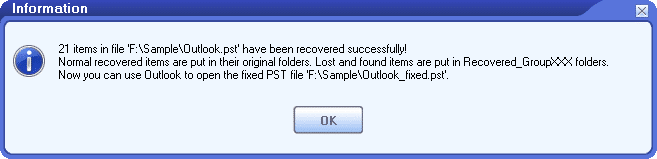
Натисніть «ОК», і ви зможете відкрити виправлений файл за допомогою MS Outlook або інших поштових клієнтів, які сумісні з файлом.
Уся ієрархія файлу буде перебудована для виправленого файлу таким чином, що електронні листи та інші об’єкти будуть розміщені в їхніх оригінальних папках. Загублені та знайдені об’єкти будуть розміщені в папках з назвою Recovered_Groupxxx.
| версія | 10.2 (Історія версій) |
| Дата випуску | Квітень 15th, 2025 |
| Розрядність | 32-розрядний, 64-розрядний |
| Підтримувані типи файлів | PST, OST |
| Підтримувані версії Outlook | Outlook 97–2021; Outlook для Office 365; Microsoft 365 |
| Відновлювані об'єкти | Повідомлення електронної пошти, вкладення, вбудовані об'єкти, папки, публікації, елементи календаря, зустрічі, запрошення на зустрічі, контакти, списки розсилки, завдання, запити на завдання, журнали та нотатки |
| Відновлення видалених даних | Видалені електронні листи та інші об'єкти |
| Файли, захищені паролем | Підтриманий |
| Файли великого розміру | Підтриманий |
| Розділення вихідних файлів | Підтриманий |
| Конвертація формату файлу | Підтриманий |
| Відновлення файлів образу диска | Підтриманий |
| Відновлення тимчасових файлів | Підтриманий |
| Підтримувані Мови | Мови 95 |
| Операційна система | Windows |
| процесор | Intel або еквівалент (x86, x64) |
| пам'ять | Мінімум 64 МБ (рекомендовано 4 ГБ) |
| Дисковий простір | 37 MB |
Файл PST (Personal Storage Table) також називається файлом особистих папок. Це свого роду файл даних Outlook. Outlook використовує його для зберігання електронних повідомлень Outlook та інших елементів поштової скриньки для облікових записів електронної пошти pop3, таких як Outlook.com або hotmail.com. Наш інструмент відновлення Outlook в основному призначений для відновлення пошкоджених файлів даних PST.
Файли PST мають два варіанти, тобто формат Юнікод і формат ANSI. Наш інструмент підтримує обидва формати. І може конвертувати між цими двома форматами, коли це необхідно. Формат ANSI має обмеження на розмір 2 ГБ. Отже, Outlook 2003 і новіші версії використовують формат Unicode. Ми також рекомендуємо вам конвертувати всі наявні файли PST у формат Unicode, якщо ви все ще не використовуєте версії Outlook, старіші за 2003.
OST file(Таблиця автономного сховища) також називається файлом автономних папок. Це ще один тип файлу даних Outlook. Microsoft Outlook використовує його для зберігання даних для облікових записів електронної пошти, відмінних від pop3, таких як облікові записи на серверах Microsoft Exchange.
Так, наше програмне забезпечення для відновлення Outlook може відновити OST файли. Ви також можете використовувати DataNumen Exchange Recovery виконати завдання, як DataNumen Exchange Recovery в основному призначений для OST відновлення даних файлів. Він також може конвертувати OST у файли PST, коли сервер Exchange аварійно завершує роботу або стає недоступним.
Є багато причин, які можуть призвести до пошкодження файлу PST, як-от збій живлення, збій жорсткого диска, віруси, завеликі файли PST (занадто великі файли PST, розмір файлу перевищує обмеження тощо), неправильне закриття (ви не закриваєте). Outlook правильно) і т.д. Ми зібрали список поширених причин. Для завеликих файлів PST можна ввімкнути конфігурацію автоархівації, щоб запобігти такій проблемі.
Ми також рекомендуємо вам мати під рукою наш інструмент для відновлення даних Outlook. Тому щоразу, коли ви натрапляєте на пошкоджений файл PST, ви можете скористатися нашим інструментом для відновлення файлів PST, щоб відновити дані файлу.
Наразі наш додаток підтримує Microsoft Outlook 97, Outlook 98, Outlook 2000, Outlook 2002, Outlook 2003, Outlook 2007, Outlook 2010, Outlook 2013, Outlook 2016, Outlook 2019 і Outlook 365.
Наш додаток підтримує Windows 95/98/ME/NT/2000/XP/Vista/7/8/8.1/10/11 і Windows Server 2003/2008/2012/2016/2019.
Ви можете побачити повний конкурентне порівняння нашого продукту з іншими подібними програмами для відновлення PST-файлів MS Outlook на ринку. На основі порівняння, наш продукт має найкращий рівень відновлення та найповніший функціонал.
Є два способи видалення DataNumen Outlook Repair.
Вибачте, але ми ще не пропонуємо послугу онлайн-ремонту.
Через багато можливостей ви можете не відкрити програму Outlook. Тому рекомендуємо вам діагностувати проблему з деякими методи усунення несправностей для визначення причини.
Якщо проблема виникає через пошкодження файлу Outlook PST, наш інструмент відновлення Outlook PST зможе її виправити. Корпорація Майкрософт також надає вбудований інструмент відновлення папки "Вхідні" (scanpst.exe), але він працює лише в небагатьох випадках.
Якщо проблема виникла через інсталяцію програми Outlook, ви можете відновити Office або Office 365, виконавши наведені нижче дії з усунення несправностей.
Якщо проблема виникає у вашому профілі Outlook, її можна усунути, виконавши такі дії:
Якщо проблема пов’язана з надбудовами, ви можете тимчасово вимкнути їх наступним чином:
Ви також можете використовувати Windows Update, щоб оновити Outlook до останньої версії, яка може вирішити проблему Outlook.
Ви можете використовувати Помічник підтримки та відновлення Microsoft щоб діагностувати проблему з Outlook.
Якщо всі наведені вище рішення не працюють, ви можете скористатися функцією «Відновлення системи» в операційній системі Windows, щоб відновити систему до попереднього працездатного стану. Зауважте, що в Windows 10 ця функція вимкнена за умовчанням. Попередньо його потрібно ввімкнути вручну.
Якщо ви раніше створювали резервну копію файлу Outlook PST, ви також можете спробувати відновити резервну копію файлу PST. Цей метод є швидшим за спосіб 7, оскільки вам потрібно лише відновити файл Outlook PST, а не всю систему.
Примітка. Ми протестували наведені вище рішення з Outlook 2010, Outlook 2013, Outlook 2016, Outlook 2019 і Outlook 365.
За замовчуванням наше програмне забезпечення для відновлення Outlook PST буде встановлено в такий каталог у 64-розрядній системі Windows:
C:\Program Files (x86)\DataNumen\DataNumen Outlook Repair\
або в наступному каталозі в 32-розрядній системі Windows:
C: \ Program Files \DataNumen\DataNumen Outlook Repair\
Так, остання версія DataNumen Outlook Repair повністю підтримує 32- і 64-розрядні версії Windows 10 і 11.
Загалом служба підтримки Microsoft запропонує вам скористатися вбудованим інструментом відновлення PST Outlook, тобто Inbox Repair Tool (scanpst.exe), для сканування та відновлення пошкоджених файлів PST. Якщо це не спрацює, вони також скористаються нашими DataNumen Outlook Repair для відновлення PST-файлів Outlook.
На жаль, наразі Outlook для Mac ще не підтримується, оскільки для зберігання даних використовується інший формат файлу .OLM (Outlook для Mac).
Наш інструмент відновлення файлів використовуватиме дуже складний алгоритм для аналізу кожного байта файлу даних PST. Тому час ремонту залежить від багатьох факторів. Нижче наведено деякі з них:
Існує кілька способів відновлення видалених електронних листів та інших елементів:
Після видалення електронної пошти спробуйте натиснути Ctrl + Z, щоб відновити її. Ви також можете використовувати цей метод для відновлення видалених елементів.
Якщо ваш файл PST має a Видалені елементи папку. Після видалення електронної пошти ви можете спробувати знайти її в цій папці та відновити.
Якщо ваш файл PST не має a Видалені елементи папку, потім перевірте, чи є в ній папка Trash папку, ви також можете спробувати відновити видалені елементи з цієї папки.
Якщо наведені вище методи не дають результатів, можна спробувати скористатися Відновити видалені елементи команду для відновлення ваших елементів, як показано нижче:
Якщо ви не можете побачити Відновити видалені елементи варіант, то ваш обліковий запис не підтримує таку функцію.
Якщо всі наведені вище методи не допомагають, ви можете скористатися нашим інструментом відновити видалені листи.
Вибачте, але це неможливо. Якщо ви розпочинаєте процес відновлення, єдиний варіант — зупинити його. Пізніше, якщо ви захочете повторно відновити той самий файл Outlook, вам потрібно буде почати все спочатку та розпочати процес відновлення з самого початку.
Так, MS Outlook має безкоштовну вбудовану програму Інструмент відновлення папки "Вхідні" (scanpst.exe) який можна використовувати для відновлення файлів особистих папок (PST) з незначними пошкодженнями.
Для різних версій і розрядності Outlook і Windows розташування для scanpst.exe також досить різне. Ви можете скористатися наведеною нижче таблицею, щоб знайти каталоги scanpst.exe:
| Тип встановлення | 32-бітна Windows | 64-бітна Windows | |
| Office 365/Windows 365 (32-розрядна) | Натисніть, щоб запустити | C:\Program Files\Microsoft Office\root\Office16 | C:\Program Files (x86)\Microsoft Office\root\Office16 |
| Office 365/Windows 365 (64-розрядна) | Натисніть, щоб запустити | N / A | C:\Program Files\Microsoft Office\root\Office16 |
| Outlook 2016/2019 (32 біт) | нормальний | C: \ Program Files \ Microsoft Office \ Office16 | C:\Program Files (x86)\Microsoft Office\Office16 |
| Outlook 2016/2019 (64 біт) | нормальний | N / A | C: \ Program Files \ Microsoft Office \ Office16 |
| Outlook 2016/2019 (32 біт) | Натисніть, щоб запустити | C:\Program Files\Microsoft Office\root\Office16 | C:\Program Files (x86)\Microsoft Office\root\Office16 |
| Outlook 2016/2019 (64 біт) | Натисніть, щоб запустити | N / A | C:\Program Files\Microsoft Office\root\Office16 |
| Outlook 2013 (32-розрядна версія) | нормальний | C: \ Program Files \ Microsoft Office \ Office15 | C:\Program Files (x86)\Microsoft Office\Office15 |
| Outlook 2013 (64-розрядна версія) | нормальний | N / A | C: \ Program Files \ Microsoft Office \ Office15 |
| Outlook 2013 (32-розрядна версія) | Натисніть, щоб запустити | C:\Program Files\Microsoft Office\root\Office15 | C:\Program Files (x86)\Microsoft Office\root\Office15 |
| Outlook 2013 (64-розрядна версія) | Натисніть, щоб запустити | N / A | C:\Program Files\Microsoft Office\root\Office15 |
| Outlook 2010 (32-розрядна версія) | нормальний | C: \ Program Files \ Microsoft Office \ Office14 | C:\Program Files (x86)\Microsoft Office\Office14 |
| Outlook 2010 (64-розрядна версія) | нормальний | N / A | C: \ Program Files \ Microsoft Office \ Office14 |
| Outlook 2010 (32-розрядна версія) | Натисніть, щоб запустити | C:\Program Files\Microsoft Office\root\Office14 | C:\Program Files (x86)\Microsoft Office\root\Office14 |
| Outlook 2010 (64-розрядна версія) | Натисніть, щоб запустити | N / A | C:\Program Files\Microsoft Office\root\Office14 |
| Outlook 2007 (32-розрядна версія) | нормальний | C: \ Program Files \ Microsoft Office \ Office12 | C:\Program Files (x86)\Microsoft Office\Office12 |
Це виглядає трохи складно. Тож кращим способом є пошук «scanpst.exe» на локальному комп’ютері. Якщо ви встановили Outlook, ви зможете його знайти.
Після знаходження scanpst.exe двічі клацніть, щоб запустити його та виправити файли Outlook.
Однак інструмент відновлення папки "Вхідні" (scanpst.exe) працює лише в небагатьох випадках. Зокрема, він може лише відновлювати файли PST з незначними пошкодженнями. Для сильно пошкоджених файлів PST це буде збій, припинення роботи або просто повідомлення про помилку, що не вдається відновити файл. У таких випадках потрібно використовувати наш інструмент відновлення Outlook PST замість.
Для відновлення пошкоджених файлів офлайн-сховища (OST) у Microsoft є інструмент scanost.exe. OST файли.
Так, ми рекомендуємо вам закрити всі програми, включаючи програму Microsoft Outlook, інші програми Office, як-от PowerPointтощо, перш ніж використовувати наш інструмент відновлення файлів PST для відновлення файлів Outlook і відновлення електронних листів Outlook.
Так, ми рекомендуємо вам створити обліковий запис електронної пошти, навіть якщо ви не надсилаєте/отримуєте жодних електронних листів за допомогою нього.
Ви можете зробити наступне:
Ми також рекомендуємо вам перевірити такі розташування за замовчуванням для файлів PST:
C: Користувачі% username% \ t
C: Користувачі% username%% Документи Файли Outlook \ t
Для Windows XP і старіших версій ви можете перевірити такі місця:
C:\Documents and Settings\%username%\Local Settings\Application Data\Microsoft\Outlook\
C:\Documents and Settings\%username%\My Documents\Outlook Files\
Будь ласка, виконайте наступне:
Ви також можете знайти докладний посібник щодо відновлення файлів даних Outlook за допомогою нашого програмного забезпечення, відвідавши веб-сторінку DataNumen Outlook Repair домашня сторінка, а потім клацніть вкладку «Як відновити». Є покрокова інструкція та відеоінструкція.
Так ми робимо. Щоб відновити пошкоджені файли PST, створені Outlook для Android, можна виконати наступні дії:
Так, усі поштові клієнти, сумісні з форматом PST, можуть відкривати фіксований файл PST, створений нашим інструментом відновлення Outlook. Наприклад, ви можете імпортувати файл PST на сервер Exchange.
Зауважте, що наш інструмент відновлення PST може виводити файли PST у двох форматах, тобто Outlook 97 – 2002 і Outlook 2003 – 2021/Office 365. Вам потрібно встановити формат файлу на основі версії Outlook, яка використовуватиметься для відкриття файлу. Якщо ви будете використовувати Outlook на локальному комп’ютері, щоб відкрити файл PST, наш інструмент автоматично встановить вихідний формат.
Формат файлу .DBX використовується Outlook Express, який повторно розглядався протягом 16 років. Отже, наш інструмент не підтримує виведення даних у форматі .DBX.
Формат .MBOX — це формат файлу Unix для зберігання колекції повідомлень електронної пошти. Ми не підтримуємо пряме виведення файлу у форматі .MBOX, але ви можете використовувати Mozilla Thunderbird, щоб перетворити фіксований файл PST у формат .mbox.
Наше програмне забезпечення для відновлення Outlook не підтримує таку функцію. Але ви можете зробити це вручну наступним чином:
Наше програмне забезпечення для відновлення Outlook PST не підтримує автоматичне виконання цього завдання. Але ви можете зробити це вручну, як показано нижче:
Ви можете зробити наступне:
Ви можете зробити наступне:
Обидві версії використовують той самий механізм відновлення PST. Але демо-версія замінить тіло повідомлення демонстраційним текстом. Щоб отримати фактично відновлений вміст, потрібно використовувати повну версію, щоб повторно відновити пошкоджений файл PST.
Так, наш інструмент відновлення Outlook може відновлювати файли PST розміром до 16777216 ТБ. А наш інструмент відновлення даних Outlook може розділити великий файл на маленькі частини.
Зауважте, що різні версії Outlook мають різні обмеження щодо розміру файлу PST, див цю статтю для рішень.
Так, крім виправлення пошкоджень файлів PST, наш інструмент відновлення файлів PST також може відновити видалені елементи, зокрема папки, електронні листи Outlook та інші елементи поштової скриньки.
Так, наш інструмент відновлення файлів спробує видалити дублікати електронних листів під час процесу відновлення даних PST. Але іноді ви все одно можете знайти дублікати електронних листів у папках Recovered_Groupxxx. Це нормально.
Ні. Наш інструмент відновлення PST НЕ змінить вихідний пошкоджений файл PST. Він створить новий файл PST, що містить відновлені дані.
Так, навіть якщо ви забудете пароль, ми все одно зможемо відновити дані із зашифрованого файлу PST.
Процедура залежить від типу вашого облікового запису Outlook:
Так, якщо ви отримали електронні листи Outlook.com у файлі PST на локальному комп’ютері, ви можете відновити електронні листи, включно з видаленими листами з файлу PST за допомогою нашого інструменту.
Однак для тих електронних листів, які не надійшли до локального файлу PST, вам потрібно ввійти в Outlook.com і перевірити, чи доступна функція відновлення електронної пошти в Інтернеті.
За замовчуванням усі електронні листи буде відновлено до вихідних папок. Якщо ви не можете знайти потрібний електронний лист у вихідній папці, ви можете скористатися функцією пошуку в Outlook, щоб знайти електронний лист за його темою, відправником або іншим критерієм. Іноді наш інструмент може помістити електронний лист в іншу папку або папку Recovered_Group###.
Вам слід завжди відкривати фіксований файл PST, а не імпортувати його.
Outlook як «Майстер імпорту та експорту», який може імпортувати електронні листи у файл PST. Однак процес імпорту перезапише наявні електронні листи з тими самими темами. Тому це небезпечно. Особливо, коли ви намагаєтеся імпортувати електронні листи з фіксованого файлу PST, створеного демонстраційною версією, оскільки теми цих електронних листів є демонстраційними текстами, а не дійсно відновленим вмістом.
Існує два види паролів Outlook:
Відновлення втрачених даних Outlook, включаючи електронні листи та інші об'єкти з необроблених дисків або накопичувачів
Деталі
Відновлення повідомлень та інших елементів із застарілих або пошкоджених файлів автономного сховища Microsoft Exchange (.ost)
Деталі
Відновити ВИДАЛЕНІ електронні листи від Outlook Express файли DBX.
Деталі
Відновлення електронних листів від пошкоджених Outlook Express файли DBX та MBX.
Деталі
Відновити та відновити пошкоджені документи Microsoft Word (файли .doc та .docx).
Деталі
Відновити та відновити пошкоджені або пошкоджені файли Microsoft Excel xls, xlw та xlsx.
Деталі
Відновлення та відновлення пошкоджених баз даних Microsoft Access (файли .mdb та .accdb).
Деталі DataNumen Outlook Repair