
DataNumen Excel repair Jest to najbardziej advanced excel repair Narzędzie na świecie. Wspierane przez doskonałe wsparcie techniczne, to narzędzie może odtworzyć uszkodzone
Przegląd
Udogodnienia
Jak naprawić
Więcej informacji
Podobne produkty
Dlaczego DataNumen Excel Repair?

#XNUMX Wskaźnik odzyskiwania

Ponad XNUMX+ milionów użytkowników

Ponad XNUMX+ lat doświadczenia

Gwarancja XNUMX% satysfakcji
Odzyskamy znacznie więcej niż nasi konkurenci
DataNumen Excel Repair vs. Excel Recovery, Recovery Toolbox for Excel, ExcelFix itp.
Średni wskaźnik odzysku
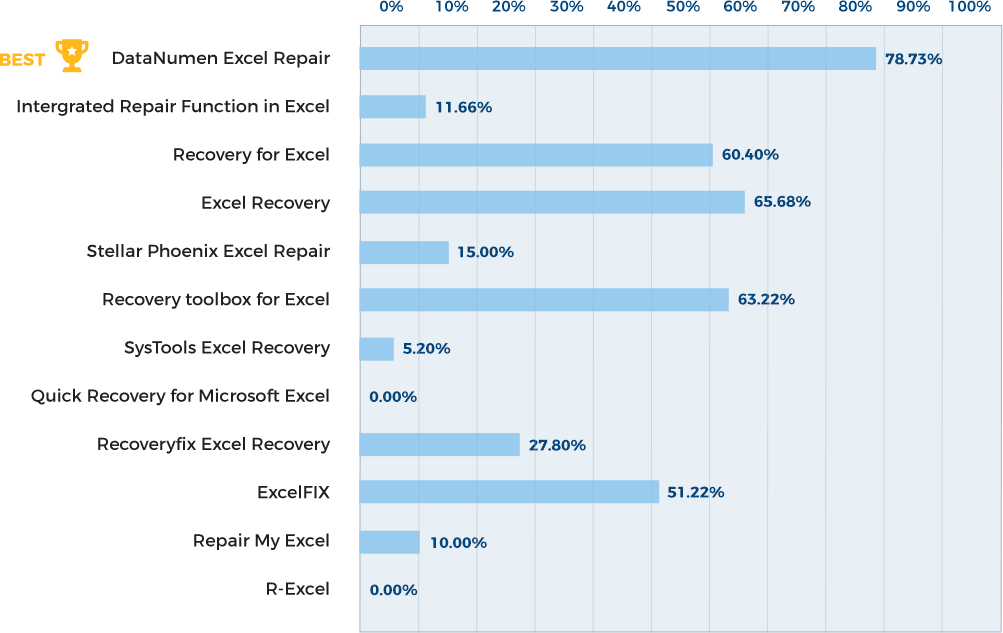
Dowiedz się więcej o tym, jak DataNumen Excel Repair pali konkurencję
Opinie naszych klientów

... Czytaj więcej
DataNumen Excel repair Jest to najbardziej advanced excel repair Narzędzie na świecie. Dzięki doskonałemu wsparciu technicznemu, to narzędzie może odtworzyć uszkodzone dane Excela w najbardziej wydajny i dokładny sposób. Gorąco polecam. DataNumen Naprawa programu Excel.
Nilesh Kulkarni
Rozwiązania komputerowe
Pune, Maharasztra, Indie
December 24, 2025
Dziękuję za to narzędzie, naprawdę pomogło mi ono w pełni naprawić mój plik Excela.
udom in
August 19, 2019
Ten produkt działał poprawnie.
Eugenio G. Bahamondesa
M.Ss. Starszy Inżynier - elektryk
Inżynierowie NorTecnica Ltd.
Iquique, Chile
To bardzo fajny program. To coś co, działa automatycznie, co bardzo lubię.
Jestem facetem od baz danych i naprawdę wolę używać Foxpro niż arkusza kalkulacyjnego Excel.
Ale
To bardzo fajny program. To coś co, działa automatycznie, co bardzo lubię.
Jestem facetem od baz danych i naprawdę wolę używać Foxpro niż arkusza kalkulacyjnego Excel.
Ale to tak nie działa, zwłaszcza gdy pracujesz z innymi ludźmi.
Gdyby Wasz program nie zadziałał, mój przyjaciel i ja ucieklibyśmy się do ręcznej naprawy za pomocą przeglądarki plików hex lub ASCII i ręcznie edytowali plik binarny, aby naprawić uszkodzenie. Co za męka.
Cóż, tak się nie stało. Dobra robota, macie mój głos i polecenia w przyszłości.
Dzięki jeszcze raz. Wart swojej ceny.
Rick Fayter
Konsultant Database
Ohio, Stany Zjednoczone
DataNumen Excel Repair uratował dzień i odzyskał potrzebne dane z mojego uszkodzonego pliku. Jest niezwykle łatwy w użyciu, działał bardzo dobrze na moim
DataNumen Excel Repair uratował mój dzień i odzyskałem potrzebne dane z mojego uszkodzonego pliku. Jest niezwykle łatwy w użyciu, działał bardzo dobrze i bardzo go polecam!
E. Madsen
Główny Inżynier
Technologia PIN, Inc.
New York, NY, USA
Działało pięknie! Wszystkie moje terminy i moje (prawdopodobnie zbyt skomplikowane) dane do krzyżowego odsyłania są teraz z powrotem! DZIĘKUJĘ!! W lecie miałem
Udało się idealnie! Wszystkie moje terminy i (prawdopodobnie zbyt skomplikowane) dane do odsyłaczy są już z powrotem! DZIĘKUJĘ!! Latem miałam wolny czas, żeby nad nimi popracować, ale wkrótce zaczynamy szkołę i bardziej pochłania mnie praca fizyczna niż komputerowa, a NIE MIAŁAM czasu (ani ochoty), żeby usiąść i ponownie wprowadzić SIEDEMSET DZIEWIĘĆDZIESIĄT DWIE terminy biologiczne, definicje i odsyłacze! Na samą myśl robiło mi się niedobrze.
Życzę wspaniałej reszty tygodnia oraz spokojnego i przyjemnego weekendu!
Kristi Rankin Nauczyciel
Brownwood, Teksas, USA
13 sierpnia 2014
Narzędzie do naprawy programu Excel było w stanie wyodrębnić wszystkie dane tekstowe z 2 uszkodzonych plików Excela, które były otwarte i zapisywane, gdy miałem awarię komputera.
Narzędzie do naprawy programu Excel było w stanie wyodrębnić wszystkie dane tekstowe z 2 uszkodzonych plików Excela, które były otwarte i zapisywane, gdy miałem awarię komputera. Narzędzie nie mogło jednak pobrać wszystkiego z całym formatowaniem (pogrubienie, kolory itp.), utracono dane wraz z około połową formuł (głównie tych skomplikowanych, które łączyły ze sobą arkusze). Tam, gdzie były możliwe problemy, narzędzie dzieliło istniejący arkusz na dodatkowe arkusze, abyś wiadomo było, gdzie sprawdzić straty - świetny pomysł. Ogólnie wspaniały wynik, ponieważ dane były najtrudniejsze do przywrócenia z oryginalnego źródła. Jeden z plików był tak zniekształcony, że nie można go było skopiować, otworzyć (ani nawet usunąć!) za pomocą żadnego programu MS! Ogólnie narzędzie zaoszczędziło mi około tygodni pracy. Przywrócenie normalnego stanu plików zajęło mniej niż jeden dzień poprzez powtórzenie formatowania ze znacznie starszej wersji pliku i wyrywkowe sprawdzenie danych. Uwaga dla użytkowników: jeśli wydaje się, że narzędzie zatrzymało się, zachowaj cierpliwość - naprawienie trudniejszego pliku zajęło prawie godzinę.
John Chapman
Melbourne, Australia
1 stycznia 2017 r
Niezwykle prosty interfejs
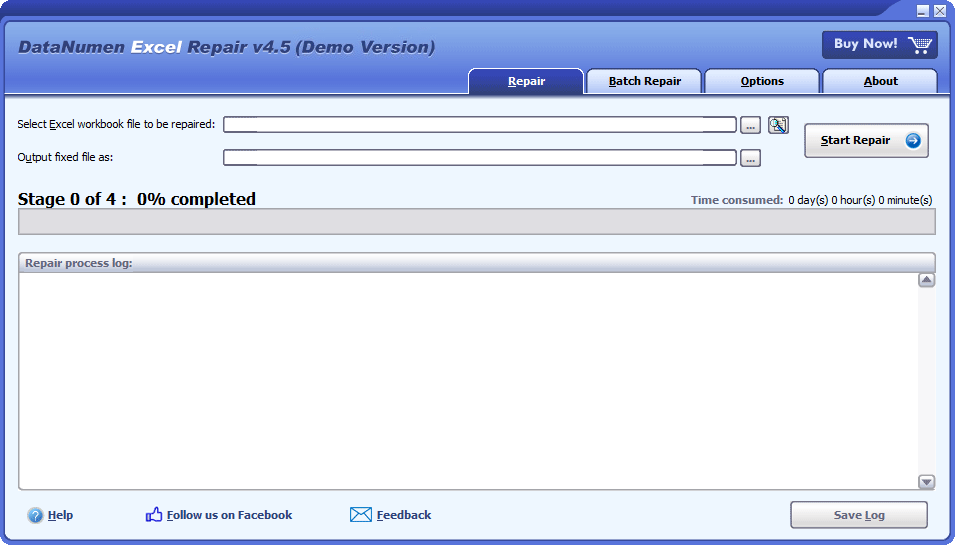
Naprawa
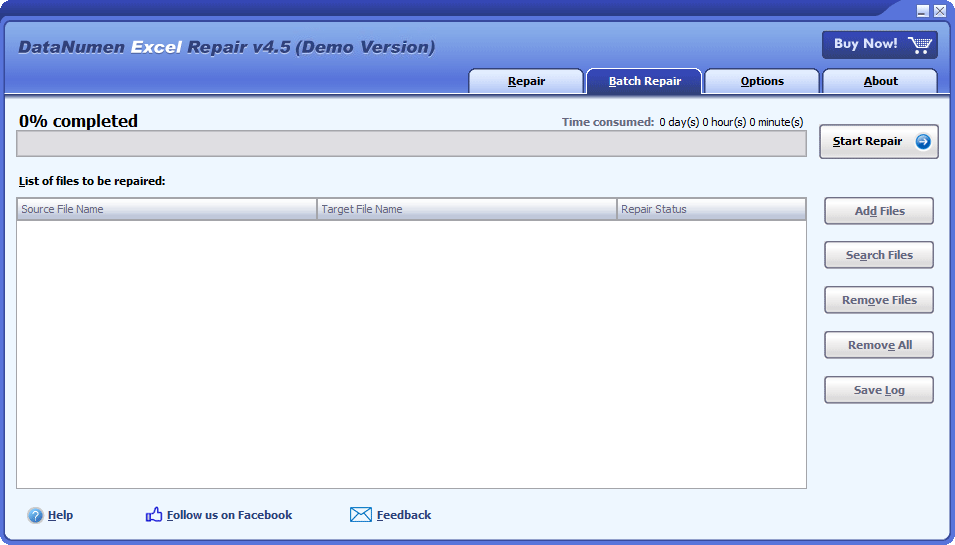
Naprawa partycji
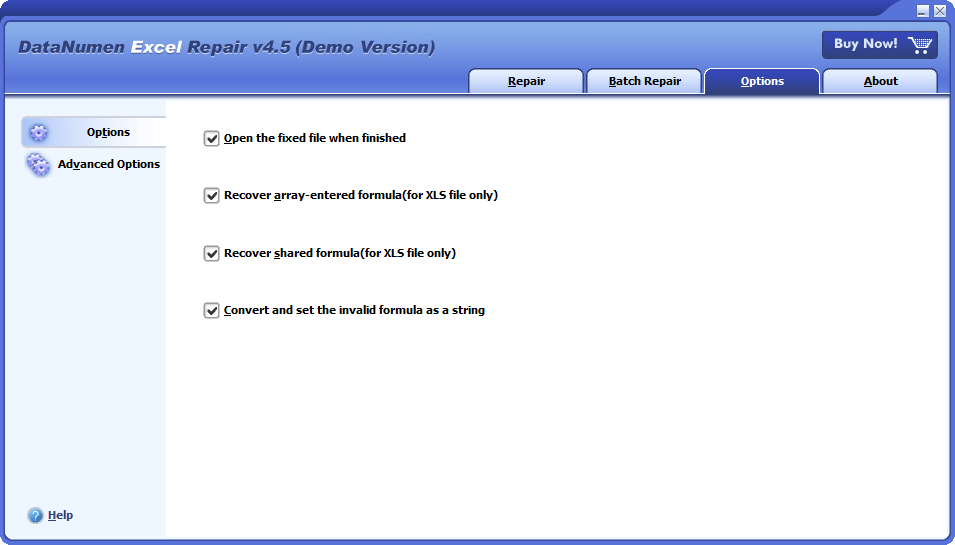
Opcje
Rozwiązanie dla następujących typowych błędów i problemów w pliku Excel

- Ten plik nie ma rozpoznawalnego formatu.
- Program Excel znalazł nieczytelną zawartość w pliku „nazwa_pliku.xslx”.
- nazwa_pliku.xls nie jest dostępna.
Darmowe pobieraniePonad 20 lat doświadczenia
Kup teraz100% gwarancja satysfakcji
Główne cechy
- Napraw pliki Excel xls, xlw, xlsx i xlsm Microsoft Excel 3, 4, 5, 95, 97, 2000, XP, 2003, 2007, 2010, 2013, 2016, 2019, 2021, Excel dla formatów Office 365 i Microsoft 365.
- Naprawia pliki skoroszytów wygenerowane przez program Excel dla systemów Windows i Mac.
- Odzyskuje dane komórki w uszkodzonych plikach Excel.
- Odzyskuje formuły, w tym formuły udostępnione i formuły wprowadzone w tablicy.
- Odzyskuje standardowe formaty i niestandardowe formaty komórek i formuł.
- Odzyskuje nazwy arkuszy roboczych.
Darmowe pobieraniePonad 20 lat doświadczenia
Kup teraz100% gwarancja satysfakcji
Odzyskaj uszkodzone pliki Excela za pomocą DataNumen Excel Repair
Otwórz DataNumen Excel Repair.
Uwaga: przed rozpoczęciem procesu odzyskiwania zamknij wszystkie inne aplikacje, w tym program Microsoft Excel.
Wybierz plik źródłowy do naprawy:

Użyj  , aby przeglądać plik, lub
  aby znaleźć plik na komputerze lokalnym. Możesz również wprowadzić nazwę pliku ręcznie lub przeciągnąć i upuścić plik do pola edycji.
Po ustawieniu nazwy pliku źródłowego, DataNumen Excel Repair automatycznie wygeneruje stałą nazwę pliku. Na przykład, jeśli plik źródłowy to Damaged.xlsx, automatycznie wygenerowany plik naprawiony będzie miał nazwę Damaged_fixed.xlsx.

Oczywiście możesz to zmienić, albo wybrać , aby wybrać katalog wyjściowy.
Teraz możesz kliknąć  , aby zacząć proces naprawy. DataNumen Excel Repair przeanalizuje plik źródłowy i naprawi w nim błędy.

Pasek postępu pokaże etap, postęp i całkowity czas.
Jeśli nasz program pomyślnie naprawi plik, zobaczysz następujący komunikat:
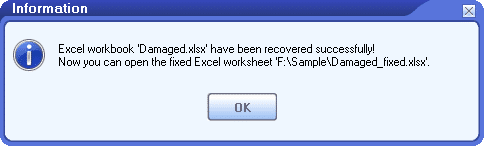
Kliknij przycisk „OK”, aby otworzyć naprawiony plik w programie Excel. Możesz także dwukrotnie kliknąć plik w Eksploratorze Windows, aby otworzyć go ręcznie.
Więcej informacji
| Wersja | 4.5 (Historia wersji) |
| Data wydania | Listopada 9th, 2023 |
| Obsługiwane typy plików | XLS, XLW, XLSX, XLSM |
| Obsługiwane wersje programu Excel | Excel 3.0–2021; Excel dla pakietu Office 365; Microsoft 365 |
| Odzyskiwalne obiekty | Arkusze kalkulacyjne, komórki, formuły, formuły współdzielone, formuły wprowadzane do tablicy, formaty standardowe, formaty niestandardowe, nazwy arkuszy kalkulacyjnych |
| Obsługiwane języki | Języki 95 |
wymagania
| System operacyjny | Windows |
| Procesor | Intel lub równoważny (x86, x64) |
| Pamięć | Minimum 32 MB (zalecane 1 GB) |
| Miejsce na dysku | 21 MB |
Bayer MaterialScience modernizuje odzyskiwanie danych w Excelu dzięki DataNumen Rozwiązanie
Ratowanie krytycznych danych: historia sukcesu firmy Trafigura DataNumen Excel Repair
Sysco zapewnia integralność danych dzięki DataNumen Excel Repair: Historia sukcesu
DataNumen Excel Repair: Podstawa zarządzania danymi w New York Life Insurance
Costco oszczędza dane dzięki DataNumen Excel Repair: Studium przypadku
Procter & Gamble zwiększa niezawodność danych dzięki DataNumen Excel Repair: Studium przypadku
Siemens pokonuje uszkodzenie danych programu Excel dzięki DataNumen Excel Repair: Studium przypadku
Firma General Electric usprawnia odzyskiwanie i wydajność plików programu Excel dzięki DataNumen Excel Repair: studium przypadku
Jak naprawić uszkodzony skoroszyt EXCEL za darmo?
Microsoft Office Excel ma wbudowaną funkcję, która może naprawić uszkodzony plik Excel. Za każdym razem, gdy wykryje uszkodzenia w Twoim pliku, uruchomi tryb Odzyskiwanie plików i spróbuje naprawić plik. Jednak czasami tryb Odzyskiwanie plików nie rozpocznie się automatycznie lub możesz chcieć naprawić plik ręcznie. W takich przypadkach wykonaj poniższe czynności:
Uwaga: Przed naprawieniem uszkodzonego skoroszytu spróbuj skopiować go na lokalny dysk twardy, jeśli jest przechowywany na dysku sieciowym.
- Otwórz MS Excel.
- Wybierz Plik > Otwórz > Przeglądaj.
- W Otwórz znajdź plik Excel do naprawy.
- Do NIE klikaj dwukrotnie pliku, ponieważ program próbuje otworzyć plik bezpośrednio, zamiast go naprawiać. Zamiast tego należy kliknąć plik jednym kliknięciem.
- Następnie kliknij strzałkę obok Otwórz zobaczysz rozwijaną listę otwartych metod.
- Kliknij Otwórz i napraw…
- Pojawi się okno dialogowe z napisem „Excel może przeprowadzać kontrole podczas otwierania skoroszytu i próbować naprawić wszelkie wykryte uszkodzenia lub wyodrębnić tylko dane (formuły i wartości) ze skoroszytu”.
- Aby zmaksymalizować odzyskiwanie danych, kliknij przycisk Naprawa .
- Jeśli krok 8 nie powiedzie się, powtórz kroki od 2 do 7 i kliknij przycisk Wyodrębnij Dane .
- Jeśli opcja Naprawa or Wyodrębnij Dane się powiedzie, program Excel zapisze odzyskane dane do nowego pliku o nazwie xxx [Naprawiony].xlsx, gdzie xxx to nazwa uszkodzonego pliku skoroszytu. Możesz kliknąć Plik> Zapisz jako aby zapisać naprawiony plik pod inną nazwą lub w innej lokalizacji.
Możesz także zaimportować dane z uszkodzonego skoroszytu za pomocą odnośników zewnętrznych, jak poniżej:
- Zakładając, że uszkodzony skoroszyt nazywa się Book1.xlsx.
- Otwórz Excel.
- Utwórz pusty skoroszyt i zapisz go jako Book2.xlsx, w tym samym katalogu co Book1.xlsx.
- W Book2.xlsx, w Sheet1/cell A1, wprowadź formułę =[Book1.xlsx]Sheet1!A1, A następnie naciśnij przycisk Enter.
- Jeśli dane w komórce A1 Book1/Sheet1 można odzyskać i zaimportować, pojawią się one w wywołaniu A1 Book2/Sheet1.
- Teraz możemy zastosować formułę do wszystkich pozostałych komórek.
- Wybierz komórkę A1 w Book2/Sheet1.
- Naciśnij przycisk Ctrl + C.
- Wybierz zakres większy niż w Book1, aby można było zaimportować wszystkie dane z Book1.
- Kliknij prawym przyciskiem myszy, w wyskakującym menu zobaczysz listę opcji Opcje wklejania, Wybierz Formuły jako opcję wklejania.
- W ten sposób zobaczysz, że wszystkie dane w Book1 zostały zaimportowane.
- Jednak zaimportowane dane są nadal połączone z Book1. Teraz musimy zerwać linki i zachować tylko wartości.
- Wybierz zakres obejmujący wszystkie komórki mające wartość.
- Naciśnij przycisk Ctrl + C.
- Kliknij prawym przyciskiem myszy i z menu podręcznego wybierz Wartości jako opcję wklejania.
- Nic się nie dzieje. Jednak po kliknięciu jednej z komórek, na przykład komórki A1, można zauważyć, że formuła została zastąpiona wartością.
Możesz także użyć makra, aby wyodrębnić dane z uszkodzonego skoroszytu programu Excel.
Jeśli powyższa metoda nie działa, oznacza to, że plik jest poważnie uszkodzony. Powinieneś skorzystać z usług profesjonalnego Narzędzia do odzyskiwania danych Excela, aby wykonać to zadanie.
Które wersje programu EXCEL są obsługiwane?
Obecnie obsługiwane są programy Microsoft Excel w wersjach 3, 4, 5, 95, 97, 2000, XP, 2003, 2007, 2010, 2013, 2016, 2019 oraz Excel dla usługi Office 365. Obsługiwane są zarówno formaty plików xls, jak i xlsx.
Czym są ARKUSZE „DNDEFAULTSHEET#” w odzyskanym skoroszycie?
Nasze narzędzie do naprawy plików spróbuje odzyskać nazwę i dane arkusza Excel. Czasami jednak z powodu uszkodzenia danych nie można odzyskać nazwy, ale można odzyskać dane. W takim przypadku ustawimy odzyskaną nazwę arkusza na „DNDefaultSheet#” i zapiszemy w nim odzyskane dane, gdzie # to kolejny numer arkusza, począwszy od 1.
CZY MUSZĘ MIEĆ EXCEL na moim komputerze, aby uruchomić Twoją APLIKACJĘ?
Tak, musisz mieć zainstalowany program Excel na swoim komputerze, aby uruchomić nasze narzędzie do naprawy. Przed naprawą uszkodzonego dokumentu Excel, jeśli nasze narzędzie wykryje, że nie ma zainstalowanego programu Excel, wyświetli komunikat o błędzie i przerwie proces odzyskiwania danych.
Czy muszę zamknąć program Microsoft EXCEL podczas procesu naprawy?
Tak, zalecamy to zrobić.
Podczas procesu naprawy czasami zauważysz, że program Microsoft Excel będzie automatycznie otwierany i zamykany w tle. To normalne, ponieważ nasze oprogramowanie do naprawy wywoła niektóre funkcje programu Microsoft Excel w celu wykonania niezbędnych zadań.
Czy obsługujesz PLIKI UTWORZONE PRZEZ EXCEL dla komputerów Mac?
Tak, ale musisz mieć system Windows/PC, aby wykonać odzyskiwanie, jak poniżej:
- Skopiuj uszkodzony plik MS Excel z komputera Mac na PC.
- Napraw uszkodzony plik Excel za pomocą naszego narzędzia do odzyskiwania plików i wygeneruj nowy naprawiony plik Excel.
- Skopiuj naprawiony plik Excel z komputera PC z powrotem na komputer Mac.
NIC SIĘ NIE DZIEJE PO DWUKROTNYM KLIKNIĘCIU WORKBOOKU EXCEL. Co robić?
Przede wszystkim należy zdiagnozować problem, aby ustalić, czy przyczyną problemu jest uszkodzenie pliku, w następujący sposób:
- Skopiuj skoroszyt programu Excel na inny komputer z zainstalowanym programem Excel.
- Uruchom Excel
- Kliknij Plik > Otwórz > Przeglądaj
- Wybierz skoroszyt programu Excel i kliknij przycisk Otwórz .
- Jeśli skoroszyt można pomyślnie otworzyć, oznacza to, że nie jest uszkodzony. W przeciwnym razie jest uszkodzony i można go używać w trybie „otwórz i napraw” .
Jeśli skoroszyt nie jest uszkodzony, przyczyną problemu jest program Excel zainstalowany na komputerze. Wykonaj następujące czynności:
- Spróbuj uruchomić Excela w trybie awaryjnym i otwórz skoroszyt programu Excel.
- Jeśli wszystko jest w porządku, spróbuj wyłączyć dodatki w swoim Excelu jeden po drugim, aż znajdziesz wadliwy, który powoduje problem.
- Jeśli nie można uruchomić programu Excel nawet w trybie awaryjnym, musisz to zrobić naprawiając instalację pakietu Microsoft Office i naprawić uszkodzone pliki instalacyjne dla MS Office Excel.
Czy można naprawić pliki skoroszytu programu Excel z obsługą makr (XLSM)?
Tak, jednak nasze oprogramowanie do odzyskiwania może odzyskać tylko dane, a nie makra w pliku .xlsm. Tak więc naprawiony plik zostanie zapisany w formacie .xlsx.
AWARIA PROGRAMU EXCEL PRZED ZAPISANIEM MOJEGO WORKBOOKA. CZY MOŻESZ GO ODZYSKAĆ?
Program Excel ma wbudowaną funkcję odzyskiwania niezapisanych skoroszytów w następujący sposób:
- Uruchom Excel.
- Kliknij Plik> Otwórz
- Wybierz opcję Ostatnie . Domyślnie jest już wybrany.
- Następnie w prawym panelu kliknij Odzyskiwanie niezapisanych skoroszytów .
- W Otwórz okno dialogowe pliku, znajdź żądany plik i otwórz go.
- Kliknij Zapisz jako aby zapisać odzyskany plik pod preferowaną nazwą.
CZY POMAGASZ ODZYSKAĆ FORMATOWANIE WARUNKOWE?
Przepraszamy, ale obecnie nie obsługujemy przywracania formatowania warunkowego. Dodaliśmy go do naszej listy rzeczy do zrobienia i postaramy się wdrożyć go w przyszłych wersjach. Prosimy, zapisz się do naszego newslettera, aby otrzymywać powiadomienia, gdy pojawi się nowa wersja.
Podobne produkty
DataNumen Outlook Repair
Napraw i odzyskaj uszkodzone pliki danych programu Microsoft Outlook (pst).
Szczegóły
DataNumen Word Repair
Napraw i odzyskaj uszkodzone dokumenty Microsoft Word (pliki .doc i .docx).
Szczegóły
Narzędzie do naprawy bazy danych Access
Napraw i odzyskaj uszkodzone bazy danych Microsoft Access (pliki .mdb i .accdb).
Szczegóły DataNumen Excel Repair