
---
description: Repair &amp; recover corrupted Access databases (MDB/ACCDB) with 93% success. Free download! Trusted since 2001. 30-day money-back guarantee.
title: Access Repair and Recovery Tool. Access Fix Software.
image: https://www.datanumen.com/wp-content/uploads/2019/10/datanumen-access-repair-45-boxshot.png
---


* [ ](https://www.facebook.com/DataNumen)
* [ ](https://www.linkedin.com/company/datanumen)
* [ ](https://twitter.com/DataNumen)

# Access Database Repair Tool

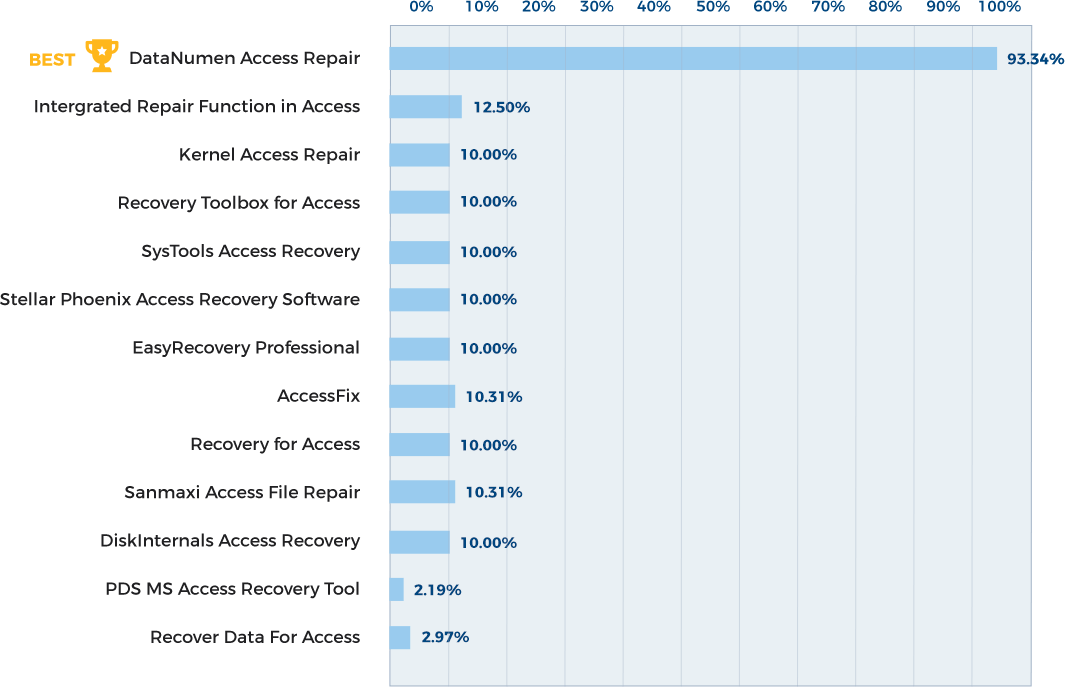
Repair and recover corrupted Microsoft Access databases (MDB/ACCDB files) with a [**verified 93.34% success rate**](https://www.datanumen.com/access-repair/compare/ "See verification data for our 93.34% success rate") – the industry’s highest. **DataNumen Access Repair** specializes in restoring critical database objects including tables, queries, and relationships while minimizing data loss from corruption.

[Free Download](https://download.datanumen.com/downloads/file/daccr.exe)20+ Years Of Experience

[ ![DataNumen Access Repair 4.5 Boxshot](https://www.datanumen.com/wp-content/uploads/2019/10/datanumen-access-repair-45-boxshot.png) ](https://download.datanumen.com/downloads/file/daccr.exe) 

![1,654 votes, average: 4.90 out of 5](https://www.datanumen.com/wp-content/themes/datanumen/images/rating_45.png "1,654 votes, average: 4.90 out of 5")   
**4.90 / 5 (from 1,654 votes)** 

* ### Overview
* ### Features
* ### How to Recover
* ### More Information
* ### Related Products

## Why DataNumen Access Repair?

---

_![#1 Recovery Rate](https://www.datanumen.com/wp-content/themes/datanumen/images/top-one-recovery-rate-icon.png)_ 

#### #1 Recovery   
Rate

_![10+ Million Users](https://www.datanumen.com/wp-content/themes/datanumen/images/10-million-users-icon.png)_ 

#### 10+ Million   
Users

_![20+ Years of Experience](https://www.datanumen.com/wp-content/themes/datanumen/images/20-years-experience-icon.png)_ 

#### 20+ Years of   
Experience

_![100% Satisfaction Guarantee](https://www.datanumen.com/wp-content/themes/datanumen/images/100-satisfaction-guarantee-icon.png)_ 

#### 100% Satisfaction   
Guarantee

## Recover Much More than Our Competitors

---

DataNumen Access Repair vs. Kernel Access Repair, EasyRecovery Professional, Stellar Phoenix Access Recovery Software, etc.

### Average Recovery Rate

[](https://www.datanumen.com/access-repair-compare/)

[Learn more about how DataNumen Access Repair smokes the competition ](https://www.datanumen.com/access-repair-compare/)

## Our Customers' Testimonials

![5 star rating]() 

My mdb file cannot be opened. With your software, I am able to fix it again.

Ebenezer West

Egypt  
April 25th, 2020

![5 star rating]() 

Some of my Access database files are corrupt. I try to use "Compact and Repair Database" feature in MS Access but not working. Your repair tool helps

[... Read more](#)

Some of my Access database files are corrupt. I try to use "Compact and Repair Database" feature in MS Access but not working. Your repair tool helps to recover my data!

Thanks a lot!

Thora Hampton

United States  
Nov 25th, 2020

![5 star rating]() 

Thank you for your help.  
The application works fine. The base is also OK.

Marcin K

e-automatyk  
ul. Leśna 17C, 62-006 Gruszczyn  
Dec 23th, 2020

![5 star rating]() 

 thanks. The product worked well.

Anthony Latos

Califonia, USA

![5 star rating]() 

In fact I found your solution in the first 10 mins!  
Anyway even though at first I thought this was a lot of money to spend on a small program,

[... Read more](#)

In fact I found your solution in the first 10 mins!  
Anyway even though at first I thought this was a lot of money to spend on a small program, DataNumen Access Repair did recover our database so now I'm very happy ;)

James Murphy

Anything Online

![5 star rating]() 

Wow your guys software is awesome I downloaded the trial software and it was able to show me all of the tables that I had in exact. This sofware

[... Read more](#)

Wow your guys software is awesome I downloaded the trial software and it was able to show me all of the tables that I had in exact. This sofware rocks and helped me so much. 

Ruff Dog

![5 star rating]() 

Thanks for getting back to me. I've since bought the software and got the link to download the software straight away. I installed it and it worked

[... Read more](#)

Thanks for getting back to me. I've since bought the software and got the link to download the software straight away. I installed it and it worked brilliantly!  
Many Thanks

Kevin O'Leary  
FETAC

Dublin, Ireland

![5 star rating]() 

Saved my Bacon! Thanks!

Brian

Atlanta, Georgia, USA

![5 star rating]() 

DataNumen Access Repair recovers more data than any other product I have used. It has helped me save many databases that have been corrupted. I am

[... Read more](#)

DataNumen Access Repair recovers more data than any other product I have used. It has helped me save many databases that have been corrupted. I am very pleased to have found this product.

Margaret Messick  
Costume Inventory Resources

Davis, CA, USA  
June 16, 2015

![5 star rating]() 

your tool is the best i was able to repair an access file for the university for personal use and im gratefull

Richard Network Manager Fixsa

Santo Domingo, Dominican Republic  
Dec 30th, 2018

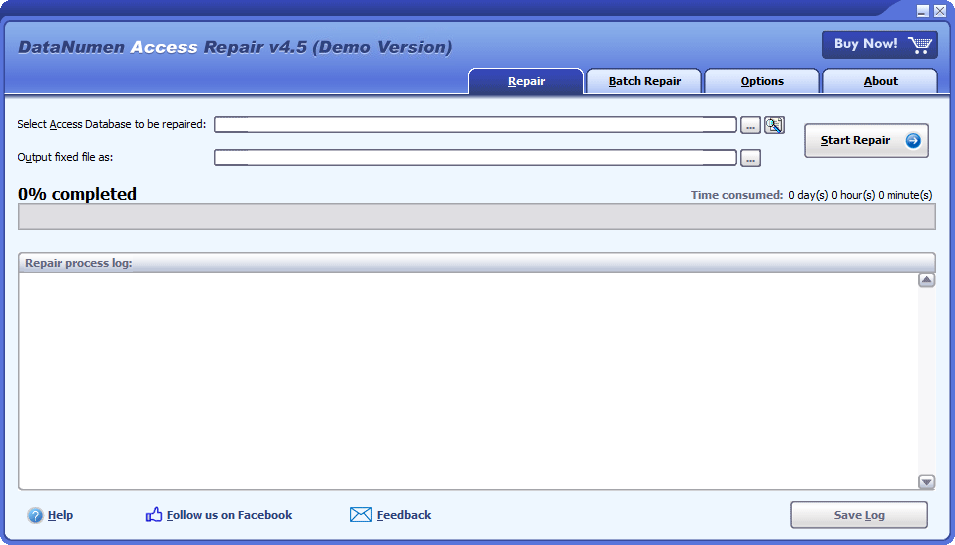
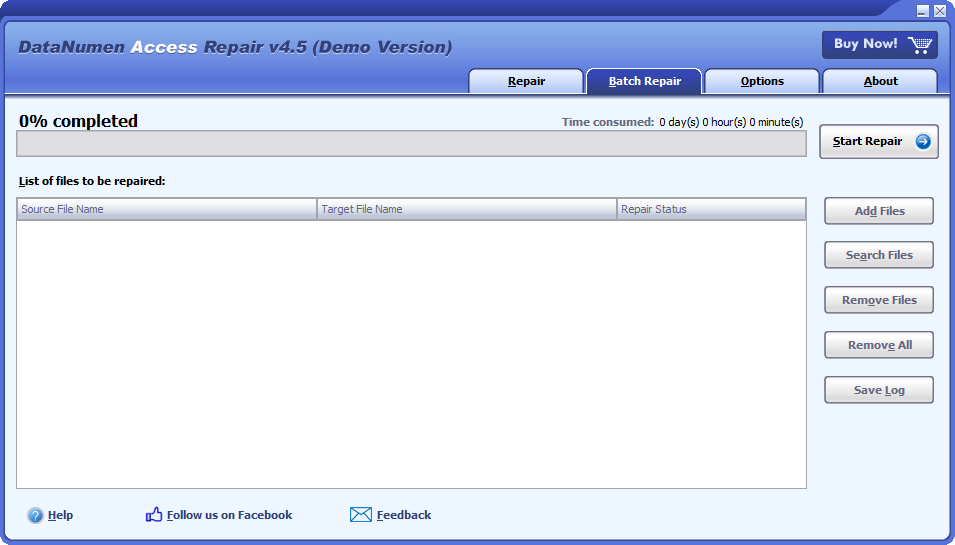
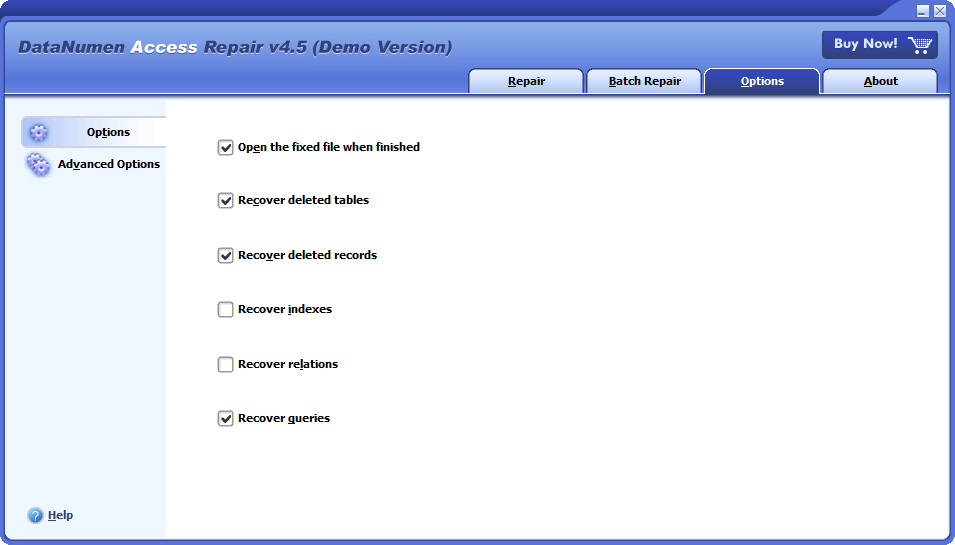
## Extremely Simple Interface

---

[](https://www.datanumen.com/wp-content/uploads/2019/10/datanumen-access-repair-45.png) 

#### Repair

[](https://www.datanumen.com/wp-content/uploads/2019/10/datanumen-access-repair-45-batch.png) 

#### Batch Repair

[](https://www.datanumen.com/wp-content/uploads/2019/10/datanumen-access-repair-45-options.png) 

#### Options

## Solution for Following Common Errors Due to [Access Database Corruption](https://www.datanumen.com/access-repair/errors/corrupt-access/)

---

![solutions]() 
* [Unrecognized Database Format](https://www.datanumen.com/access-repair/errors/unrecognized-database-format/)
* [The database ‘filename.mdb’ needs to be repaired or isn’t a database file.](https://www.datanumen.com/access-repair/errors/database-needs-repaired/)
* [The Microsoft Jet database engine could not find the object ‘xxxx’.](https://www.datanumen.com/access-repair/errors/could-not-find-object/)
* [Record(s) cannot be read; no read permission on ‘xxxx’.](https://www.datanumen.com/access-repair/errors/no-read-permission/)

[MORE ](https://www.datanumen.com/access-repair-access-error/) 

---

[Free Download](https://download.datanumen.com/downloads/file/daccr.exe)20+ Years Of Experience

[Buy Now](https://www.datanumen.com/access-repair-order/)100% Satisfaction Guarantee

## Main Features

---

* Repair Access mdb and accdb database files created by [Microsoft Access](https://www.microsoft.com/en-us/microsoft-365/access) 95, 97, 2000, 2002(XP), 2003, 2007, 2010, 2013, 2016, 2019, 2021, Access for Office 365 and Microsoft 365.
* Recover the structures and records of the tables in MS Access databases.
* Recover MEMO fields and OLE fields.
* [Recover deleted tables](https://www.datanumen.com/access-repair-undelete-access-tables/) and [records](https://www.datanumen.com/access-repair-undelete-access-records/) in Access databases.
* Recover autonumber fields.
* Recover queries, including SQL commands such as “Delete”, “Insert into” and “Update”.
* Recover other database objects, including indexes and relations.
* Recover password-encrypted Access databases.

---

[Free Download](https://download.datanumen.com/downloads/file/daccr.exe)20+ Years Of Experience

[Buy Now](https://www.datanumen.com/access-repair-order/)100% Satisfaction Guarantee

## Recover Corrupt Access Databases with DataNumen Access Repair

---

[See Video Tutorial ](https://youtu.be/hXWSGi2folE) 

Begin DataNumen Access Repair.

![DataNumen Access Repair 4.5]()

Note: Please shut down Microsoft Access before you start the recovery process for any damaged database file. You should also close other applications that could potentially modify the Access database file.

After that, choose the corrupt or damaged Access mdb/accdb file that you want to repair:

![Select Source Access Database]()

You can enter the file name directly or browse for it by clicking the ![Browse and Select File]() button.

DataNumen Access Repair will automatically save the recovered data under a file titled xxxx\_fixed.mdb. The xxxx represents the name of the damaged source file. So, the fixed file would be MyAccessDB\_fixed.mdb if the name of the damaged file was MyAccessDB.mdb. However, you can rename it if you would like:

![DataNumen Access Repair Select Destination File]()

You can directly enter the name of the file or use the ![Browse and Select File]() button to choose the file by browsing.

Next, you can use the ![Start Repair]() button to instruct DataNumen Access Repair to begin scanning and repairing the corrupt Access database file. The progress bar will look like this:

![DataNumen Access Repair Progress Bar]()

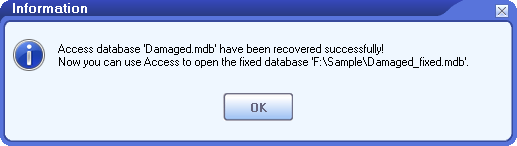
A message box that looks like this will appear if the file was capable of being repaired:

![DataNumen Access Repair Success Message Box]()

Finally, after hitting “OK” you should be able to open the repaired mdb/accdb database with Microsoft Access or a similar application.

## More Information

---

![Specifications]() Specifications 

![Case Studies]() Case Studies 

![FAQ]() FAQ 

![Help Documentation]() Help Documentation 

| **Version**                      | 4.5 ([Version History](https://www.datanumen.com/news/)) |
| -------------------------------- | -------------------------------------------------------- |
| **Release Date**                 | November 2nd, 2023                                       |
| **Supported File Types**         | MDB, ACCDB                                               |
| **Supported Access Versions**    | Access 95–2021; Access for Office 365; Microsoft 365     |
| **Recoverable Objects**          | Tables, records, queries, indexes, relationships         |
| **Deleted Data Recovery**        | Deleted tables and records                               |
| **Password-Protected Databases** | Supported                                                |
| **Supported Languages**          | 95 languages                                             |

#### Requirements

| **Operating System** | Windows                          |
| -------------------- | -------------------------------- |
| **Processor**        | Intel or equivalent (x86, x64)   |
| **Memory**           | 64 MB minimum (2 GB recommended) |
| **Disk Space**       | 23 MB                            |

[Reviving Critical Data: How HSBC Leveraged DataNumen Access Repair for Seamless Recovery](https://www.datanumen.com/access-repair/case-studies/hsbc/)   
[Reviving Critical Data: How DataNumen Access Repair Rescued Dr Pepper Snapple Group’s Database](https://www.datanumen.com/access-repair/case-studies/dr-pepper-snapple/)   
[Strengthening Databases with DataNumen Access Repair: A Case Study at Wells Fargo](https://www.datanumen.com/access-repair/case-studies/wells-fargo/)   
[Charter Communications Harnesses the Potential of DataNumen Access Repair: A Case Study](https://www.datanumen.com/access-repair/case-studies/charter-communications/)   
[Honeywell Enhances Database Management with DataNumen Access Repair: A Case Study](https://www.datanumen.com/access-repair/case-studies/honeywell/)   
[RBC Revitalizes Data Management via DataNumen Access Repair: A Case Study](https://www.datanumen.com/access-repair/case-studies/rbc/)   
[Unilever Optimizes Database Management with DataNumen Access Repair: A Case Study](https://www.datanumen.com/access-repair/case-studies/unilever/)   
[Monsanto Salvaged Critical Research Data using DataNumen Access Repair: A Case Study](https://www.datanumen.com/access-repair/case-studies/monsanto/)   
[PepsiCo’s Success with DataNumen Access Repair: A Case Study](https://www.datanumen.com/access-repair/case-studies/pepsico/)   

[More Case Studies ](https://www.datanumen.com/case-studies/) 

### Is there a free way to fix a corrupted Access database?

Yes, MS Access has a [**Compact and Repair**](https://support.microsoft.com/en-us/office/compact-and-repair-a-database-6ee60f16-aed0-40ac-bf22-85fa9f4005b2) utility. You can use it to repair a database with minor corruptions, as below:

1. Close all other applications that may access the corrupt database.
2. Start **Access**.
3. On the templates page, double-click **Blank Database** to create a blank database.
4. Then you will be able to see the menu items appear at the top of Access.
5. Click **File** \> **Close** to close the blank database.
6. Click **Database Tools** \> **Compact and Repair Database**
7. In the pop-up **Database to Compact From** dialog box, select the corrupt MS Access database to be repaired.
8. Then, in the pop-up **Compact Database Into** dialog box, select the location and name of a new database file.
9. Then Access will compact and repair the corrupt database, and output the recovered data to the new file as specified in step 8.

The “Compact and Repair Database” function can only fix corruption in tables. If the compiled VBA module codes in your database are corrupt, it will not work. You can try the following way to decompile the VBA codes and fix the corruption:

1. Back up your original database.
2. Search for “MSACCESS.EXE” on your local computer.
3. Invoke MSACCESS.EXE from its location, together with the /decompile command and the database to be decompiled. For example, for Access 2019, the command will look like this:”C:\\Program Files (x86)\\Microsoft Office\\root\\Office16\\MSACCESS.EXE” “D:\\MyCorruptDatabase.mdb” /decompile
4. Then Access will open the database, discard all the compiled modules, and keep the source VBA codes only.
5. Click **File** \> **Info** \> **Compact & Repair Database**, Access will compact and repair the current database for you.

“Compact and Repair Database” function will invoke the CompactDatabase method in Microsoft Jet database engine, which will try to open the corrupt database before compacting it. In some cases, the method may not be able to open the database so cannot proceed. In such a case, you can try a stand-alone [Jet compact utility](https://docs.microsoft.com/en-us/office/troubleshoot/access/jet-compact-utility-download), JETCOMP.exe. It will not try to open the database before compacting. So may work for your cases.

For badly damaged databases, the above methods will not work. You need to use [DataNumen Access Repair](https://www.datanumen.com/access-repair/) to do the task.

### What are your tool’s advantages over other similar tools?

There are many similar Access database repair tools in the market, such as Stellar Repair for Access. Even MS Access has a built-in function which can repair Access database files with minor corruptions. However, [our tool performs much more better than all other competitors](https://www.datanumen.com/access-repair-compare/) in the market.

### Which types of database objects can be recovered by your product?

The current version of DataNumen Access Repair supports to recover all tables, records, indexes, queries and relationships in the Access database. Other database objects, such as forms, VBA modules, macros are not supported yet.

### Which versions of Access are supported?

Our Access data recovery tool supports to repair Access database files generated by Microsoft Access 95, 97, 2000, 2002(XP), 2003, 2007, 2010, 2013, 2016, 2019, and Access for Office 365\. Both the mdb file and accdb file are supported.

When repairing the Microsoft Access database, our tool does not require Access to be installed on the local computer. It can generate the fixed Access database in Access 95/97 or Access 2000 format, which can be opened by Access 95+ versions.

### How long does it take to repair a corrupt Access database file?

There are many factors that may affect the time consumed in the file repair process. Below we outline some of the most important ones:

1. The file size. When dealing with large files, the duration of the scanning and analysis process may increase significantly because our program meticulously examines each byte in your file. This can be a quite time-consuming task. To illustrate, repairing a 2GB Access database typically requires around an hour.
2. The hardware and software configurations of your computer system. A computer with a faster CPU, more cores and more memory will normally perform faster.
3. Close all other apps when repairing. It will consume a lot of time and resources to repair a large Access database file. Therefore, it is recommended to close any other apps when using DataNumen Access Repair to repair the file.

### Is it necessary to close Microsoft Access in the repair process?

Yes, it is recommended to do so when you repair your corrupt Access database file.

In fact, throughout the repair process, you may occasionally observe Microsoft Access starting up in the background, and subsequently shutting down on its own. This behavior is completely expected because our tool will utilize the Jet database engine within Microsoft Access, if it’s installed on the local machine.

### What are the requirements of your tool?

Below are the software requirements for our data recovery tool:

Windows 95/98/ME/NT/2000/XP/Vista/7/8/8.1/10 or Windows Server 2003/2008/2012/2016/2019\. Both 32bit and 64bit systems are supported.

Microsoft Office Access is not required to be installed on the local computer.

### Why my Access file gets corrupt?

There are many reasons that will cause Access database corruption, such as power failure, hard disk/drive failure, software bugs, virus infection, ransomware attack.

The best solution to prevent data loss is to backup your database regularly. Moreover, having a professional [Access database recovery tool](https://www.datanumen.com/access-repair/) in hand is also very important, as you can use it to repair corrupt files as soon as possible.

### Is it possible to save the database in Access 95/97 format?

Yes, please do as follows:

1. Start our file repair tool.
2. Select the **“Options”** tab
3. Click **“Advanced Options”** tab in the left panel.
4. Set **“Output database format”** to **“MS Access 95/97 format”**  
5\. Repair the corrupt Access database.
5. The fixed database will be saved in Access 95/97 format.

### Can you recover deleted tables or records in an Access database?

Yes, by default, our tool will recover deleted records and tables in the source Access database. If you find the deleted records are not recovered, then please do as follows:

1. Start our tool.
2. Click “Options” tab.
3. Check “Recover deleted tables” to recover deleted tables.
4. Check “Recover deleted records” to recover deleted records.
5. Re-repair the corrupt Access database.
6. You will see the deleted tables and records are recovered. If not, then the deleted tables or records are beyond recovery, due the file corruption.

[More Articles in Knowledgebase ](https://www.datanumen.com/knowledgebase/) 

## Related Products

---

![DataNumen Oracle Recovery Boxshot]() 

### [DataNumen Oracle Recovery](https://www.datanumen.com/oracle-recovery/)

Recover corrupt Oracle DBF database files.

[Details ](https://www.datanumen.com/oracle-recovery/) 

![DataNumen DBF Repair 4.0 Boxshot]() 

### [DataNumen DBF Repair](https://www.datanumen.com/dbf-repair/)

Repair corrupt dBase, FoxBase, FoxPro and Visual FoxPro DBF files.

[Details ](https://www.datanumen.com/dbf-repair/) 

![DataNumen Outlook Repair 10.2 Screenshot]() 

### [DataNumen Outlook Repair](https://www.datanumen.com/outlook-repair/)

Repair and recover corrupt Microsoft Outlook data files (.pst).

[Details ](https://www.datanumen.com/outlook-repair/) 

![DataNumen Word Repair 5.0 Boxshot]() 

### [DataNumen Word Repair](https://www.datanumen.com/word-repair/)

Repair and recover corrupt Microsoft Word documents (.doc and .docx files).

[Details ](https://www.datanumen.com/word-repair/) 

![DataNumen Excel Repair 4.5 Boxshot]() 

### [DataNumen Excel Repair](https://www.datanumen.com/excel-repair/)

Repair and recover corrupt or damaged Microsoft Excel xls, xlw and xlsx files.

[Details ](https://www.datanumen.com/excel-repair/) 

### ![DataNumen Access Repair 4.5 Boxshot]() DataNumen Access Repair

[Free Download](https://download.datanumen.com/downloads/file/daccr.exe)

[Buy Now](https://www.datanumen.com/access-repair-order/)

![DataNumen]() 

Follow or like us on Facebook, LinkedIn and Twitter to get all promotions, latest news and updates on our products and company.

* [ ](https://www.facebook.com/DataNumen)
* [ ](https://www.linkedin.com/company/datanumen)
* [ ](https://twitter.com/DataNumen)

### Featured Products

* [DataNumen Outlook Repair](https://www.datanumen.com/outlook-repair/)
* [DataNumen SQL Recovery](https://www.datanumen.com/sql-recovery/)
* [DataNumen Exchange Recovery](https://www.datanumen.com/exchange-recovery/)
* [DataNumen Access Repair](https://www.datanumen.com/access-repair/)
* [DataNumen Excel Repair](https://www.datanumen.com/excel-repair/)
* [DataNumen PDF Repair](https://www.datanumen.com/pdf-repair/)
* [DataNumen Word Repair](https://www.datanumen.com/word-repair/)
* [DataNumen Zip Repair](https://www.datanumen.com/zip-repair/)

### [Latest news](https://www.datanumen.com/news/)

  * [DataNumen Outlook Drive Recovery 10.2 is released on May 9th, 2025](https://www.datanumen.com/outlook-drive-recovery/)
  * [DataNumen Outlook Repair 10.2 is released on April 15th, 2025](https://www.datanumen.com/outlook-repair/)
  * [DataNumen SQL Recovery 7.3 is released on February 19th, 2025](https://www.datanumen.com/sql-recovery/)

[ ](#masthead)

```json
{"@context":"https:\/\/schema.org","@graph":[{"@type":"WebPage","@id":"https:\/\/www.datanumen.com\/access-repair\/","url":"https:\/\/www.datanumen.com\/access-repair\/","name":"Access Database Repair Software | Fix & Recover MDB\/ACCDB","isPartOf":{"@id":"https:\/\/www.datanumen.com\/#website"},"primaryImageOfPage":{"@id":"https:\/\/www.datanumen.com\/access-repair\/#primaryimage"},"image":{"@id":"https:\/\/www.datanumen.com\/access-repair\/#primaryimage"},"thumbnailUrl":"https:\/\/www.datanumen.com\/wp-content\/uploads\/2019\/10\/datanumen-access-repair-45-boxshot.png","datePublished":"2019-10-14T09:43:32+00:00","dateModified":"2026-07-10T10:18:33+00:00","description":"Repair & recover corrupted Access databases (MDB\/ACCDB) with 93% success. Free download! Trusted since 2001. 30-day money-back guarantee.","breadcrumb":{"@id":"https:\/\/www.datanumen.com\/access-repair\/#breadcrumb"},"inLanguage":"en-US","potentialAction":[{"@type":"ReadAction","target":["https:\/\/www.datanumen.com\/access-repair\/"]}]},{"@type":"ImageObject","inLanguage":"en-US","@id":"https:\/\/www.datanumen.com\/access-repair\/#primaryimage","url":"https:\/\/www.datanumen.com\/wp-content\/uploads\/2019\/10\/datanumen-access-repair-45-boxshot.png","contentUrl":"https:\/\/www.datanumen.com\/wp-content\/uploads\/2019\/10\/datanumen-access-repair-45-boxshot.png","width":241,"height":320,"caption":"DataNumen Access Repair 4.5 Boxshot"},{"@type":"BreadcrumbList","@id":"https:\/\/www.datanumen.com\/access-repair\/#breadcrumb","itemListElement":[{"@type":"ListItem","position":1,"name":"Home","item":"https:\/\/www.datanumen.com\/"},{"@type":"ListItem","position":2,"name":"Access Database Repair Tool"}]},{"@type":"WebSite","@id":"https:\/\/www.datanumen.com\/#website","url":"https:\/\/www.datanumen.com\/","name":"DataNumen","description":"","publisher":{"@id":"https:\/\/www.datanumen.com\/#organization"},"potentialAction":[{"@type":"SearchAction","target":{"@type":"EntryPoint","urlTemplate":"https:\/\/www.datanumen.com\/?s={search_term_string}"},"query-input":{"@type":"PropertyValueSpecification","valueRequired":true,"valueName":"search_term_string"}}],"inLanguage":"en-US"},{"@type":"Organization","@id":"https:\/\/www.datanumen.com\/#organization","name":"DataNumen, Inc.","url":"https:\/\/www.datanumen.com\/","logo":{"@type":"ImageObject","inLanguage":"en-US","@id":"https:\/\/www.datanumen.com\/#\/schema\/logo\/image\/","url":"https:\/\/www.datanumen.com\/wp-content\/uploads\/2020\/03\/favicon.png","contentUrl":"https:\/\/www.datanumen.com\/wp-content\/uploads\/2020\/03\/favicon.png","width":600,"height":600,"caption":"DataNumen, Inc."},"image":{"@id":"https:\/\/www.datanumen.com\/#\/schema\/logo\/image\/"},"sameAs":["https:\/\/www.facebook.com\/DataNumen","https:\/\/x.com\/DataNumen","https:\/\/www.linkedin.com\/company\/datanumen","https:\/\/myspace.com\/datanumen\/","https:\/\/www.pinterest.com\/datanumen\/data-recovery\/","https:\/\/www.youtube.com\/c\/DataNumen"]}]}
{
  "@context": "https://schema.org",
  "@type": "SoftwareApplication",
  "@id": "https://www.datanumen.com/access-repair/#software",
  "name": "DataNumen Access Repair",
  "url": "https://www.datanumen.com/access-repair/",
  "image": "https://www.datanumen.com/access-repair/images/daccrboxst.jpg",
  "description": "DataNumen Access Repair is a Microsoft Access database repair and recovery tool for repairing corrupted MDB and ACCDB files and recovering tables, records, queries, indexes, relationships, and other database objects where possible.",
  "softwareVersion": "4.5",
  "dateModified": "2023-11-02",
  "releaseNotes": "https://www.datanumen.com/news/",
  "applicationCategory": "UtilitiesApplication",
  "applicationSubCategory": "Database Repair Software",
  "operatingSystem": "Windows",
  "processorRequirements": "Intel or equivalent (x86, x64)",
  "memoryRequirements": "64 MB minimum (2 GB recommended)",
  "storageRequirements": "23 MB",
  "inLanguage": [
    "English",
    "Bulgarian",
    "Czech",
    "Danish",
    "German",
    "Greek",
    "Spanish",
    "Estonian",
    "Finnish",
    "French",
    "Hungarian",
    "Indonesian",
    "Italian",
    "Japanese",
    "Korean",
    "Lithuanian",
    "Latvian",
    "Norwegian",
    "Dutch",
    "Polish",
    "Portuguese",
    "Romanian",
    "Russian",
    "Slovak",
    "Slovenian",
    "Swedish",
    "Turkish",
    "Ukrainian",
    "Chinese (Simplified)",
    "Afrikaans",
    "Albanian",
    "Amharic",
    "Arabic",
    "Armenian",
    "Assamese",
    "Azerbaijani",
    "Basque",
    "Belarusian",
    "Bengali",
    "Bosnian",
    "Catalan",
    "Chinese (Traditional)",
    "Corsican",
    "Croatian",
    "Divehi",
    "Filipino",
    "Frisian",
    "Galician",
    "Georgian",
    "Gujarati",
    "Hausa",
    "Hebrew",
    "Hindi",
    "Icelandic",
    "Igbo",
    "Irish",
    "Kannada",
    "Kazakh",
    "Khmer",
    "Kinyarwanda",
    "Kyrgyz",
    "Lao",
    "Luxembourgish",
    "Macedonian",
    "Malay",
    "Malayalam",
    "Maltese",
    "Maori",
    "Marathi",
    "Mongolian",
    "Nepali",
    "Oriya",
    "Pashto",
    "Persian",
    "Punjabi",
    "Sanskrit",
    "Scottish Gaelic",
    "Sesotho",
    "Serbian",
    "Sinhala",
    "Kiswahili",
    "Tajik",
    "Tamil",
    "Tatar",
    "Telugu",
    "Thai",
    "Turkmen",
    "Urdu",
    "Uyghur",
    "Uzbek",
    "Vietnamese",
    "Welsh",
    "isiXhosa",
    "Yoruba",
    "isiZulu"
  ],
  "publisher": {
    "@type": "Organization",
    "name": "DataNumen",
    "url": "https://www.datanumen.com/",
    "logo": "https://www.datanumen.com/images/logo.png"
  },
  "featureList": [
    "Repair Microsoft Access MDB and ACCDB database files",
    "Support Access database files created by Microsoft Access 95, 97, 2000, 2002/XP, 2003, 2007, 2010, 2013, 2016, 2019, 2021, Access for Office 365, and Microsoft 365",
    "Recover table structures and records from corrupted Access databases",
    "Recover MEMO fields and OLE fields",
    "Recover deleted tables and records in Access databases",
    "Recover AutoNumber fields",
    "Recover queries, including SQL statements such as DELETE, INSERT INTO, and UPDATE",
    "Recover database objects including indexes and relationships",
    "Recover password-protected Access databases",
    "Support 95 languages"
  ],
  "aggregateRating": {
    "@type": "AggregateRating",
    "ratingValue": "4.9",
    "bestRating": "5",
    "worstRating": "1",
    "ratingCount": "1654"
  },
  "offers": {
    "@type": "Offer",
    "name": "1 User License",
    "url": "https://www.datanumen.com/access-repair/buy/",
    "priceCurrency": "USD",
    "price": "199.95",
    "availability": "https://schema.org/InStock"
  }
}
```