
當您收到附件時,「.zip如果要解壓縮文件,通常需要將擴展名為“.txt”的檔案儲存到本機磁碟機並解壓縮。但許多用戶希望直接在 Outlook 中解壓縮。本文將教您如何透過 VBA 實現這一目標。
您一定收到過“附件”.zip“ 文件擴展名。 為了一次訪問內部文件 zip 要開啟文件,首先需要解壓縮。在這種情況下,像往常一樣,您必須先儲存文件。 zip 將文件解壓縮到本機驅動器,然後右鍵單擊該文件,從上下文選單中選擇“全部提取”。實際上,許多使用者更喜歡直接在 Outlook 中解壓縮檔案。然而,Outlook 本身並未提供此功能。幸運的是,您可以按照以下步驟使用 VBA 輕鬆實現此功能。
解壓縮 .Zip 直接在Outlook中的附件
- 首先,啟動Outlook應用程序。
- 然後在Outlook窗口中按“ Alt + F11”快捷鍵以訪問VBA編輯器。
- 接下來,在“ Microsoft Visual Basic for Applications”窗口中,打開一個未使用的模塊。
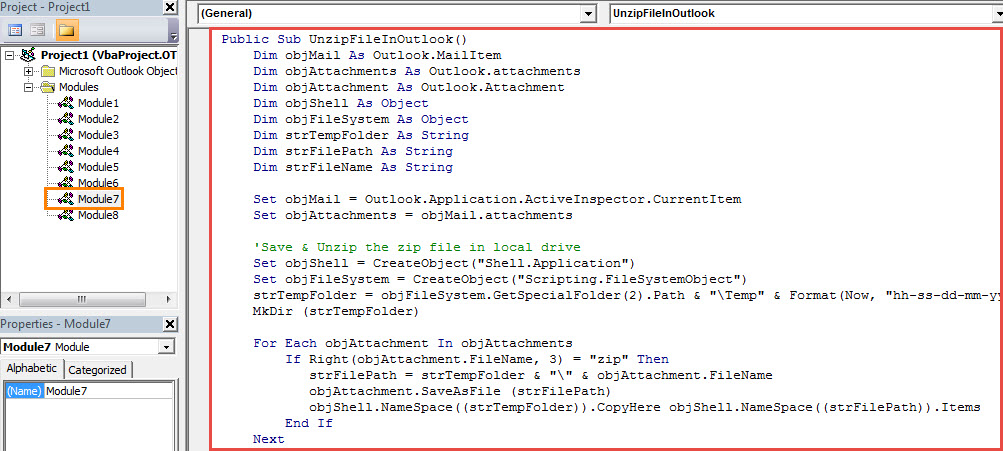
- 隨後,將以下VBA代碼複製並粘貼到該模塊中。
Public Sub UnzipFileInOutlook()
    Dim objMail As Outlook.MailItem
    Dim objAttachments As Outlook.attachments
    Dim objAttachment As Outlook.Attachment
    Dim objShell As Object
    Dim objFileSystem As Object
    Dim strTempFolder As String
    Dim strFilePath As String
    Dim strFileName As String

    Set objMail = Outlook.Application.ActiveInspector.CurrentItem
    Set objAttachments = objMail.attachments

    'Save & Unzip the zip file in local drive
    Set objShell = CreateObject("Shell.Application")
    Set objFileSystem = CreateObject("Scripting.FileSystemObject")
    strTempFolder = objFileSystem.GetSpecialFolder(2).Path & "\Temp" & Format(Now, "yyyy-mm-dd-hh-mm-ss")
    MkDir (strTempFolder)

    For Each objAttachment In objAttachments
        If Right(objAttachment.FileName, 3) = "zip" Then
           strFilePath = strTempFolder & "\" & objAttachment.FileName
           objAttachment.SaveAsFile (strFilePath)
           objShell.NameSpace((strTempFolder)).CopyHere objShell.NameSpace((strFilePath)).Items
        End If
    Next

    'Reattach the files extracted from the zip file
    strFileName = Dir(strTempFolder & "\")

    While Len(strFileName) > 0
          objMail.attachments.Add (strTempFolder & "\" & strFileName)
          strFileName = Dir
          objMail.Save
    Wend

    'Delete the attachments in “.zip” file extension
    Set objAttachments = objMail.attachments
    For Each objAttachment In objAttachments
        If Right(objAttachment.FileName, 3) = "zip" Then
           objAttachment.Delete
           objMail.Save
        End If
    Next

    'Delete the temp folder and files
    objFileSystem.DeleteFolder (strTempFolder)
End Sub
- 之後,您可以像往常一樣將新的VBA項目添加到消息窗口的快速訪問工具欄。
- 最後,您可以嘗試一下。
- 首先,使用 zip 文件放在自己的窗口中。
- 然後單擊“操作”>“編輯消息”。
- 接下來,在快速訪問工具欄中單擊新的宏按鈕。
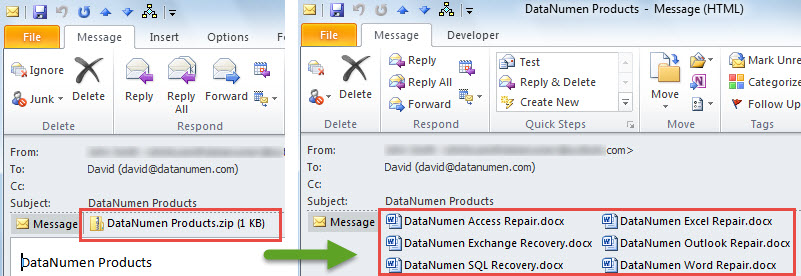
- 立刻 zip 文件將解壓縮,如下圖所示:

擺脫煩人的PST問題
儘管新Unicode格式的PST文件支持20 GB的文件大小,但保持文件盡可能小仍然是明智的。 這是因為較大的PST文件更容易損壞。 一旦您的PST文件遭到破壞,您將必須努力 恢復PST 數據。 在這種情況下,您別無選擇,只能使用經過驗證的信譽良好的工具,例如 DataNumen Outlook Repair.
作者簡介:
Shirley Zhang是的數據恢復專家 DataNumen,Inc.是數據恢復技術的全球領導者,包括 sql修復 和Outlook修復軟件產品。 欲了解更多信息,請訪問 萬維網。datanumen.COM