
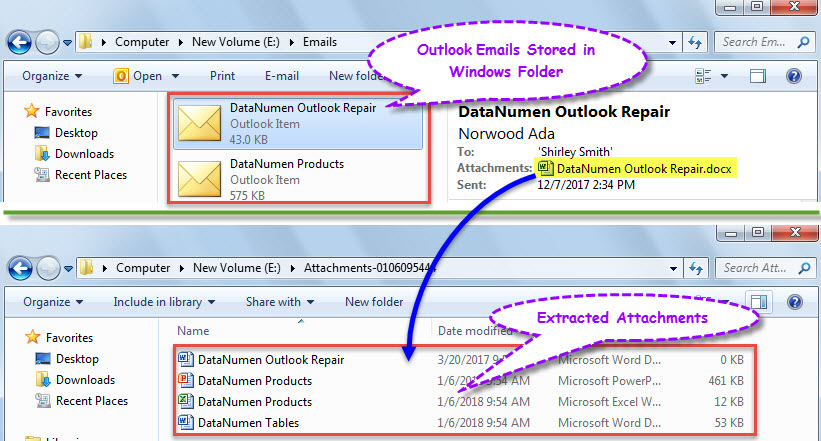
也許您已在 Windows 文件夾中以 .msg 格式存儲了多封 Outlook 電子郵件。 而以後,你想從這些文件中提取附件,可以使用本文分享的方式。
從 Outlook 中的電子郵件中提取附件非常容易。 但是,在 Windows 文件夾中導出為 .msg 文件的電子郵件又如何呢? 一般來說,您必須首先在 Outlook 中打開這些 .msg 文件,然後將其中的附件一一保存。 也許你會覺得太麻煩了。 因此,接下來,我們將教您另一種更快的解決方案。
從 Windows 文件夾中的所有 Outlook 郵件文件中提取附件
- 首先,啟動 Outlook 應用程式並執行 VBA 編輯器。
- 然後,在“ Microsoft Visual Basic for Applications”窗口中,將下面的VBA代碼複製到未使用的模塊中。
Dim strAttachmentFolder As String

Sub ExtractAttachmentsFromEmailsStoredinWindowsFolder()
    Dim objShell, objWindowsFolder As Object

    'Select a Windows folder
    Set objShell = CreateObject("Shell.Application")
    Set objWindowsFolder = objShell.BrowseForFolder(0, "Select a Windows Folder:", 0, "")

    If Not objWindowsFolder Is Nothing Then
       'Create a new folder for saving extracted attachments
       strAttachmentFolder = "E:\Attachments-" & Format(Now, "MMDDHHMMSS") & "\"
       MkDir (strAttachmentFolder)
       Call ProcessFolders(objWindowsFolder.self.Path & "\")
       MsgBox "Completed!", vbInformation + vbOKOnly
    End If
End Sub

Sub ProcessFolders(strFolderPath As String)
    Dim objFileSystem As Object
    Dim objFolder As Object
    Dim objFiles As Object
    Dim objFile As Object
    Dim objItem As Object
    Dim i As Long
    Dim objSubFolder As Object

    Set objFileSystem = CreateObject("Scripting.FileSystemObject")
    Set objFolder = objFileSystem.GetFolder(strFolderPath)
    Set objFiles = objFolder.Files

    For Each objFile In objFiles
        If objFileSystem.GetExtensionName(objFile) = "msg" Then
           'Open the Outlook emails stored in Windows folder
           Set objItem = Session.OpenSharedItem(objFile.Path)

           If TypeName(objItem) = "MailItem" Then
              If objItem.Attachments.Count > 0 Then
                 'Extract attachments
                 For i = objItem.Attachments.Count To 1 Step -1
                     objItem.Attachments(i).SaveAsFile strAttachmentFolder & objItem.Attachments(i).FileName
                 Next
              End If
           End If
        End If
    Next

    'Process all subfolders recursively
    If objFolder.SubFolders.Count > 0 Then
       For Each objSubFolder In objFolder.SubFolders
           If ((objSubFolder.Attributes And 2) = 0) And ((objSubFolder.Attributes And 4) = 0) Then
              Call ProcessFolders(objSubFolder.Path)
           End If
       Next
    End If
End Sub
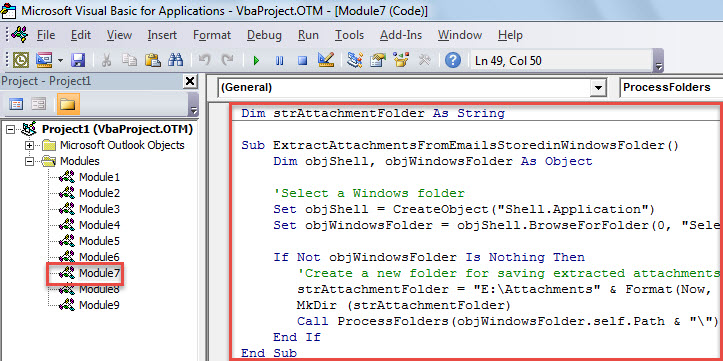
- 隨後,將光標移至第一個子程序並按“F5”鍵。
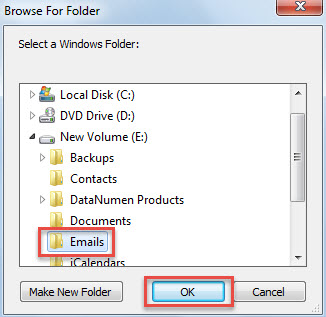
- 然後,您需要在彈出的對話框中選擇源 Windows 文件夾。

- 單擊“確定”後,宏將繼續工作。
- 完成後,您將收到“已完成”消息。
- 現在,您可以訪問預定義的本地文件夾來保存提取的附件。

有效解決 Outlook 問題
由於 Outlook 確實容易出錯,因此在處理 Outlook 對象時必須保持謹慎,例如永遠不要信任未知電子郵件中嵌入的文件或鏈接等。 否則,您的 Outlook 文件很容易損壞。 在這種情況下,即使是內部修復工具也沒有多大幫助。 您只能求助於經驗豐富的外部實用程序,例如 DataNumen Outlook Repair。 它可以 修復PST 毫不費力地歸檔。
作者簡介:
Shirley Zhang是的數據恢復專家 DataNumen,Inc.是數據恢復技術的全球領導者,包括 損壞的SQL 和Outlook修復軟件產品。 欲了解更多信息,請訪問 萬維網。datanumen.COM