
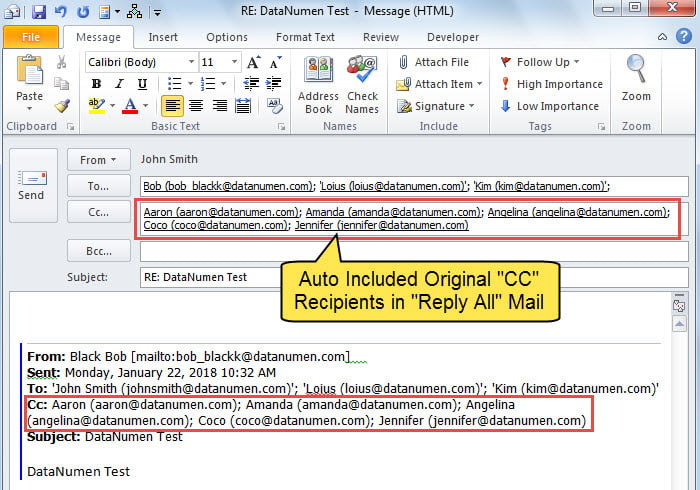
使用“全部答复”時,響應的電子郵件還將在“抄送”字段中包括原始電子郵件的“抄送”收件人。 但是,如果您希望排除這種類型的收件人,則可以使用本文介紹的方法。
有時,您希望將電子郵件回复給原始發件人和“收件人”收件人。 在這種情況下,您肯定會考慮使用“全部答复”選項。 但是,通過這種方式,如果原始郵件中也有“抄送”收件人,則“全部答复”電子郵件將自動將“抄送”收件人復製到“抄送”字段。 如果您不想回复它們,則必須手動將其刪除,這有點麻煩。 現在,在下面的內容中,我們將教您如何讓Outlook根據您的需要自動完成它。
使用“全部答复”時快速排除原始“ CC”收件人
- 首先,啟動 Outlook。
- 然後,通過閱讀上一篇文章訪問VBA編輯器-如何在Outlook中運行VBA代碼“。
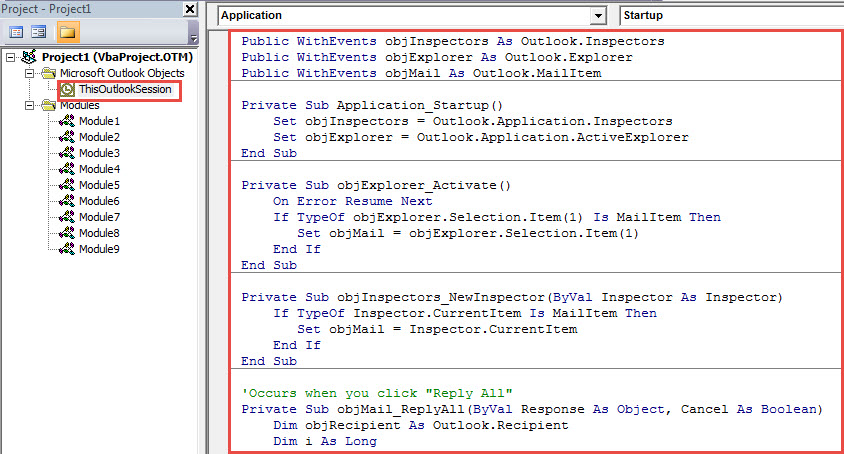
- 接下來,將以下VBA代碼複製到“ ThisOutlookSession”項目中。
Public WithEvents objInspectors As Outlook.Inspectors
Public WithEvents objExplorer As Outlook.Explorer
Public WithEvents objMail As Outlook.MailItem

Private Sub Application_Startup()
    Set objInspectors = Outlook.Application.Inspectors
    Set objExplorer = Outlook.Application.ActiveExplorer
End Sub

Private Sub objExplorer_Activate()
    On Error Resume Next
    If TypeOf objExplorer.Selection.Item(1) Is MailItem Then
       Set objMail = objExplorer.Selection.Item(1)
    End If
End Sub

Private Sub objInspectors_NewInspector(ByVal Inspector As Inspector)
    If TypeOf Inspector.CurrentItem Is MailItem Then
       Set objMail = Inspector.CurrentItem
    End If
End Sub

'Occurs when you click "Reply All"
Private Sub objMail_ReplyAll(ByVal Response As Object, Cancel As Boolean)
    Dim objRecipient As Outlook.Recipient
    Dim i As Long

    'Ask you if to exclude CC recipients
    If MsgBox("Do you want to exclude original CC recipients? " , vbQuestion + vbYesNo) = vbYes Then
       'If select Yes, remove CC recipients
       For i = Response.Recipients.Count To 1 Step -1
           If Response.Recipients(i).Type = olCC Then
              Response.Recipients.Remove (i)
           End If
       Next
    End If
End Sub
- 然後,重新啟動 Outlook 以啟動此新項目。
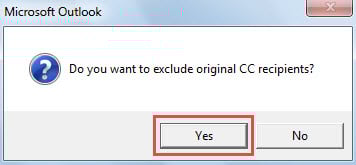
- 從那時起,每當您單擊“全部答复”按鈕時,都會出現提示,如下圖所示,詢問您是否要排除原始抄送收件人。

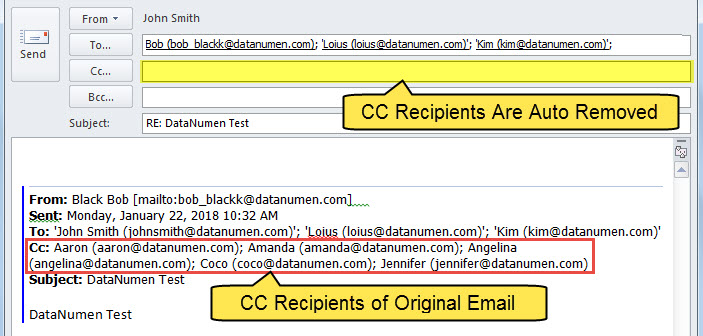
- 如果選擇“是”,Outlook將自動刪除“抄送”字段中的收件人。

做好充分準備以應對Outlook損壞
眾所周知,沒有人能百分之百保證自己免受 Outlook 損壞的影響。因此,所有 Outlook 的常用使用者都必須採取多項預防措施。首先,最重要的措施之一是定期備份並更新 Outlook 資料。其次,學習如何使用收件匣修復工具也十分必要。最後,與經驗豐富的 Outlook 管理員保持聯繫是明智之舉。 Outlook修復 附近的工具,例如 DataNumen Outlook Repair.
作者簡介:
Shirley Zhang是的數據恢復專家 DataNumen,Inc.是數據恢復技術的全球領導者,包括 恢復mdf 和Outlook修復軟件產品。 欲了解更多信息,請訪問 萬維網。datanumen.COM