
默認情況下,Outlook 將自動使用任務的默認提醒時間來標記所有類型的項目。 但是,如果您想根據項目類型對標記的項目使用不同的提醒時間,則可以參考本文介紹的方法。
Outlook 允許您為所有標記的項目設置默認提醒時間,而不管項目類型如何。 您可以轉到“文件”菜單並單擊“選項”。 然後,在“Outlook 選項”窗口中,您可以在“任務”選項卡上看到“默認提醒時間”選項,如下圖所示。
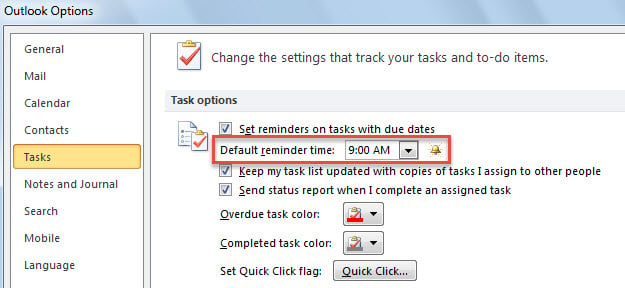
然而,大多數用戶希望為不同類型的標記項目設定不同的提醒時間,例如標記郵件設定為“9:00”,標記聯絡人設定為“17:30”。接下來,我們將以這個例子為例,介紹一個方法。
為不同種類的標記項目設置不同的默認提醒時間
- 首先,啟動 Outlook 應用程式。
- 然後,參考“如何在Outlook中運行VBA代碼“。
- 在隨後出現的“Microsoft Visual Basic for Applications”窗口中,將以下代碼複製到“ThisOutlookSession”項目中。
Public WithEvents objExplorer As Outlook.Explorer
Public WithEvents objInspectors As Outlook.Inspectors
Public WithEvents objMail As Outlook.MailItem
Public WithEvents objContact As Outlook.ContactItem

Private Sub Application_Startup()
    Set objExplorer = Outlook.Application.ActiveExplorer
    Set objInspectors = Outlook.Application.Inspectors
End Sub

Private Sub objExplorer_SelectionChange()
    On Error Resume Next
    If objExplorer.Selection.Item(1).Class = olMail Then
       Set objMail = objExplorer.Selection.Item(1)
    ElseIf TypeOf objExplorer.Selection.Item(1) Is ContactItem Then
       Set objContact = objExplorer.Selection.Item(1)
    End If
End Sub

Private Sub objInspectors_NewInspector(ByVal Inspector As Inspector)
    If Inspector.CurrentItem.Class = olMail Then
       Set objMail = Inspector.CurrentItem
    ElseIf Inspector.CurrentItem.Class = olContact Then
       Set objContact = Inspector.CurrentItem
    End If
End Sub

Private Sub objMail_PropertyChange(ByVal Name As String)
    If Name = "ToDoTaskOrdinal" Then
       If objMail.IsMarkedAsTask = True Then
          If objMail.TaskDueDate <> "1/1/4501" Then
             With objMail
                  .ReminderSet = True
                  'Change the reminder time for flagged emails
                  .ReminderTime = objMail.TaskDueDate & " 10:00"
                  .Save
             End With
          End If
       End If
    End If
End Sub

Private Sub objContact_PropertyChange(ByVal Name As String)
    If Name = "ToDoTaskOrdinal" Then
       If objContact.IsMarkedAsTask = True Then
          If objContact.TaskDueDate <> "1/1/4501" Then
             With objContact
                  .ReminderSet = True
                  'Change the reminder time for flagged contacts
                  .ReminderTime = objContact.TaskDueDate & " 17:30"
                  .Save
             End With
          End If
       End If
    End If
End Sub
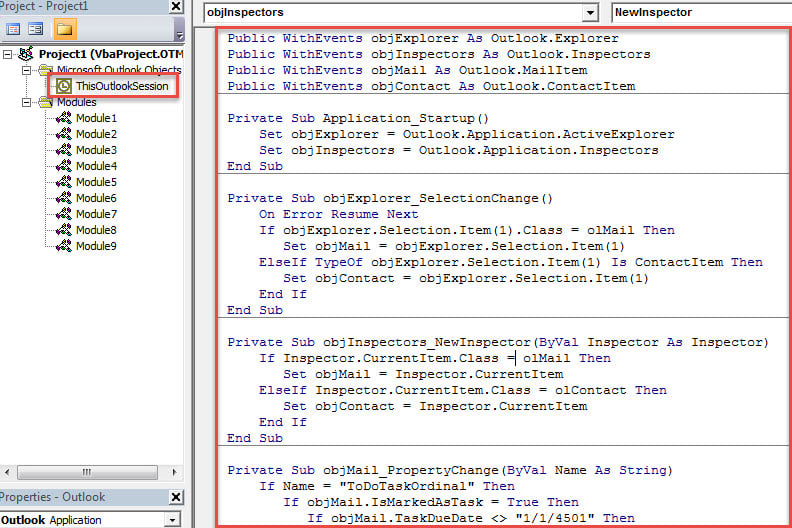
- 之後,重新啟動 Outlook 以啟動此巨集。
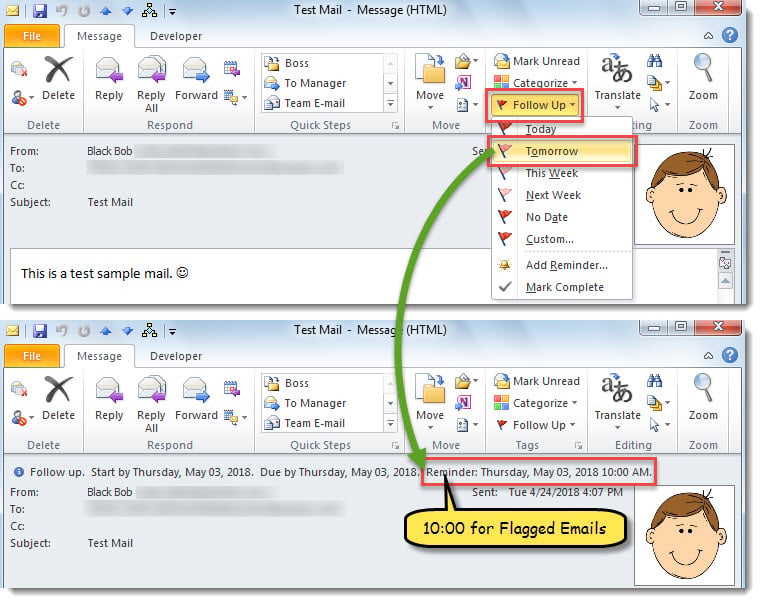
- 從現在起,每次標記電子郵件時,提醒時間將設置為標記到期日的“10:00”。

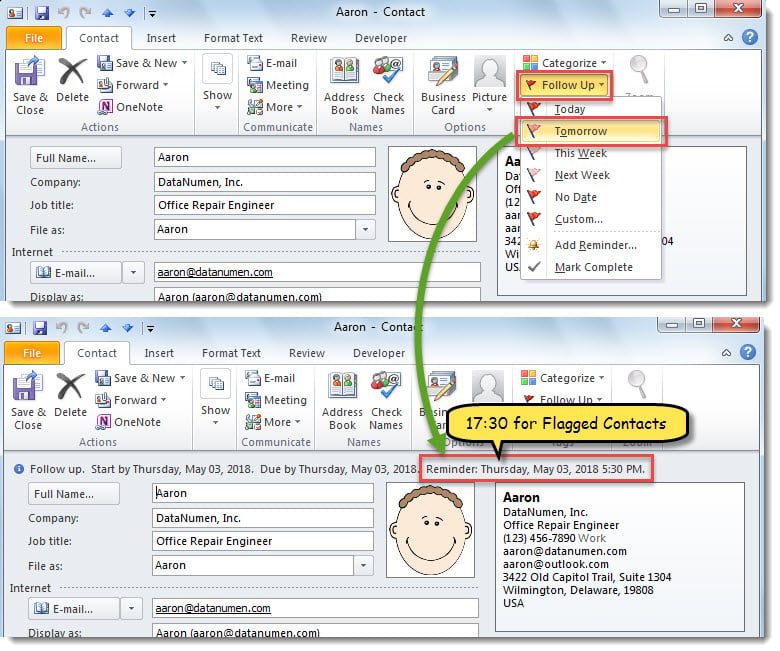
- 當您標記聯繫人時,提醒時間將設置為標記到期日的“17:30”。

靈活解決 Outlook 問題
您在使用 Outlook 時可能會遇到各種各樣的問題。因此,您需要提前學習一些應對方法。例如,如果您的 Outlook 經常重啟,您需要修復 Office 或停用第三方加載項等。或者,如果您的 Outlook PST 檔案損壞,您可以先嘗試… 收件箱維修工具. 當它失敗時,您可以繼續求助於強大的外部工具,例如 DataNumen Outlook Repair.
作者簡介:
Shirley Zhang是的數據恢復專家 DataNumen,Inc.是數據恢復技術的全球領導者,包括 mdf恢復 和Outlook修復軟件產品。 欲了解更多信息,請訪問 萬維網。datanumen.COM