
很容易將Word文檔附加為 PDF 文件發送到Outlook電子郵件。 但是,如果您希望將多個Word文檔附加為 PDF 文件發送到電子郵件,您可以閱讀此文章。 在這裡,我們將向您展示批量獲取它的方法。
將Word文檔附加為 PDF 若要將文件傳送至 Outlook 電子郵件,您可以先開啟 Word 文檔,然後前往「文件」功能表。接著,您可以切換到「儲存並傳送」選項卡,其中有一個「以 PDF 格式傳送」按鈕,如下圖所示。
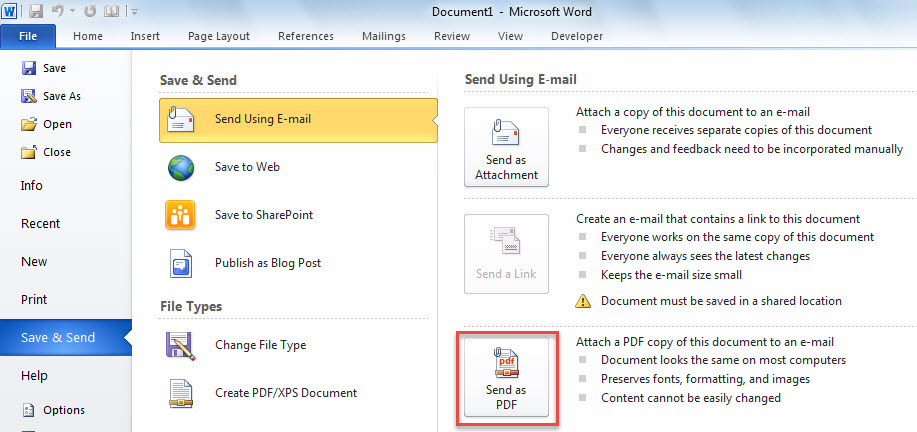
因此,將Word文檔附加為 PDF 到一封電子郵件。 但是,如果您想將多個Word文檔轉換並附加為 PDF 文件發送到郵件,最好使用以下方法。 它可以讓您批量完成它。
批量轉換並附加多個Word文檔為 PDF 文件到電子郵件
- 首先,將你需要的 Word 文件放在同一個 Windows 資料夾中。
- 然後,啟動Outlook程序。
- 接下來,將以下代碼複製到未使用的項目或模塊中。
Dim objMail As Outlook.MailItem

Sub BatchAttachMultipleWordDocumentsAsPDFToEmail()
    Dim objShell As Object
    Dim objWindowsFolder As Object
    Dim strWindowsFolder As String

    Set objMail = Outlook.Application.CreateItem(olMailItem)

    'Select the specific Windows folder
    Set objShell = CreateObject("Shell.Application")
    Set objWindowsFolder = objShell.BrowseForFolder(0, "Select a Windows folder:", 0, "")

    If Not objWindowsFolder Is Nothing Then
       strWindowsFolder = objWindowsFolder.self.Path & "\"

       Call ProcessFolders(strWindowsFolder)

       objMail.Display
    End If
End Sub

Sub ProcessFolders(strPath As String)
    Dim objFileSystem As Object
    Dim objFolder As Object
    Dim objFile As Object
    Dim objWordApp As Word.Application
    Dim objWordDocument As Word.Document
    Dim strDocumentName As String
    Dim strPDF As String

    Set objFileSystem = CreateObject("Scripting.FileSystemObject")
    Set objFolder = objFileSystem.GetFolder(strPath)

    For Each objFile In objFolder.Files
        strFileExtension = objFileSystem.GetExtensionName(objFile)
        If LCase(strFileExtension) = "doc" Or LCase(strFileExtension) = "docx" Then
           Set objWordApp = CreateObject("Word.Application")
           Set objWordDocument = objWordApp.Documents.Open(objFile.Path)

           'Convert document to pdf
           strDocumentName = Left(objWordDocument.Name, (Len(objWordDocument.Name) - Len(strFileExtension)) - 1)
           strPDF = strPath & strDocumentName & ".pdf"
           objWordDocument.ExportAsFixedFormat strPDF, wdExportFormatPDF

           objWordDocument.Close False

           'Attach the pdf to email
           objMail.Attachments.Add strPDF

           Kill strPDF
        End If
    Next

    'Process all folders and subfolders
    If objFolder.SubFolders.Count > 0 Then
       For Each objSubfolder In objFolder.SubFolders
           If ((objSubfolder.Attributes And 2) = 0) And ((objSubfolder.Attributes And 4) = 0) Then
              ProcessFolders (objSubfolder.Path)
           End If
       Next
    End If
End Sub
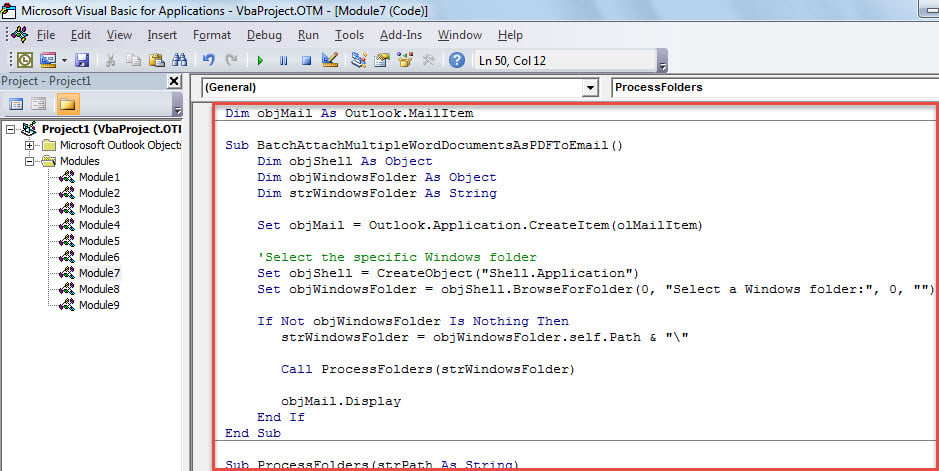
- 之後,將光標移至第一個子例程。
- 隨後,按“ F5”立即運行該宏。
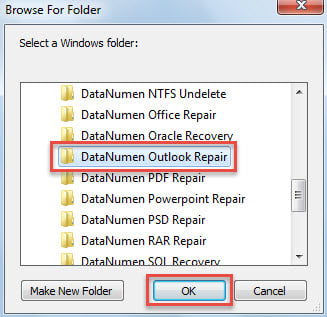
- 在彈出的小對話框中,選擇用於存儲源Word文檔的Windows文件夾。

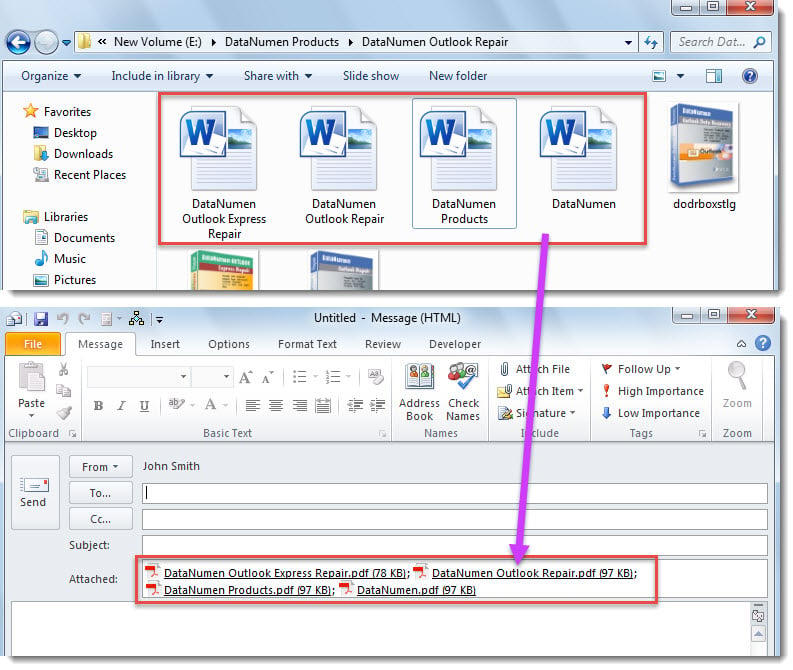
- 一次,將創建一個新電子郵件,您可以在其中看到附件 PDF 文件,例如以下 screenshost。

困擾Outlook麻煩
您是否為其他Outlook問題所困擾? 例如,Outlook經常卡在“不響應”狀態或Outlook PST文件變得不可訪問等。通常,您可以先嘗試使用收件箱修復工具, 掃描儀,以解決PST問題。 但是,有時問題可能超出了內置工具所能解決的範圍。 因此,您最好在附近保留一個更強大的外部實用程序,例如 DataNumen Outlook Repair.
作者簡介:
Shirley Zhang是的數據恢復專家 DataNumen,Inc.是數據恢復技術的全球領導者,包括 sql修復 和Outlook修復軟件產品。 欲了解更多信息,請訪問 萬維網。datanumen.COM