
一些用戶希望 Outlook 在發送沒有主題的電子郵件時自動將電子郵件正文的第一行作為主題。 現在,在本文中,我們將介紹一種通過 VBA 代碼實現它的方法。
多個用戶在撰寫和發送電子郵件時經常忘記輸入主題。 因此,通常情況下,他們希望如果外發電子郵件沒有主題,Outlook 可以通過電子郵件正文的第一行自動填充主題。 下面,我們將與您分享一個簡單方便的方法。
在發送沒有主題的電子郵件之前自動將正文的第一行作為主題
- 首先,啟動Outlook應用程序。
- 然後,按照“如何在Outlook中運行VBA代碼”,就可以進入VBA編輯器了。
- 接下來,在 VBA 編輯器中,請依照「…」的說明新增對「MS Word 物件庫」的參考。如何在 VBA 中新增物件庫引用“。
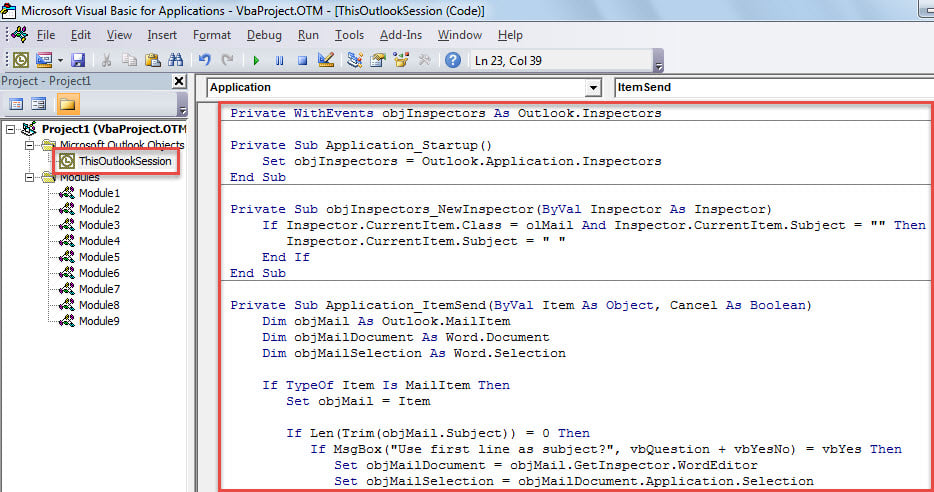
- 稍後,將下面的代碼複製到“ThisOutlookSession”項目中。
Private WithEvents objInspectors As Outlook.Inspectors

Private Sub Application_Startup()
    Set objInspectors = Outlook.Application.Inspectors
End Sub

Private Sub objInspectors_NewInspector(ByVal Inspector As Inspector)
    If Inspector.CurrentItem.Class = olMail And Inspector.CurrentItem.Subject = "" Then
       Inspector.CurrentItem.Subject = " "
    End If
End Sub

Private Sub Application_ItemSend(ByVal Item As Object, Cancel As Boolean)
    Dim objMail As Outlook.MailItem
    Dim objMailDocument As Word.Document
    Dim objMailSelection As Word.Selection

    If TypeOf Item Is MailItem Then
       Set objMail = Item

       If Len(Trim(objMail.Subject)) = 0 Then
          If MsgBox("No subject! Whether to take first line as subject?", vbQuestion + vbYesNo) = vbYes Then
             Set objMailDocument = objMail.GetInspector.WordEditor
             Set objMailSelection = objMailDocument.Application.Selection

             objMailDocument.Range(0, 0).Select
             objMailSelection.MoveEnd wdLine

             'Take first line of body as subject
             objMail.Subject = objMailSelection.Text
          End If
       End If
     End If
End Sub
- 之後,將遊標置於「Application_Startup」子程式中,然後按下「F5」。
- 最後,您可以嘗試一下。
- 首先,創建並撰寫一封只有主題為空的電子郵件。
- 然後,單擊“發送”按鈕。
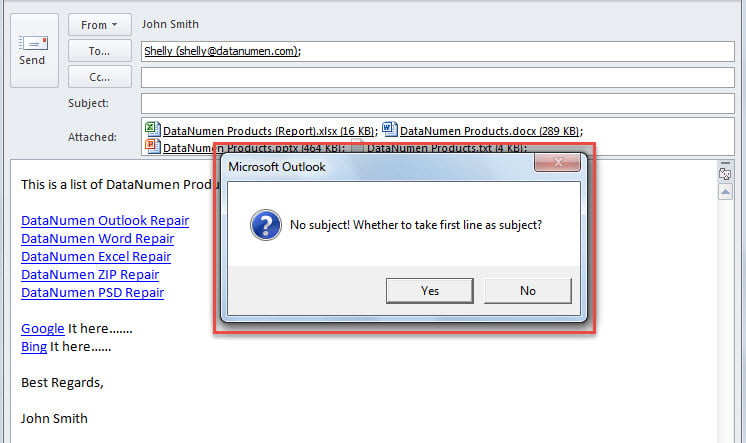
- 稍後,您將收到一條消息,詢問是否將正文的第一行作為主題。

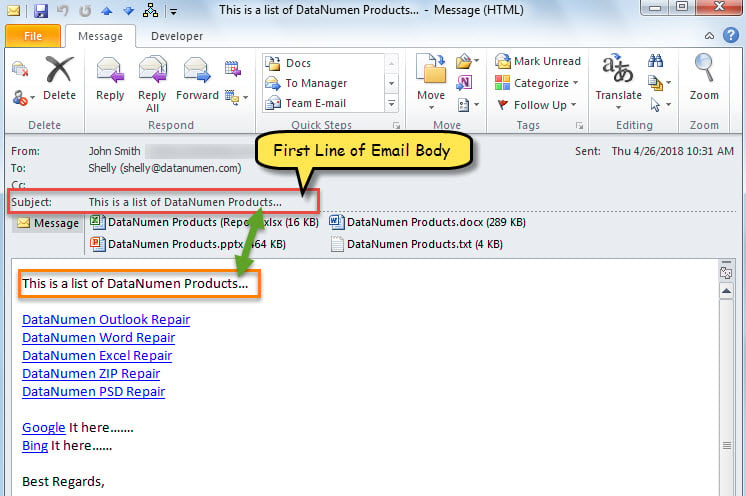
- 只要您選擇“是”按鈕,電子郵件正文的第一行將被提取並用作主題並發送電子郵件。

確保您的 Outlook 數據安全
當然,您的 Outlook 中有多個重要的電子郵件和其他項目。 因此,您一定不願意遇到 Outlook 數據丟失的情況。 然後,您必須採取一些措施,例如定期備份 Outlook 的數據,學習使用內置的修復工具 修復Outlook 錯誤並準備強大的外部恢復實用程序。 DataNumen Outlook Repair 由於其高 PST 恢復率,是一個不錯的選擇。
作者簡介:
Shirley Zhang是的數據恢復專家 DataNumen,Inc.是數據恢復技術的全球領導者,包括 sql恢復 和Outlook修復軟件產品。 欲了解更多信息,請訪問 萬維網。datanumen.COM