
從Microsoft Access導出信息非常簡單-假設您只想生成一個導出文件。 但是,當您需要將查詢(或表)拆分為多個導出文件時該怎麼辦? 例如,如果您需要每月導出客戶交易清單–每個客戶都有自己的導出文件? 這就是本文可以為您提供幫助的地方。 生成2個,10個或一百個不同的導出內容,就像運行一些VBA代碼段一樣簡單,並且工作將在幾秒鐘內完成,而不是數小時的手動剪切/粘貼。 因此,讓我們開始...
該方法
因為我們希望它盡可能靈活和可用,所以本文的代碼將比平時更長,但是您很快就會明白為什麼。
首先–讓我們概述一下我們想要實現的目標:
給定查詢,每次指定字段中的值更改時輸出一個新文件。
所面臨的挑戰
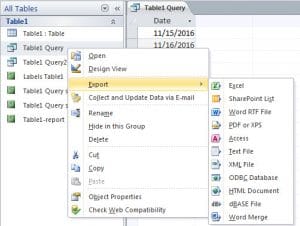 為了實現這一點,我們需要能夠逐步遍歷查詢結果,將當前行中的相關欄位與上一行中的值進行比較——如果它們不同,則建立一個新文件,並將查詢結果輸出到該文件中。
這不適合什麼
正如我已經提到的那樣-您有很多原因想要導出數據庫的一部分,但是將其用作備份/歸檔目的的形式並不是其中之一-當然不是我所採用的方法在這裡使用–如果您要從計算機中恢復,則要做的最後一件事 損壞的mdb數據庫 正在研究如何將大量出口重新組合在一起!
該如何解決?
條條大路通羅馬,這只是其中一種方法——但我認為這種方法效果相當不錯。首先,我們將查詢結果讀取到一個陣列中,以便於後續操作。接下來,我們將遍歷該數組,檢查相關欄位中是否出現了新值。如果沒有新值,我們將整個記錄輸出到目前正在寫入的檔案中;如果有新值,我們將關閉目前檔案並建立新檔案。
還有代碼
Sub DoExport(fieldName As String, queryName As String, filePath As String, Optional delim As Variant = vbTab)
    Dim db As Database
    Dim objRecordset As ADODB.Recordset
    Dim qdf As QueryDef

    Dim fldcounter, colno, numcols As Integer
    Dim numrows, loopcount As Long
    Dim data, fs, fwriter As Variant
    Dim fldnames(), headerString As String

    'get details of the query we'll be exporting
    Set objRecordset = New ADODB.Recordset
    Set db = CurrentDb
    Set qdf = db.QueryDefs(queryName)

    'load the query into a recordset so we can work with it
    objRecordset.Open qdf.SQL, CurrentProject.Connection, adOpenDynamic, adLockReadOnly

    'load the recordset into an array
    data = objRecordset.GetRows

    'close the recordset as we're done with it now
    objRecordset.Close

    'get details of the size of array, and position of the field we're checking for in that array
    colno = qdf.Fields(fieldName).OrdinalPosition
    numrows = UBound(data, 2)
    numcols = UBound(data, 1)


    'as we'll need to write out a header for each file - get the field names for that header
    'and construct a header string
    ReDim fldnames(numcols)
    For fldcounter = 0 To qdf.Fields.Count - 1
        fldnames(fldcounter) = qdf.Fields(fldcounter).Name
    Next
    headerString = Join(fldnames, delim)

    'prepare the file scripting interface so we can create and write to our file(s)
    Set fs = CreateObject("Scripting.FileSystemObject")

    'loop through our array and output to the file
    For loopcount = 0 To numrows
        If loopcount > 0 Then
            If data(colno, loopcount) <> data(colno, loopcount - 1) Then
                If Not IsEmpty(fwriter) Then fwriter.Close
                Set fwriter = fs.createTextfile(filePath & data(colno, loopcount) & ".txt", True)
                fwriter.writeline headerString
                writetoFile data, queryName, fwriter, loopcount, numcols
            Else
                writetoFile data, delim, fwriter, loopcount, numcols
            End If
        Else
            Set fwriter = fs.createTextfile(filePath & data(colno, loopcount) & ".txt", True)
            fwriter.writeline headerString
            writetoFile data, delim, fwriter, loopcount, numcols
        End If
    Next

    'tidy up after ourselves
    fwriter.Close
    Set fwriter = Nothing
    Set objRecordset = Nothing
    Set db = Nothing
    Set qdf = Nothing

End Sub


'parameters are passed "by reference" to prevent moving potentially large objects around in memory
Sub writetoFile(ByRef data As Variant, ByVal delim As Variant, ByRef fwriter As Variant, ByVal counter As Long, ByVal numcols As Integer)
    Dim loopcount As Integer
    Dim outstr As String

    For loopcount = 0 To numcols
        outstr = outstr & data(loopcount, counter)
        If loopcount < numcols Then outstr = outstr & delim
    Next
    fwriter.writeline outstr
End Sub
代碼在做什麼–關鍵點
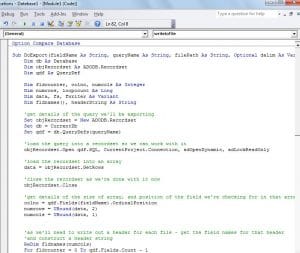 我在程式碼的大部分關鍵位置都添加了註釋,但還有幾點值得強調。
首先–我們將代碼分為兩個例程。 第一個檢查是否將當前記錄寫入我們當前正在處理的同一文件,或者是否應該將其寫入新文件。 第二個例程將整個記錄的詳細信息輸出到文件。 這樣做是為了減少代碼中的重複,否則您會在許多地方看到相同的循環。
其次–我正在使用“查詢定義”來獲取有關我們要處理的查詢的詳細信息–如果您希望能夠使其適應於表的使用,則可以考慮進行交換,以便它使用“表格定義”。
話雖如此,我非常有信心這是您可以參考並使用很多代碼的代碼!
作者簡介:
Mitchell Pond是 DataNumen,Inc.是數據恢復技術的全球領導者,包括 修復 SQL Server 數據 和excel恢復軟件產品。 欲了解更多信息,請訪問 萬維網。datanumen.COM