
可以通過檢查Excel VBA中的“客戶端”記錄,根據需要對其進行更改,然後將其保存回服務器來修改服務器上的數據。
一種更有效的方法是在“服務器端”工作,尤其是在數據庫位於遠程位置且涉及大量流量的情況下。 此練習從Excel調用存儲過程,以根據員工的出生日期(即18-25歲,26-35歲等)將員工分類到各個年齡段,而無需在服務器和Excel之間進行大量數據交換。
本文假定讀者已顯示“開發人員”功能區,並且熟悉VBA編輯器。 如果沒有,請使用Google“ Excel開發人員標籤”或“ Excel代碼窗口”。
該練習包含三個要素:
- 數據表 工作人員 在數據庫中 測試數據庫;
- 存儲過程 範圍;
- 一個Excel xlsm,我們稱之為 XLSM。 可以找到一個示例Excel文件 此處
數據表
在以下位置創建數據庫 SQL Server 被稱為 數據庫測試.
設置表格的以下列 工作人員.
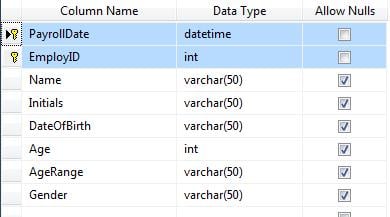
將以下內容複製到表中:
| 2017/05/25 | 1 | 褐色 | J | 1946/12/02 | M | ||
| 2017/05/25 | 2 | 智能 | A | 1976/03/26 | F | ||
| 2017/05/25 | 3 | 巡航 | T | 1962/07/03 | M | ||
| 2017/05/25 | 4 | 羅漢 | L | 1986/07/02 | F | ||
| 2017/05/25 | 5 | 弗雷德里克森 | F | 1964/03/15 | M | ||
| 2017/05/25 | 6 | 斯奈德 | L | 1968/07/05 | F | ||
| 2017/05/25 | 7 | 利普尼基 | J | 1983/11/25 | M | ||
| 2017/05/25 | 8 | 胡佛 | S | 2002/12/08 | F | ||
| 2017/05/25 | 9 | 沃森 | E | 1990/04/15 | F |
存儲過程。
針對TestDB運行以下腳本以創建存儲過程:
USE [TestDB]
GO
/****** Object: StoredProcedure [dbo].[spAgeRange] Script Date: 2017/05/10 12:16:28 PM ******/
SET ANSI_NULLS ON
GO
SET QUOTED_IDENTIFIER ON
GO

CREATE PROCEDURE [dbo].[spAgeRange]

    @PayrollDate varchar(50)

AS
BEGIN

    SET NOCOUNT ON;
    UPDATE tblStaff SET Age = CONVERT(int, DATEDIFF(day, DateOfBirth, GETDATE()) / 365.25, 0)
    WHERE tblStaff.PayrollDate = @PayrollDate

    Update tblStaff set AgeRange = '>56' where Age >= 56 and PayrollDate = @PayrollDate

    Update tblStaff set AgeRange = '46 to 55' where Age >= 46 and Age < 56 and PayrollDate = PayrollDate

    Update tblStaff set AgeRange = '39 to 45' where Age >= 39 and Age < 46 and PayrollDate = @PayrollDate

    Update tblStaff set AgeRange = '31 to 38' where Age >= 30 and Age < 39 and PayrollDate = @PayrollDate

    Update tblStaff set AgeRange = '25 to 30' where Age >= 25 and Age < 30 and PayrollDate = @PayrollDate

    Update tblStaff set AgeRange = '18 to 24' where Age >= 18 and Age < 25 and PayrollDate = @PayrollDate

    Update tblStaff set AgeRange = '<18' where Age < 18 and PayrollDate = @PayrollDate

END
存儲過程將保存在數據庫的“可編程性”下。
Excel VBA
剩下的就是從Excel調用存儲過程,提供 工資單日期 參數“ 2017/05/25”。 您會注意到我只是數據類型 工資單日期 作為字符串,而不是用不同的日期格式進行搏鬥。 可以很簡單地將字符串轉換為日期 轉 如果 工資單日期 用於算術目的。
創建一個新的工作簿。 打開VBA代碼窗口,然後插入模塊。
在代碼窗口的“工具”菜單中,引用適當的 ActiveX 2.nn 函式庫 促進數據對象的使用。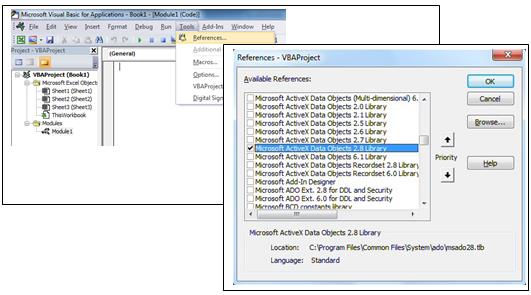
將以下代碼粘貼到“代碼”窗口中。 一旦激活,它將連接到 SQL Server,按照ConnectDatabase子過程
'All "public" in case the code is spread over several modules.
Public connDB As New ADODB.Connection
Public rs As New ADODB.Recordset
Public strSQL As String
Public strConnectionstring As String
Public strServer As String
Public strDBase As String
Public strUser As String
Public strPwd As String
Public PayrollDate As String

Sub WriteStoredProcedure()
     PayrollDate = "2017/05/25"
     Call ConnectDatabase
     On Error GoTo errSP
     strSQL = "EXEC spAgeRange '" & PayrollDate & "'"
     connDB.Execute (strSQL)
     Exit Sub
errSP:
MsgBox Err.Description
End Sub

Sub ConnectDatabase()
     If connDB.State = 1 Then connDB.Close
     On Error GoTo ErrConnect
     strServer = "SERVERNAME" ‘The name or IP Address of the SQL Server
     strDBase = "TestDB"
     strUser = "" 'leave this blank for Windows authentication
     strPwd = ""

     If strPwd > "" Then
         strConnectionstring = "DRIVER={SQL Server};Server=" & strServer & ";Database=" & strDBase & ";Uid=" & strUser & ";Pwd=" & strPwd & ";Connection Timeout=30;"
     Else
         strConnectionstring = "DRIVER={SQL Server};SERVER=" & strServer & ";Trusted_Connection=yes;DATABASE=" &    strDBase 'Windows authentication
     End If
     connDB.ConnectionTimeout = 30
     connDB.Open strConnectionstring
Exit Sub
ErrConnect:
     MsgBox Err.Description
End Sub
將一個按鈕添加到Sheet1並將其分配給子過程“寫存儲過程“
結果
按下按鈕,然後檢查tblStaff,應使用年齡和年齡範圍進行更新。 處理已在服務器端進行。
恢復損壞的工作簿
如果 Excel 崩潰,很可能會導致您唯一的 Excel 工作簿副本也隨之遺失。很多時候,Excel 都無法恢復損壞的工作簿;在這種情況下,除非您有工具可以恢復工作簿,否則自創建工作簿以來所做的所有工作都可能永久丟失。 修復Excel xlsx或xlsm文件。
作者簡介:
Felix Hooker是的數據恢復專家 DataNumen,Inc.是數據恢復技術的全球領導者,包括 rar修復 和sql恢復軟件產品。 欲了解更多信息,請訪問 萬維網。datanumen.COM