
一些用戶希望Outlook在打開和閱讀特定電子郵件時可以自動打開在電子郵件正文中插入的超鏈接。 現在,在本文中,我們將分享一種可以輕鬆實現的方法。
當打開和閱讀特定的電子郵件(例如來自老闆的至關重要的電子郵件)時,如果電子郵件包含多個超鏈接,則您肯定會打開這些鏈接。 與手動打開嵌入式超鏈接相比,使Outlook自動打開它們肯定會更加方便。 在這裡,我們將教您如何詳細實現它。
閱讀特定電子郵件時自動打開所有嵌入式超鏈接
- 首先,啟動 Outlook 應用程式。
- 進入Outlook窗口後,按“ Alt + F11”鍵快捷方式。
- 在隨後的VBA編輯器窗口中,您需要啟用“ Microsoft VBScript正則表達式”對象。 點擊“工具”,然後選擇“參考”來實現。
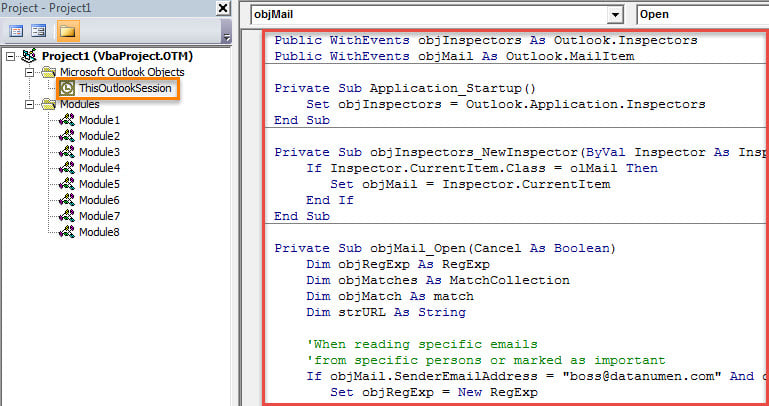
- 接下來,打開“ ThisOutlookSession”項目。
- 然後,將以下VBA代碼複製到該項目中。
Public WithEvents objInspectors As Outlook.Inspectors
Public WithEvents objMail As Outlook.MailItem

Private Sub Application_Startup()
 Set objInspectors = Outlook.Application.Inspectors
End Sub

Private Sub objInspectors_NewInspector(ByVal Inspector As Inspector)
 If Inspector.CurrentItem.Class = olMail Then
 Set objMail = Inspector.CurrentItem
 End If
End Sub

Private Sub objMail_Open(Cancel As Boolean)
    Dim objRegExp As RegExp
    Dim objMatches As MatchCollection
    Dim objMatch As match
    Dim strURL As String

    'When opening specific emails
    'From specific persons or marked as important
    If objMail.SenderEmailAddress = "boss@datanumen.com" And objMail.Importance = olImportanceHigh Then
       Set objRegExp = New RegExp

       With objRegExp
            .Pattern = "(([0-9a-z=\?:/\.&-^!#$;_])*)"
            .Global = True
            .IgnoreCase = True
       End With

       If objRegExp.Test(objMail.Body) Then

          Set objMatches = objRegExp.Execute(objMail.Body)
          For Each objMatch In objMatches
              strURL = objMatch.SubMatches(0)

              'Exclude hyperlinks of email addresses
              If InStr(strURL, "@") = 0 Then

                 'Get the Internet Explorer
                 'Change the path as per your own case
                 Shell (Chr(34) & "C:\Program Files\Internet Explorer\iexplore.exe" & Chr(34) & strURL)
                 DoEvents
              End If
          Next
       End If
    End If
End Sub
- 之後,您應該簽署此宏。 單擊“工具”>“數字簽名”以完成此操作。
- 接下來,退出當前窗口並更改Outlook宏設置。
- 最後,您需要重新啟動 Outlook 以啟用新的 VBA 專案。
- 從那時起,每次當您雙擊特定的電子郵件以在其自己的“消息”窗口中閱讀時,Outlook都會自動識別電子郵件正文中的超鏈接,並立即在Internet Explorer中打開它們。
永不繞過Outlook錯誤
也許您遇到過各種Outlook錯誤。 儘管消除Outlook問題很困難,但是您也不能忽略它們。 累積的錯誤可能導致Outlook中的嚴重災難,例如PST損壞。 因此,您最好準備一個強大的外部 Outlook修復 實用程序,例如 DataNumen Outlook Repair。 它可以最大程度地減少損壞,從而最大程度地提取PST數據。
作者簡介:
Shirley Zhang是的數據恢復專家 DataNumen,Inc.是數據恢復技術的全球領導者,包括 損壞的mdf 和Outlook修復軟件產品。 欲了解更多信息,請訪問 萬維網。datanumen.COM