
有時,您需要提取並打印多封電子郵件的附件列表。 在這篇文章中,我們將教您兩種獲取它的方法。
如果您收到多封帶有多個附件的電子郵件供您參考,您可能需要打印出這些附件名稱。 在這種情況下,如何才能批量獲取呢? 下面,我們將教您兩種快速打印多封 Outlook 電子郵件的附件列表的方法。
方法 1:以 RTF 格式打印和復製附件列表
- 首先,打開 Outlook 電子郵件。
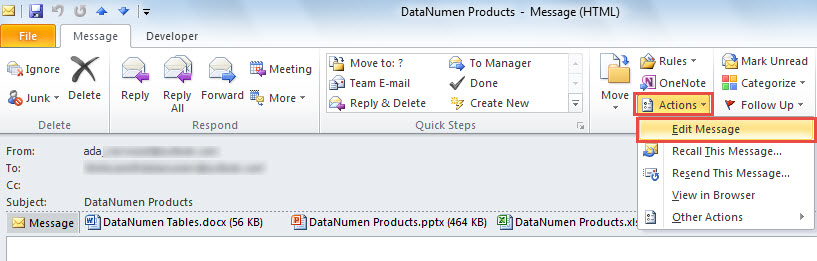
- 然後,在消息窗口中,單擊“操作”並選擇“編輯消息”。

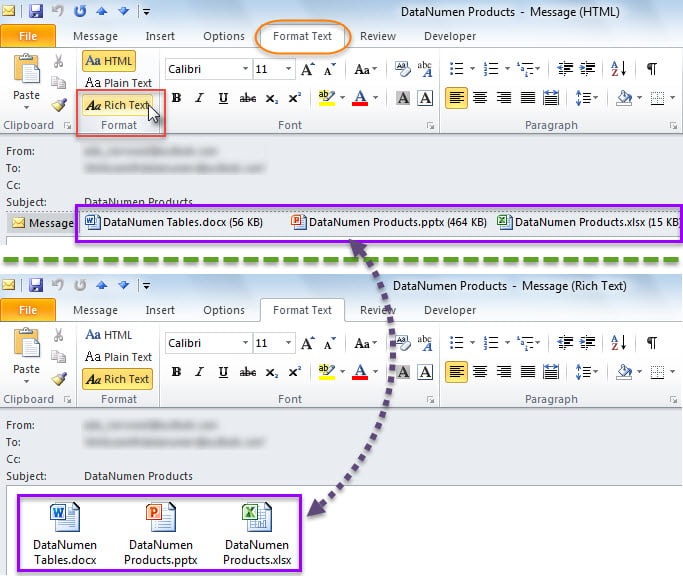
- 接下來,轉到“格式文本”選項卡,在其中選擇“富文本”格式。
- 您立即可以看到電子郵件附件已移至正文。

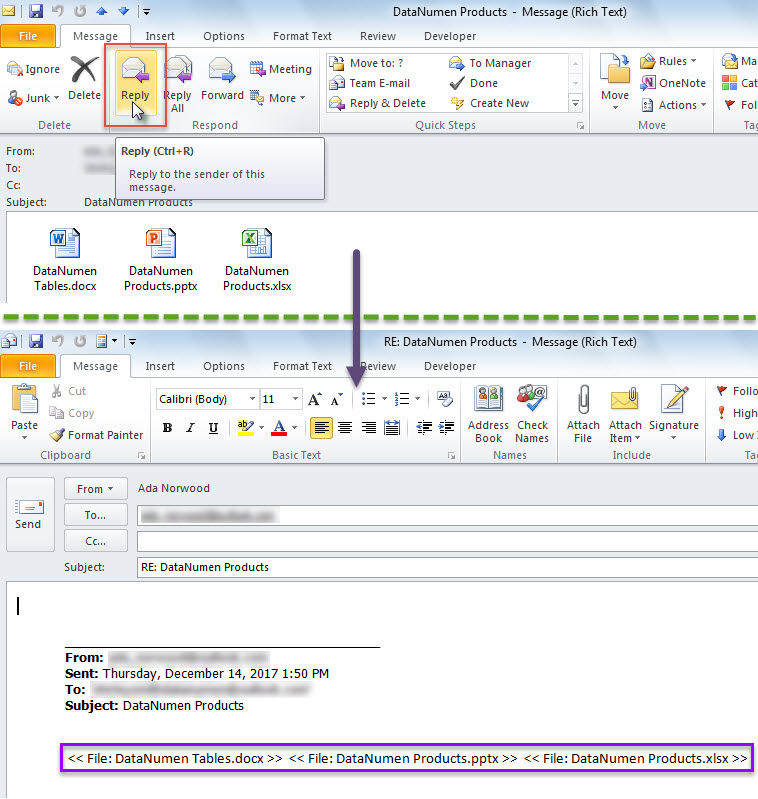
- 之後,單擊“消息”選項卡“回复”組中的“回复”按鈕。
- 在後續的郵件中,附件列表已經在正文中了,如下圖所示。

- 現在您可以將附件列表複製到新電子郵件中。
- 稍後使用此方法將其他電子郵件的附件列表複製到新郵件中。
- 最後,您可以照常打印這封新郵件。
方法2:通過Outlook VBA打印附件列表
- 首先,按下「Alt + F11」開啟 Outlook VBA 編輯器。
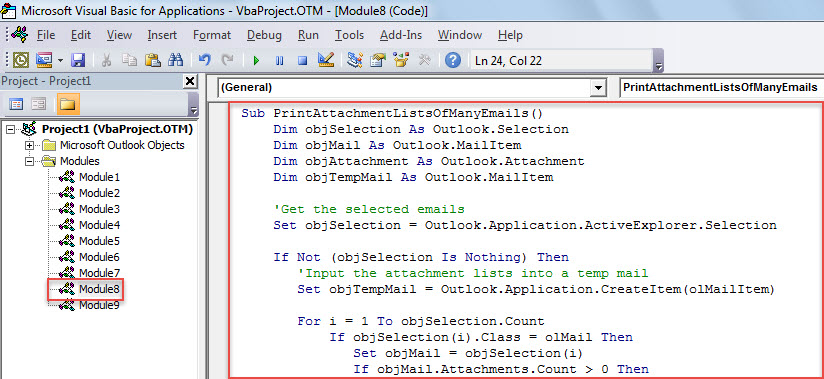
- 然後,將以下VBA代碼複製到模塊中。
Sub PrintAttachmentListsOfManyEmails()
    Dim objSelection As Outlook.Selection
    Dim objMail As Outlook.MailItem
    Dim objAttachment As Outlook.Attachment
    Dim objTempMail As Outlook.MailItem

    'Get the selected emails
    Set objSelection = Outlook.Application.ActiveExplorer.Selection

    If Not (objSelection Is Nothing) Then
       'Input the attachment lists into a temp mail
       Set objTempMail = Outlook.Application.CreateItem(olMailItem)

       For i = 1 To objSelection.Count
           If objSelection(i).Class = olMail Then
              Set objMail = objSelection(i)
              If objMail.Attachments.Count > 0 Then

                 objTempMail.Body = objTempMail.Body & vbCr & "-------------------------------------------------------------------------------------------------------------" & vbCr & vbCr & i & ". " & objMail.Subject & vbCr & vbCr & "Attachment List:" & vbCr

                 For n = 1 To objMail.Attachments.Count
                     Set objAttachment = objMail.Attachments(n)
                     objTempMail.Body = objTempMail.Body & vbCr & "<<" & objAttachment.FileName & " Size: " & Round(objAttachment.Size / 1024, 1) & " KB>>"
                 Next
              End If
           End If
       Next

       'Print the temp mail
       objTempMail.PrintOut
     End If
End Sub
- 然後,參考文章-“將這個宏添加到快速訪問工具欄”如何在Outlook中運行VBA代碼“。
- 最終,嘗試使用此宏。
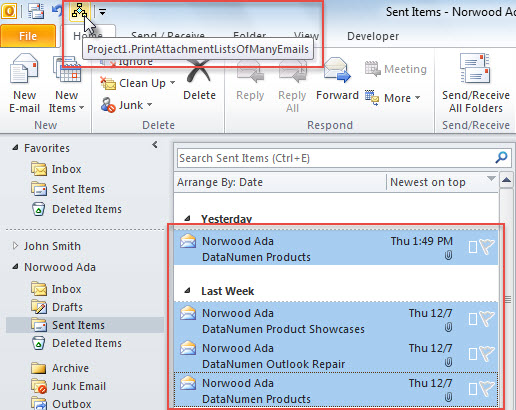
- 首先,選擇幾封電子郵件。
- 然後,單擊快速訪問工具欄中的宏按鈕。

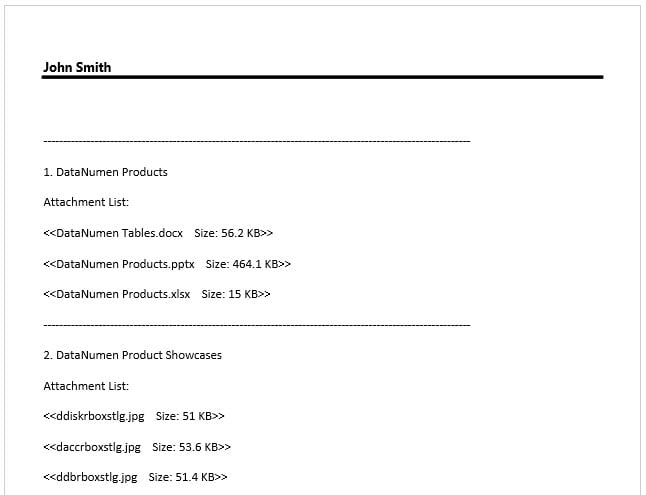
- 這些電子郵件的附件列表一定已經被立即打印出來了。

求助於頂級 Outlook 修復工具
當您遇到 Outlook 文件損壞時,最好的消息是您手頭有最近的 Outlook 數據備份。 它可以讓您擺脫複雜的 Outlook 文件修復。 但是,有時備份可能無法恢復。 那時,您需要求助於更出色、更專業的修復工具,例如 DataNumen Outlook Repair。 它可以修復 損壞的PST 幾分鐘之內。
作者簡介:
Shirley Zhang是的數據恢復專家 DataNumen,Inc.是數據恢復技術的全球領導者,包括 維修MDF 和Outlook修復軟件產品。 欲了解更多信息,請訪問 萬維網。datanumen.COM