
有時,您可能想計算一下Outlook聯繫人的年齡。 但是Outlook沒有此功能,手動計數將容易出錯。 因此,本文將通過Outlook VBA向您介紹2種快速方法。
建立新的 Outlook 聯絡人時,您可以輸入聯絡人的生日。 Outlook 會自動在您的行事曆中建立對應的生日提醒。這樣,當有人過生日時,您就會收到提醒。此時,您可能想知道聯絡人的年齡。但是 Outlook 本身並沒有計算聯絡人年齡的功能。幸運的是,我們可以使用 Outlook VBA 輕鬆獲取此資訊。
方法1:獲取特定的Outlook聯繫人的年齡
- 首先,啟動 Outlook,然後按下「Alt + F11」鍵。
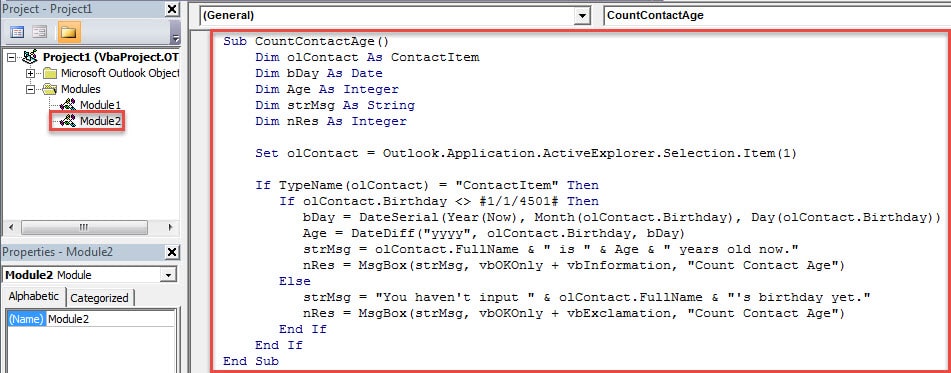
- 然後,在新的“ Microsoft Visual Basic for Applications”窗口中,您應該打開一個新模塊並將以下VBA代碼複製到其中。
Sub CountContactAge()
    Dim olContact As ContactItem
    Dim bDay As Date
    Dim Age As Integer
    Dim strMsg As String
    Dim nRes As Integer

    Set olContact = Outlook.Application.ActiveExplorer.Selection.Item(1)

    If TypeName(olContact) = "ContactItem" Then
       If olContact.Birthday <> #1/1/4501# Then
          bDay = DateSerial(Year(Now), Month(olContact.Birthday), Day(olContact.Birthday))
          Age = DateDiff("yyyy", olContact.Birthday, bDay)
          strMsg = olContact.FullName & " is " & Age & " years old now."
          nRes = MsgBox(strMsg, vbOKOnly + vbInformation, "Count Contact Age")
       Else
          strMsg = "You haven't input " & olContact.FullName & "'s birthday yet."
          nRes = MsgBox(strMsg, vbOKOnly + vbExclamation, "Count Contact Age")
       End If
    End If
End Sub
- 隨後,您可以退出當前窗口,然後像往常一樣將新的宏添加到快速訪問工具欄。
- 之後,您可以訪問“聯繫人”文件夾並選擇特定的聯繫人,然後按快速訪問工具欄中的宏按鈕。
- 最後,您可能會得到以下結果:
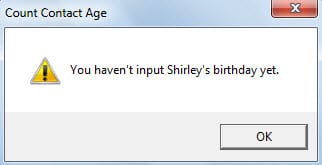
- 如果您尚未輸入聯繫人的生日,則會收到如下圖所示的警報:

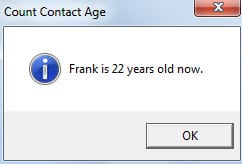
- 如果您輸入了聯繫人的生日,則會出現一個對話框,告訴您聯繫人的年齡,如下圖所示:

如果您想獲得多個或所有聯繫人的年齡,方法1將非常乏味。 因此,請繼續閱讀以使用方法2。
方法2:快速獲取所有Outlook聯繫人的年齡
- 首先,轉到“聯繫人”窗格,然後在“視圖”選項卡上單擊“視圖設置”按鈕。
- 在新的“高級視圖設置”對話框中,單擊“列”按鈕。
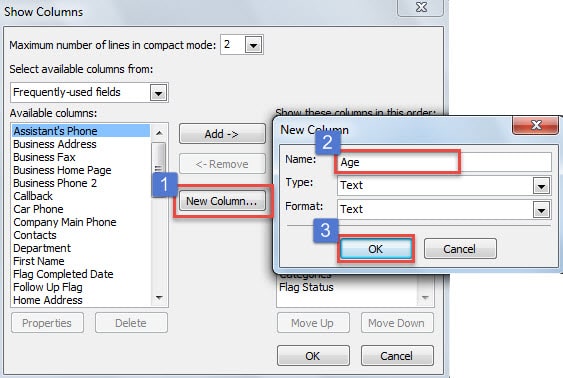
- 然後在“顯示列”對話框中,按“新建列”按鈕。 在“新列”對話框中,在“名稱”框中鍵入“年齡”,然後單擊“確定”。

- 之後,單擊一系列“確定”以返回到Outlook主窗口。
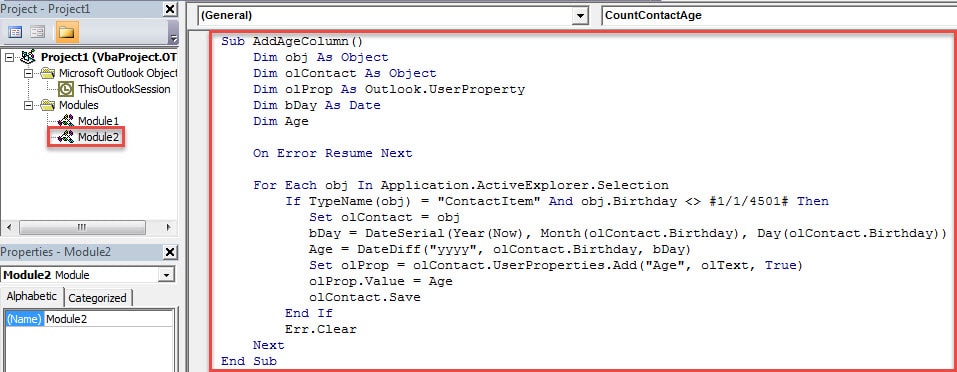
- 隨後,按“ Alt + F11”打開“ Visual Basic”窗口,然後將以下代碼複製到新模塊中。
Sub AddAgeColumn()
    Dim obj As Object
    Dim olContact As Object
    Dim olProp As Outlook.UserProperty
    Dim bDay As Date
    Dim Age

    On Error Resume Next

    For Each obj In Application.ActiveExplorer.Selection
        If TypeName(obj) = “ContactItem” And obj.Birthday <> #1/1/4501# Then
           Set olContact = obj
           bDay = DateSerial(Year(Now), Month(olContact.Birthday), Day(olContact.Birthday))
           Age = DateDiff("yyyy", olContact.Birthday, bDay)
           Set olProp = olContact.UserProperties.Add("Age", olText, True)
           olProp.Value = Age
           olContact.Save
        End If
        Err.Clear
    Next
End Sub
- 以後,您可以將新的宏添加到快速訪問工具欄。
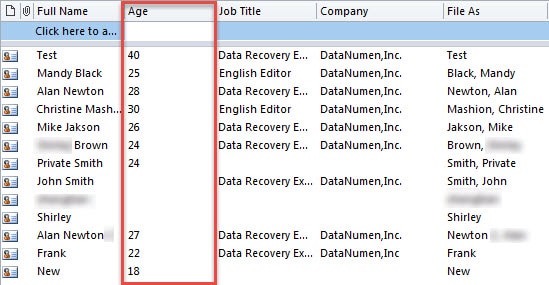
- 最終通過“ Ctrl + A”選擇所有聯繫人,然後按快速訪問工具欄中的宏按鈕。 您將獲得所有聯繫人的年齡,但沒有生日的聯繫人除外,如下圖所示:

當心有關Outlook數據的風險
Outlook容易腐敗。 因此,您應該密切注意Outlook數據周圍的所有危險。 它們通常是病毒,惡意軟件,停電和人為錯誤等。此外,以確保您可以快速 修復Outlook PST數據損壞,您最好在附近放置經驗豐富的維修工具,例如 DataNumen Outlook Repair.
作者簡介:
Shirley Zhang是的數據恢復專家 DataNumen,Inc.是數據恢復技術的全球領導者,包括 修復損壞的SQL文件 和Outlook修復軟件產品。 欲了解更多信息,請訪問 萬維網。datanumen.COM