
Ved hjelp av Excel kan du enkelt bygge ditt eget whois-søkeverktøy. Dette verktøyet vil hjelpe nettstedutviklere eller hostingselskaper med å konvertere domener til leads. Dette verktøyet viser navnene på personer eller organisasjoner som eier forskjellige domener.
Last ned nå
Hvis du vil begynne å bruke programvaren så snart som mulig, kan du:
Ellers, hvis du vil gjøre DIY, kan du lese innholdet nedenfor.
La oss forberede GUI
GUI-en til dette verktøyet er veldig enkelt. Som vist på bildet er bare ett ark med nødvendige overskrifter og kolonner tilstrekkelig. I dette eksemplet, for et gitt domene, vil verktøyet skrape registrantnavn og registrantorganisasjon. For å la brukere kjøre makroen, lag en knapp på samme ark.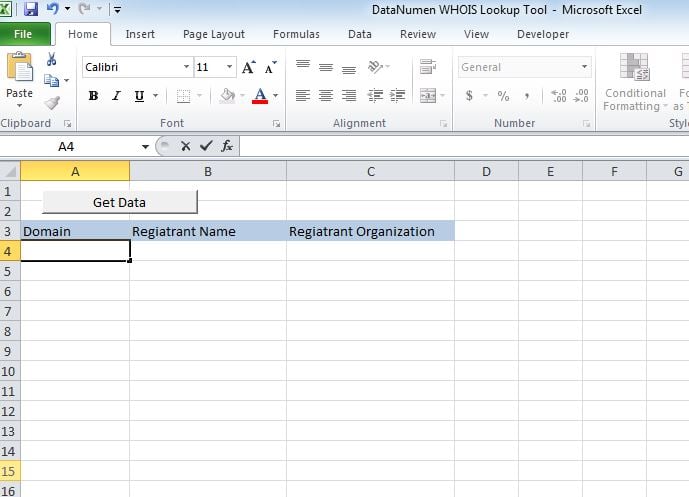
La oss gjøre det funksjonelt
Lim inn skriptet i en ny modul og fest sub "whoismacor" til knappen vi opprettet på Sheet1.
La oss teste det
Legg til domener i kolonne A og kjør makroen. Verdier vil vises i respektive kolonner.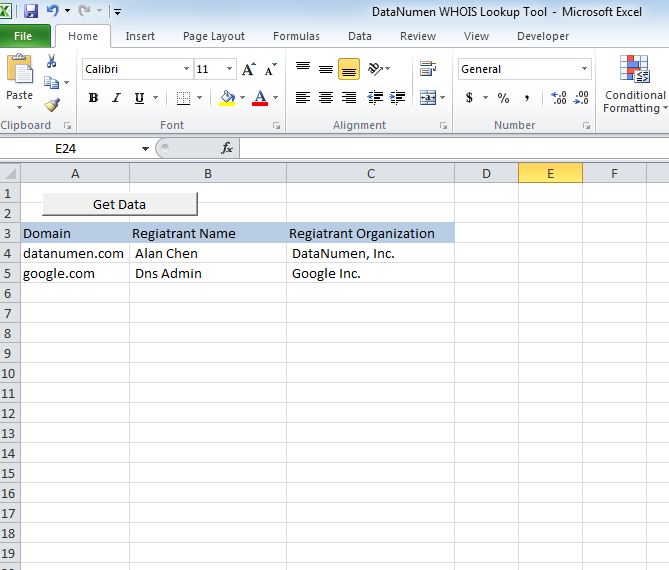
Endre det
Per nå viser verktøyet 2 overskrifter, dvs. registrantnavn og registrantorganisasjon. Du kan tilpasse verktøyet for å hente hvilken som helst av følgende overskrifter.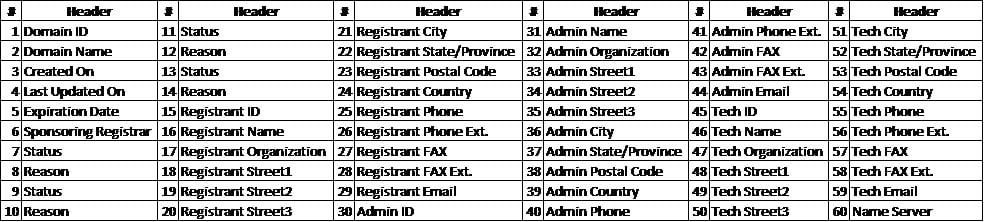
Gjenopprett xlsm-fil
Hvis du har problemer med å åpne eller lagre dette verktøyet, er det store endringer som du har en korrupt Excel-fil og du må fikse det før du bruker det.
Script
Sub whoismacro()
    Dim v_lrow As Long
    Application.DisplayStatusBar = True
    v_lrow = Sheets("whois").Range("A" & Rows.Count).End(xlUp).Row
    Dim r As Long
    Dim v_string As String
    For r = 4 To v_lrow
        Application.StatusBar = "Macro is running... Now fetching Registrant Name and Organization info for domain at Row : " & r & " /// Total Rows : " & v_lrow
        Sheets("whois").Range("B" & r).Value = WhoIsName(Sheets("whois").Range("A" & r).Value)
        Sheets("whois").Range("C" & r).Value = WhoIsorganization(Sheets("whois").Range("A" & r).Value)
    Next r
    Application.StatusBar = "Ready"
End Sub

Function WhoIsName(v_string As String) As String
    Application.DisplayStatusBar = True
    v_string = Replace(v_string, "http://www.", "")
    v_string = Replace(v_string, "https://www.", "")
    v_string = Replace(v_string, "http://", "")
    v_string = Replace(v_string, "https://", "")
    Dim I As Long
    Dim browobj As Object
    Dim obj1 As Object
    Dim obj2 As Object
    Dim obj3 As Object
    Dim v_website As String
    Dim ws As Worksheet
    Dim rng As Range
    Dim tbl As Object
    Dim rw As Object
    Dim cl As Object
    Dim tabno As Long
    Dim nextrow As Long
    Dim URl As String
    Dim lastRow As Long
    Dim xmlobj As Object
    Dim htmobj As Object
    Dim divobj As Object
    Dim objH3 As Object
    Dim linkobj As Object
    Dim vv_startrow As Integer
    Dim vv_lastrow As Integer
    Application.DisplayAlerts = False
    Application.DisplayStatusBar = True
    URl = "https://www.whois.com/whois/" & v_string
    Set xmlobj = CreateObject("MSXML2.XMLHTTP")
    xmlobj.Open "GET", URl, False
    xmlobj.setRequestHeader "Content-Type", "text/xml"
    xmlobj.setRequestHeader "Cache-Control", "no-cache"
    xmlobj.send
    Set htmobj = CreateObject("htmlfile")
    htmobj.body.innerHTML = xmlobj.responseText
    x = InStr(htmobj.body.innertext, "Registrant Name:")
    y = InStr(x, htmobj.body.innertext, Chr(10))
    WhoIsName = Replace(Mid(htmobj.body.innertext, x, y - x), "Registrant Name:", "")
End Function

Function WhoIsorganization(v_string As String) As String
    Application.DisplayStatusBar = True
    v_string = Replace(v_string, "http://www.", "")
    v_string = Replace(v_string, "https://www.", "")
    v_string = Replace(v_string, "http://", "")
    v_string = Replace(v_string, "https://", "")
    Dim I As Long
    Dim browobj As Object
    Dim obj1 As Object
    Dim obj2 As Object
    Dim obj3 As Object
    Dim v_website As String
    Dim ws As Worksheet
    Dim rng As Range
    Dim tbl As Object
    Dim rw As Object
    Dim cl As Object
    Dim tabno As Long
    Dim nextrow As Long
    Dim URl As String
    Dim lastRow As Long
    Dim xmlobj As Object
    Dim htmobj As Object
    Dim divobj As Object
    Dim objH3 As Object
    Dim linkobj As Object
    Dim vv_startrow As Integer
    Dim vv_lastrow As Integer
    Application.DisplayAlerts = False
    Application.DisplayStatusBar = True
    URl = "https://www.whois.com/whois/" & v_string
    Set xmlobj = CreateObject("MSXML2.XMLHTTP")
    xmlobj.Open "GET", URl, False
    xmlobj.setRequestHeader "Content-Type", "text/xml"
    xmlobj.setRequestHeader "Cache-Control", "no-cache"
    xmlobj.send
    Set htmobj = CreateObject("htmlfile")
    htmobj.body.innerHTML = xmlobj.responseText
    x = InStr(htmobj.body.innertext, "Registrant Organization:")
    Debug.Print x
    y = InStr(x, htmobj.body.innertext, Chr(10))
    Debug.Print y
    WhoIsorganization = Replace(Mid(htmobj.body.innertext, x, y - x), "Registrant Organization:", "")
End Function
Forfatterintroduksjon:
Nick Vipond er en datagjenopprettingsekspert innen DataNumen, Inc., som er verdensledende innen datagjenopprettingsteknologier, inkludert reparer docx-problem og Outlook-programvareprodukter. For mer informasjon besøk www.datanumen. Med