
Šajā rakstā parādīts, kā atzīmēt un izvaicāt kalendāru ar pele. 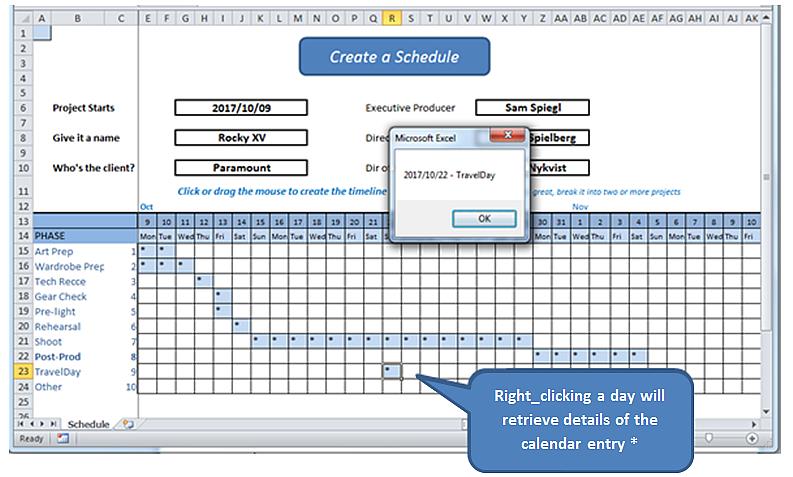
* Reālajā pasaulē mēs atvērtu veidlapu jēgpilnu dienasgrāmatu ierakstu lasīšanai un ierakstīšanai datu bāzē. Šis vingrinājums vienkārši atklāj pareizās noklikšķināšanas mehānismu un atrod informāciju no pašas darblapas.
Pirms sākam dažus skaidrojošus vārdus par izklājlapu, kuras darba modeli var atrast šeit.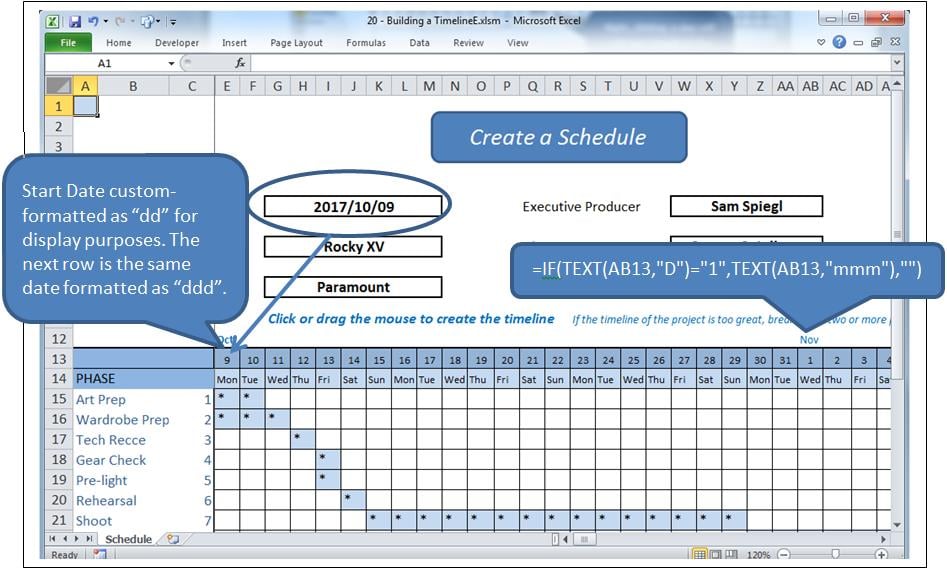
Process
Noklikšķinot uz šūnas režģī, šī šūna tiks iezīmēta un mainīta tās vērtība. Noklikšķinot un velkot, tiks izcelts diapazons un mainītas tā vērtības. Ja šūna ir aizpildīta, tā tiks notīrīta, pretējā gadījumā tā tiks aizpildīta, šajā gadījumā ar “*”.
Savukārt labais klikšķis ir informācijas pieprasījums no atlasītās šūnas.
Būtībā tiek izmantoti divi notikumi, kā arī vairāki moduļi.
- Worksheet_SelectionChange ko sauc, kad tiek atlasīta šūna vai šūnas.
- Worksheet_BeforeRightClick ko sauc ar peles labo pogu.
Problēma
Šūnas labā noklikšķināšana arī ir atlase, aktivizēšana AtlaseMainīt. Mums būs jāļauj šim notikumam iet savu gaitu, notīrot atlasīto šūnu, pirms tā nodod vadību PirmsRightClick notikums, kad mēs atkārtoti aizpildīsim notīrīto šūnu. Bet šī darbība izraisīs Atlase mainīta atkal jāpārtrauc tā notīrīšana.
To mēs darīsim ar Būla karogu ar nosaukumu blnLoading.
Notikumi
Ievadiet kodu koda logā aiz darblapas (ti, nevis modulī).
Option Explicit

    Dim blnLoading As Boolean
    Dim sPhase As String
    Dim currCellValue As String
    Dim dDate As Date

    Private Sub Worksheet_SelectionChange(ByVal Target As Range)
     If ActiveCell.Row > 14 And ActiveCell.Row < 25 Then
         If ActiveCell.Column > 4 And ActiveCell.Column < 47 Then 'selection is valid

             On Error Resume Next
             currCellValue = Target.Value 'get the target value from (ByVal Target As Range)

             If blnLoading = True Then 'a value of True will force an exit from this event
                 blnLoading = False
                 Exit Sub
             End If

             sPhase = Cells(ActiveCell.Row, 1)
             If sPhase = "" Then Exit Sub

             If ActiveCell = "*" Then 'if the cell is populated, clear the selected range
                 Call ClearRange
                 Call UnblockCalendar
             Else
                 Call PopulateRange
             End If

             Call RedrawCells
             Range("A1").Select 'revive the SelectionChange event by changing selection.
             Exit Sub
         End If
     End If
End Sub

Private Sub Worksheet_BeforeRightClick(ByVal Target As Range, Cancel As Boolean)
     If currCellValue = "*" Then   'picked up by the previous event BEFORE it cleared it;
                                     'This means this is a valid diary entry with detail.
        blnLoading = True    'this will prevent the SelectionChange event (above) from running.
        Target.Select
        'currCell = Target.Address
        'Range(currCell).Select

            Target.Value = "*" 're-instate the value of the cell, since SelectionChange has cleared it
            Call PopulateRange
            dDate = Cells(13, ActiveCell.Column)
            sPhase = Cells(ActiveCell.Row, 1)
            MsgBox dDate & " - " & sPhase
        Cancel = True 'suppress Excel’s standard right_click menus
    End If
    Range("A1").Select
        blnLoading = False
End Sub
Tas rūpējas par diviem notikumiem.
Atsauces kods
Pievienojiet kodam šādu diapazonu aizpildīšanu un samazināšanu:
Sub ClearRange()
     Selection.FormulaR1C1 = ""
     With Selection.Interior
         .Pattern = xlNone
         .TintAndShade = 0
         .PatternTintAndShade = 0
     End With
End Sub

Sub PopulateRange()
     Selection.FormulaR1C1 = "*"
     With Selection.Interior
         .Pattern = xlSolid
         .PatternColorIndex = xlAutomatic
         .ThemeColor = xlThemeColorLight2
         .TintAndShade = 0.799981688894314
         .PatternTintAndShade = 0
     End With
End Sub
Režģu līniju uzturēšana
Programmā ievietojiet moduli. Lai saglabātu režģa izskatu, pievienojiet šādu kodu. Tas tika nokopēts no makro reģistratora, atlaišanas un visa cita.
Option Explicit

Sub UnblockCalendar()
     Selection.FormulaR1C1 = ""
     With Selection
         Selection.Borders(xlDiagonalDown).LineStyle = xlNone
         Selection.Borders(xlDiagonalUp).LineStyle = xlNone
         Selection.Borders(xlEdgeLeft).LineStyle = xlNone
         Selection.Borders(xlEdgeTop).LineStyle = xlNone
         Selection.Borders(xlEdgeBottom).LineStyle = xlNone
         Selection.Borders(xlEdgeRight).LineStyle = xlNone
         Selection.Borders(xlInsideVertical).LineStyle = xlNone
         Selection.Borders(xlInsideHorizontal).LineStyle = xlNone
     End With
End Sub

Sub RedrawCells()
     Selection.Borders(xlDiagonalDown).LineStyle = xlNone
     Selection.Borders(xlDiagonalUp).LineStyle = xlNone
     With Selection.Borders(xlEdgeLeft)
         .LineStyle = xlContinuous
         .ColorIndex = 0
         .TintAndShade = 0
         .Weight = xlThin
     End With
     With Selection.Borders(xlEdgeTop)
         .LineStyle = xlContinuous
         .ColorIndex = 0
         .TintAndShade = 0
         .Weight = xlThin
     End With
     With Selection.Borders(xlEdgeBottom)
         .LineStyle = xlContinuous
         .ColorIndex = 0
         .TintAndShade = 0
         .Weight = xlThin
     End With
     With Selection.Borders(xlEdgeRight)
         .LineStyle = xlContinuous
         .ColorIndex = 0
         .TintAndShade = 0
         .Weight = xlThin
     End With
     With Selection.Borders(xlInsideVertical)
         .LineStyle = xlContinuous
         .ColorIndex = 0
         .TintAndShade = 0
         .Weight = xlThin
     End With
     With Selection.Borders(xlInsideHorizontal)
         .LineStyle = xlContinuous
         .ColorIndex = 0
         .TintAndShade = 0
         .Weight = xlThin
     End With
End Sub
Aizsardzība pret katastrofām
Ikviens, kurš daudz strādā ar Excel, zina, ka sarežģītas xlsm izklājlapas laiku pa laikam var avarēt, sabojājot atvērto dokumentu. Vairākos gadījumos, nekā varētu gaidīt, bojāto darbgrāmatu nevar atgūt, izmantojot Excel atkopšanas rutīnas. Ja nav dublējumu, paveiktais darbs tiek zaudēts. To var novērst ar rīkiem, kas paredzēti, lai veiktu Excel labojums.
Autora ievads:
Fēlikss Hukers ir datu atkopšanas eksperts DataNumen, Inc., kas ir pasaules līderis datu atkopšanas tehnoloģiju, tostarp rar failu remonts un SQL atkopšanas programmatūras produkti. Lai iegūtu vairāk informācijas, apmeklējiet vietni www.datanumen. Ar