
如果您想將嵌入在郵件正文中的所有圖片快速更改為電子郵件附件,則無需手動刪除並重新附加。 您可以只使用本文中公開的VBA代碼。
有時,您可能希望將所有嵌入的圖像批量轉換為附件。 例如,郵件正文中的圖片過多會打斷您閱讀正文中的文本。 因此,您要從電子郵件正文中刪除它們,並將其添加為附件。 當然,您可以手動執行此操作。 但是,如果有任何工具或VBA代碼可以一勞永逸地做到這一點,則必須更加方便。 在這裡,我們將向您介紹這樣的VBA代碼。
快速將所有嵌入的圖像轉換為附件
- 首先,star您的Outlook程序。
- 然後,您可以切換到“開發人員”選項卡,然後單擊“ Visual Basic”按鈕。
- 接下來,您將進入Outlook VBA編輯器窗口。
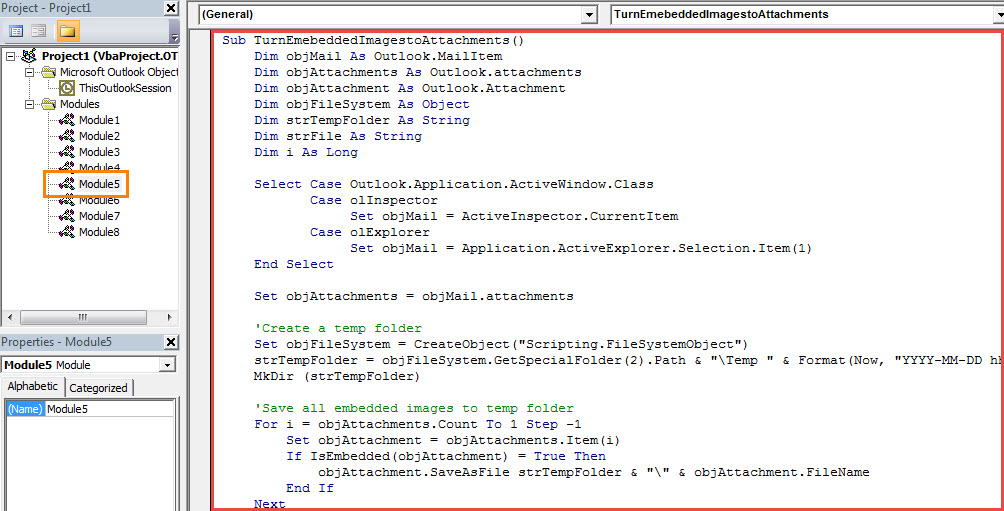
- 隨後,您需要將以下VBA代碼複製到空白模塊中。
Sub TurnEmebeddedImagestoAttachments()
    Dim objMail As Outlook.MailItem
    Dim objAttachments As Outlook.attachments
    Dim objAttachment As Outlook.Attachment
    Dim objFileSystem As Object
    Dim strTempFolder As String
    Dim strFile As String
    Dim i As Long

    Select Case Outlook.Application.ActiveWindow.Class
           Case olInspector
                Set objMail = ActiveInspector.CurrentItem
           Case olExplorer
                Set objMail = Application.ActiveExplorer.Selection.Item(1)
    End Select

    Set objAttachments = objMail.attachments

    'Create a temp folder
    Set objFileSystem = CreateObject("Scripting.FileSystemObject")
    strTempFolder = objFileSystem.GetSpecialFolder(2).Path & "\Temp " & Format(Now, "YYYY-MM-DD hh-mm-ss")
    MkDir (strTempFolder)

    'Save all embedded images to temp folder
    For i = objAttachments.Count To 1 Step -1
        Set objAttachment = objAttachments.Item(i)
        If IsEmbedded(objAttachment) = True Then
           objAttachment.SaveAsFile strTempFolder & "\" & objAttachment.FileName
        End If
    Next

    'Add extracted images as attachments
    strTempFolder = strTempFolder & "\"
    strFile = Dir(strTempFolder)

    While Len(strFile) > 0
          objMail.attachments.Add (strTempFolder & strFile)
          strFile = Dir
    Wend

    'Remove embedded images from message body
    With objMail
        .BodyFormat = olFormatPlain
    End With
End Sub

Function IsEmbedded(objCurAttachment As Outlook.Attachment) As Boolean
    Dim objPropertyAccessor As Outlook.PropertyAccessor
    Dim strProperty As String

    Set objPropertyAccessor = objCurAttachment.PropertyAccessor
    strProperty = objPropertyAccessor.GetProperty("http://schemas.microsoft.com/mapi/proptag/0x3712001E")

    If InStr(1, strProperty, "@") > 0 Then
       IsEmbedded = True
    Else
       IsEmbedded = False
    End If
End Function
- 之後,您應該確認您的Outlook是否設置為允許宏。
- (可選)如果您經常需要這樣做,則最好將新的宏添加到“快速訪問工具欄”中,以便將來方便檢查。
- 最終您可以嘗試一下。 選擇或打開電子郵件,然後通過單擊快速訪問工具欄中的新宏按鈕來運行宏。
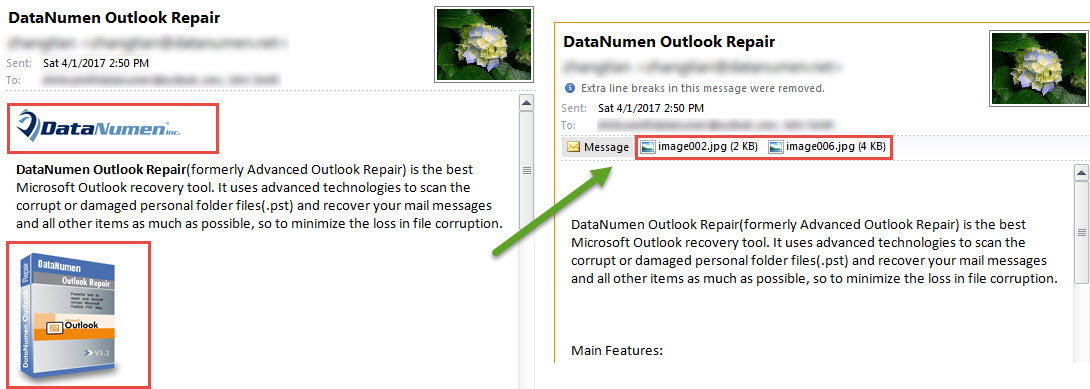
- 立即將所有嵌入的圖像更改為附件,如以下屏幕截圖所示:

保護寶貴的Outlook數據的技巧
眾所周知,Outlook PST文件與Word文件或Excel電子表格等普通文件一樣容易受到攻擊。 因此,您應該時刻注意PST文件周圍的所有風險,例如病毒或不當處理。 因此,您需要為PST文件進行常規數據備份。 另外,如果您負擔得起,則保持穩健是明智的 Outlook修復 方便的工具,像 DataNumen Outlook Repair.
作者簡介:
Shirley Zhang是的數據恢復專家 DataNumen,Inc.是數據恢復技術的全球領導者,包括 恢復mdf 和Outlook修復軟件產品。 欲了解更多信息,請訪問 萬維網。datanumen.COM