
一些用戶還希望在查看日曆中的生日事件時看到相應人員的年齡。 因此,在本文中,我們將分享一種輕鬆實現這一想法的方法。
當您向聯繫人添加生日信息時,Outlook 將自動在日曆中創建生日事件。 在這種情況下,每次當您在日曆中看到生日事件時,您可能還想獲取相應人員的年齡。 因此,在這裡我們將向您介紹一種實現方法。
在列表視圖中顯示所有生日活動對應人員的年齡
- 首先,啟動 Outlook VBA 編輯器。
- 然後,將以下代碼複製到模塊中。
Sub ShowAgesOfBirthdayEventsListView()
    Dim objStore As Outlook.Store
    Dim objOutlookFile As Outlook.Folder
    Dim objFolder As Outlook.Folder

    'Process All Calendar Folders in Your Outlook
    For Each objStore In Outlook.Application.Session.Stores
        Set objOutlookFile = objStore.GetRootFolder
        For Each objFolder In objOutlookFile.Folders
            If objFolder.DefaultItemType = olAppointmentItem Then
               Call ProcessFolders(objFolder)
            End If
        Next
    Next
End Sub

Sub ProcessFolders(ByVal objCalendar As Outlook.Folder)
    Dim i As Integer
    Dim objItem As Object
    Dim objBirthdayEvent As Outlook.AppointmentItem
    Dim dStart, dBirth As Date
    Dim nAge As Integer
    Dim objNewProperty As Outlook.UserProperty
    Dim objSubCalendar As Outlook.Folder

    For i = objCalendar.Items.Count To 1 Step -1
        Set objItem = objCalendar.Items.Item(i)
        'Add "Age" Property to Birthday Events
        If (objItem.MeetingStatus = olNonMeeting) And (objItem.IsRecurring = True) And (Right(objItem.Subject, 11) = "'s Birthday") Then
           Set objBirthdayEvent = objItem
           dStart = objBirthdayEvent.Start

           'Count Age
           dCurrentBirthday = DateSerial(Year(Now), Month(dStart), Day(dStart))
           nAge = DateDiff("yyyy", dStart, dCurrentBirthday)

           Set objNewProperty = objBirthdayEvent.UserProperties.Find("Age", True)
           If objNewProperty Is Nothing Then
              Set objNewProperty = objBirthdayEvent.UserProperties.Add("Age", olText, True)
           End If

           objNewProperty.value = nAge
           objBirthdayEvent.Save
        End If
    Next

    'Process All Sub-Calendar Folders Recursively
    If objCalendar.Folders.Count > 0 Then
       For Each objSubCalendar In objCalendar.Folders
           Call ProcessFolders(objSubCalendar)
       Next
    End If
End Sub
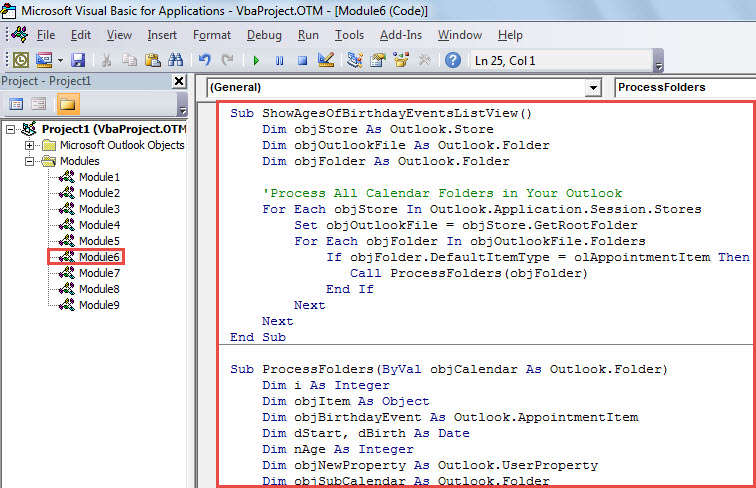
- 之後,將光標置於第一個子程序中,按“F5”運行該宏。
- 宏完成後,退出 VBA 編輯器並打開日曆文件夾。
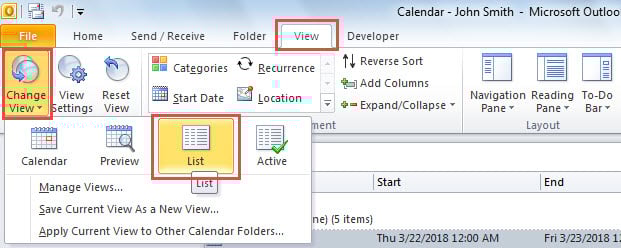
- 隨後,轉到“視圖”選項卡並單擊“更改視圖”>“列表”。

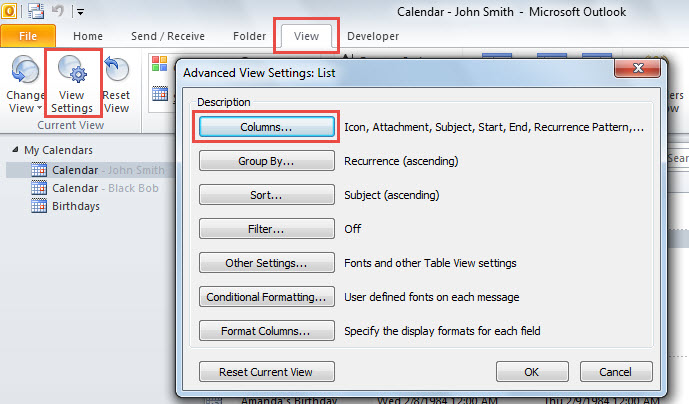
- 接下來,單擊“查看設置”按鈕。
- 在彈出的對話框中,選擇“列”。

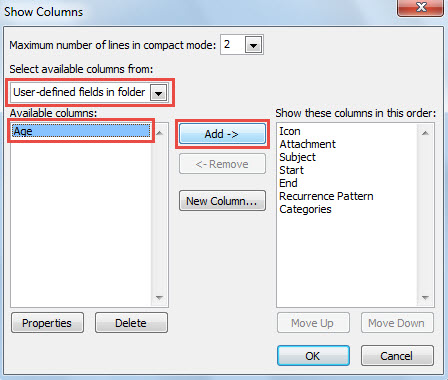
- 然後,在“顯示列”的下一個對話框中,從“選擇可用字段”列表中選擇“文件夾中的用戶定義字段”。
- 隨後,在“可用列”框中選中“年齡”,然後單擊“添加 ->”按鈕。

- 最後,單擊一系列“確定”,直到返回日曆項目列表。
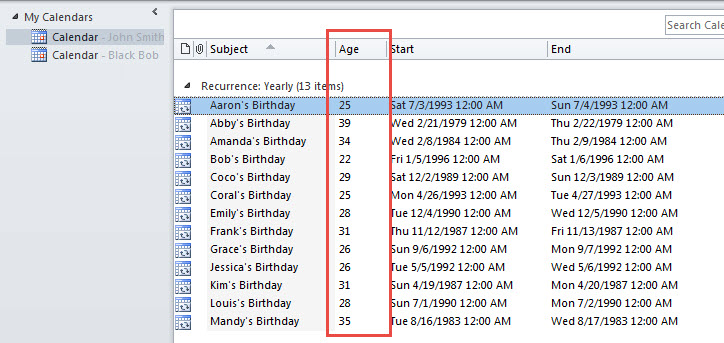
- 現在,在列表中,您可以看到所有生日事件的人員年齡,如下圖所示。

修復受損的Outlook文件
遇到時你可能會感到恐慌 腐敗的Outlook 文件,其中包含許多有價值的電子郵件和日程安排。 儘管這個問題相當令人絕望,但你還是必須立即冷靜下來,考慮採取有效的措施。 如果你繼續擔心,情況可能會變得越來越糟。 實際上,有多種方法和實用程序可以修復損壞的文件,例如收件箱修復工具和更強大且經驗豐富的工具,例如 DataNumen Outlook Repair.
作者簡介:
Shirley Zhang是的數據恢復專家 DataNumen,Inc.是數據恢復技術的全球領導者,包括 SQL Server 固定 和Outlook修復軟件產品。 欲了解更多信息,請訪問 萬維網。datanumen.COM