
以下文章顯示瞭如何用日曆標記和查詢日曆 滑鼠 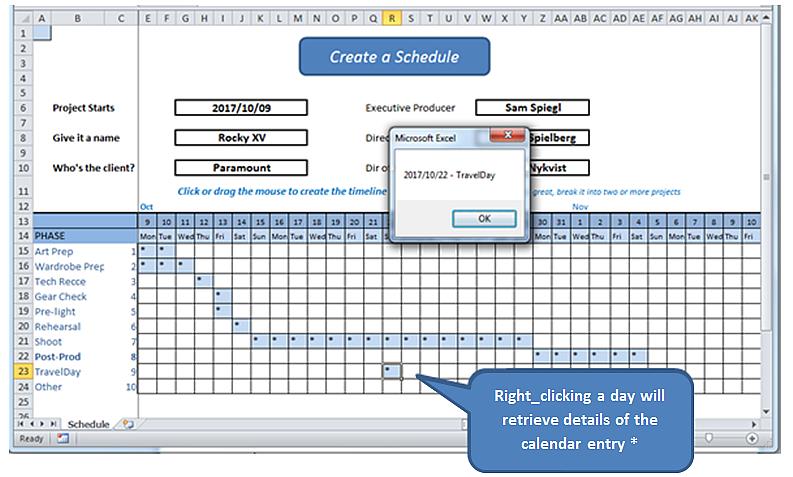
*在現實世界中,我們將打開一個表單以讀取有意義的日記條目並將其寫入數據庫。 該練習僅揭示了right_clicking的機制,並從工作表本身中查找詳細信息。
在開始之前,請先對電子表格進行一些解釋,並找到其工作模型 此處.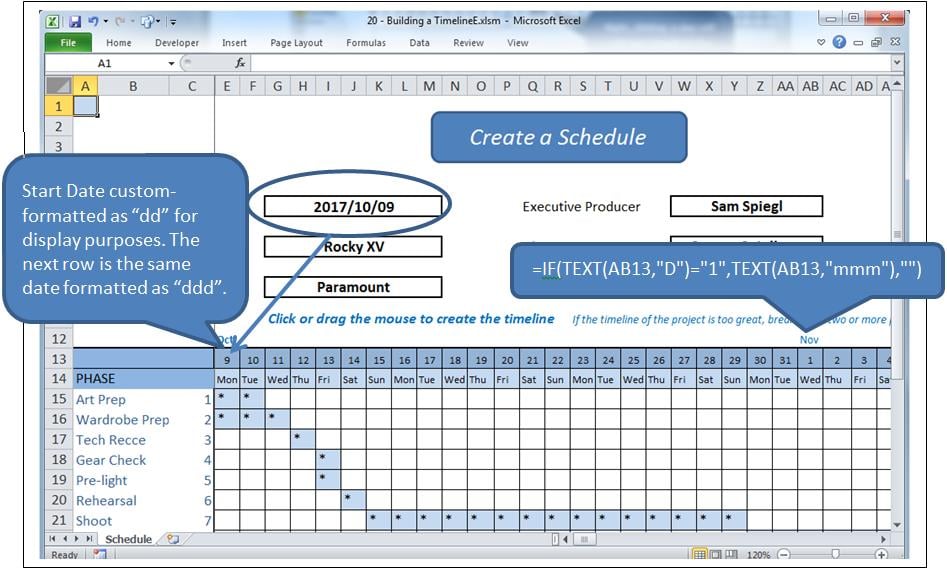
該過程
單擊網格中的一個單元格將突出顯示該單元格並更改其值。 單擊並拖動將突出顯示一個範圍並更改其值。 如果填充了一個單元格,則將其清除,否則將填充該單元格,在這種情況下,將顯示為“ *”。
相反,right_click是從選定單元格請求信息的請求。
本質上使用了兩個事件以及幾個模塊。
- 工作表_SelectionChange 當選擇一個或多個單元格時調用。
- 工作表_BeforeRightClick 這是通過鼠標右鍵調用的。
問題
右鍵單擊一個單元格也構成一個選擇,觸發 選擇變更。 我們將不得不讓該事件繼續進行,清除選定的單元格,然後再將控制權交還給 前右擊k事件,當我們重新填充清除的單元格時。 但是此動作將觸發 選擇已更改 事件再次發生,必須停止再次清除它。
我們將使用一個名為blnLoading的布爾標誌來完成此操作。
事件
在工作表後面的代碼窗口中輸入以下內容(即不在模塊中)。
Option Explicit

    Dim blnLoading As Boolean
    Dim sPhase As String
    Dim currCellValue As String
    Dim dDate As Date

    Private Sub Worksheet_SelectionChange(ByVal Target As Range)
     If ActiveCell.Row > 14 And ActiveCell.Row < 25 Then
         If ActiveCell.Column > 4 And ActiveCell.Column < 47 Then 'selection is valid

             On Error Resume Next
             currCellValue = Target.Value 'get the target value from (ByVal Target As Range)

             If blnLoading = True Then 'a value of True will force an exit from this event
                 blnLoading = False
                 Exit Sub
             End If

             sPhase = Cells(ActiveCell.Row, 1)
             If sPhase = "" Then Exit Sub

             If ActiveCell = "*" Then 'if the cell is populated, clear the selected range
                 Call ClearRange
                 Call UnblockCalendar
             Else
                 Call PopulateRange
             End If

             Call RedrawCells
             Range("A1").Select 'revive the SelectionChange event by changing selection.
             Exit Sub
         End If
     End If
End Sub

Private Sub Worksheet_BeforeRightClick(ByVal Target As Range, Cancel As Boolean)
     If currCellValue = "*" Then   'picked up by the previous event BEFORE it cleared it;
                                     'This means this is a valid diary entry with detail.
        blnLoading = True    'this will prevent the SelectionChange event (above) from running.
        Target.Select
        'currCell = Target.Address
        'Range(currCell).Select

            Target.Value = "*" 're-instate the value of the cell, since SelectionChange has cleared it
            Call PopulateRange
            dDate = Cells(13, ActiveCell.Column)
            sPhase = Cells(ActiveCell.Row, 1)
            MsgBox dDate & " - " & sPhase
        Cancel = True 'suppress Excel’s standard right_click menus
    End If
    Range("A1").Select
        blnLoading = False
End Sub
這將處理兩個事件。
參考代號
將以下填充和填充範圍附加到代碼中:
Sub ClearRange()
     Selection.FormulaR1C1 = ""
     With Selection.Interior
         .Pattern = xlNone
         .TintAndShade = 0
         .PatternTintAndShade = 0
     End With
End Sub

Sub PopulateRange()
     Selection.FormulaR1C1 = "*"
     With Selection.Interior
         .Pattern = xlSolid
         .PatternColorIndex = xlAutomatic
         .ThemeColor = xlThemeColorLight2
         .TintAndShade = 0.799981688894314
         .PatternTintAndShade = 0
     End With
End Sub
網格線的維護
將模塊插入應用程序。 添加以下代碼以維護網格的外觀。 這是從宏記錄器,冗餘和所有副本中復制的。
Option Explicit

Sub UnblockCalendar()
     Selection.FormulaR1C1 = ""
     With Selection
         Selection.Borders(xlDiagonalDown).LineStyle = xlNone
         Selection.Borders(xlDiagonalUp).LineStyle = xlNone
         Selection.Borders(xlEdgeLeft).LineStyle = xlNone
         Selection.Borders(xlEdgeTop).LineStyle = xlNone
         Selection.Borders(xlEdgeBottom).LineStyle = xlNone
         Selection.Borders(xlEdgeRight).LineStyle = xlNone
         Selection.Borders(xlInsideVertical).LineStyle = xlNone
         Selection.Borders(xlInsideHorizontal).LineStyle = xlNone
     End With
End Sub

Sub RedrawCells()
     Selection.Borders(xlDiagonalDown).LineStyle = xlNone
     Selection.Borders(xlDiagonalUp).LineStyle = xlNone
     With Selection.Borders(xlEdgeLeft)
         .LineStyle = xlContinuous
         .ColorIndex = 0
         .TintAndShade = 0
         .Weight = xlThin
     End With
     With Selection.Borders(xlEdgeTop)
         .LineStyle = xlContinuous
         .ColorIndex = 0
         .TintAndShade = 0
         .Weight = xlThin
     End With
     With Selection.Borders(xlEdgeBottom)
         .LineStyle = xlContinuous
         .ColorIndex = 0
         .TintAndShade = 0
         .Weight = xlThin
     End With
     With Selection.Borders(xlEdgeRight)
         .LineStyle = xlContinuous
         .ColorIndex = 0
         .TintAndShade = 0
         .Weight = xlThin
     End With
     With Selection.Borders(xlInsideVertical)
         .LineStyle = xlContinuous
         .ColorIndex = 0
         .TintAndShade = 0
         .Weight = xlThin
     End With
     With Selection.Borders(xlInsideHorizontal)
         .LineStyle = xlContinuous
         .ColorIndex = 0
         .TintAndShade = 0
         .Weight = xlThin
     End With
End Sub
預防災難
經常使用 Excel 進行開發的人都知道,複雜的 xlsm 電子表格有時會崩潰,導致開啟的文件損壞。很多情況下,Excel 的復原程式無法恢復損壞的工作簿。如果沒有備份,所有工作都將遺失。使用專門設計的工具可以避免這種情況的發生。 Excel修復.
作者簡介:
Felix Hooker是的數據恢復專家 DataNumen,Inc.是數據恢復技術的全球領導者,包括 rar修復 和sql恢復軟件產品。 欲了解更多信息,請訪問 萬維網。datanumen.COM