
您無法將 Outlook 配置為使用特定的非默認打印機來打印電子郵件。 但在本文中,我們將向您展示一種使用 Outlook VBA 實現它的方法。
您的計算機必須將打印機設置為默認打印機,該打印機將應用於此計算機上的所有程序。 在這種情況下,如果您想通過 Outlook 中的非默認打印機打印電子郵件,則每次打印時都必須更改打印機。 這是相當麻煩的。 因此,在下文中,我們將與您分享一種無需每次都更換打印機而自動使用特定打印機打印電子郵件的方法。
自動使用特定打印機打印電子郵件
- 首先,啟動 Outlook 應用程式。
- 然後,在Outlook主窗口中,按“ Alt + F11”鍵按鈕。
- 接下來,在顯示的「Microsoft Visual Basic for Applications」視窗中,您需要先啟用「Microsoft Word 物件庫」。您可以透過點擊“工具”>“引用”來實現此操作。
- 然後,您需要訪問一個空模塊。
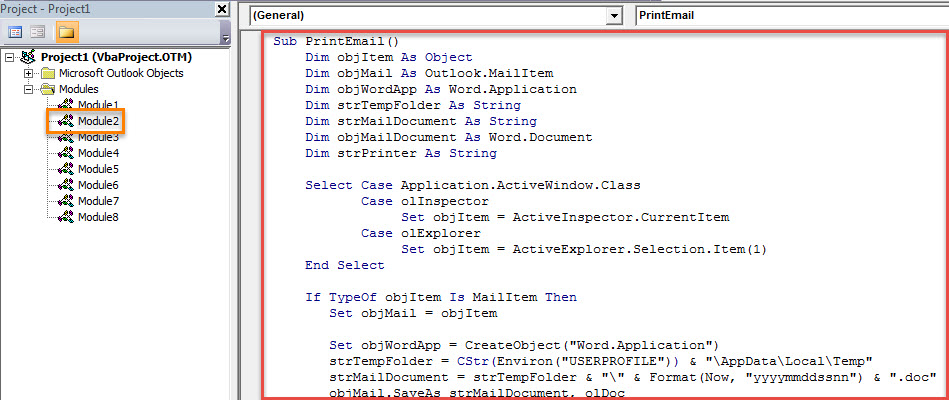
- 隨後,將以下VBA代碼複製並粘貼到該模塊中。
Sub PrintEmail()
    Dim objItem As Object
    Dim objMail As Outlook.MailItem
    Dim objWordApp As Word.Application
    Dim strTempFolder As String
    Dim strMailDocument As String
    Dim objMailDocument As Word.Document
    Dim strPrinter As String

    Select Case Application.ActiveWindow.Class
           Case olInspector
                Set objItem = ActiveInspector.CurrentItem
           Case olExplorer
                Set objItem = ActiveExplorer.Selection.Item(1)
    End Select

    If TypeOf objItem Is MailItem Then
       Set objMail = objItem

       Set objWordApp = CreateObject("Word.Application")
       strTempFolder = CStr(Environ("USERPROFILE")) & "\AppData\Local\Temp"
       strMailDocument = strTempFolder & "\" & Format(Now, "yyyymmddssnn") & ".doc"
       objMail.SaveAs strMailDocument, olDoc

       Set objMailDocument = objWordApp.Documents.Open(strMailDocument)
       objWordApp.Visible = True
       objMailDocument.Activate

       strPrinter = objWordApp.ActivePrinter
       'Change to the name of specific printer
       objWordApp.ActivePrinter = "Specific Printer"
       objWordApp.PrintOut Range:=wdPrintAllDocument, Item:=wdPrintDocumentContent
       objWordApp.ActivePrinter = strPrinter

       objMailDocument.Close False
       objWordApp.Quit
       Kill strMailDocument
    End If
End Sub
- 之後,您可以關閉當前窗口。
- 然後,轉到“文件”菜單,然後單擊“選項”。
- 在“Outlook 選項”窗口中,轉到“快速訪問工具欄”選項卡,然後像往常一樣將新宏添加到快速訪問工具欄。
- 最後,您可以嘗試這個 VBA 項目。
- 首先,選擇或打開您要打印的電子郵件。
- 然後,在快速訪問工具欄中單擊宏按鈕。
- 該電子郵件將立即由特定打印機打印出來。
- 從現在開始,要通過特定打印機打印電子郵件,您只需使用此宏即可。
事故腐敗後恢復展望
為了防止 Outlook 資料遺失,您需要採取許多措施。例如,您應該定期備份 PST 檔案。當然,建議您使用外部修復工具,例如… DataNumen Outlook Repair。 它可以 修復PST 錯誤並為您恢復最大的 Outlook 數據。
作者簡介:
Shirley Zhang是的數據恢復專家 DataNumen,Inc.是數據恢復技術的全球領導者,包括 恢復SQL 和Outlook修復軟件產品。 欲了解更多信息,請訪問 萬維網。datanumen.COM