
---
description: Repair the corrupt DBF database files and recover as much of your data as possible, thereby minimizing the loss in file corruption.
title: DBF Repair Tool. DBF Recovery Software. DBF Fix Tool.
image: https://www.datanumen.com/wp-content/uploads/2019/10/datanumen-dbf-repair-40-boxshot.png
---


* [ ](https://www.facebook.com/DataNumen)
* [ ](https://www.linkedin.com/company/datanumen)
* [ ](https://twitter.com/DataNumen)

# DataNumen DBF Repair

**DataNumen DBF Repair** is the **best** DBF recovery tool in the world. It can repair the corrupt DBF database files and recover as much of your data as possible, thereby minimizing the loss in file corruption.

[Free Download](https://download.datanumen.com/downloads/file/ddbfr.exe)20+ Years Of Experience

[ ![DataNumen DBF Repair 4.0 Boxshot](https://www.datanumen.com/wp-content/uploads/2019/10/datanumen-dbf-repair-40-boxshot.png) ](https://download.datanumen.com/downloads/file/ddbfr.exe) 

![1,644 votes, average: 4.90 out of 5](https://www.datanumen.com/wp-content/themes/datanumen/images/rating_45.png "1,644 votes, average: 4.90 out of 5")   
**4.90 / 5 (from 1,644 votes)** 

* ### Overview
* ### Features
* ### How to Recover
* ### More Information
* ### Related Products

## Why DataNumen DBF Repair?

---

_![#1 Recovery Rate](https://www.datanumen.com/wp-content/themes/datanumen/images/top-one-recovery-rate-icon.png)_ 

#### #1 Recovery   
Rate

_![10+ Million Users](https://www.datanumen.com/wp-content/themes/datanumen/images/10-million-users-icon.png)_ 

#### 10+ Million   
Users

_![20+ Years of Experience](https://www.datanumen.com/wp-content/themes/datanumen/images/20-years-experience-icon.png)_ 

#### 20+ Years of   
Experience

_![100% Satisfaction Guarantee](https://www.datanumen.com/wp-content/themes/datanumen/images/100-satisfaction-guarantee-icon.png)_ 

#### 100% Satisfaction   
Guarantee

## Our Customers' Testimonials

![5 star rating]() 

You guys are genius's. The file is fixed and complete.

Graeme Nightingale  
IT Consultant  
http://www.linkedin.com/in/graeme-nightingale-447a7239  
ABN: 62 233 206 636  
Tel: 61 (0)419 313 378  
https://www.cgn.com.au/

PO Box 4080  
Frankston Victoria 3199  
Australia  
April 25, 2026

![5 star rating]() 

In our company, there is an old FoxPro DBF file. We cannot open it. We think it is oversized. Your DBF recovery software helps to fix the file. Now

[... Read more](#)

In our company, there is an old FoxPro DBF file. We cannot open it. We think it is oversized. Your DBF recovery software helps to fix the file. Now we can access the data inside it properly.

Kenelm Butler

Canada  
Oct 10, 2018

![5 star rating]() 

The tool fixes my Microsoft FoxPro Database with a quick scan. Very helpful!

Myrtle Terry

Delaware, US  
July 15, 2019

![5 star rating]() 

has a well advance repair

matt desmond

![5 star rating]() 

Hello Chen,

I just wanted to let you know that DataNumen DBF Repair was able to recover all the data from our ACT! 2000 database.

Stephen Rice  
Production Director

Sacramento Magazines Corp.

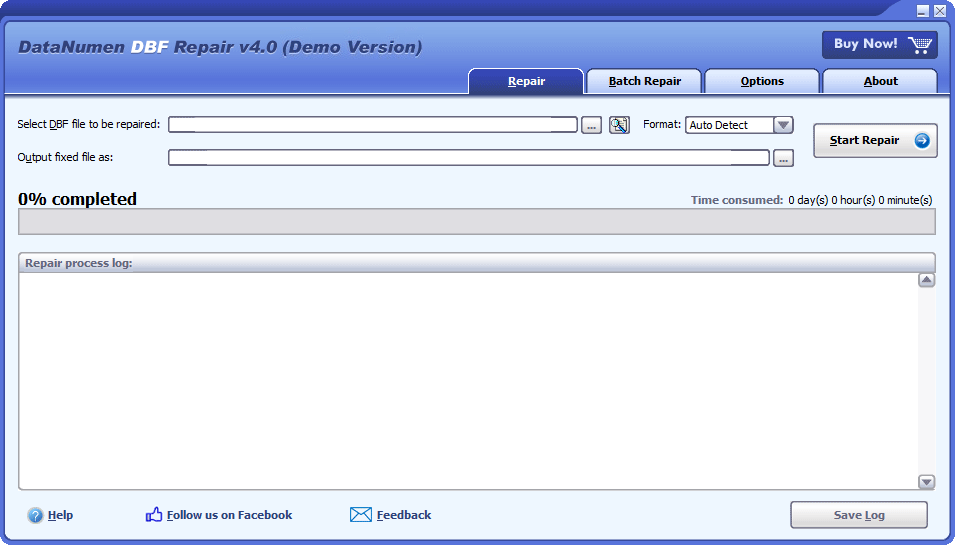
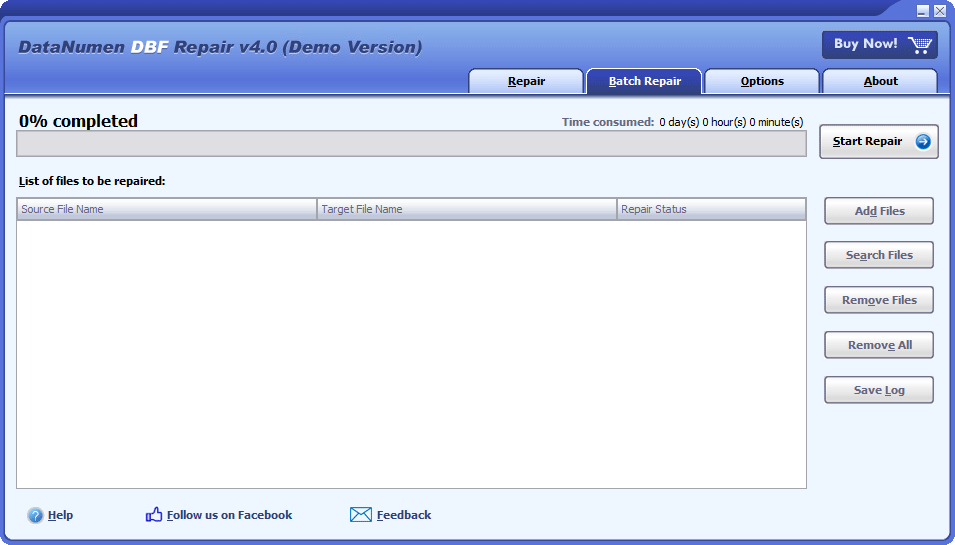
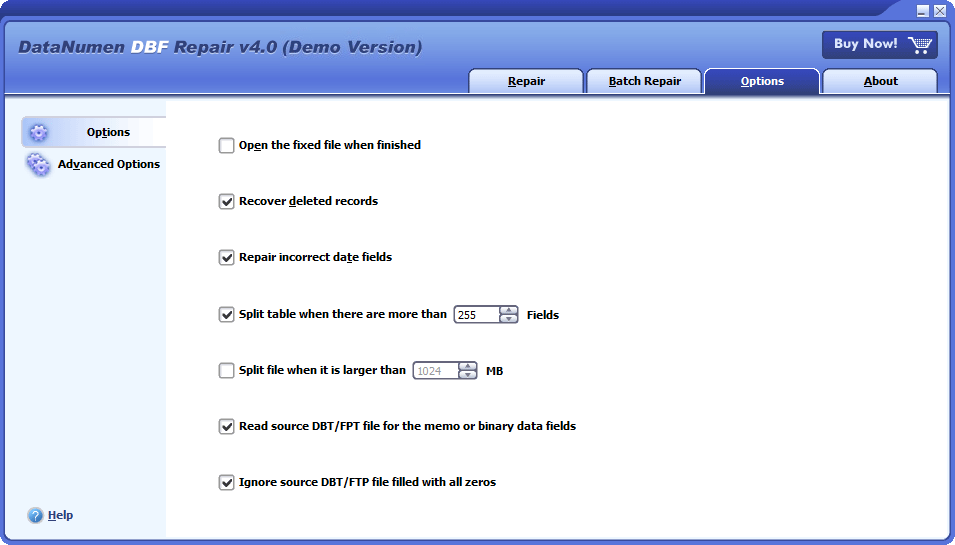
## Extremely Simple Interface

---

[](https://www.datanumen.com/wp-content/uploads/2019/10/datanumen-dbf-repair-40.png) 

#### Repair

[](https://www.datanumen.com/wp-content/uploads/2019/10/datanumen-dbf-repair-40-batch.png) 

#### Batch Repair

[](https://www.datanumen.com/wp-content/uploads/2019/10/datanumen-dbf-repair-40-options.png) 

#### Options

[Free Download](https://download.datanumen.com/downloads/file/ddbfr.exe)20+ Years Of Experience

[Buy Now](https://www.datanumen.com/dbf-repair-order/)100% Satisfaction Guarantee

## Main Features

---

* Support all versions of [DBF database](https://en.wikipedia.org/wiki/.dbf), including Clipper, dBASE III, dBASE IV, dBASE 5 for dos, dBASE 5 for Windows, FoxBase, FoxPro, Microsoft Visual FoxPro DBF, etc.
* Repair both the corrupt DBF file header and the data records.
* Repair DBF files with memo or binary data fields stored in DBT or FPT files.
* Split the DBF file when its size reaches a predefined limit, especially, support to split oversized 2GB DBF files.
* Split the table when its field count reaches a predefined maximum field count.

---

[Free Download](https://download.datanumen.com/downloads/file/ddbfr.exe)20+ Years Of Experience

[Buy Now](https://www.datanumen.com/dbf-repair-order/)100% Satisfaction Guarantee

## Using DataNumen DBF Repair to Recover Damaged DBF Databases

---

[See Video Tutorial ](https://youtu.be/Vr5Ri43PCN8) 

Start DataNumen DBF Repair.

![DataNumen DBF Repair 4.0]()

**Note:** Before recovering any damaged or corrupt dbf file with our file repair tool, please close any other applications that may modify the dbf file.

Select the corrupt or damaged dbf file to be repaired:

![Select Source File]()

You can input the dbf filename directly or click the ![Browse]() button to browse and select the damaged DBF file. You may also click the ![Find]() button to find the dbf file to be repaired on the local computer.

In combo box ![Select Source File Format](), you may also select the format of the source dbf file. Currently the following DBF formats are supported:

dBASE III  
dBASE IV  
dBASE 5  
FoxBase  
FoxPro 2.0  
FoxPro 2.5  
FoxPro 2.6  
Visual FoxPro

By default, the DBF format is set to "Auto Detect" so that our repair software will detect the file format of the source dbf database and output the fixed one according to the detected format. However, if the output file cannot be opened successfully by your application, then you can specify the file format to force our database recovery tool to generate the file in the format that is compatible with your application.

For Clipper database files, you can choose dBASE III as its format.

By default, our DBF file recovery tool will save the recovered data into a new file named xxxx\_fixed.dbf, where xxxx is the name of the source dbf file. For example, for source dbf file Damaged.dbf, the default name for the fixed file will be Damaged\_fixed.dbf. If you want to use another name, then please select or set it accordingly:

![Select Destination File]()

You can input the fixed file name directly or click the ![Browse]() button to browse and select the fixed file.

Click the ![Start Repair]() button, and our DBF repair tool will analyze and repair the corrupt dbf file. Progress bar

![Progress Bar]()

will indicate the data recovery progress.

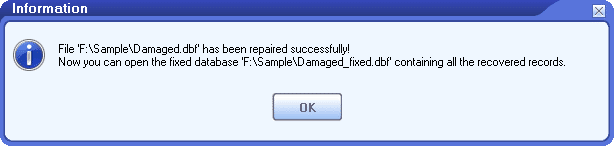
After the repair process, if the source dbf database can be repaired successfully, you will see a message box like this:

![Success Message Box]()

Now you can open the recovered file with the corresponding applications.

## More Information

---

![Specifications]() Specifications 

![Case Studies]() Case Studies 

![FAQ]() FAQ 

![Help Documentation]() Help Documentation 

| **Version**                               | 4.0 ([Version History](https://www.datanumen.com/news/))                                                                                            |
| ----------------------------------------- | --------------------------------------------------------------------------------------------------------------------------------------------------- |
| **Release Date**                          | January 17th, 2024                                                                                                                                  |
| **Bitness**                               | 32-bit                                                                                                                                              |
| **Supported File Types**                  | DBF, DBT, FPT                                                                                                                                       |
| **Supported DBF Applications**            | Clipper, dBASE III, dBASE IV, dBASE 5 for DOS, dBASE 5 for Windows, FoxBase, FoxPro, Microsoft Visual FoxPro, and other DBF-compatible applications |
| **Recoverable Objects**                   | Tables                                                                                                                                              |
| **Table Schema and Record Recovery**      | Supported                                                                                                                                           |
| **Recoverable Data Types**                | All data types, including memo and binary fields                                                                                                    |
| **Oversized DBF File Splitting**          | Supported                                                                                                                                           |
| **Output Table Splitting by Field Count** | Supported                                                                                                                                           |
| **Supported Languages**                   | 95 languages                                                                                                                                        |

#### Requirements

| **Operating System** | Windows                          |
| -------------------- | -------------------------------- |
| **Processor**        | Intel or equivalent (x86, x64)   |
| **Memory**           | 16 MB minimum (1 GB recommended) |
| **Disk Space**       | 19 MB                            |

[Reviving Critical Data: How Thyssenkrupp Elevator Utilized DataNumen DBF Repair to Restore Essential Database Files](https://www.datanumen.com/dbf-repair/case-studies/thyssenkrupp-elevator/)   
[Abbott Diabetes Care Streamlines Database Management with DataNumen DBF Repair: A Case Study](https://www.datanumen.com/dbf-repair/case-studies/abbott-diabetes-care/)   

[More Case Studies ](https://www.datanumen.com/case-studies/) 

### Which types of DBF files are supported?

Our DBF recovery tool support to repair DBF files created by different kinds of software products, including dBASE III, dBASE IV, dBASE 5 for dos, dBASE 5 for Windows, FoxBase, FoxPro, Microsoft Visual FoxPro, Clipper, etc.

### Do you support to recover FoxPro or Visual FoxPro databases?

Yes, our tool supports both FoxPro and Visual FoxPro databases.

### How does the demo version differ from the full version?

The demo and full versions utilize the identical DBF recovery engine. However, the demo version merely offers a preview of the recovered data, without providing the ability to export them.

### If the DBF file header is badly corrupted, can you load the schema from another DBF file?

Sorry but currently our DBF repair tool do not support such a feature yet.

### Can you output the fixed database in MDB format?

Sorry but currently our DBF data recovery tool cannot save the recovered data in Access MDB format.

### Which operating systems are supported?

Currently, our repair software supports Windows 95/98/ME/NT/2000/XP/Vista/7/8/8.1/10 and Windows Server 2003/2008/2012/2016/2019 operating systems. Both 32bit and 64bit are supported.

### How long does it take to repair a DBF database file?

Our DBF file recovery tool uses an advanced algorithm to analyze the damaged database file in a quick way. The total time depends on the following factors:

1. The DBF file size.
2. If the database has an associated DBT or FPT file. The size of the DBT or FPT file will also affect the total time.

### What causes a DBF database file to become corrupt?

Numerous factors can lead to DBF database file corruption, such as hard drive failure, viruses, unexpected power down, too many fields in the table, oversized database, etc. We recommend you to have a DBF repair tool on hand so that whenever your database is corrupt, you can use the database recovery tool to repair the corrupt file as soon as possible.

### Do you support to recover indexes?

Sorry, but our recovery software cannot recover indexes in DBF databases. But you can use our recovery software to recover the database first, then use the following command to rebuild the index on the recovered file:

INDEX ON <key expression> TAG <tag name> \[OF <index filename>\]

### Do you offer an online file repair service?

Sorry but currently we do not provide such a service yet.

[More Articles in Knowledgebase ](https://www.datanumen.com/knowledgebase/) 

## Related Products

---

![DataNumen Database Recovery Boxshot]() 

### [DataNumen Database Recovery](https://www.datanumen.com/database-recovery/)

Database recovery suite, including recovery tools for corrupt Microsoft Access databases and DBF databases.

[Details ](https://www.datanumen.com/database-recovery/) 

![DataNumen Oracle Recovery Boxshot]() 

### [DataNumen Oracle Recovery](https://www.datanumen.com/oracle-recovery/)

Recover corrupt Oracle DBF database files.

[Details ](https://www.datanumen.com/oracle-recovery/) 

![DataNumen SQL Recovery 7.3 Boxshot]() 

### [DataNumen SQL Recovery](https://www.datanumen.com/sql-recovery/)

Repair corrupt Microsoft SQL Server MDF databases.

[Details ](https://www.datanumen.com/sql-recovery/) 

![DataNumen Access Repair 4.5 Boxshot]() 

### [Access Database Repair Tool](https://www.datanumen.com/access-repair/)

Repair and recover corrupt Microsoft Access databases (.mdb and .accdb files). 

[Details ](https://www.datanumen.com/access-repair/) 

### ![DataNumen DBF Repair 4.0 Boxshot]() DataNumen DBF Repair

[Free Download](https://download.datanumen.com/downloads/file/ddbfr.exe)

[Buy Now](https://www.datanumen.com/dbf-repair-order/)

![DataNumen]() 

Follow or like us on Facebook, LinkedIn and Twitter to get all promotions, latest news and updates on our products and company.

* [ ](https://www.facebook.com/DataNumen)
* [ ](https://www.linkedin.com/company/datanumen)
* [ ](https://twitter.com/DataNumen)

### Featured Products

* [DataNumen Outlook Repair](https://www.datanumen.com/outlook-repair/)
* [DataNumen SQL Recovery](https://www.datanumen.com/sql-recovery/)
* [DataNumen Exchange Recovery](https://www.datanumen.com/exchange-recovery/)
* [DataNumen Access Repair](https://www.datanumen.com/access-repair/)
* [DataNumen Excel Repair](https://www.datanumen.com/excel-repair/)
* [DataNumen PDF Repair](https://www.datanumen.com/pdf-repair/)
* [DataNumen Word Repair](https://www.datanumen.com/word-repair/)
* [DataNumen Zip Repair](https://www.datanumen.com/zip-repair/)

### [Latest news](https://www.datanumen.com/news/)

  * [DataNumen Outlook Drive Recovery 10.2 is released on May 9th, 2025](https://www.datanumen.com/outlook-drive-recovery/)
  * [DataNumen Outlook Repair 10.2 is released on April 15th, 2025](https://www.datanumen.com/outlook-repair/)
  * [DataNumen SQL Recovery 7.3 is released on February 19th, 2025](https://www.datanumen.com/sql-recovery/)

[ ](#masthead)

```json
{"@context":"https:\/\/schema.org","@graph":[{"@type":"WebPage","@id":"https:\/\/www.datanumen.com\/dbf-repair\/","url":"https:\/\/www.datanumen.com\/dbf-repair\/","name":"DBF Repair Tool. DBF Recovery Software. DBF Fix Tool.","isPartOf":{"@id":"https:\/\/www.datanumen.com\/#website"},"primaryImageOfPage":{"@id":"https:\/\/www.datanumen.com\/dbf-repair\/#primaryimage"},"image":{"@id":"https:\/\/www.datanumen.com\/dbf-repair\/#primaryimage"},"thumbnailUrl":"https:\/\/www.datanumen.com\/wp-content\/uploads\/2019\/10\/datanumen-dbf-repair-40-boxshot.png","datePublished":"2019-10-23T09:26:50+00:00","dateModified":"2026-07-24T04:24:03+00:00","description":"Repair the corrupt DBF database files and recover as much of your data as possible, thereby minimizing the loss in file corruption.","breadcrumb":{"@id":"https:\/\/www.datanumen.com\/dbf-repair\/#breadcrumb"},"inLanguage":"en-US","potentialAction":[{"@type":"ReadAction","target":["https:\/\/www.datanumen.com\/dbf-repair\/"]}]},{"@type":"ImageObject","inLanguage":"en-US","@id":"https:\/\/www.datanumen.com\/dbf-repair\/#primaryimage","url":"https:\/\/www.datanumen.com\/wp-content\/uploads\/2019\/10\/datanumen-dbf-repair-40-boxshot.png","contentUrl":"https:\/\/www.datanumen.com\/wp-content\/uploads\/2019\/10\/datanumen-dbf-repair-40-boxshot.png","width":241,"height":320,"caption":"DataNumen DBF Repair 4.0 Boxshot"},{"@type":"BreadcrumbList","@id":"https:\/\/www.datanumen.com\/dbf-repair\/#breadcrumb","itemListElement":[{"@type":"ListItem","position":1,"name":"Home","item":"https:\/\/www.datanumen.com\/"},{"@type":"ListItem","position":2,"name":"DataNumen DBF Repair"}]},{"@type":"WebSite","@id":"https:\/\/www.datanumen.com\/#website","url":"https:\/\/www.datanumen.com\/","name":"DataNumen","description":"","publisher":{"@id":"https:\/\/www.datanumen.com\/#organization"},"potentialAction":[{"@type":"SearchAction","target":{"@type":"EntryPoint","urlTemplate":"https:\/\/www.datanumen.com\/?s={search_term_string}"},"query-input":{"@type":"PropertyValueSpecification","valueRequired":true,"valueName":"search_term_string"}}],"inLanguage":"en-US"},{"@type":"Organization","@id":"https:\/\/www.datanumen.com\/#organization","name":"DataNumen, Inc.","url":"https:\/\/www.datanumen.com\/","logo":{"@type":"ImageObject","inLanguage":"en-US","@id":"https:\/\/www.datanumen.com\/#\/schema\/logo\/image\/","url":"https:\/\/www.datanumen.com\/wp-content\/uploads\/2020\/03\/favicon.png","contentUrl":"https:\/\/www.datanumen.com\/wp-content\/uploads\/2020\/03\/favicon.png","width":600,"height":600,"caption":"DataNumen, Inc."},"image":{"@id":"https:\/\/www.datanumen.com\/#\/schema\/logo\/image\/"},"sameAs":["https:\/\/www.facebook.com\/DataNumen","https:\/\/x.com\/DataNumen","https:\/\/www.linkedin.com\/company\/datanumen","https:\/\/myspace.com\/datanumen\/","https:\/\/www.pinterest.com\/datanumen\/data-recovery\/","https:\/\/www.youtube.com\/c\/DataNumen"]}]}
{
  "@context": "https://schema.org",
  "@type": "SoftwareApplication",
  "@id": "https://www.datanumen.com/dbf-repair/#software",
  "name": "DataNumen DBF Repair",
  "url": "https://www.datanumen.com/dbf-repair/",
  "downloadUrl": "https://download.datanumen.com/downloads/file/ddbfr.exe",
  "image": "https://www.datanumen.com/dbf-repair/images/ddbfrboxst.jpg",
  "description": "DataNumen DBF Repair is a DBF database repair and recovery tool for repairing corrupted DBF files and recovering table schemas, records, memo fields, and binary fields stored in DBF, DBT, and FPT files where possible.",
  "softwareVersion": "4.0",
  "dateModified": "2024-01-17",
  "releaseNotes": "https://www.datanumen.com/news/",
  "applicationCategory": "UtilitiesApplication",
  "applicationSubCategory": "Database Repair Software",
  "operatingSystem": "Windows",
  "processorRequirements": "Intel or equivalent (x86, x64)",
  "memoryRequirements": "16 MB minimum (1 GB recommended)",
  "storageRequirements": "19 MB",
  "inLanguage": [
    "English",
    "Bulgarian",
    "Czech",
    "Danish",
    "German",
    "Greek",
    "Spanish",
    "Estonian",
    "Finnish",
    "French",
    "Hungarian",
    "Indonesian",
    "Italian",
    "Japanese",
    "Korean",
    "Lithuanian",
    "Latvian",
    "Norwegian",
    "Dutch",
    "Polish",
    "Portuguese",
    "Romanian",
    "Russian",
    "Slovak",
    "Slovenian",
    "Swedish",
    "Turkish",
    "Ukrainian",
    "Chinese (Simplified)",
    "Afrikaans",
    "Albanian",
    "Amharic",
    "Arabic",
    "Armenian",
    "Assamese",
    "Azerbaijani",
    "Basque",
    "Belarusian",
    "Bengali",
    "Bosnian",
    "Catalan",
    "Chinese (Traditional)",
    "Corsican",
    "Croatian",
    "Divehi",
    "Filipino",
    "Frisian",
    "Galician",
    "Georgian",
    "Gujarati",
    "Hausa",
    "Hebrew",
    "Hindi",
    "Icelandic",
    "Igbo",
    "Irish",
    "Kannada",
    "Kazakh",
    "Khmer",
    "Kinyarwanda",
    "Kyrgyz",
    "Lao",
    "Luxembourgish",
    "Macedonian",
    "Malay",
    "Malayalam",
    "Maltese",
    "Maori",
    "Marathi",
    "Mongolian",
    "Nepali",
    "Oriya",
    "Pashto",
    "Persian",
    "Punjabi",
    "Sanskrit",
    "Scottish Gaelic",
    "Sesotho",
    "Serbian",
    "Sinhala",
    "Kiswahili",
    "Tajik",
    "Tamil",
    "Tatar",
    "Telugu",
    "Thai",
    "Turkmen",
    "Urdu",
    "Uyghur",
    "Uzbek",
    "Vietnamese",
    "Welsh",
    "isiXhosa",
    "Yoruba",
    "isiZulu"
  ],
  "publisher": {
    "@type": "Organization",
    "name": "DataNumen",
    "url": "https://www.datanumen.com/",
    "logo": "https://www.datanumen.com/images/logo.png"
  },
  "featureList": [
    "Available as a 32-bit application",
    "Repair DBF database files and related DBT and FPT files",
    "Support DBF files created by Clipper, dBASE III, dBASE IV, dBASE 5 for DOS, dBASE 5 for Windows, FoxBase, FoxPro, Microsoft Visual FoxPro, and other DBF-compatible applications",
    "Recover tables from corrupted DBF files",
    "Recover table schemas and records",
    "Recover all supported data types, including memo and binary fields",
    "Split oversized DBF files",
    "Split output tables according to a predefined maximum field count",
    "Support 95 languages"
  ],
  "aggregateRating": {
    "@type": "AggregateRating",
    "ratingValue": "4.9",
    "bestRating": "5",
    "worstRating": "1",
    "ratingCount": "1644"
  },
  "offers": {
    "@type": "Offer",
    "name": "1 User License",
    "url": "https://www.datanumen.com/dbf-repair/buy/",
    "priceCurrency": "USD",
    "price": "149.95",
    "availability": "https://schema.org/InStock"
  }
}
```