---
description: If you are using Gmail account via IMAP in Outlook, you may find that the emails, which you’ve deleted from Outlook, still exist on Gmail server. This article will teach you how to make the emails to get deleted from both Outlook and IMAP server.
title: How to Delete Emails of Gmail Account from Both Outlook and IMAP Mail Server
image: https://www.datanumen.com/blogs/wp-content/uploads/2016/12/Account-Settings.jpg
---


* [ ](https://www.facebook.com/DataNumen)
* [ ](http://www.linkedin.com/company/datanumen)
* [ ](https://twitter.com/DataNumen)

[Home](https://www.datanumen.com/blogs/) \> [Solutions](https://www.datanumen.com/blogs/category/solutions/) \> [Office Solutions](https://www.datanumen.com/blogs/category/solutions/office-solutions/) \> [Outlook Solutions](https://www.datanumen.com/blogs/category/solutions/office-solutions/outlook-solutions/) \> How to Delete Emails of Gmail Account from Both Outlook and IMAP Mail Server

# How to Delete Emails of Gmail Account from Both Outlook and IMAP Mail Server

[Outlook Solutions](https://www.datanumen.com/blogs/category/solutions/office-solutions/outlook-solutions/)  September 29, 2025 

Share Now: 
* [ ](https://www.facebook.com/sharer.php?u=https%3A%2F%2Fwww.datanumen.com%2Fblogs%2Fdelete-emails-gmail-account-outlook-imap-mail-server%2F)
* [ ](https://x.com/share?url=https%3A%2F%2Fwww.datanumen.com%2Fblogs%2Fdelete-emails-gmail-account-outlook-imap-mail-server%2F&text=How+to+Delete+Emails+of+Gmail+Account+from+Both+Outlook+and+IMAP+Mail+Server)
* [ ](https://www.linkedin.com/sharing/share-offsite/?url=https%3A%2F%2Fwww.datanumen.com%2Fblogs%2Fdelete-emails-gmail-account-outlook-imap-mail-server%2F)
* [ ](javascript:void%28%28function%28%29%7Bvar%20e=document.createElement%28'script'%29;e.setAttribute%28'type','text/javascript'%29;e.setAttribute%28'charset','UTF-8'%29;e.setAttribute%28'src','//assets.pinterest.com/js/pinmarklet.js?r='+Math.random%28%29%2A99999999%29;document.body.appendChild%28e%29%7D%29%28%29%29;)
* [ ](https://www.reddit.com/submit?url=https%3A%2F%2Fwww.datanumen.com%2Fblogs%2Fdelete-emails-gmail-account-outlook-imap-mail-server%2F&title=How+to+Delete+Emails+of+Gmail+Account+from+Both+Outlook+and+IMAP+Mail+Server)
* [ ](https://www.tumblr.com/share/link?url=https%3A%2F%2Fwww.datanumen.com%2Fblogs%2Fdelete-emails-gmail-account-outlook-imap-mail-server%2F)
* [ ](https://vk.com/share.php?url=https%3A%2F%2Fwww.datanumen.com%2Fblogs%2Fdelete-emails-gmail-account-outlook-imap-mail-server%2F)
* [ ](https://www.xing.com/spi/shares/new?url=https%3A%2F%2Fwww.datanumen.com%2Fblogs%2Fdelete-emails-gmail-account-outlook-imap-mail-server%2F)

_If you are using Gmail account via IMAP in Outlook, you may find that the emails, which you’ve deleted from Outlook, still exist on Gmail server. This article will teach you how to make the emails to get deleted from both Outlook and IMAP server._

By default, Gmail account is configured to archive emails instead of deleting them. More specifically, when you delete an email of Gmail account via IMAP in Outlook, it just removes all the deleted email’s labels, such that it will still exist in “All Mail” folder. This kind of email will never get deleted from IMAP mail server of Gmail until a purge command is activated. To change this situation, you can apply the following 2 methods.

## **Change E-mail Settings in Outlook**

You can realize it directly within Outlook. But the concrete operations vary with the versions of your Outlook. Here we will take the Outlook 2010 as an example.

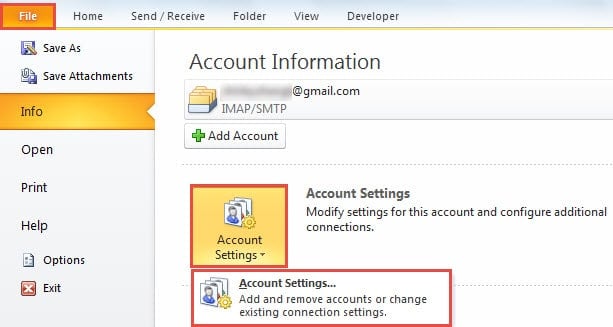
1. In the first place, launch Outlook and go to “File” menu > “Account Settings” button > “Account Settings” option.![Account Settings](https://www.datanumen.com/blogs/wp-content/uploads/2016/12/Account-Settings.jpg "Account Settings")
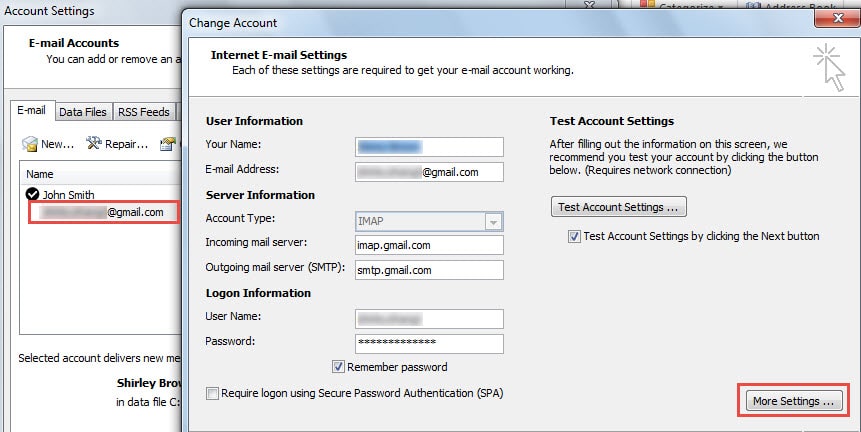
2. Then in the new popup “Account Settings” window, double click on the Gmail account under “E-mail” tab.
3. Next in the subsequent “Change Account” window, locate and click on “More Settings” button.![More Settings]()
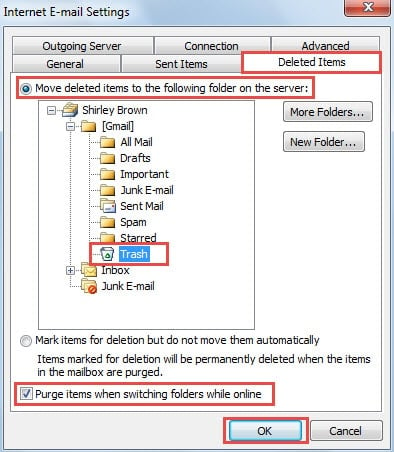
4. After that, another new dialog box of “Internet E-mail Settings” will turn up.
* Firstly, switch to “Deleted Items” tab.
* Then ensure “Move deleted items to the following folder on the server” is selected.
* And next pitch on the “Trash” folder.
* Later mark the checkbox next to the “Purge items when switching folders while online” option.
* Ultimately, click on “OK” button to save the changes.![Purge items when switching folders while online]()
1. Now click “Next” button to enable the changes. Finally after finishing the test, you can close all the dialog boxes and get back to main Outlook window.

## **Change Gmail Settings**

For previous versions of Outlook, the above method will be inaccessible. In this case, you still can achieve your purpose via changing related Gmail settings.

1. At the very beginning, logon your Gmail account in Internet Browser.
2. Then hit the gear icon in the top right corner and choose “Settings” from the drop down list.
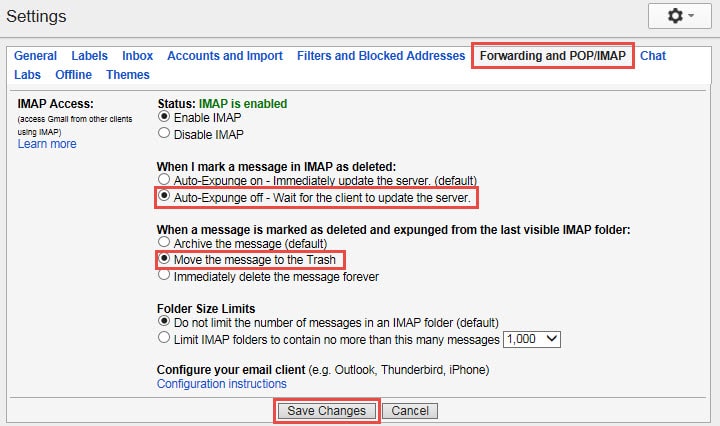
3. Next in the “Settings” screen, shift to “Forwarding and POP/IMAP” tab.
4. Later you should enable “Auto-Expunge off”.
5. After that, enable “Move the message to the Trash”.
6. And eventually click on “Save Changes” button at bottom.![Change Gmail Settings]()

## **What to Do in Case of Outlook Crash**

To be honest, Outlook crash is almost inevitable. Therefore, you should prepare for all the potential emergencies. In the event of Outlook crash, you can firstly try to start it in safe mode. If Outlook cannot start even in safe mode, there are great chances that Outlook or Outlook data file is corrupted. In terms of [Outlook PST file corruption](https://www.datanumen.com/outlook-repair/), your first resort must be the Scanpst.exe. If it fails, you have no choice but to take aid of more experienced tools, like DataNumen Outlook Repair.

## **Author Introduction:**

Shirley Zhang is a data recovery expert in DataNumen, Inc., which is the world leader in data recovery technologies, including [repair SQL Server mdf data error](https://www.datanumen.com/sql-recovery/) and outlook repair software products. For more information visit [www.datanumen.com](https://www.datanumen.com)

Share Now: 
* [ ](https://www.facebook.com/sharer.php?u=https%3A%2F%2Fwww.datanumen.com%2Fblogs%2Fdelete-emails-gmail-account-outlook-imap-mail-server%2F)
* [ ](https://x.com/share?url=https%3A%2F%2Fwww.datanumen.com%2Fblogs%2Fdelete-emails-gmail-account-outlook-imap-mail-server%2F&text=How+to+Delete+Emails+of+Gmail+Account+from+Both+Outlook+and+IMAP+Mail+Server)
* [ ](https://www.linkedin.com/sharing/share-offsite/?url=https%3A%2F%2Fwww.datanumen.com%2Fblogs%2Fdelete-emails-gmail-account-outlook-imap-mail-server%2F)
* [ ](javascript:void%28%28function%28%29%7Bvar%20e=document.createElement%28'script'%29;e.setAttribute%28'type','text/javascript'%29;e.setAttribute%28'charset','UTF-8'%29;e.setAttribute%28'src','//assets.pinterest.com/js/pinmarklet.js?r='+Math.random%28%29%2A99999999%29;document.body.appendChild%28e%29%7D%29%28%29%29;)
* [ ](https://www.reddit.com/submit?url=https%3A%2F%2Fwww.datanumen.com%2Fblogs%2Fdelete-emails-gmail-account-outlook-imap-mail-server%2F&title=How+to+Delete+Emails+of+Gmail+Account+from+Both+Outlook+and+IMAP+Mail+Server)
* [ ](https://www.tumblr.com/share/link?url=https%3A%2F%2Fwww.datanumen.com%2Fblogs%2Fdelete-emails-gmail-account-outlook-imap-mail-server%2F)
* [ ](https://vk.com/share.php?url=https%3A%2F%2Fwww.datanumen.com%2Fblogs%2Fdelete-emails-gmail-account-outlook-imap-mail-server%2F)
* [ ](https://www.xing.com/spi/shares/new?url=https%3A%2F%2Fwww.datanumen.com%2Fblogs%2Fdelete-emails-gmail-account-outlook-imap-mail-server%2F)

[← Previous post](https://www.datanumen.com/blogs/auto-move-email-specific-cc-recipients/)

[Next post →](https://www.datanumen.com/blogs/monitor-sql-server-database-growth-using-tsql-excel/)

Comments are closed.

![Data Recovery Blog]() 

Follow or like us on Facebook, LinkedIn and Twitter to get all promotions, latest news and updates on our products and company.

* [ ](https://www.facebook.com/DataNumen)
* [ ](http://www.linkedin.com/company/datanumen)
* [ ](https://twitter.com/DataNumen)

### Featured Products

* [DataNumen Outlook Repair](https://www.datanumen.com/outlook-repair/)
* [DataNumen SQL Recovery](https://www.datanumen.com/sql-recovery/)
* [DataNumen Exchange Recovery](https://www.datanumen.com/exchange-recovery/)
* [DataNumen Access Repair](https://www.datanumen.com/access-repair/)
* [DataNumen Excel Repair](https://www.datanumen.com/excel-repair/)
* [DataNumen PDF Repair](https://www.datanumen.com/pdf-repair/)
* [DataNumen Word Repair](https://www.datanumen.com/word-repair/)
* [DataNumen Zip Repair](https://www.datanumen.com/zip-repair/)

### Popular posts

[ ](#masthead)

```json
{"@context":"https:\/\/schema.org","@graph":[{"@type":"Article","@id":"https:\/\/www.datanumen.com\/blogs\/delete-emails-gmail-account-outlook-imap-mail-server\/#article","isPartOf":{"@id":"https:\/\/www.datanumen.com\/blogs\/delete-emails-gmail-account-outlook-imap-mail-server\/"},"author":{"name":"AuthorCCW","@id":"https:\/\/www.datanumen.com\/blogs\/#\/schema\/person\/33ded6c47c77587f9158d99f05e23957"},"headline":"How to Delete Emails of Gmail Account from Both Outlook and IMAP Mail Server","datePublished":"2016-12-27T01:04:36+00:00","dateModified":"2025-09-29T10:59:59+00:00","mainEntityOfPage":{"@id":"https:\/\/www.datanumen.com\/blogs\/delete-emails-gmail-account-outlook-imap-mail-server\/"},"wordCount":537,"commentCount":2,"publisher":{"@id":"https:\/\/www.datanumen.com\/blogs\/#organization"},"image":{"@id":"https:\/\/www.datanumen.com\/blogs\/delete-emails-gmail-account-outlook-imap-mail-server\/#primaryimage"},"thumbnailUrl":"https:\/\/www.datanumen.com\/blogs\/wp-content\/uploads\/2016\/12\/Account-Settings.jpg","articleSection":["Outlook Solutions"],"inLanguage":"en-US","potentialAction":[{"@type":"CommentAction","name":"Comment","target":["https:\/\/www.datanumen.com\/blogs\/delete-emails-gmail-account-outlook-imap-mail-server\/#respond"]}]},{"@type":"WebPage","@id":"https:\/\/www.datanumen.com\/blogs\/delete-emails-gmail-account-outlook-imap-mail-server\/","url":"https:\/\/www.datanumen.com\/blogs\/delete-emails-gmail-account-outlook-imap-mail-server\/","name":"How to Delete Emails of Gmail Account from Both Outlook and IMAP Mail Server","isPartOf":{"@id":"https:\/\/www.datanumen.com\/blogs\/#website"},"primaryImageOfPage":{"@id":"https:\/\/www.datanumen.com\/blogs\/delete-emails-gmail-account-outlook-imap-mail-server\/#primaryimage"},"image":{"@id":"https:\/\/www.datanumen.com\/blogs\/delete-emails-gmail-account-outlook-imap-mail-server\/#primaryimage"},"thumbnailUrl":"https:\/\/www.datanumen.com\/blogs\/wp-content\/uploads\/2016\/12\/Account-Settings.jpg","datePublished":"2016-12-27T01:04:36+00:00","dateModified":"2025-09-29T10:59:59+00:00","description":"If you are using Gmail account via IMAP in Outlook, you may find that the emails, which you’ve deleted from Outlook, still exist on Gmail server. This article will teach you how to make the emails to get deleted from both Outlook and IMAP server.","inLanguage":"en-US","potentialAction":[{"@type":"ReadAction","target":["https:\/\/www.datanumen.com\/blogs\/delete-emails-gmail-account-outlook-imap-mail-server\/"]}]},{"@type":"ImageObject","inLanguage":"en-US","@id":"https:\/\/www.datanumen.com\/blogs\/delete-emails-gmail-account-outlook-imap-mail-server\/#primaryimage","url":"https:\/\/www.datanumen.com\/blogs\/wp-content\/uploads\/2016\/12\/Account-Settings.jpg","contentUrl":"https:\/\/www.datanumen.com\/blogs\/wp-content\/uploads\/2016\/12\/Account-Settings.jpg","width":613,"height":327,"caption":"Account Settings"},{"@type":"WebSite","@id":"https:\/\/www.datanumen.com\/blogs\/#website","url":"https:\/\/www.datanumen.com\/blogs\/","name":"Data Recovery Blog","description":"Discuss every aspect of data recovery","publisher":{"@id":"https:\/\/www.datanumen.com\/blogs\/#organization"},"potentialAction":[{"@type":"SearchAction","target":{"@type":"EntryPoint","urlTemplate":"https:\/\/www.datanumen.com\/blogs\/?s={search_term_string}"},"query-input":{"@type":"PropertyValueSpecification","valueRequired":true,"valueName":"search_term_string"}}],"inLanguage":"en-US"},{"@type":"Organization","@id":"https:\/\/www.datanumen.com\/blogs\/#organization","name":"Data Recovery Blog","url":"https:\/\/www.datanumen.com\/blogs\/","logo":{"@type":"ImageObject","inLanguage":"en-US","@id":"https:\/\/www.datanumen.com\/blogs\/#\/schema\/logo\/image\/","url":"https:\/\/www.datanumen.com\/blogs\/wp-content\/uploads\/2019\/02\/logowithouttext.jpg","contentUrl":"https:\/\/www.datanumen.com\/blogs\/wp-content\/uploads\/2019\/02\/logowithouttext.jpg","width":296,"height":397,"caption":"Data Recovery Blog"},"image":{"@id":"https:\/\/www.datanumen.com\/blogs\/#\/schema\/logo\/image\/"},"sameAs":["https:\/\/www.facebook.com\/DataNumen","https:\/\/x.com\/DataNumen","http:\/\/www.linkedin.com\/company\/datanumen","https:\/\/myspace.com\/datanumen\/","http:\/\/www.pinterest.com\/datanumen\/","https:\/\/www.youtube.com\/channel\/UCVIIuuKfUBHSJauUaVP13tw"]},{"@type":"Person","@id":"https:\/\/www.datanumen.com\/blogs\/#\/schema\/person\/33ded6c47c77587f9158d99f05e23957","name":"AuthorCCW","image":{"@type":"ImageObject","inLanguage":"en-US","@id":"https:\/\/secure.gravatar.com\/avatar\/3516ed90fc242780d3947a989f895bc46e70c3e83485d30f2b457a007906aa58?s=96&d=mm&r=g","url":"https:\/\/secure.gravatar.com\/avatar\/3516ed90fc242780d3947a989f895bc46e70c3e83485d30f2b457a007906aa58?s=96&d=mm&r=g","contentUrl":"https:\/\/secure.gravatar.com\/avatar\/3516ed90fc242780d3947a989f895bc46e70c3e83485d30f2b457a007906aa58?s=96&d=mm&r=g","caption":"AuthorCCW"},"sameAs":["https:\/\/www.datanumen.com\/"]}]}
```