
Gamit ang Excel, madali kang makakagawa ng sarili mong whois lookup tool. Ang tool na ito ay makakatulong sa mga website developer o hosting company na gawing lead ang mga domain. Ipinapakita ng tool na ito ang pangalan ng mga tao o organisasyon na nagmamay-ari ng iba't ibang domain.
Download na Ngayon
Kung gusto mong simulan ang paggamit ng software sa lalong madaling panahon, maaari mong:
I-download ang Software Ngayon
Kung hindi man, kung nais mong DIY, maaari mong basahin ang mga nilalaman sa ibaba.
Ihanda natin ang GUI
Ang GUI ng tool na ito ay napaka-simple. Gaya ng ipinapakita sa larawan, sapat na ang isang sheet na may kinakailangang mga header at column. Sa halimbawang ito, para sa isang ibinigay na Domain, kakamot ang tool sa Pangalan ng Nagparehistro at Organisasyon ng Nagparehistro. Upang payagan ang mga user na patakbuhin ang macro, gumawa ng button sa parehong sheet.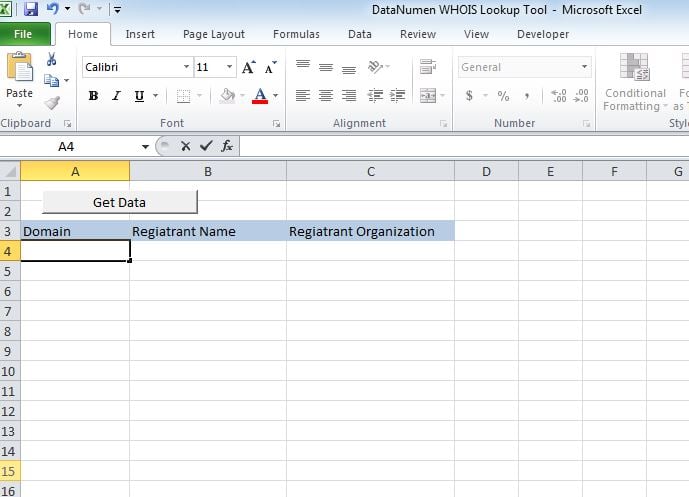
Gawin nating pagpapaandar ito
I-paste ang script sa isang bagong module at ilakip ang sub “whoismacor” sa button na ginawa namin sa Sheet1.
Subukan natin ito
Magdagdag ng mga domain sa Column A at patakbuhin ang macro. Ang mga halaga ay ipapakita sa kani-kanilang mga column.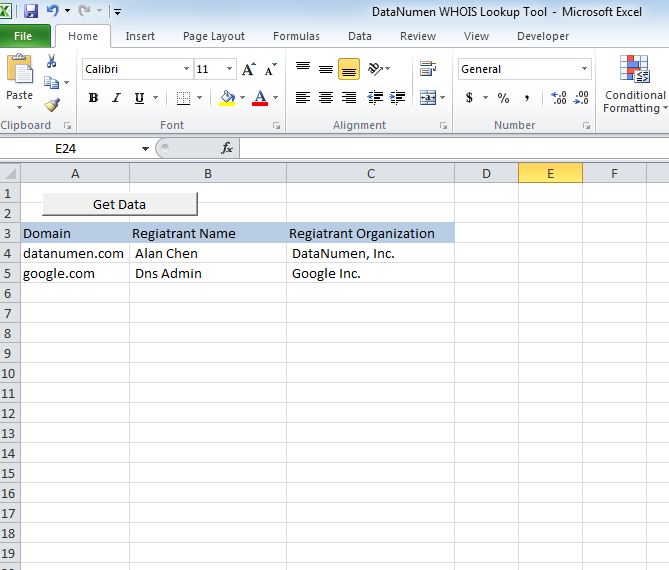
Baguhin ito
Sa ngayon ang tool ay nagpapakita ng 2 header ie, Registrant Name at Registrant Organization. Maaari mong i-customize ang tool upang kunin ang alinman sa mga sumusunod na header.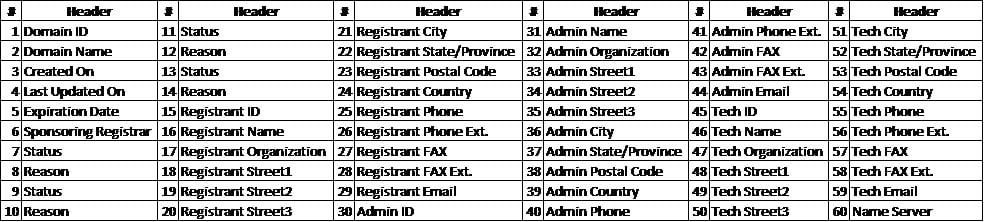
I-recover ang xlsm file
Kung nagkakaproblema ka sa pagbubukas o pag-save ng tool na ito, may mataas na pagbabago na mayroon ka sira na Excel file at kailangan mong ayusin ito bago gamitin.
Iskrip
Sub whoismacro()
    Dim v_lrow As Long
    Application.DisplayStatusBar = True
    v_lrow = Sheets("whois").Range("A" & Rows.Count).End(xlUp).Row
    Dim r As Long
    Dim v_string As String
    For r = 4 To v_lrow
        Application.StatusBar = "Macro is running... Now fetching Registrant Name and Organization info for domain at Row : " & r & " /// Total Rows : " & v_lrow
        Sheets("whois").Range("B" & r).Value = WhoIsName(Sheets("whois").Range("A" & r).Value)
        Sheets("whois").Range("C" & r).Value = WhoIsorganization(Sheets("whois").Range("A" & r).Value)
    Next r
    Application.StatusBar = "Ready"
End Sub

Function WhoIsName(v_string As String) As String
    Application.DisplayStatusBar = True
    v_string = Replace(v_string, "http://www.", "")
    v_string = Replace(v_string, "https://www.", "")
    v_string = Replace(v_string, "http://", "")
    v_string = Replace(v_string, "https://", "")
    Dim I As Long
    Dim browobj As Object
    Dim obj1 As Object
    Dim obj2 As Object
    Dim obj3 As Object
    Dim v_website As String
    Dim ws As Worksheet
    Dim rng As Range
    Dim tbl As Object
    Dim rw As Object
    Dim cl As Object
    Dim tabno As Long
    Dim nextrow As Long
    Dim URl As String
    Dim lastRow As Long
    Dim xmlobj As Object
    Dim htmobj As Object
    Dim divobj As Object
    Dim objH3 As Object
    Dim linkobj As Object
    Dim vv_startrow As Integer
    Dim vv_lastrow As Integer
    Application.DisplayAlerts = False
    Application.DisplayStatusBar = True
    URl = "https://www.whois.com/whois/" & v_string
    Set xmlobj = CreateObject("MSXML2.XMLHTTP")
    xmlobj.Open "GET", URl, False
    xmlobj.setRequestHeader "Content-Type", "text/xml"
    xmlobj.setRequestHeader "Cache-Control", "no-cache"
    xmlobj.send
    Set htmobj = CreateObject("htmlfile")
    htmobj.body.innerHTML = xmlobj.responseText
    x = InStr(htmobj.body.innertext, "Registrant Name:")
    y = InStr(x, htmobj.body.innertext, Chr(10))
    WhoIsName = Replace(Mid(htmobj.body.innertext, x, y - x), "Registrant Name:", "")
End Function

Function WhoIsorganization(v_string As String) As String
    Application.DisplayStatusBar = True
    v_string = Replace(v_string, "http://www.", "")
    v_string = Replace(v_string, "https://www.", "")
    v_string = Replace(v_string, "http://", "")
    v_string = Replace(v_string, "https://", "")
    Dim I As Long
    Dim browobj As Object
    Dim obj1 As Object
    Dim obj2 As Object
    Dim obj3 As Object
    Dim v_website As String
    Dim ws As Worksheet
    Dim rng As Range
    Dim tbl As Object
    Dim rw As Object
    Dim cl As Object
    Dim tabno As Long
    Dim nextrow As Long
    Dim URl As String
    Dim lastRow As Long
    Dim xmlobj As Object
    Dim htmobj As Object
    Dim divobj As Object
    Dim objH3 As Object
    Dim linkobj As Object
    Dim vv_startrow As Integer
    Dim vv_lastrow As Integer
    Application.DisplayAlerts = False
    Application.DisplayStatusBar = True
    URl = "https://www.whois.com/whois/" & v_string
    Set xmlobj = CreateObject("MSXML2.XMLHTTP")
    xmlobj.Open "GET", URl, False
    xmlobj.setRequestHeader "Content-Type", "text/xml"
    xmlobj.setRequestHeader "Cache-Control", "no-cache"
    xmlobj.send
    Set htmobj = CreateObject("htmlfile")
    htmobj.body.innerHTML = xmlobj.responseText
    x = InStr(htmobj.body.innertext, "Registrant Organization:")
    Debug.Print x
    y = InStr(x, htmobj.body.innertext, Chr(10))
    Debug.Print y
    WhoIsorganization = Replace(Mid(htmobj.body.innertext, x, y - x), "Registrant Organization:", "")
End Function
Panimula ng May-akda:
Si Nick Vipond ay isang dalubhasa sa pagbawi ng data sa DataNumen, Inc., na pinuno ng mundo sa mga teknolohiya sa pagbawi ng data, kasama ang ayusin ang problema sa docx at pananaw sa mga produkto ng software sa pagbawi. Para sa karagdagang impormasyon pagbisita www.datanumen. Sa