
အောက်ပါဆောင်းပါးတွင် ပြက္ခဒိန်တစ်ခုအား အမှတ်အသားပြု၍ စစ်ဆေးမေးမြန်းနည်းကို ပြသထားသည်။ မောက်စ် 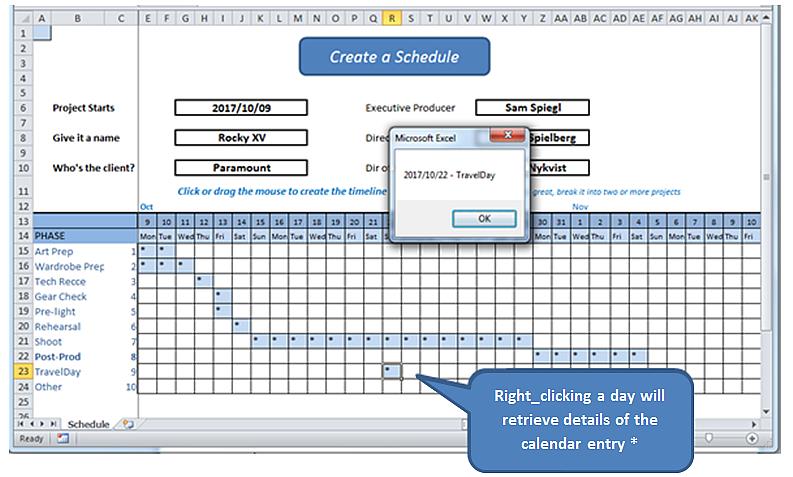
* လက်တွေ့ကမ္ဘာတွင်၊ ကျွန်ုပ်တို့သည် ဒေတာဘေ့စ်တစ်ခုသို့ အဓိပ္ပါယ်ရှိသော ဒိုင်ယာရီ ထည့်သွင်းမှုများကို ဖတ်ရန်နှင့် ရေးရန် ဖောင်တစ်ခုဖွင့်ထားသည်။ ဤလေ့ကျင့်ခန်းသည် ညာဖက်ကလစ်နှိပ်ခြင်း၏ စက်ယန္တရားများကို ရိုးရိုးရှင်းရှင်းဖော်ပြပြီး အလုပ်စာရွက်ကိုယ်တိုင်မှ အသေးစိတ်အချက်အလက်များကို ရှာဖွေသည်။
ကျွန်ုပ်တို့မစတင်မီ၊ တွေ့ရှိနိုင်သည့် အလုပ်ပုံစံတစ်ခုဖြစ်သည့် စာရင်းဇယားနှင့်ပတ်သက်သော ရှင်းလင်းချက်အချို့ကို ကျွန်ုပ်တို့တွေ့နိုင်ပါသည်။ ဒီမှာ.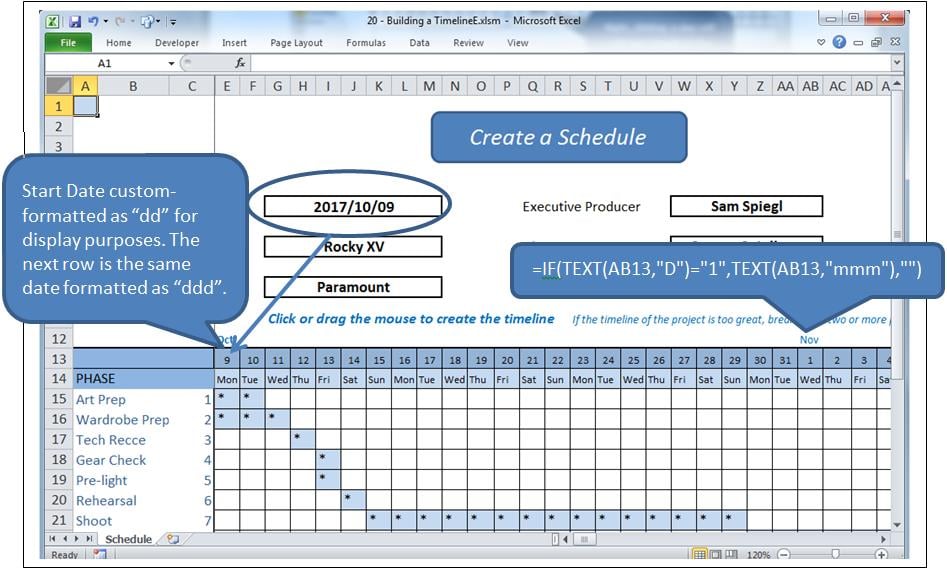
အဆိုပါလုပ်ငန်းစဉ်
ဇယားကွက်အတွင်းရှိ ဆဲလ်တစ်ခုကို ကလစ်နှိပ်ခြင်းဖြင့် ထိုဆဲလ်ကို မီးမောင်းထိုးပြပြီး ၎င်း၏တန်ဖိုးကို ပြောင်းလဲမည်ဖြစ်သည်။ ကလစ်ဆွဲခြင်းဖြင့် အပိုင်းအခြားတစ်ခုကို မီးမောင်းထိုးပြပြီး ၎င်း၏တန်ဖိုးများကို ပြောင်းလဲပါမည်။ ဆဲလ်တစ်ခုအား ပြည့်နေပါက၊ ၎င်းကို ရှင်းလင်းမည်ဖြစ်ပြီး၊ သို့မဟုတ်ပါက ၎င်းကို "*" ဖြင့် ပြည့်စေမည်ဖြစ်သည်။
ဆန့်ကျင်ဘက်အားဖြင့် right_click ဆိုသည်မှာ ရွေးချယ်ထားသောဆဲလ်မှ အချက်အလက်တောင်းဆိုမှုဖြစ်သည်။
အခြေခံအားဖြင့် module အများအပြားနှင့်အတူအသုံးပြုသောဖြစ်ရပ်နှစ်ခုရှိသည်။
- Worksheet_SelectionChange ဆဲလ်တစ်ခု သို့မဟုတ် ဆဲလ်တစ်ခုကို ရွေးချယ်သည့်အခါ ဟုခေါ်သည်။
- Worksheet_BeforeRightClick ညာဖက်မောက်စ်ခလုတ်ဖြင့် ခေါ်သည်။
ပြဿနာ
ဆဲလ်တစ်ခုကို right_click နှိပ်ခြင်းသည် ရွေးချယ်မှုတစ်ခုလည်းပါဝင်သည်၊ အစပျိုးသည်။ ရွေးချယ်မှုပြောင်းလဲခြင်း။. ၎င်းကို မထိန်းချုပ်မီ ထိုအဖြစ်အပျက်သည် ၎င်း၏လမ်းစဉ်ကို လည်ပတ်စေရမည်ဖြစ်ပြီး၊ ရွေးချယ်ထားသော ဆဲလ်ကို ရှင်းပစ်ရမည်ဖြစ်သည်။ အရင်က RightClicရှင်းလင်းထားသောဆဲလ်ကို ပြန်လည်ဖြည့်သွင်းသည့်အခါ k ဖြစ်ရပ်။ ဒါပေမယ့် ဒီလုပ်ဆောင်ချက်က ဖြစ်ပေါ်လာလိမ့်မယ်။ ရွေးချယ်မှု ပြောင်းလဲခဲ့သည်။ ထပ်မံရှင်းလင်းခြင်းမပြုရန် ရပ်တန့်ထားရမည့် ဖြစ်ရပ်တစ်ခုဖြစ်သည်။
ဒါကို blnLoading လို့ ခေါ်တဲ့ boolean အလံနဲ့ လုပ်မယ်။
ဖြစ်ရပ်များ
အလုပ်စာရွက်နောက်ကွယ်ရှိ ကုဒ်ဝင်းဒိုးတွင် အောက်ပါတို့ကို ထည့်သွင်းပါ (ဆိုလိုသည်မှာ မော်ဂျူးတစ်ခုတွင်မဟုတ်)။
Option Explicit

    Dim blnLoading As Boolean
    Dim sPhase As String
    Dim currCellValue As String
    Dim dDate As Date

    Private Sub Worksheet_SelectionChange(ByVal Target As Range)
     If ActiveCell.Row > 14 And ActiveCell.Row < 25 Then
         If ActiveCell.Column > 4 And ActiveCell.Column < 47 Then 'selection is valid

             On Error Resume Next
             currCellValue = Target.Value 'get the target value from (ByVal Target As Range)

             If blnLoading = True Then 'a value of True will force an exit from this event
                 blnLoading = False
                 Exit Sub
             End If

             sPhase = Cells(ActiveCell.Row, 1)
             If sPhase = "" Then Exit Sub

             If ActiveCell = "*" Then 'if the cell is populated, clear the selected range
                 Call ClearRange
                 Call UnblockCalendar
             Else
                 Call PopulateRange
             End If

             Call RedrawCells
             Range("A1").Select 'revive the SelectionChange event by changing selection.
             Exit Sub
         End If
     End If
End Sub

Private Sub Worksheet_BeforeRightClick(ByVal Target As Range, Cancel As Boolean)
     If currCellValue = "*" Then   'picked up by the previous event BEFORE it cleared it;
                                     'This means this is a valid diary entry with detail.
        blnLoading = True    'this will prevent the SelectionChange event (above) from running.
        Target.Select
        'currCell = Target.Address
        'Range(currCell).Select

            Target.Value = "*" 're-instate the value of the cell, since SelectionChange has cleared it
            Call PopulateRange
            dDate = Cells(13, ActiveCell.Column)
            sPhase = Cells(ActiveCell.Row, 1)
            MsgBox dDate & " - " & sPhase
        Cancel = True 'suppress Excel’s standard right_click menus
    End If
    Range("A1").Select
        blnLoading = False
End Sub
ဒါက Event နှစ်ခုကို ဂရုစိုက်တယ်။
ကိုးကားကုဒ်
ကုဒ်တွင် အောက်ပါ၊ လူအားဖြည့်ခြင်းနှင့် လူနေထူထပ်ခြင်း အပိုင်းအခြားများကို ထပ်ဖြည့်ပါ-
Sub ClearRange()
     Selection.FormulaR1C1 = ""
     With Selection.Interior
         .Pattern = xlNone
         .TintAndShade = 0
         .PatternTintAndShade = 0
     End With
End Sub

Sub PopulateRange()
     Selection.FormulaR1C1 = "*"
     With Selection.Interior
         .Pattern = xlSolid
         .PatternColorIndex = xlAutomatic
         .ThemeColor = xlThemeColorLight2
         .TintAndShade = 0.799981688894314
         .PatternTintAndShade = 0
     End With
End Sub
Gridlines များကို ထိန်းသိမ်းခြင်း။
အပလီကေးရှင်းထဲသို့ module တစ်ခုထည့်ပါ။ ဇယားကွက်ပုံသဏ္ဍာန်ကို ထိန်းသိမ်းရန်အတွက် အောက်ပါကုဒ်ကို ထည့်ပါ။ ၎င်းကို မက်ခရိုအသံဖမ်းစက်မှ ကူးယူထားခြင်း၊ ထပ်ယူမှုများနှင့် အားလုံးကို။
Option Explicit

Sub UnblockCalendar()
     Selection.FormulaR1C1 = ""
     With Selection
         Selection.Borders(xlDiagonalDown).LineStyle = xlNone
         Selection.Borders(xlDiagonalUp).LineStyle = xlNone
         Selection.Borders(xlEdgeLeft).LineStyle = xlNone
         Selection.Borders(xlEdgeTop).LineStyle = xlNone
         Selection.Borders(xlEdgeBottom).LineStyle = xlNone
         Selection.Borders(xlEdgeRight).LineStyle = xlNone
         Selection.Borders(xlInsideVertical).LineStyle = xlNone
         Selection.Borders(xlInsideHorizontal).LineStyle = xlNone
     End With
End Sub

Sub RedrawCells()
     Selection.Borders(xlDiagonalDown).LineStyle = xlNone
     Selection.Borders(xlDiagonalUp).LineStyle = xlNone
     With Selection.Borders(xlEdgeLeft)
         .LineStyle = xlContinuous
         .ColorIndex = 0
         .TintAndShade = 0
         .Weight = xlThin
     End With
     With Selection.Borders(xlEdgeTop)
         .LineStyle = xlContinuous
         .ColorIndex = 0
         .TintAndShade = 0
         .Weight = xlThin
     End With
     With Selection.Borders(xlEdgeBottom)
         .LineStyle = xlContinuous
         .ColorIndex = 0
         .TintAndShade = 0
         .Weight = xlThin
     End With
     With Selection.Borders(xlEdgeRight)
         .LineStyle = xlContinuous
         .ColorIndex = 0
         .TintAndShade = 0
         .Weight = xlThin
     End With
     With Selection.Borders(xlInsideVertical)
         .LineStyle = xlContinuous
         .ColorIndex = 0
         .TintAndShade = 0
         .Weight = xlThin
     End With
     With Selection.Borders(xlInsideHorizontal)
         .LineStyle = xlContinuous
         .ColorIndex = 0
         .TintAndShade = 0
         .Weight = xlThin
     End With
End Sub
ကပ်ဆိုးဘေးမှ ကာကွယ်ပေးခြင်း။
Excel ဖွံ့ဖြိုးတိုးတက်ရေး အများကြီးလုပ်သူတိုင်း ရှုပ်ထွေးတဲ့ xlsm spreadsheets တွေဟာ တစ်ခါတစ်ရံမှာ crash ဖြစ်ပြီး ဖွင့်ထားတဲ့ document ကို ပျက်စီးစေနိုင်တယ်ဆိုတာ သိပါလိမ့်မယ်။ မျှော်လင့်ထားတာထက် ပိုပြီးတော့တောင် ပျက်စီးနေတဲ့ workbook ကို Excel ရဲ့ recovery routines တွေနဲ့ ပြန်မရနိုင်ပါဘူး။ backup တွေမရှိရင် လုပ်ပြီးသားအလုပ်တွေ ဆုံးရှုံးသွားပါလိမ့်မယ်။ ဒါကို လုပ်ဆောင်ဖို့ ဒီဇိုင်းထုတ်ထားတဲ့ tools တွေနဲ့ ကာကွယ်နိုင်ပါတယ်။ Excel fix.
စာရေးသူနိဒါန်း:
Felix Hooker သည် ဒေတာပြန်လည်ရယူရေးဆိုင်ရာ ကျွမ်းကျင်သူဖြစ်သည်။ DataNumen, Inc. အပါအဝင် ဒေတာပြန်လည်ရယူရေးနည်းပညာများတွင် ကမ္ဘာ့ခေါင်းဆောင်ဖြစ်သည်။ rar ပြုပြင်ခြင်း နှင့် sql recovery software ထုတ်ကုန်များ။ ပိုမိုသိရှိလိုပါကသွားရောက်ကြည့်ရှု www ။datanumen.com