
ဤဆောင်းပါးတွင်၊ သင့် Word document မှ အပိုင်းများကို အခြားတစ်ခု သို့မဟုတ် အများအပြားသို့ ခွဲထုတ်ရန် မြန်ဆန်လွယ်ကူသော နည်းလမ်း ၂ ခုကို သင့်အား ပေးပါမည်။
အကြောင်းအရာများကို စာရွက်စာတမ်းတစ်ခုမှ အခြားတစ်ခုသို့ ထုတ်ယူရန် မကြာခဏ ဖြစ်တတ်ပါသည်။ ကျွန်ုပ်တို့၏ယခင်ဆောင်းပါးတွင်၊ စာမျက်နှာများကိုစာရွက်စာတမ်းမှမည်သို့ထုတ်ယူရမည်ကိုဆွေးနွေးထားသည်။ အသေးစိတ်အချက်အလက်များအတွက် သင်သည် ဤဆောင်းပါးကို ကိုးကားနိုင်သည်- သင့် Word Document မှ တစ်ဦးချင်း စာမျက်နှာများကို ထုတ်ယူရန် အမြန်နည်းလမ်း 2 ခု
ယနေ့တွင် ကဏ္ဍအလိုက် ထုတ်ယူနည်းကို ဖော်ပြပါမည်။ 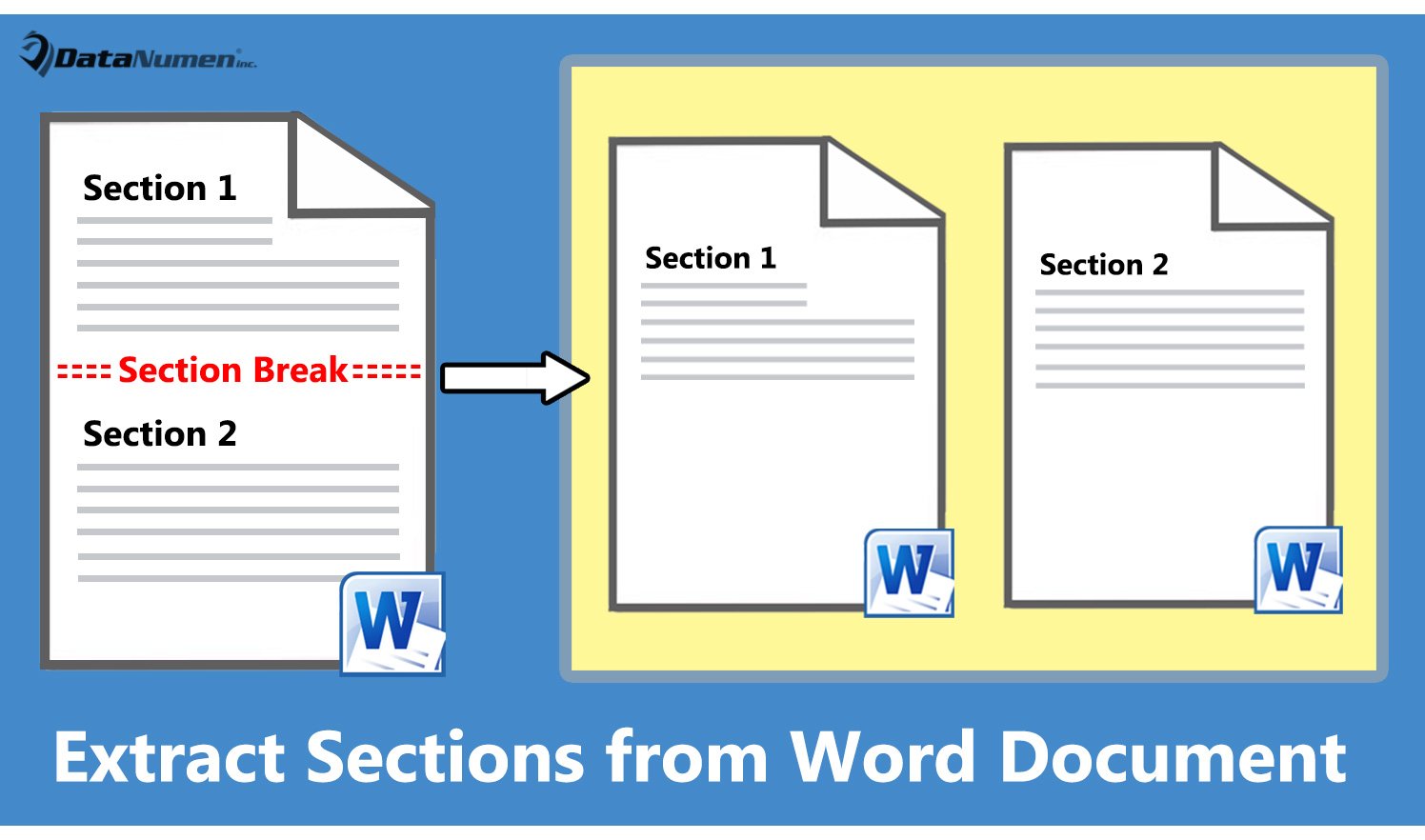
နည်းလမ်း 1- လက်ရှိအပိုင်းကို စာရွက်စာတမ်းအသစ်တစ်ခုသို့ ထုတ်ယူပါ။
- ပထမဦးစွာ၊ cursor ကို target section တွင်ထားပါ။
- ထို့နောက် Word တွင် VBA တည်းဖြတ်သူကိုခေါ်ရန် "Alt+ F11" ကိုနှိပ်ပါ။
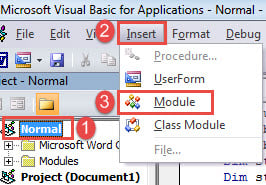
- ထို့နောက် ဘယ်ဘက်ကော်လံရှိ “Normal” ကိုနှိပ်ပါ။
- နှင့် menu bar တွင် "Insert" ကိုနှိပ်ပါ။
- ထို့နောက် အဆိုပါ drop-down menu တွင် "Module" ကိုရွေးချယ်ပါ။

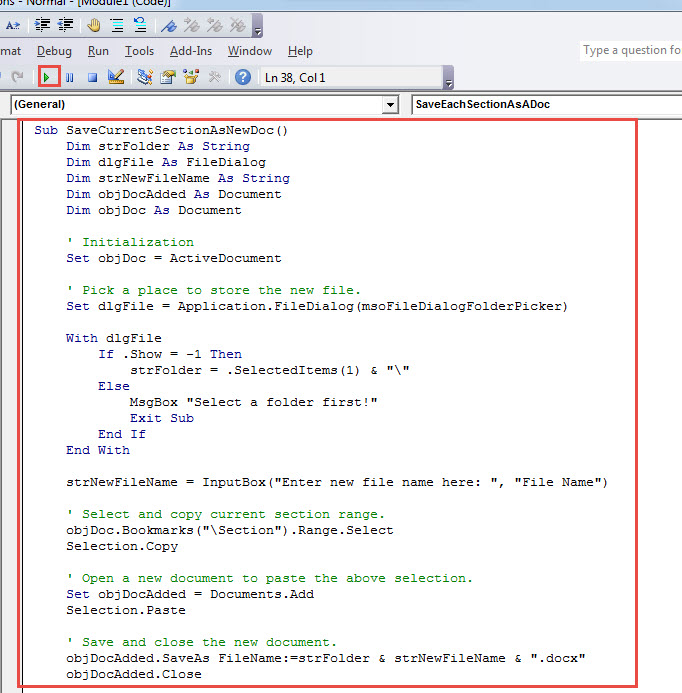
- မော်ဂျူးအသစ်ကိုဖွင့်ရန် နှစ်ချက်နှိပ်ပြီး အောက်ပါကုဒ်များကို ထိုနေရာတွင် ကူးထည့်ပါ-
Sub SaveCurrentSectionAsNewDoc()
  Dim strFolder As String
  Dim dlgFile As FileDialog
  Dim strNewFileName As String
  Dim objDocAdded As Document
  Dim objDoc As Document

  ' Initialization
  Set objDoc = ActiveDocument

  ' Pick a place to store the new file.
  Set dlgFile = Application.FileDialog(msoFileDialogFolderPicker)

  With dlgFile
    If .Show = -1 Then
      strFolder = .SelectedItems(1) & "\"
    Else
      MsgBox "Select a folder first!"
      Exit Sub
    End If
  End With

  strNewFileName = InputBox("Enter new file name here: ", "File Name")

  ' Select and copy current section range.
  objDoc.Bookmarks("\Section").Range.Select
  Selection.Copy

  ' Open a new document to paste the above selection.
  Set objDocAdded = Documents.Add
  Selection.Paste

  ' Save and close the new document.
  objDocAdded.SaveAs FileName:=strFolder & strNewFileName & ".docx"
  objDocAdded.Close
End Sub
- ထို့နောက် မီနူးဘားပေါ်ရှိ “Run” ကို နှိပ်ပါ သို့မဟုတ် “F5” ကို နှိပ်ပါ။

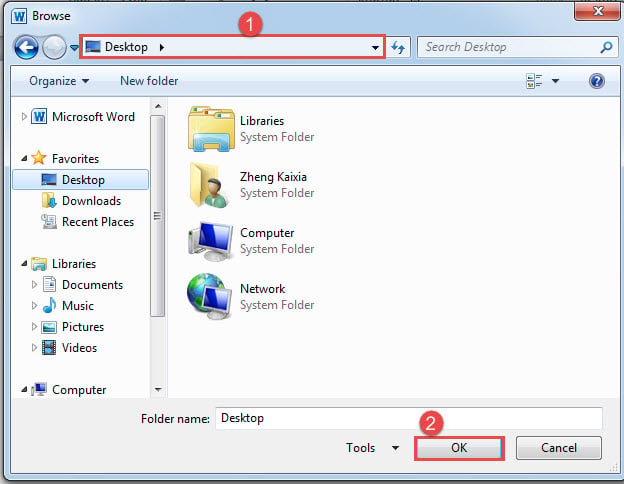
- ထို့နောက် "Browse" window ပေါ်လာလိမ့်မည်။ စာရွက်စာတမ်းအသစ်ကို သိမ်းဆည်းရန်နေရာကို ရွေးပြီး “OK” ကိုနှိပ်ပါ။

- "ဖိုင်အမည်" အကွက်တွင်၊ ဖိုင်အသစ်အတွက်အမည်ကိုရိုက်ထည့်ကာ "OK" ကိုနှိပ်ပါ။

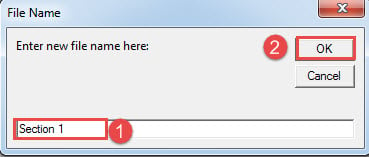
ယခုသင်သည် အပိုင်းကို စာတမ်းအသစ်တစ်ခုသို့ ထုတ်ယူပြီးဖြစ်သည်။
နည်းလမ်း 2- မှတ်တမ်းတစ်ခုစီတွင် အပိုင်းတစ်ခုစီကို တစ်ဦးချင်းအသစ်များဆီသို့ ထုတ်ယူပါ။
ဤနည်းဖြင့် စာရွက်စာတမ်းတစ်ခုရှိ ကဏ္ဍအားလုံးကို အစုလိုက်လုပ်ဆောင်ရန် ကူညီပေးနိုင်သည်။ ဟုတ်ပါတယ်၊ ကျွန်ုပ်တို့လည်း macro တစ်ခုလိုပါလိမ့်မယ်။
- အစပိုင်းမှာ target document ကိုဖွင့်ပါ။
- ထို့နောက် macro တစ်ခုကို ထည့်သွင်းပြီး လုပ်ဆောင်ရန် နည်းလမ်း 1 တွင် အဆင့်များကို လိုက်နာပါ။
- ဤအချိန်မှသာ အဆိုပါ macro ကို ဤတစ်ခုနှင့် အစားထိုးပါ။
Sub SaveEachSectionAsADoc()
  Dim objDocAdded As Document
  Dim objDoc As Document
  Dim nSectionNum As Integer
  Dim strFolder As String

  Dim dlgFile As FileDialog

  ' Initialization
  Set objDoc = ActiveDocument

  Set dlgFile = Application.FileDialog(msoFileDialogFolderPicker)

  ' Pick a location to keep new files.
  With dlgFile
    If .Show = -1 Then
      strFolder = .SelectedItems(1) & "\"
    Else
      MsgBox "Select a folder first!"
      Exit Sub
    End If
  End With

  ' Step through each section in current document, copy and paste each to a new one.
  For nSectionNum = 1 To ActiveDocument.Sections.Count
    Selection.GoTo What:=wdGoToSection, Which:=wdGoToNext, Name:=nSectionNum
    ActiveDocument.Sections(nSectionNum).Range.Copy

    Set objDocAdded = Documents.Add
    Selection.Paste

    ' Save and close new documents.
    objDocAdded.SaveAs FileName:=strFolder & "Section " & nSectionNum & ".docx"
    objDocAdded.Close
  Next nSectionNum
End Sub
- သို့တိုင်၊ "Browse" ဝင်းဒိုးတွင်၊ သိုလှောင်မှုလမ်းကြောင်းကိုရွေးချယ်ပြီး "OK" ကိုနှိပ်ပါ။
စိတ်အနှောင့်အယှက်ဖြစ်စေသော စကားလုံးအမှားများကို ပြင်ဆင်ပါ။
၎င်းကိုအသုံးပြုနေစဉ်တွင် Word error အချို့တွေ့တတ်သည်။ စိတ်အနှောက်အယှက်ဖြစ်နိုင်တယ်၊ အချိန်ယူရမယ်။ စကားလုံးပြန်လည်ရယူပါ။ တတ်နိုင်သမျှအမြန်ဆုံး။ ဘာကြောင့်လဲဆိုတော့ အချိန်ပိုကြာလေ၊ Data ဆုံးရှုံးမှုက ပိုပြင်းထန်လေလေ ဖြစ်ပါတယ်။ ထို့ကြောင့် ပြုပြင်သည့် ကိရိယာကို ကြိုတင်ကိုင်ထားရန် အကြံပြုအပ်ပါသည်။
စာရေးသူနိဒါန်း:
Vera Chen သည် ဒေတာပြန်လည်ရယူရေးဆိုင်ရာ ကျွမ်းကျင်သူဖြစ်သည်။ DataNumen, Inc. အပါအဝင် ဒေတာပြန်လည်ရယူရေးနည်းပညာများတွင် ကမ္ဘာ့ခေါင်းဆောင်ဖြစ်သည်။ ပျက်စီးနေသော xls နှင့် pdf ဆော့ဖ်ဝဲ ထုတ်ကုန်များကို ပြုပြင်ခြင်း။ ပိုမိုသိရှိလိုပါကသွားရောက်ကြည့်ရှု www ။datanumen.com