
Utilizzando Excel è possibile creare facilmente un proprio strumento di ricerca Whois. Questo strumento aiuterà gli sviluppatori web o le società di hosting a convertire i domini in potenziali clienti. Lo strumento visualizza i nomi delle persone o delle organizzazioni proprietarie dei diversi domini.
Scarica Ora
Se desideri iniziare a utilizzare il software il prima possibile, puoi:
Altrimenti, se vuoi fare il fai-da-te, puoi leggere i contenuti di seguito.
Prepariamo la GUI
La GUI di questo strumento è molto semplice. Come mostrato nell'immagine, è sufficiente un solo foglio con le intestazioni e le colonne necessarie. In questo esempio, per un determinato dominio, lo strumento eseguirà lo scraping del nome del registrante e dell'organizzazione del registrante. Per consentire agli utenti di eseguire la macro, crea un pulsante sullo stesso foglio.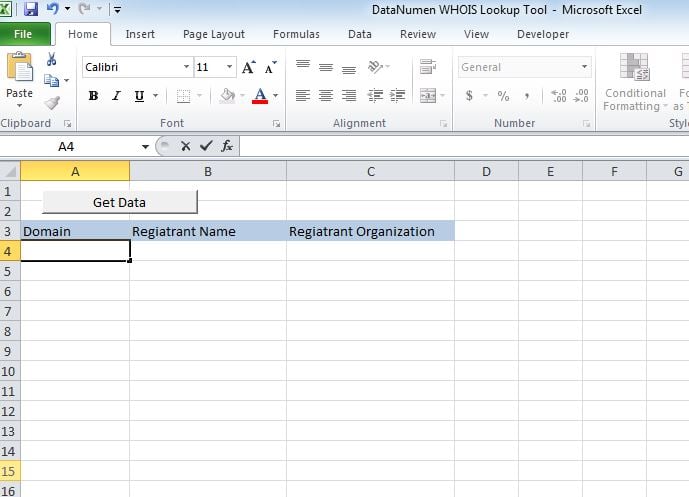
Rendiamolo funzionale
Incolla lo script in un nuovo modulo e allega il sub "whoismacor" al pulsante che abbiamo creato su Sheet1.
Proviamolo
Aggiungi i domini nella colonna A ed esegui la macro. I valori verranno visualizzati nelle rispettive colonne.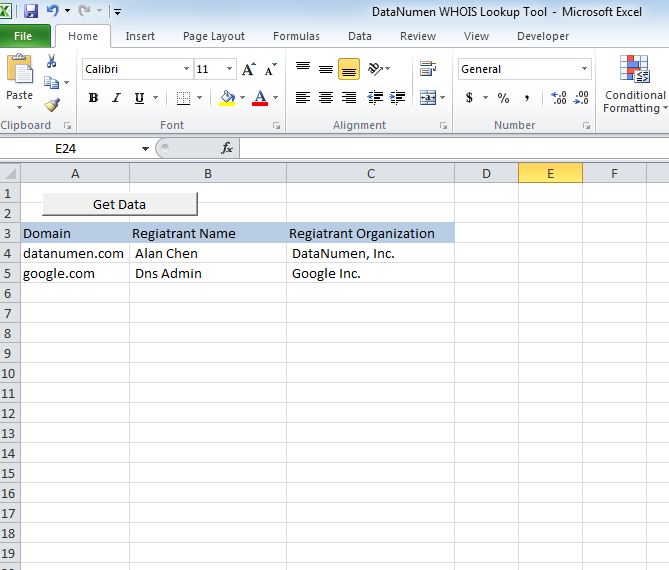
Modificalo
A partire da ora lo strumento mostra 2 intestazioni, ovvero Nome del registrante e Organizzazione del registrante. È possibile personalizzare lo strumento per recuperare una delle seguenti intestazioni.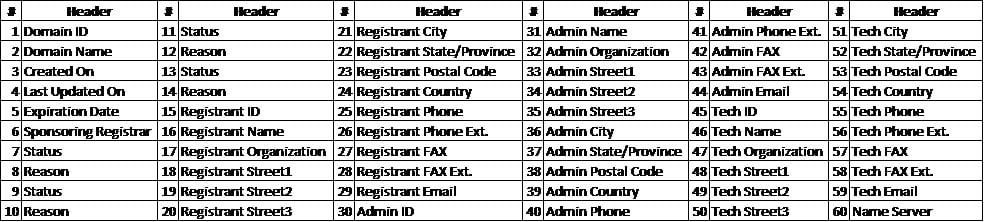
Recupera file xlsm
Se hai problemi ad aprire o salvare questo strumento, ci sono grandi cambiamenti che hai a file Excel corrotto e devi aggiustarlo prima di usarlo.
Copione
Sub whoismacro()
    Dim v_lrow As Long
    Application.DisplayStatusBar = True
    v_lrow = Sheets("whois").Range("A" & Rows.Count).End(xlUp).Row
    Dim r As Long
    Dim v_string As String
    For r = 4 To v_lrow
        Application.StatusBar = "Macro is running... Now fetching Registrant Name and Organization info for domain at Row : " & r & " /// Total Rows : " & v_lrow
        Sheets("whois").Range("B" & r).Value = WhoIsName(Sheets("whois").Range("A" & r).Value)
        Sheets("whois").Range("C" & r).Value = WhoIsorganization(Sheets("whois").Range("A" & r).Value)
    Next r
    Application.StatusBar = "Ready"
End Sub

Function WhoIsName(v_string As String) As String
    Application.DisplayStatusBar = True
    v_string = Replace(v_string, "http://www.", "")
    v_string = Replace(v_string, "https://www.", "")
    v_string = Replace(v_string, "http://", "")
    v_string = Replace(v_string, "https://", "")
    Dim I As Long
    Dim browobj As Object
    Dim obj1 As Object
    Dim obj2 As Object
    Dim obj3 As Object
    Dim v_website As String
    Dim ws As Worksheet
    Dim rng As Range
    Dim tbl As Object
    Dim rw As Object
    Dim cl As Object
    Dim tabno As Long
    Dim nextrow As Long
    Dim URl As String
    Dim lastRow As Long
    Dim xmlobj As Object
    Dim htmobj As Object
    Dim divobj As Object
    Dim objH3 As Object
    Dim linkobj As Object
    Dim vv_startrow As Integer
    Dim vv_lastrow As Integer
    Application.DisplayAlerts = False
    Application.DisplayStatusBar = True
    URl = "https://www.whois.com/whois/" & v_string
    Set xmlobj = CreateObject("MSXML2.XMLHTTP")
    xmlobj.Open "GET", URl, False
    xmlobj.setRequestHeader "Content-Type", "text/xml"
    xmlobj.setRequestHeader "Cache-Control", "no-cache"
    xmlobj.send
    Set htmobj = CreateObject("htmlfile")
    htmobj.body.innerHTML = xmlobj.responseText
    x = InStr(htmobj.body.innertext, "Registrant Name:")
    y = InStr(x, htmobj.body.innertext, Chr(10))
    WhoIsName = Replace(Mid(htmobj.body.innertext, x, y - x), "Registrant Name:", "")
End Function

Function WhoIsorganization(v_string As String) As String
    Application.DisplayStatusBar = True
    v_string = Replace(v_string, "http://www.", "")
    v_string = Replace(v_string, "https://www.", "")
    v_string = Replace(v_string, "http://", "")
    v_string = Replace(v_string, "https://", "")
    Dim I As Long
    Dim browobj As Object
    Dim obj1 As Object
    Dim obj2 As Object
    Dim obj3 As Object
    Dim v_website As String
    Dim ws As Worksheet
    Dim rng As Range
    Dim tbl As Object
    Dim rw As Object
    Dim cl As Object
    Dim tabno As Long
    Dim nextrow As Long
    Dim URl As String
    Dim lastRow As Long
    Dim xmlobj As Object
    Dim htmobj As Object
    Dim divobj As Object
    Dim objH3 As Object
    Dim linkobj As Object
    Dim vv_startrow As Integer
    Dim vv_lastrow As Integer
    Application.DisplayAlerts = False
    Application.DisplayStatusBar = True
    URl = "https://www.whois.com/whois/" & v_string
    Set xmlobj = CreateObject("MSXML2.XMLHTTP")
    xmlobj.Open "GET", URl, False
    xmlobj.setRequestHeader "Content-Type", "text/xml"
    xmlobj.setRequestHeader "Cache-Control", "no-cache"
    xmlobj.send
    Set htmobj = CreateObject("htmlfile")
    htmobj.body.innerHTML = xmlobj.responseText
    x = InStr(htmobj.body.innertext, "Registrant Organization:")
    Debug.Print x
    y = InStr(x, htmobj.body.innertext, Chr(10))
    Debug.Print y
    WhoIsorganization = Replace(Mid(htmobj.body.innertext, x, y - x), "Registrant Organization:", "")
End Function
Introduzione dell'autore:
Nick Vipond è un esperto di recupero dati in DataNumen, Inc., che è il leader mondiale nelle tecnologie di recupero dati, tra cui riparare problema docx e prodotti software di ripristino di Outlook. Per maggiori informazioni visita www.datanumen.com