
Հաջորդ հոդվածը ցույց է տալիս, թե ինչպես կարելի է նշել և հարցաքննել օրացույցը մուկ 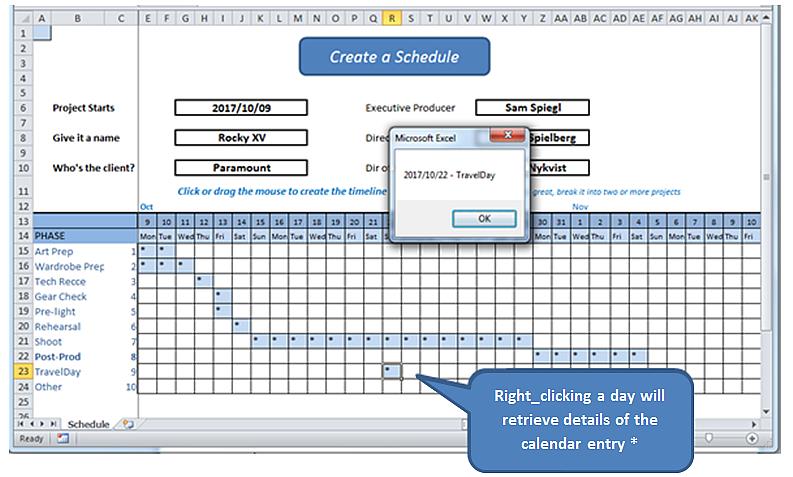
* Իրական աշխարհում մենք ձև կբացեինք տվյալների բազայում կարդալու և գրելու իմաստալից օրագրի գրառումներ: Այս վարժությունը պարզապես բացահայտում է աջ սեղմման մեխանիզմը և մանրամասները գտնում է հենց աշխատանքային թերթիկից:
Նախքան սկսելը, աղյուսակի վերաբերյալ բացատրության մի քանի բառ, որի աշխատանքային մոդելը կարելի է գտնել այստեղ.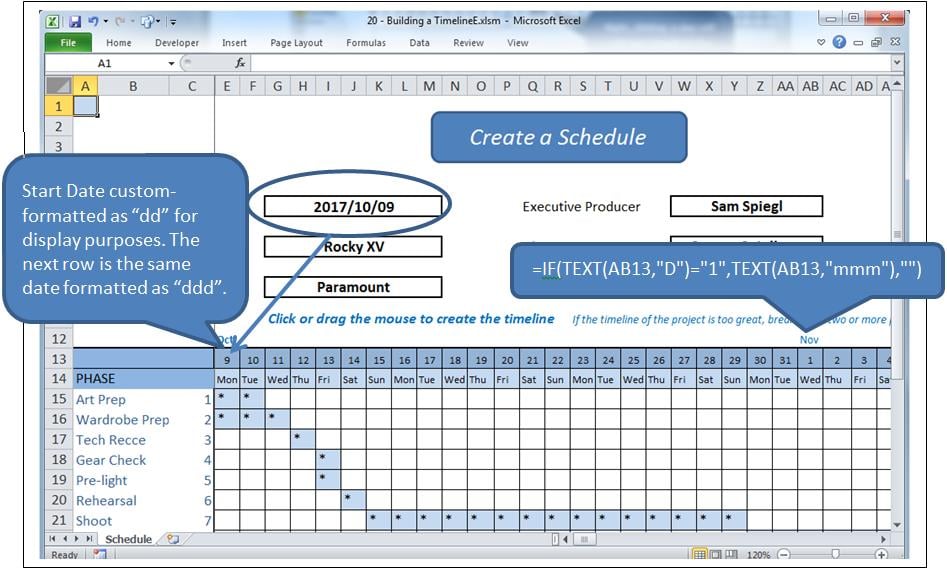
Գործընթացը
Clickանցի ներսում գտնվող բջջի վրա կտտացնելը կարևոր կդարձնի այդ բջիջը և կփոխի դրա արժեքը: Կտտացնել-քաշելն ընդգծելու է մի տիրույթ և փոխելու է դրա արժեքները: Եթե բջիջը բնակեցված է, այն մաքրվելու է, հակառակ դեպքում `բնակվելու է, այս դեպքում` «*»:
Ի տարբերություն աջ_ճլիկի `ընտրված բջիջից տեղեկատվության խնդրանքն է:
Ըստ էության, օգտագործվում են երկու իրադարձություններ, մի քանի մոդուլների հետ միասին:
- Worksheet_SelectionChange որը կոչվում է բջիջ կամ բջիջներ ընտրելու ժամանակ:
- Worksheet_BeforeRightClick- ը որը կոչվում է աջ մկնիկի կոճակով:
Խնդիրը
Բջիջը աջով կտտացնելը նաև ընտրություն է, գործարկում Ընտրության փոփոխություն, Մենք ստիպված կլինենք թույլ տալ, որ այդ իրադարձությունն ընթանա իր ընթացքով ՝ մաքրելով ընտրված բջիջը, նախքան այն վերահսկողությունը հանձնի իրեն BeforeRightClic- ըk իրադարձություն, երբ մենք վերաբնակեցնենք մաքրված բջիջը: Բայց այս գործողությունը կխթանի այն Ընտրություն Փոխված նորից իրադարձություն, որը պետք է դադարեցվի այն եւս մեկ անգամ մաքրելուց:
Դա մենք կանենք blonLoading կոչվող բուլյան դրոշի հետ:
Իրադարձությունները
Մուտքագրեք հետևյալը աշխատանքային թերթի ետևում գտնվող ծածկագրի պատուհանում (այսինքն ՝ ոչ մոդուլի մեջ):
Option Explicit

    Dim blnLoading As Boolean
    Dim sPhase As String
    Dim currCellValue As String
    Dim dDate As Date

    Private Sub Worksheet_SelectionChange(ByVal Target As Range)
     If ActiveCell.Row > 14 And ActiveCell.Row < 25 Then
         If ActiveCell.Column > 4 And ActiveCell.Column < 47 Then 'selection is valid

             On Error Resume Next
             currCellValue = Target.Value 'get the target value from (ByVal Target As Range)

             If blnLoading = True Then 'a value of True will force an exit from this event
                 blnLoading = False
                 Exit Sub
             End If

             sPhase = Cells(ActiveCell.Row, 1)
             If sPhase = "" Then Exit Sub

             If ActiveCell = "*" Then 'if the cell is populated, clear the selected range
                 Call ClearRange
                 Call UnblockCalendar
             Else
                 Call PopulateRange
             End If

             Call RedrawCells
             Range("A1").Select 'revive the SelectionChange event by changing selection.
             Exit Sub
         End If
     End If
End Sub

Private Sub Worksheet_BeforeRightClick(ByVal Target As Range, Cancel As Boolean)
     If currCellValue = "*" Then   'picked up by the previous event BEFORE it cleared it;
                                     'This means this is a valid diary entry with detail.
        blnLoading = True    'this will prevent the SelectionChange event (above) from running.
        Target.Select
        'currCell = Target.Address
        'Range(currCell).Select

            Target.Value = "*" 're-instate the value of the cell, since SelectionChange has cleared it
            Call PopulateRange
            dDate = Cells(13, ActiveCell.Column)
            sPhase = Cells(ActiveCell.Row, 1)
            MsgBox dDate & " - " & sPhase
        Cancel = True 'suppress Excel’s standard right_click menus
    End If
    Range("A1").Select
        blnLoading = False
End Sub
Սա հոգ է տանում երկու Իրադարձությունների մասին:
Ուղղորդված ծածկագիր
Կոդին ավելացրեք հետևյալ ՝ բնակեցված և բնակեցված տիրույթները.
Sub ClearRange()
     Selection.FormulaR1C1 = ""
     With Selection.Interior
         .Pattern = xlNone
         .TintAndShade = 0
         .PatternTintAndShade = 0
     End With
End Sub

Sub PopulateRange()
     Selection.FormulaR1C1 = "*"
     With Selection.Interior
         .Pattern = xlSolid
         .PatternColorIndex = xlAutomatic
         .ThemeColor = xlThemeColorLight2
         .TintAndShade = 0.799981688894314
         .PatternTintAndShade = 0
     End With
End Sub
Gանցային գծերի սպասարկում
Տեղադրեք մոդուլը ծրագրի մեջ: Addանցի տեսքը պահպանելու համար ավելացրեք հետևյալ ծածկագիրը: Սա պատճենվել է մակրո ձայնագրիչից, կրճատումներից և բոլորից:
Option Explicit

Sub UnblockCalendar()
     Selection.FormulaR1C1 = ""
     With Selection
         Selection.Borders(xlDiagonalDown).LineStyle = xlNone
         Selection.Borders(xlDiagonalUp).LineStyle = xlNone
         Selection.Borders(xlEdgeLeft).LineStyle = xlNone
         Selection.Borders(xlEdgeTop).LineStyle = xlNone
         Selection.Borders(xlEdgeBottom).LineStyle = xlNone
         Selection.Borders(xlEdgeRight).LineStyle = xlNone
         Selection.Borders(xlInsideVertical).LineStyle = xlNone
         Selection.Borders(xlInsideHorizontal).LineStyle = xlNone
     End With
End Sub

Sub RedrawCells()
     Selection.Borders(xlDiagonalDown).LineStyle = xlNone
     Selection.Borders(xlDiagonalUp).LineStyle = xlNone
     With Selection.Borders(xlEdgeLeft)
         .LineStyle = xlContinuous
         .ColorIndex = 0
         .TintAndShade = 0
         .Weight = xlThin
     End With
     With Selection.Borders(xlEdgeTop)
         .LineStyle = xlContinuous
         .ColorIndex = 0
         .TintAndShade = 0
         .Weight = xlThin
     End With
     With Selection.Borders(xlEdgeBottom)
         .LineStyle = xlContinuous
         .ColorIndex = 0
         .TintAndShade = 0
         .Weight = xlThin
     End With
     With Selection.Borders(xlEdgeRight)
         .LineStyle = xlContinuous
         .ColorIndex = 0
         .TintAndShade = 0
         .Weight = xlThin
     End With
     With Selection.Borders(xlInsideVertical)
         .LineStyle = xlContinuous
         .ColorIndex = 0
         .TintAndShade = 0
         .Weight = xlThin
     End With
     With Selection.Borders(xlInsideHorizontal)
         .LineStyle = xlContinuous
         .ColorIndex = 0
         .TintAndShade = 0
         .Weight = xlThin
     End With
End Sub
Պաշտպանություն աղետից
Excel-ում շատ մշակող յուրաքանչյուր ոք գիտի, որ բարդ XLSM աղյուսակները կարող են ժամանակ առ ժամանակ խափանվել՝ վնասելով բացված փաստաթուղթը: Ավելի շատ դեպքերում, քան կարելի էր սպասել, վնասված աշխատանքային գիրքը չի կարող վերականգնվել Excel-ի վերականգնման ընթացակարգերի միջոցով: Եթե պահուստային պատճեններ չկան, կատարված աշխատանքը կորչում է: Սա կարելի է կանխել՝ օգտագործելով գործիքներ, որոնք նախատեսված են… Excel ֆիքս.
Հեղինակի ներածություն.
Ֆելիքս Հուքերը տվյալների վերականգման փորձագետ է DataNumen, Inc., որը տվյալների վերականգման տեխնոլոգիաների համաշխարհային առաջատարն է, այդ թվում rar-ի վերանորոգում և sql վերականգնման ծրագրային արտադրանքները: Լրացուցիչ տեղեկությունների համար այցելեք www.datanumen.com