---
description: In Outlook VBA editor, if you desire to use the objects of other applications, such as Microsoft Excel or Word, you have to add the according object library references in the first place. This article will share you the concrete steps.
title: How to Add an Object Library Reference in VBA
image: https://www.datanumen.com/blogs/wp-content/uploads/2017/10/references.jpg
---

-
-
-

[Home](https://www.datanumen.com/blogs/) > [Solutions](https://www.datanumen.com/blogs/category/solutions/) > [Office Solutions](https://www.datanumen.com/blogs/category/solutions/office-solutions/) > [Outlook Solutions](https://www.datanumen.com/blogs/category/solutions/office-solutions/outlook-solutions/) > How to Add an Object Library Reference in VBA

# How to Add an Object Library Reference in VBA

[Outlook Solutions](https://www.datanumen.com/blogs/category/solutions/office-solutions/outlook-solutions/) September 29, 2025

Share Now:

-
-
-
-
-
-
-
-

*In Outlook VBA editor, if you desire to use the objects of other applications, such as Microsoft Excel or Word, you have to add the according object library references in the first place. This article will share you the concrete steps.*

To start with, you could access the Outlook VBA editor either by pressing “Alt + F11” keys or clicking on the “Visual Basic” button in the “Developer” ribbon. Then, you can follow the steps below to establish the reference to your wanted objects. Here we take “Microsoft Excel Object Library” as an instance.

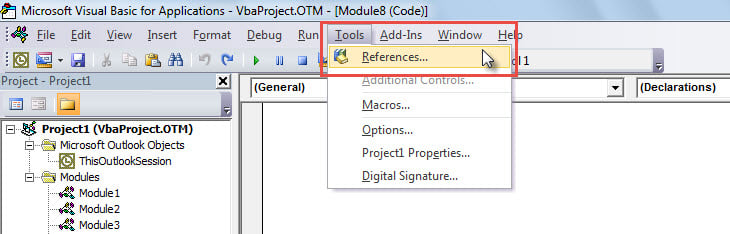
1. In VBA editor window, click the “Tools” button in the menu bar.
2. Then, from the drop down list, select the “References” option.![Select "References" Option from "Tools" Drop Down List](https://www.datanumen.com/blogs/wp-content/uploads/2017/10/references.jpg "Select \"References\" Option from \"Tools\" Drop Down List")
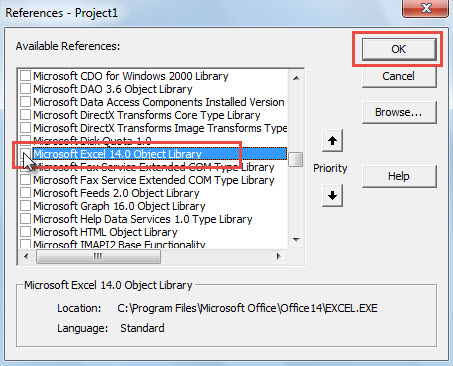
3. Subsequently, the “References – Project 1” dialog box will display.
4. In this dialog box, you can pull the scrolling bar down until you locate what you want, such as “Microsoft Excel 14.0 Object Library”.![Enable Your Wanted Object Library](https://www.datanumen.com/blogs/wp-content/uploads/2017/10/find-related-object-library.jpg "Enable Your Wanted Object Library")
5. After that, mark the checkbox in front of this object.
6. Finally, click “OK”.
7. From now on, you have added the Excel object library reference successfully.
8. Since then, you can make use of the objects in MS Excel at will.

You can follow the steps above to add the other object libraries as per your needs.

## Author Introduction:

Shirley Zhang is a data recovery expert in DataNumen, Inc., which is the world leader in data recovery technologies, including [corrupt mdf](https://www.datanumen.com/sql-recovery/) and outlook repair software products. For more information visit [www.datanumen.com](https://www.datanumen.com/)

Share Now:

-
-
-
-
-
-
-
-

[← Previous post](https://www.datanumen.com/blogs/run-vba-code-outlook/)

[Next post →](https://www.datanumen.com/blogs/link-ms-access-2016-data-dynamics-365/)

Comments are closed.

![Data Recovery Blog]()

Follow or like us on Facebook, LinkedIn and Twitter to get all promotions, latest news and updates on our products and company.

-
-
-

### Featured Products

- [DataNumen Outlook Repair](https://www.datanumen.com/outlook-repair/)
- [DataNumen SQL Recovery](https://www.datanumen.com/sql-recovery/)
- [DataNumen Exchange Recovery](https://www.datanumen.com/exchange-recovery/)
- [DataNumen Access Repair](https://www.datanumen.com/access-repair/)
- [DataNumen Excel Repair](https://www.datanumen.com/excel-repair/)
- [DataNumen PDF Repair](https://www.datanumen.com/pdf-repair/)
- [DataNumen Word Repair](https://www.datanumen.com/word-repair/)
- [DataNumen Zip Repair](https://www.datanumen.com/zip-repair/)

### Popular posts

```json
{"@context":"https:\/\/schema.org","@graph":[{"@type":"Article","@id":"https:\/\/www.datanumen.com\/blogs\/add-object-library-reference-vba\/#article","isPartOf":{"@id":"https:\/\/www.datanumen.com\/blogs\/add-object-library-reference-vba\/"},"author":{"name":"AuthorCCW","@id":"https:\/\/www.datanumen.com\/blogs\/#\/schema\/person\/33ded6c47c77587f9158d99f05e23957"},"headline":"How to Add an Object Library Reference in VBA","datePublished":"2017-10-10T03:07:00+00:00","dateModified":"2025-09-29T10:37:52+00:00","mainEntityOfPage":{"@id":"https:\/\/www.datanumen.com\/blogs\/add-object-library-reference-vba\/"},"wordCount":246,"commentCount":3,"publisher":{"@id":"https:\/\/www.datanumen.com\/blogs\/#organization"},"image":{"@id":"https:\/\/www.datanumen.com\/blogs\/add-object-library-reference-vba\/#primaryimage"},"thumbnailUrl":"https:\/\/www.datanumen.com\/blogs\/wp-content\/uploads\/2017\/10\/references.jpg","articleSection":["Outlook Solutions"],"inLanguage":"en-US","potentialAction":[{"@type":"CommentAction","name":"Comment","target":["https:\/\/www.datanumen.com\/blogs\/add-object-library-reference-vba\/#respond"]}]},{"@type":"WebPage","@id":"https:\/\/www.datanumen.com\/blogs\/add-object-library-reference-vba\/","url":"https:\/\/www.datanumen.com\/blogs\/add-object-library-reference-vba\/","name":"How to Add an Object Library Reference in VBA","isPartOf":{"@id":"https:\/\/www.datanumen.com\/blogs\/#website"},"primaryImageOfPage":{"@id":"https:\/\/www.datanumen.com\/blogs\/add-object-library-reference-vba\/#primaryimage"},"image":{"@id":"https:\/\/www.datanumen.com\/blogs\/add-object-library-reference-vba\/#primaryimage"},"thumbnailUrl":"https:\/\/www.datanumen.com\/blogs\/wp-content\/uploads\/2017\/10\/references.jpg","datePublished":"2017-10-10T03:07:00+00:00","dateModified":"2025-09-29T10:37:52+00:00","description":"In Outlook VBA editor, if you desire to use the objects of other applications, such as Microsoft Excel or Word, you have to add the according object library references in the first place. This article will share you the concrete steps.","inLanguage":"en-US","potentialAction":[{"@type":"ReadAction","target":["https:\/\/www.datanumen.com\/blogs\/add-object-library-reference-vba\/"]}]},{"@type":"ImageObject","inLanguage":"en-US","@id":"https:\/\/www.datanumen.com\/blogs\/add-object-library-reference-vba\/#primaryimage","url":"https:\/\/www.datanumen.com\/blogs\/wp-content\/uploads\/2017\/10\/references.jpg","contentUrl":"https:\/\/www.datanumen.com\/blogs\/wp-content\/uploads\/2017\/10\/references.jpg","width":730,"height":234,"caption":"Select \"References\" Option from \"Tools\" Drop Down List"},{"@type":"WebSite","@id":"https:\/\/www.datanumen.com\/blogs\/#website","url":"https:\/\/www.datanumen.com\/blogs\/","name":"Data Recovery Blog","description":"Discuss every aspect of data recovery","publisher":{"@id":"https:\/\/www.datanumen.com\/blogs\/#organization"},"potentialAction":[{"@type":"SearchAction","target":{"@type":"EntryPoint","urlTemplate":"https:\/\/www.datanumen.com\/blogs\/?s={search_term_string}"},"query-input":{"@type":"PropertyValueSpecification","valueRequired":true,"valueName":"search_term_string"}}],"inLanguage":"en-US"},{"@type":"Organization","@id":"https:\/\/www.datanumen.com\/blogs\/#organization","name":"Data Recovery Blog","url":"https:\/\/www.datanumen.com\/blogs\/","logo":{"@type":"ImageObject","inLanguage":"en-US","@id":"https:\/\/www.datanumen.com\/blogs\/#\/schema\/logo\/image\/","url":"https:\/\/www.datanumen.com\/blogs\/wp-content\/uploads\/2019\/02\/logowithouttext.jpg","contentUrl":"https:\/\/www.datanumen.com\/blogs\/wp-content\/uploads\/2019\/02\/logowithouttext.jpg","width":296,"height":397,"caption":"Data Recovery Blog"},"image":{"@id":"https:\/\/www.datanumen.com\/blogs\/#\/schema\/logo\/image\/"},"sameAs":["https:\/\/www.facebook.com\/DataNumen","https:\/\/x.com\/DataNumen","http:\/\/www.linkedin.com\/company\/datanumen","https:\/\/myspace.com\/datanumen\/","http:\/\/www.pinterest.com\/datanumen\/","https:\/\/www.youtube.com\/channel\/UCVIIuuKfUBHSJauUaVP13tw"]},{"@type":"Person","@id":"https:\/\/www.datanumen.com\/blogs\/#\/schema\/person\/33ded6c47c77587f9158d99f05e23957","name":"AuthorCCW","image":{"@type":"ImageObject","inLanguage":"en-US","@id":"https:\/\/secure.gravatar.com\/avatar\/3516ed90fc242780d3947a989f895bc46e70c3e83485d30f2b457a007906aa58?s=96&d=mm&r=g","url":"https:\/\/secure.gravatar.com\/avatar\/3516ed90fc242780d3947a989f895bc46e70c3e83485d30f2b457a007906aa58?s=96&d=mm&r=g","contentUrl":"https:\/\/secure.gravatar.com\/avatar\/3516ed90fc242780d3947a989f895bc46e70c3e83485d30f2b457a007906aa58?s=96&d=mm&r=g","caption":"AuthorCCW"},"sameAs":["https:\/\/www.datanumen.com\/"]}]}
```