
Con Excel, puedes crear fácilmente tu propia herramienta de consulta WHOIS. Esta herramienta ayudará a los desarrolladores web o a las empresas de alojamiento a convertir dominios en clientes potenciales. Muestra los nombres de las personas u organizaciones propietarias de diferentes dominios.
Descargar Ahora
Si desea comenzar a utilizar el software lo antes posible, puede:
De lo contrario, si desea hacer bricolaje, puede leer el contenido a continuación.
Preparemos la GUI
La GUI de esta herramienta es muy simple. Como se muestra en la imagen, solo una hoja con los encabezados y columnas necesarios es suficiente. En este ejemplo, para un dominio determinado, la herramienta extraerá el nombre del registrante y la organización del registrante. Para permitir que los usuarios ejecuten la macro, cree un botón en la misma hoja.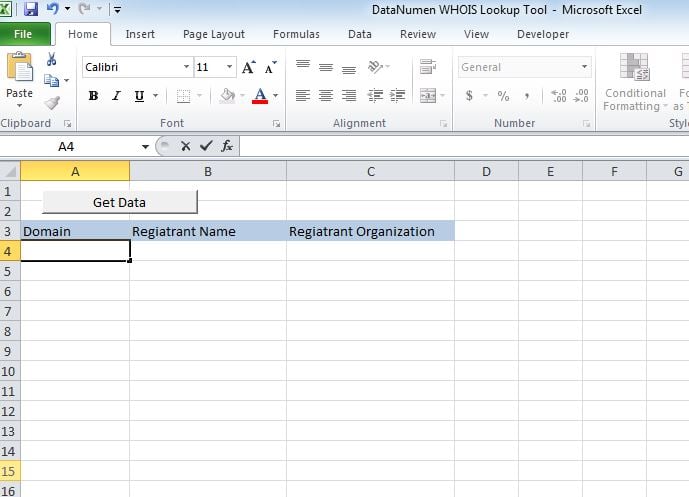
Hagámoslo funcional
Pegue el script en un nuevo módulo y adjunte el sub "whoismacor" al botón que creamos en Sheet1.
Vamos a probarlo
Agregue dominios en la Columna A y ejecute la macro. Los valores se mostrarán en las columnas respectivas.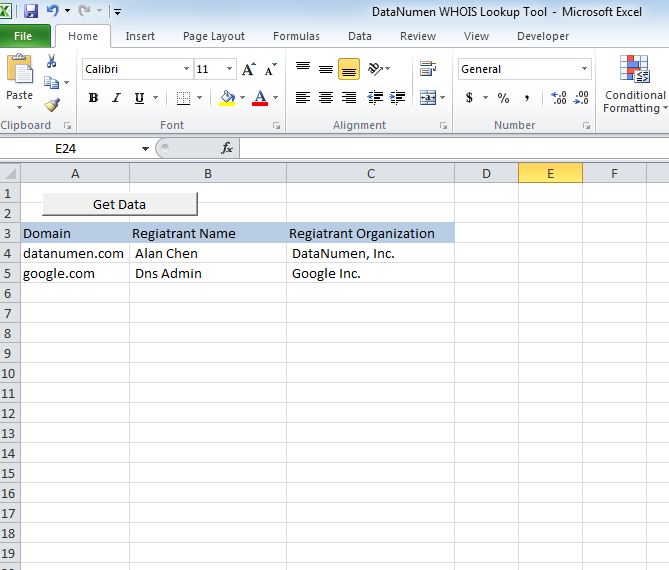
Modificarlo
A partir de ahora, la herramienta muestra 2 encabezados, es decir, el nombre del registrante y la organización del registrante. Puede personalizar la herramienta para obtener cualquiera de los siguientes encabezados.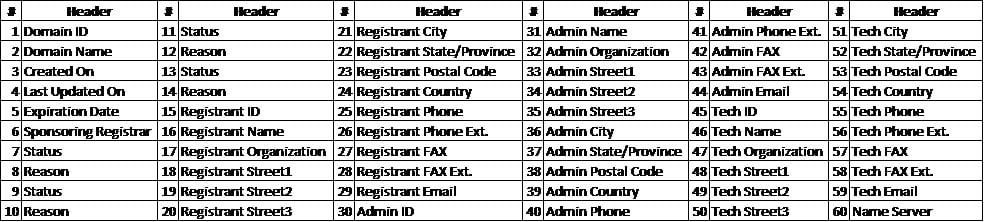
Recuperar archivo xlsm
Si tiene problemas para abrir o guardar esta herramienta, hay grandes cambios que tiene archivo de Excel corrupto y tienes que arreglarlo antes de usarlo.
Script
Sub whoismacro()
    Dim v_lrow As Long
    Application.DisplayStatusBar = True
    v_lrow = Sheets("whois").Range("A" & Rows.Count).End(xlUp).Row
    Dim r As Long
    Dim v_string As String
    For r = 4 To v_lrow
        Application.StatusBar = "Macro is running... Now fetching Registrant Name and Organization info for domain at Row : " & r & " /// Total Rows : " & v_lrow
        Sheets("whois").Range("B" & r).Value = WhoIsName(Sheets("whois").Range("A" & r).Value)
        Sheets("whois").Range("C" & r).Value = WhoIsorganization(Sheets("whois").Range("A" & r).Value)
    Next r
    Application.StatusBar = "Ready"
End Sub

Function WhoIsName(v_string As String) As String
    Application.DisplayStatusBar = True
    v_string = Replace(v_string, "http://www.", "")
    v_string = Replace(v_string, "https://www.", "")
    v_string = Replace(v_string, "http://", "")
    v_string = Replace(v_string, "https://", "")
    Dim I As Long
    Dim browobj As Object
    Dim obj1 As Object
    Dim obj2 As Object
    Dim obj3 As Object
    Dim v_website As String
    Dim ws As Worksheet
    Dim rng As Range
    Dim tbl As Object
    Dim rw As Object
    Dim cl As Object
    Dim tabno As Long
    Dim nextrow As Long
    Dim URl As String
    Dim lastRow As Long
    Dim xmlobj As Object
    Dim htmobj As Object
    Dim divobj As Object
    Dim objH3 As Object
    Dim linkobj As Object
    Dim vv_startrow As Integer
    Dim vv_lastrow As Integer
    Application.DisplayAlerts = False
    Application.DisplayStatusBar = True
    URl = "https://www.whois.com/whois/" & v_string
    Set xmlobj = CreateObject("MSXML2.XMLHTTP")
    xmlobj.Open "GET", URl, False
    xmlobj.setRequestHeader "Content-Type", "text/xml"
    xmlobj.setRequestHeader "Cache-Control", "no-cache"
    xmlobj.send
    Set htmobj = CreateObject("htmlfile")
    htmobj.body.innerHTML = xmlobj.responseText
    x = InStr(htmobj.body.innertext, "Registrant Name:")
    y = InStr(x, htmobj.body.innertext, Chr(10))
    WhoIsName = Replace(Mid(htmobj.body.innertext, x, y - x), "Registrant Name:", "")
End Function

Function WhoIsorganization(v_string As String) As String
    Application.DisplayStatusBar = True
    v_string = Replace(v_string, "http://www.", "")
    v_string = Replace(v_string, "https://www.", "")
    v_string = Replace(v_string, "http://", "")
    v_string = Replace(v_string, "https://", "")
    Dim I As Long
    Dim browobj As Object
    Dim obj1 As Object
    Dim obj2 As Object
    Dim obj3 As Object
    Dim v_website As String
    Dim ws As Worksheet
    Dim rng As Range
    Dim tbl As Object
    Dim rw As Object
    Dim cl As Object
    Dim tabno As Long
    Dim nextrow As Long
    Dim URl As String
    Dim lastRow As Long
    Dim xmlobj As Object
    Dim htmobj As Object
    Dim divobj As Object
    Dim objH3 As Object
    Dim linkobj As Object
    Dim vv_startrow As Integer
    Dim vv_lastrow As Integer
    Application.DisplayAlerts = False
    Application.DisplayStatusBar = True
    URl = "https://www.whois.com/whois/" & v_string
    Set xmlobj = CreateObject("MSXML2.XMLHTTP")
    xmlobj.Open "GET", URl, False
    xmlobj.setRequestHeader "Content-Type", "text/xml"
    xmlobj.setRequestHeader "Cache-Control", "no-cache"
    xmlobj.send
    Set htmobj = CreateObject("htmlfile")
    htmobj.body.innerHTML = xmlobj.responseText
    x = InStr(htmobj.body.innertext, "Registrant Organization:")
    Debug.Print x
    y = InStr(x, htmobj.body.innertext, Chr(10))
    Debug.Print y
    WhoIsorganization = Replace(Mid(htmobj.body.innertext, x, y - x), "Registrant Organization:", "")
End Function
Introducción del autor:
Nick Vipond es un experto en recuperación de datos en DataNumen, Inc., que es el líder mundial en tecnologías de recuperación de datos, incluyendo reparar problema docx y productos de software de recuperación de Outlook. Para más información visite www.datanumen.com