
许多用户希望打印所有压缩的文件 zip 无需麻烦地保存和解压缩 Outlook 电子邮件的附件 zip 依恋。 因此,本文将介绍一种更有效的实现方法。
当你想打印一个 zip 对于附件,您可能习惯于点击附件图标,然后点击功能区中的“快速打印”按钮。但是,即使这样,Outlook 仍然会提示您先保存并解压缩文件。如果您想避免这些繁琐的步骤,可以使用以下 VBA 代码。
打印所有文件 Zip 电子邮件附件
- 首先,启动 Outlook 应用程序。
- 然后,按照文章中显示的步骤访问 Outlook VBA 编辑器 – “如何在 Outlook 中运行 VBA 代码。
- 接下来,您可以打开“ThisOutlookSession”项目或未使用的模块。
- 随后,复制并粘贴下面的 VBA 代码。
Dim objShell As Object
Dim objFileSystem As Object

Sub PrintAllFilesInZipAttachment ()
    Dim objAttachmentSelection As Outlook.AttachmentSelection
    Dim objAttachment, objTempAttachment As Outlook.Attachment
    Dim strTempFolder As String
    Dim strSavingPath As String
    Dim objTempMail As Outlook.MailItem
    Dim strFileName As String

    'Get selected attachment
    Set objAttachmentSelection = Outlook.Application.ActiveExplorer.AttachmentSelection
    Set objAttachment = objAttachmentSelection.Item(1)

    If Right(LCase(objAttachment.filename), 3) = "zip" Then

       'Save & Unzip the zip attachment
       Set objShell = CreateObject("Shell.Application")
       Set objFileSystem = CreateObject("Scripting.FileSystemObject")
       strTempFolder = objFileSystem.GetSpecialFolder(2).Path & "\Unzip" & Format(Now, "yyyymmddhhmmss")
       MkDir (strTempFolder)

       strSavingPath = strTempFolder & "\" & objAttachment.filename
       objAttachment.SaveAsFile (strSavingPath)
       objShell.NameSpace((strTempFolder)).CopyHere objShell.NameSpace((strSavingPath)).Items

       'Attach Unzipped files to a temp mail
       Set objTempMail = Outlook.Application.CreateItem(olMailItem)
       objTempMail.Display
       strFileName = Dir(strTempFolder & "\")

       While Len(strFileName) > 0
             objTempMail.Attachments.Add (strTempFolder & "\" & strFileName)
             strFileName = Dir()
       Wend

       'Print all attachments of the temp email
       Call PrintFiles(objTempMail)

       objTempMail.Close olDiscard

       objFileSystem.DeleteFolder (strTempFolder)
    End If
End Sub

Sub PrintFiles(ByVal objMail As Outlook.MailItem)
    Dim objAttachment As Outlook.Attachment
    Dim strTempFolder, strFilePath As String
    Dim objTempFolder As Object
    Dim objTempFolderItem As Object

    strTempFolder = objFileSystem.GetSpecialFolder(2).Path & "\TEMP" & Format(Now, "yyyymmddhhmmss")
    MkDir (strTempFolder)

    'Print all attachments
    For Each objAttachment In objMail.Attachments
        If Right(LCase(objAttachment.filename), 3) <> "zip" Then
           strFilePath = strTempFolder & "\" & objAttachment.filename
           objAttachment.SaveAsFile (strFilePath)

           Set objShell = CreateObject("Shell.Application")
           Set objTempFolder = objShell.NameSpace(0)
           Set objTempFolderItem = objTempFolder.ParseName(strFilePath)
           objTempFolderItem.InvokeVerbEx ("print")
        End If
    Next

    objFileSystem.DeleteFolder (strTempFolder)
End Sub
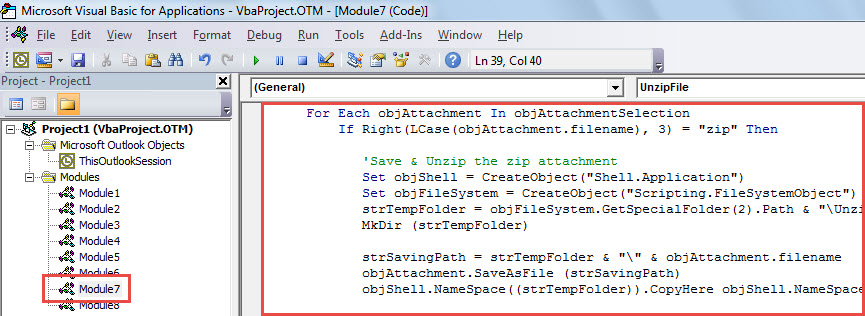
- 之后,关闭当前的 VBA 编辑器窗口。
- 稍后,前往 Outlook 选项将新宏添加到快速访问工具栏。
- 最后,你可以拍一张:
- 首先,选择一个 zip 电子邮件的附件。
- 然后,单击快速访问工具栏中的宏。

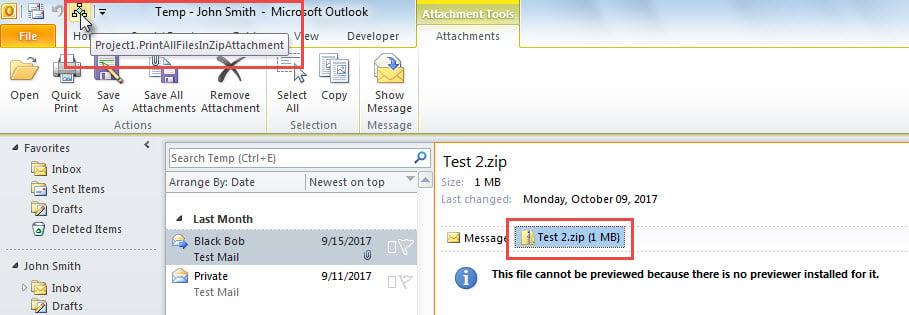
- 文件立即压缩到选定的 zip 将打印附件。
备份 Outlook 数据文件
您可能已经发现 Outlook 容易出现数据损坏。一旦 Outlook 损坏,您的 Outlook 数据就会丢失。因此,定期备份 Outlook 数据文件至关重要,这样您就可以轻松地通过备份恢复 Outlook 数据。但是,如果您发现备份已经过期数周且无效,那么您别无选择,只能求助于可靠且经验丰富的服务商。 太平洋标准时间恢复 工具,例如 DataNumen Outlook Repair.
作者简介:
Shirley Zhang 是一位数据恢复专家 DataNumen, Inc.,它是数据恢复技术领域的世界领先者,包括 损坏的中密度纤维板 和 outlook 修复软件产品。 欲了解更多信息,请访问 datanumen.com