
ถ้าคุณต้องการแทนที่ประเภทสีของรายการ Outlook คุณจะต้องลบประเภทเดิมออกเมื่อมีการกำหนดหมวดหมู่ใหม่ ดังนั้น ในบทความนี้ เราจะสอนวิธีทำให้สิ่งนี้เป็นแบบอัตโนมัติผ่าน VBA
เหตุผลหลักที่เราใช้หมวดหมู่สีใน Outlook คือเพื่อจัดประเภทและจัดการรายการ Outlook ของคุณได้ดีขึ้น นอกจากนี้ Outlook ยังอนุญาตให้เรากำหนดหมวดหมู่สีตั้งแต่หนึ่งหมวดหมู่ขึ้นไปให้กับรายการเดียว อย่างไรก็ตาม การมีหมวดหมู่มากเกินไปสำหรับรายการเดียวอาจทำให้กฎการจัดหมวดหมู่ของคุณเกะกะในบางครั้ง ดังนั้น ผู้ใช้จำนวนมากต้องการแทนที่หมวดหมู่สีแทนการซ้อนทับหมวดหมู่ ที่นี่เราจะเปิดเผยวิธีการที่มีประสิทธิภาพให้กับคุณ
แทนที่ประเภทสีของรายการ Outlook
- ในตอนแรกให้เปิดแอปพลิเคชัน Outlook ของคุณ
- จากนั้นสลับไปที่แท็บ "นักพัฒนา" แล้วคลิกปุ่ม "Visual Basic" หรือกดปุ่มลัด "Alt + F11"
- จากนั้นคุณจะเข้าสู่หน้าต่าง“ Microsoft Visual Basic for Applications”
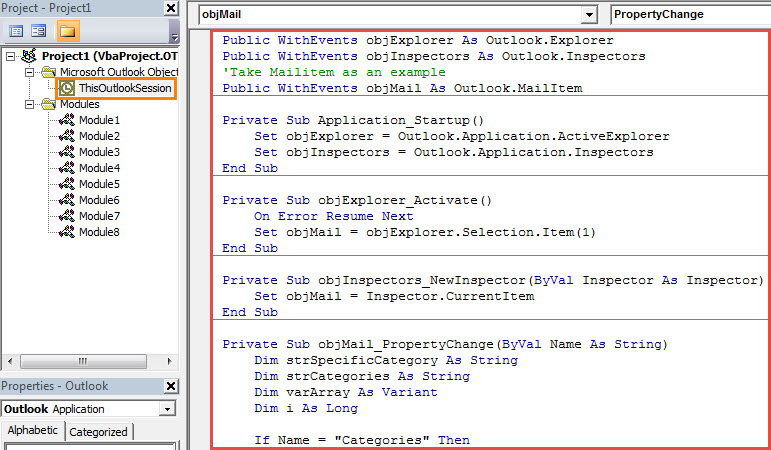
- ณ จุดนี้ คุณควรคลิกสองครั้งที่โปรเจ็กต์ “ThisOutlookSession” ทางด้านซ้ายเพื่อเปิด
- จากนั้นคัดลอกรหัส VBA ต่อไปนี้ลงในหน้าต่างโครงการนี้
Public WithEvents objExplorer As Outlook.Explorer
Public WithEvents objInspectors As Outlook.Inspectors
'Take Mailitem as an example
Public WithEvents objMail As Outlook.MailItem

Private Sub Application_Startup()
    Set objExplorer = Outlook.Application.ActiveExplorer
    Set objInspectors = Outlook.Application.Inspectors
End Sub

Private Sub objExplorer_Activate()
    On Error Resume Next
    Set objMail = objExplorer.Selection.Item(1)
End Sub

Private Sub objInspectors_NewInspector(ByVal Inspector As Inspector)
    Set objMail = Inspector.CurrentItem
End Sub

Private Sub objMail_PropertyChange(ByVal Name As String)
    Dim strSpecificCategory As String
    Dim strCategories As String
    Dim varArray As Variant
    Dim i As Long

    If Name = "Categories" Then
       strCategories = objMail.Categories
       varArray = Split(objMail.Categories, ",")
       If UBound(varArray) >= 1 Then
          'If want to get a confirmation before removing the original category
          'Add the following lines
          'Dim strPrompt As String
          'Dim nResponse As Integer
          'strPrompt = "Do you want to remove the original color category?"
          'nResponse = MsgBox(strPrompt, vbQuestion + vbYesNo, "Color Category Assignment")
          'If nResponse = vbYes Then
          For i = 0 To UBound(varArray)
              'Remove the previous color categories
              varArray(1) = ""
              'Rebuild the categories
              objMail.Categories = Join(varArray, ",")
              Exit Sub
          Next i
          'End If
       End If
    End If
End Sub
- หลังจากนั้น คุณควรกำหนดใบรับรองดิจิทัลให้กับแมโครใหม่นี้
- หลังจากนั้นคุณต้องตรวจสอบการตั้งค่าแมโคร Outlook ของคุณเพื่อให้แน่ใจว่าได้เปิดใช้งานมาโครที่เซ็นชื่อแล้ว
- สุดท้าย คุณควรเริ่มต้น Outlook ใหม่เพื่อเปิดใช้งานโปรเจ็กต์ VBA ใหม่
- จากนี้ไป ทุกครั้งที่คุณกำหนดหมวดหมู่ใหม่ให้กับรายการ หมวดหมู่ก่อนหน้าจะถูกลบออกโดยอัตโนมัติ
จัดการกับปัญหา Outlook ที่ยุ่งยาก
เนื่องจาก Outlook มีแนวโน้มที่จะเกิดข้อผิดพลาดและเสียหาย คุณจะพบกับปัญหาต่างๆ ใน Outlook ของคุณ ดังนั้นคุณควรระมัดระวังให้เพียงพอ ตัวอย่างเช่น ขอแนะนำให้สำรองข้อมูลไฟล์ PST ของคุณเป็นประจำ ยิ่งกว่านั้นคุณควรได้รับอำนาจที่แข็งแกร่ง PST แก้ไข เครื่องมือเช่น DataNumen Outlook Repair.
บทนำผู้เขียน:
Shirley Zhang เป็นผู้เชี่ยวชาญด้านการกู้คืนข้อมูลใน DataNumen, Inc. ซึ่งเป็นผู้นำระดับโลกด้านเทคโนโลยีการกู้คืนข้อมูล ได้แก่ กู้ Sql Server และผลิตภัณฑ์ซอฟต์แวร์ซ่อมแซมแนวโน้ม ดูข้อมูลเพิ่มเติมได้ที่ wwwdatanumenด้วย.