
บทความนี้จะสอนวิธีง่ายๆในการพิมพ์รายการการนัดหมายทั้งหมดที่แสดงเป็น "ไม่ว่าง" และกำหนดเวลาในช่วงวันที่ที่ต้องการ
การค้นหาตารางนัดหมายที่ไม่ว่างในช่วงวันที่ที่กำหนดในปฏิทินทั้งหมดนั้นค่อนข้างง่าย คุณสามารถตั้งค่าขอบเขตการค้นหาเป็น “รายการปฏิทินทั้งหมด” จากนั้นค้นหาตารางนัดหมายที่มี “แสดงเวลาเป็น” เท่ากับ “ไม่ว่าง” และอยู่ในช่วงวันที่เริ่มต้นและสิ้นสุดที่ระบุ แต่ด้วยวิธีนี้ เมื่อต้องการพิมพ์ตารางนัดหมายที่พบและไปที่ “ไฟล์” > “พิมพ์” คุณจะเห็นว่ามีเพียง “รูปแบบบันทึกช่วยจำ” เท่านั้น ซึ่งหมายความว่าคุณไม่สามารถพิมพ์ตารางนัดหมายที่พบในรูปแบบรายการได้ ดังนั้น หากคุณต้องการพิมพ์รายการตารางนัดหมายดังกล่าว คุณสามารถใช้วิธีต่อไปนี้
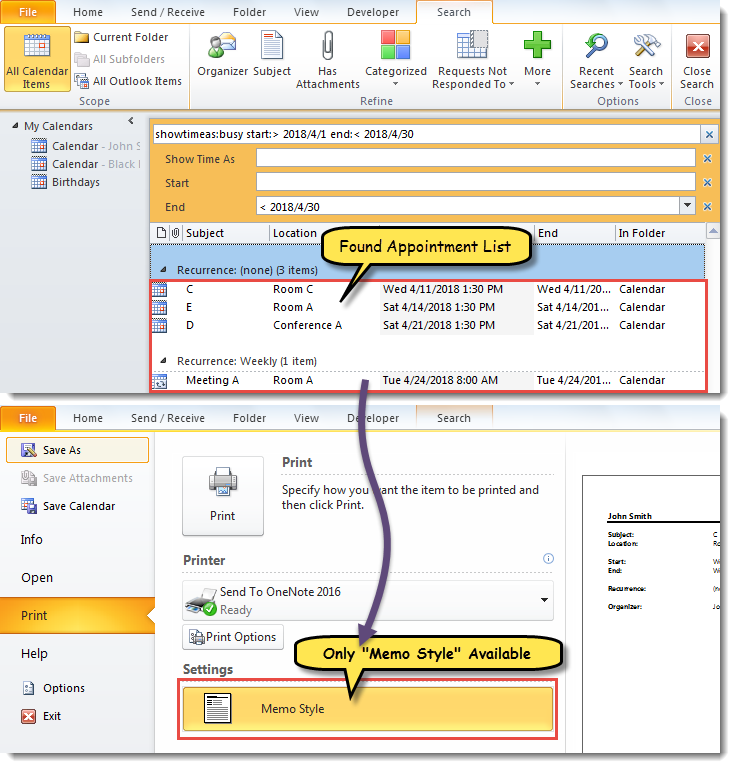
พิมพ์รายการการนัดหมายที่ไม่ว่างทั้งหมดในช่วงวันที่ที่ระบุ
- ในตอนแรกให้เปิดตัวแก้ไข Outlook VBA ผ่าน“ Alt + F11”
- จากนั้น ในหน้าต่างป๊อปอัพ “Microsoft Visual Basic for Applications” ให้เพิ่มการอ้างอิงไปยัง “MS Excel Object Library” ตาม “วิธีการเพิ่มการอ้างอิงไลบรารีอ็อบเจ็กต์ใน VBA"
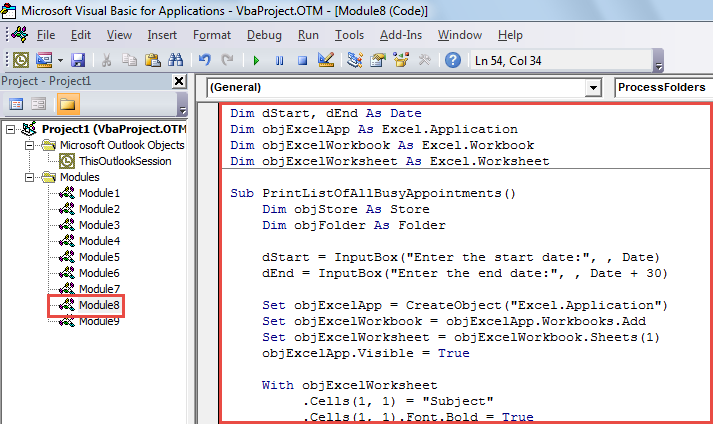
- หลังจากนั้นให้ใส่รหัส VBA ต่อไปนี้ในโมดูล
Dim dStart, dEnd As Date
Dim objExcelApp As Excel.Application
Dim objExcelWorkbook As Excel.Workbook
Dim objExcelWorksheet As Excel.Worksheet

Sub PrintListOfAllBusyAppointments()
    Dim objStore As Store
    Dim objFolder As Folder

    dStart = InputBox("Enter the start date:", , Date)
    dEnd = InputBox("Enter the end date:", , Date + 30)

    Set objExcelApp = CreateObject("Excel.Application")
    Set objExcelWorkbook = objExcelApp.Workbooks.Add
    Set objExcelWorksheet = objExcelWorkbook.Sheets(1)
    objExcelApp.Visible = True

    With objExcelWorksheet
         .Cells(1, 1) = "Subject"
         .Cells(1, 1).Font.Bold = True
         .Cells(1, 2) = "Location"
         .Cells(1, 2).Font.Bold = True
         .Cells(1, 3) = "Start"
         .Cells(1, 3).Font.Bold = True
         .Cells(1, 4) = "End"
         .Cells(1, 4).Font.Bold = True
         .Cells(1, 5) = "In Folder"
         .Cells(1, 5).Font.Bold = True
    End With

    For Each objStore In Application.Session.Stores
        For Each objFolder In objStore.GetRootFolder.Folders
            If objFolder.DefaultItemType = olAppointmentItem Then
               Call ProcessFolders(objFolder)
            End If
        Next
    Next

    objExcelWorksheet.Columns("A:E").AutoFit
    objExcelWorksheet.PrintOut
    objExcelWorkbook.Close False
    objExcelApp.Quit
End Sub

Sub ProcessFolders(ByVal objCurFolder As Folder)
    Dim strFilter As String
    Dim objItems As Outlook.Items
    Dim objRestrictedItems As Outlook.Items
    Dim objAppointment As AppointmentItem
    Dim nLastRow As Integer
    Dim objSubFolder As Folder

    Set objItems = objCurFolder.Items
    objItems.IncludeRecurrences = True
    objItems.Sort "[Start]"

    'Get the appointments in the specific date range
    strFilter = "[Start] >= " & Chr(34) & dStart & " 00:00 AM" & Chr(34) & " AND [End] <= " & Chr(34) & dEnd & " 11:59 PM" & Chr(34)
    Set objRestrictedItems = objItems.Restrict(strFilter)

    For Each objAppointment In objRestrictedItems
        If objAppointment.BusyStatus = olBusy Then
           nLastRow = objExcelWorksheet.Range("A" & objExcelWorksheet.Rows.Count).End(xlUp).Row + 1

           With objExcelWorksheet
                .Range("A" & nLastRow) = objAppointment.Subject
                .Range("B" & nLastRow) = objAppointment.Location
                .Range("C" & nLastRow) = objAppointment.Start
                .Range("D" & nLastRow) = objAppointment.End
                .Range("E" & nLastRow) = objCurFolder.FolderPath
           End With
        End If
    Next

    'Process all subfolders recursively
    If objCurFolder.Folders.Count > 0 Then
       For Each objSubFolder In objCurFolder.Folders
           Call ProcessFolders(objSubFolder)
       Next
    End If
End Sub
- ต่อมาคลิกเข้าไปในรูทีนย่อยแรกแล้วกดปุ่ม“ F5”
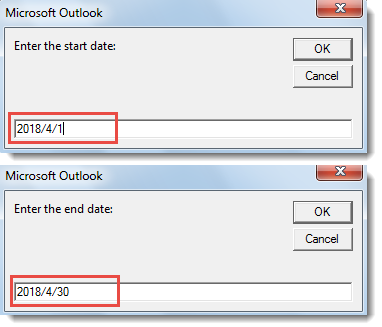
- ถัดไปคุณจะต้องระบุช่วงวันที่เพื่อค้นหาการนัดหมาย

- จากนั้นคลิก“ ตกลง” เพื่อดำเนินการต่อมาโคร
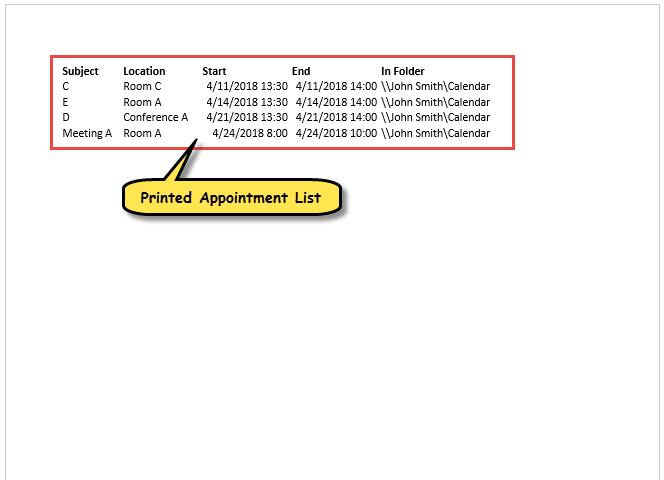
- ในที่สุดเมื่อมาโครเสร็จสิ้นรายการการนัดหมายที่ไม่ว่างในช่วงวันที่ที่กำหนดไว้ล่วงหน้าในโฟลเดอร์ปฏิทินทั้งหมดจะถูกพิมพ์ออกมาดังที่แสดงในภาพหน้าจอด้านล่าง

แก้ไขปัญหาที่รบกวนการทุจริตของ Outlook
หาก Outlook ของคุณปิดอยู่เสมอในลักษณะที่ไม่เหมาะสมคุณอาจพบปัญหามากมายในภายหลัง ในบรรดาไฟล์ Outlook ที่เสียหายเป็นไฟล์ที่แย่ที่สุด หากคุณไม่ต้องการสูญเสียข้อมูลคุณต้องใช้เครื่องมือแก้ไข PST เช่น DataNumen Outlook Repair. สามารถรับข้อมูลสูงสุดกลับมาจาก Outlook เสียหาย ไฟล์
บทนำผู้เขียน:
Shirley Zhang เป็นผู้เชี่ยวชาญด้านการกู้คืนข้อมูลใน DataNumen, Inc. ซึ่งเป็นผู้นำระดับโลกด้านเทคโนโลยีการกู้คืนข้อมูล ได้แก่ แก้ไข sql และผลิตภัณฑ์ซอฟต์แวร์ซ่อมแซมแนวโน้ม ดูข้อมูลเพิ่มเติมได้ที่ wwwdatanumenด้วย.