
การส่งออกข้อมูลจาก Microsoft Access นั้นง่ายมากโดยสมมติว่าคุณต้องการสร้างไฟล์ส่งออกไฟล์เดียวเท่านั้น แต่คุณจะทำอย่างไรเมื่อต้องแยกแบบสอบถาม (หรือตาราง) เป็นไฟล์ส่งออกหลายไฟล์ ตัวอย่างเช่นหากคุณต้องการส่งออกรายการธุรกรรมของลูกค้าในแต่ละเดือนลูกค้าแต่ละรายมีไฟล์ส่งออกของตนเองหรือไม่ บทความนี้สามารถช่วยคุณได้ การสร้างการส่งออก 2, 10 หรือการส่งออกที่แตกต่างกันเป็นร้อยรายการจะทำได้ง่ายเพียงแค่เรียกใช้ข้อมูลโค้ด VBA เล็กน้อยและงานจะเสร็จสิ้นในไม่กี่วินาทีไม่ใช่ชั่วโมงของการตัด / วางด้วยตนเอง เริ่มกันเลย…
วิธีการ
เนื่องจากเราต้องการให้สิ่งนี้มีความยืดหยุ่นและใช้งานได้มากที่สุดโค้ดสำหรับบทความนี้จะยาวกว่าปกติเล็กน้อย แต่คุณจะเห็นว่าทำไมในไม่ช้า
ประการแรก - มาร่างสิ่งที่เราต้องการจะบรรลุ:
ให้แบบสอบถามส่งออกไฟล์ใหม่ทุกครั้งที่ค่าในฟิลด์ที่ระบุเปลี่ยนแปลง
ความท้าทาย
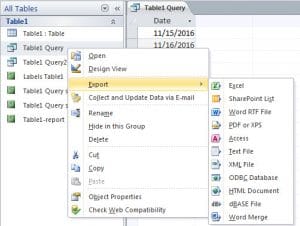 ในการทำเช่นนี้ เราจำเป็นต้องสามารถตรวจสอบผลลัพธ์ของคำสั่งค้นหาทีละขั้นตอน โดยเปรียบเทียบฟิลด์ที่เกี่ยวข้องในแถวปัจจุบันกับค่าในแถวก่อนหน้า และหากค่าแตกต่างกัน ให้สร้างไฟล์ใหม่และเริ่มแสดงผลลัพธ์ของคำสั่งค้นหาในไฟล์นั้น
สิ่งนี้ไม่เหมาะสำหรับ
ดังที่ฉันได้กล่าวไปแล้ว - มีเหตุผลมากมายที่คุณต้องการส่งออกบางส่วนของฐานข้อมูลของคุณ แต่การใช้เป็นรูปแบบของวัตถุประสงค์ในการสำรองข้อมูล / เก็บถาวรไม่ใช่หนึ่งในนั้น - ไม่แน่นอนด้วยวิธีการที่ฉัน ใช้ที่นี่ - สิ่งสุดท้ายที่คุณต้องทำหากคุณต้องเผชิญกับการกู้คืนจากไฟล์ ฐานข้อมูล mdb เสียหาย กำลังคิดหาวิธีต่อการส่งออกจำนวนมากกลับเข้าด้วยกัน!
การแก้ปัญหา?
มีหลายวิธีที่จะทำสิ่งหนึ่งสิ่งใดได้เสมอ วิธีนี้เป็นเพียงหนึ่งในนั้น แต่ผมคิดว่ามันได้ผลดีทีเดียว ขั้นแรก เราจะอ่านข้อมูลจากคำสั่ง SQL ลงในอาร์เรย์เพื่อให้การทำงานง่ายขึ้น จากนั้นเราจะวนลูปผ่านอาร์เรย์นั้น ตรวจสอบว่าเราพบค่าใหม่ในฟิลด์ที่เกี่ยวข้องหรือไม่ ถ้าไม่ใช่ค่าใหม่ เราจะส่งออกข้อมูลทั้งหมดไปยังไฟล์ปัจจุบันที่เรากำลังเขียนอยู่ แต่ถ้าเป็นค่าใหม่ เราจะปิดไฟล์นั้นและเริ่มต้นไฟล์ใหม่
และรหัส ...
Sub DoExport(fieldName As String, queryName As String, filePath As String, Optional delim As Variant = vbTab)
    Dim db As Database
    Dim objRecordset As ADODB.Recordset
    Dim qdf As QueryDef

    Dim fldcounter, colno, numcols As Integer
    Dim numrows, loopcount As Long
    Dim data, fs, fwriter As Variant
    Dim fldnames(), headerString As String

    'get details of the query we'll be exporting
    Set objRecordset = New ADODB.Recordset
    Set db = CurrentDb
    Set qdf = db.QueryDefs(queryName)

    'load the query into a recordset so we can work with it
    objRecordset.Open qdf.SQL, CurrentProject.Connection, adOpenDynamic, adLockReadOnly

    'load the recordset into an array
    data = objRecordset.GetRows

    'close the recordset as we're done with it now
    objRecordset.Close

    'get details of the size of array, and position of the field we're checking for in that array
    colno = qdf.Fields(fieldName).OrdinalPosition
    numrows = UBound(data, 2)
    numcols = UBound(data, 1)


    'as we'll need to write out a header for each file - get the field names for that header
    'and construct a header string
    ReDim fldnames(numcols)
    For fldcounter = 0 To qdf.Fields.Count - 1
        fldnames(fldcounter) = qdf.Fields(fldcounter).Name
    Next
    headerString = Join(fldnames, delim)

    'prepare the file scripting interface so we can create and write to our file(s)
    Set fs = CreateObject("Scripting.FileSystemObject")

    'loop through our array and output to the file
    For loopcount = 0 To numrows
        If loopcount > 0 Then
            If data(colno, loopcount) <> data(colno, loopcount - 1) Then
                If Not IsEmpty(fwriter) Then fwriter.Close
                Set fwriter = fs.createTextfile(filePath & data(colno, loopcount) & ".txt", True)
                fwriter.writeline headerString
                writetoFile data, queryName, fwriter, loopcount, numcols
            Else
                writetoFile data, delim, fwriter, loopcount, numcols
            End If
        Else
            Set fwriter = fs.createTextfile(filePath & data(colno, loopcount) & ".txt", True)
            fwriter.writeline headerString
            writetoFile data, delim, fwriter, loopcount, numcols
        End If
    Next

    'tidy up after ourselves
    fwriter.Close
    Set fwriter = Nothing
    Set objRecordset = Nothing
    Set db = Nothing
    Set qdf = Nothing

End Sub


'parameters are passed "by reference" to prevent moving potentially large objects around in memory
Sub writetoFile(ByRef data As Variant, ByVal delim As Variant, ByRef fwriter As Variant, ByVal counter As Long, ByVal numcols As Integer)
    Dim loopcount As Integer
    Dim outstr As String

    For loopcount = 0 To numcols
        outstr = outstr & data(loopcount, counter)
        If loopcount < numcols Then outstr = outstr & delim
    Next
    fwriter.writeline outstr
End Sub
รหัสกำลังทำอะไร - ประเด็นสำคัญ
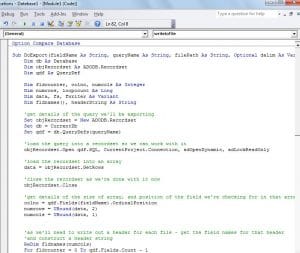 ฉันได้เพิ่มคำอธิบายประกอบลงในโค้ดในจุดสำคัญส่วนใหญ่แล้ว แต่ยังมีอีกสองสามจุดที่ควรเน้นย้ำ
ขั้นแรก - เราได้แบ่งรหัสออกเป็นสองกิจวัตร ขั้นแรกตรวจสอบว่าควรเขียนบันทึกปัจจุบันลงในไฟล์เดียวกันกับที่เรากำลังดำเนินการอยู่หรือไม่หรือควรเขียนลงในไฟล์ใหม่ รูทีนที่สองจะแสดงรายละเอียดของเร็กคอร์ดทั้งหมดไปยังไฟล์ ทำด้วยวิธีนี้เพื่อลดการทำซ้ำในโค้ดมิฉะนั้นคุณจะเห็นการวนซ้ำแบบเดียวกันเกิดขึ้นในหลาย ๆ ที่
อย่างที่สอง - ฉันกำลังใช้“ คำจำกัดความของคำค้นหา” เพื่อดูรายละเอียดเกี่ยวกับคำค้นหาที่เรากำลังดำเนินการอยู่ - หากคุณต้องการปรับให้เข้ากับตารางได้คุณจะต้องดูที่การสลับเพื่อให้ใช้ " นิยามตาราง” แทน
จากที่กล่าวมาฉันค่อนข้างมั่นใจว่านี่เป็นโค้ดส่วนหนึ่งที่คุณจะอ้างถึงและใช้บ่อยมาก!
บทนำผู้เขียน:
Mitchell Pond เป็นผู้เชี่ยวชาญด้านการกู้คืนข้อมูลใน DataNumen, Inc. ซึ่งเป็นผู้นำระดับโลกด้านเทคโนโลยีการกู้คืนข้อมูล ได้แก่ ซ่อมแซม SQL Server ข้อมูล และผลิตภัณฑ์ซอฟต์แวร์กู้คืน excel ดูข้อมูลเพิ่มเติมได้ที่ wwwdatanumenด้วย.