
V tomto článku sa pozrieme na to, ako možno použiť MS Access na spustenie systému správy knižníc. Poskytneme tiež praktické postrehy o navrhovaní takýchto aplikácií.
Aj keď nie ste veľkým čitateľom, možno ste už niekedy v živote navštívili knižnicu. Preto vám nebude ťažké uveriť, že aj knižnice využívajú systémy riadenia. Knižnice sú v skutočnosti jednou z kľúčových organizácií, ktoré využívajú systémy riadenia údajov. Ako inak si myslíte, že majú prehľad o tom, aké knihy majú? Čo nemajú? Čo si objednali? A čo všetko vydali? Toto všetko a oveľa viac sa v knižnici riadi pomocou efektívneho systému riadenia knižnice.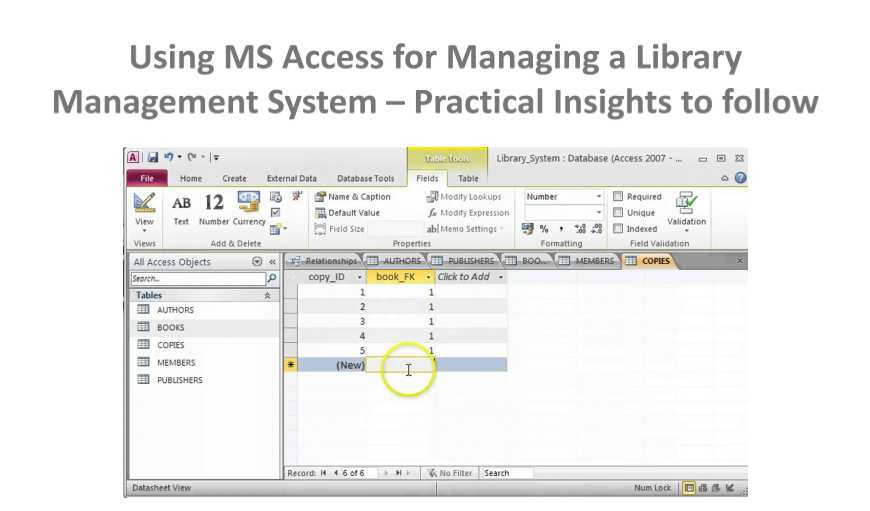
Použitie MS Access na vytvorenie systému správy knižníc
 Systém správy relačných databáz bol navrhnutý tak, aby fungoval ako efektívny systém správy knižníc pre knižnice rôznych veľkostí a rozsahov. Je to všestranná aplikácia, ktorú možno použiť na zabezpečenie lepšej správy fondov a inventára, komplexných prehľadov, zníženia chýb pri napĺňaní a ďalších vecí. Či už teda máte verejnú alebo akademickú knižnicu, používanie systému MS Access pre správu knižníc môže byť vždy užitočné. Je nielen bezpečný, ale aj užívateľsky prívetivý a flexibilný, takže ho môžu používať nielen knižnice, ale aj rôzne iné organizácie, ktoré potrebujú systém správy.
Ako pomáha systém správy knižníc?
Samotný termín systém riadenia knižnice ďalej vysvetľuje, kde sa dá použiť a ako môže byť užitočný. Aby mal knihovník k dispozícii všetky potrebné informácie o knihách, je dôležité tieto systémy riadenia využívať. Tieto systémy sa dajú použiť aj na automatizáciu všetkých potrebných úloh a zároveň na zaistenie bezpečnosti všetkých uložených údajov. Ak plánujete používať MS Access ako systém riadenia, mali by ste vedieť nielen ako ho používať, ale aj ako ho navrhnúť.
Kľúčové tipy pre návrh systému riadenia knižnice
Pri plánovaní návrhu systému riadenia MS Access pre knižnice majte na pamäti nasledujúce.
- Zaistite správnu katalogizáciu
Hlavným cieľom vytvorenia týchto systémov riadenia je zabezpečiť, aby vám poskytovali informácie nielen o knihách, ale aj o časopisoch, CD a iných položkách uložených v knižnici.
- Mať ustanovenia pre nové žiadosti
Majte dostatočné zabezpečenie, aby ste sa mohli postarať o nové žiadosti o určité tituly, časopisy a časopisy.
- Majte výkonný vyhľadávač
Ak sa chcete ubezpečiť, že na všetky zadané vyhľadávania odpovedáte rýchlo, musíte mať k dispozícii výkonný vyhľadávací nástroj, ktorý dokáže rýchlo spracovávať informácie a poskytovať výsledky.
- Majte pevné pokuty
Často by ste sa museli vysporiadať s používateľmi, ktorí nielenže vrátia knihu nadčas, ale nakoniec ich aj poškodia. To sú druh používateľov, ktorých by ste mali vždy penalizovať. Majte pevne stanovené pokuty, ktoré by ste im účtovali.
Existuje mnoho ďalších úloh, ktoré by ste museli vykonávať denne, aby ste zabezpečili správne fungovanie knižnice. Toto sú tie, ktoré jednoducho nemôžete vynechať.
Hoci Access pôsobí ako skvelá platforma na správu knižníc, zvážte aj šance... korupcia mdb pri práci na takejto aplikácii. Pri riešení takýchto udalostí je vždy rozumné udržiavať obslužný program Access Access.
Úvod autora:
Vivian Stevens je expertkou na obnovu dát v DataNumen, Inc., ktorá je svetovým lídrom v oblasti technológií obnovy dát, vrátane SQL Server fixné a vynikajúce softvérové produkty na obnovenie. Pre viac informácií navštívte www.datanumen. S